
1. Gabatarwa
Thank you for choosing the HiLook HIKVISION 204U-K1 4-Channel 5MP HD DVR. This manual provides essential information for the proper installation, operation, and maintenance of your digital video recorder. Please read this manual thoroughly before using the product and retain it for future reference.
2. Muhimman Umarnin Tsaro
- Tushen wutan lantarki: Use only the power adapter specified for this device. Ensure the power voltage is stable and meets the requirements.
- Samun iska: Kar a toshe kowane buɗewar samun iska. Shigar daidai da umarnin masana'anta.
- Ruwa da Danshi: Do not expose the device to rain or moisture. Do not place objects filled with liquids, such as vases, on the apparatus.
- Zazzabi: Operate the device within the specified temperature range. Avoid extreme hot or cold environments.
- Tsaftacewa: Tsaftace kawai da bushe bushe. Kada a yi amfani da masu tsabtace ruwa ko masu tsabtace iska.
- Hidima: Kada kayi yunƙurin yiwa wannan samfur sabis da kanka. Koma duk sabis ɗin zuwa ƙwararrun ma'aikatan sabis.
- Hard Drive: Handle the hard drive with care. Improper installation or removal can cause data loss or damage.
3. Abubuwan Kunshin
Verify that all items are present and in good condition upon unpacking. If any items are missing or damaged, contact your retailer.
- HiLook HIKVISION 204U-K1 DVR Unit
- Adaftar Wuta
- Kebul na USB
- SATA Data Cable (for HDD connection)
- SATA Power Cable (for HDD connection)
- Jagoran Fara Mai Sauri

Figure 3.1: The HiLook HIKVISION 204U-K1 DVR unit, shown with an optional hard drive and included accessories such as a mouse and cables.
4. Saitin Farko
4.1. Haɗa DVR ɗin
Follow these steps to connect your DVR to cameras, a monitor, and the network.
- Install Hard Drive (Optional): If your DVR did not come with a pre-installed hard drive, open the DVR casing, connect the SATA data and power cables to the HDD, and secure the HDD inside the DVR.
- Haɗa kyamarori: Connect your surveillance cameras to the BNC video input ports on the rear panel of the DVR. This model supports 4 channels.
- Mai Kula da Haɗawa: Connect a monitor to the HDMI or VGA output port on the rear panel.
- Haɗa cibiyar sadarwa: Connect an Ethernet cable from the DVR's LAN port to your router or network switch for remote access and network features.
- Haɗa linzamin kwamfuta na USB: Plug the included USB mouse into one of the USB ports for navigation.
- Haɗa Ikon: Connect the power adapter to the DVR's power input and then plug it into a power outlet.

Figure 4.1: Rear panel of the DVR, illustrating the various input and output ports including video in, audio in/out, VGA, HDMI, USB, network interface, and power supply.
4.2. Ƙarfafawa
After all connections are made, the DVR will power on automatically. The system will boot up, and you should see the HiLook logo on your connected monitor. Follow the on-screen prompts for initial setup, including setting up an administrator password and configuring network settings.
5. Jagorar Aiki
5.1. Mai amfani Interface Overview
The DVR's graphical user interface (GUI) can be navigated using the USB mouse. Right-click to access the main menu, and left-click to select options. The live view displays feeds from connected cameras.
5.2. Rikodi da sake kunnawa
- Rikodin da hannu: Daga mai rai view, click the record icon to start or stop manual recording for a specific channel.
- Shirya rikodin: Access the main menu, navigate to Record > Schedule to set up continuous or motion-triggered recording schedules for each camera.
- sake kunnawa: Daga babban menu, zaɓi sake kunnawa. Choose the date, time, and camera channel to review rubuce footage.
5.3. Gano Motsi da Faɗakarwa
The DVR supports smart motion detection and can send alerts via email or push notifications to a mobile application.
- Configure Motion Detection: Je zuwa Main Menu > Alarm > Motion Detection. Select the camera channel, enable motion detection, and define the detection area and sensitivity.
- Set Up Email Alerts: In Main Menu > Network > Email, configure your SMTP server settings and recipient email addresses. Enable email linkage for motion detection events.
- Mobile App Notifications: Download the official HiLook mobile application. Add your DVR to the app and enable push notifications for alarm events.

Figure 5.1: A smartphone screen showing a real-time email notification triggered by smart motion detection.

Figure 5.2: A smartphone displaying multiple smart motion-triggered alerts, indicating movement detected in specific areas monitored by surveillance cameras.
6. Kulawa
- Tsaftacewa: Regularly clean the exterior of the DVR with a soft, dry cloth. Ensure ventilation openings are free from dust.
- Sabunta Firmware: Check the official HiLook website for the latest firmware updates. Updating firmware can improve performance and add new features. Follow the provided instructions carefully.
- Gudanar da Hard Drive: Periodically check the health of your hard drive through the DVR's system settings. Ensure sufficient storage space is available for recordings.
- Tsaron Kalmar wucewa: Regularly change your administrator password to maintain system security.
7. Shirya matsala
If you encounter issues with your DVR, refer to the table below for common problems and solutions.
| Matsala | Dalili mai yiwuwa | Magani |
|---|---|---|
| Babu fitarwa bidiyo akan na'urar duba | Loose HDMI/VGA cable; Incorrect monitor input; DVR not powered on. | Check cable connections; Select correct input on monitor; Verify power supply. |
| Babu hoton kamara | Camera not powered; Loose BNC cable; Faulty camera. | Ensure camera power; Check BNC connections; Test camera with another input if possible. |
| Cannot access DVR remotely | Network cable disconnected; Incorrect network settings; Firewall blocking access. | Verify Ethernet connection; Check IP address, gateway, DNS settings; Configure router/firewall. |
| Babu rikodi | Hard drive not installed/initialized; Recording schedule not set; HDD full. | Install/initialize HDD; Configure recording schedule; Check HDD status and capacity. |
| Gano motsi baya aiki | Motion detection disabled; Sensitivity too low; Detection area not set. | Enable motion detection; Adjust sensitivity; Define detection area. |
8. Bayanan fasaha
Below are the key technical specifications for the HiLook HIKVISION 204U-K1 DVR.
| Siffar | Ƙayyadaddun bayanai |
|---|---|
| Samfura | 204U-K1 |
| Shigarwar Bidiyo | 4-channel BNC interface (supports HDTVI/AHD/CVI/CVBS/IP) |
| Matsi na Bidiyo | H.265 Pro+/H.265 Pro/H.265/H.264 |
| Fitowar Bidiyo | 1 HDMI, 1 VGA (simultaneous output) |
| Ƙimar Fitar da HDMI | Up to 4K (3840 × 2160) for 204U-K1 |
| Sauti / Fitarwa | 1-ch RCA (2-way audio) / 1-ch RCA |
| Hard Disk Drive (HDD) | 1 SATA interface, up to 10 TB capacity |
| Hanyar hanyar sadarwa | 1 RJ45 10M/100M self-adaptive Ethernet interface |
| USB Interface | 2 × USB 2.0 |
| Tushen wutan lantarki | 12 VDC |
| Girma (W × D × H) | Approx. 200 × 200 × 45 mm (7.9 × 7.9 × 1.8 inch) |
| Nauyi (ba tare da HDD ba) | Kimanin 1 kg (2.2 lb) |
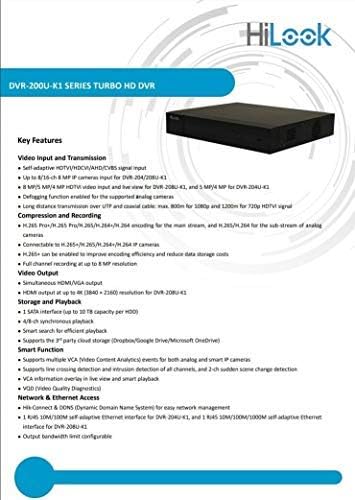
Figure 8.1: A detailed list of key features for the DVR-200U-K1 series, including video input/transmission, compression, video output, storage, smart functions, and network access.
9. Garanti da Abokin ciniki Support
Your HiLook HIKVISION 204U-K1 DVR comes with a limited warranty. Please refer to the warranty card included in your package or visit the official HiLook website for detailed warranty terms and conditions. For technical assistance, troubleshooting, or service inquiries, please contact your authorized HiLook dealer or customer support.
Albarkatun Kan layi: For additional support, firmware downloads, and FAQs, please visit the official HiLook support website.