
1. Introdución
The ZTE U60 Pro MU5250 is a portable 5G Wi-Fi 7 router designed to provide high-speed internet connectivity on the go. It features an ultra-high-speed 5G-A network, the flagship Snapdragon X75 chip platform, and advanced Wi-Fi 7 technology. This device is equipped with a 10,000 mAh high-capacity battery, offering extended usage and the ability to function as a power bank for other electronic devices. Its 3.5-inch HD touchscreen allows for easy network management and traffic monitoring. The U60 Pro supports up to 64 simultaneous device connections and offers convenient NFC one-touch connectivity, intelligent AI scenes, and AI voice management for a fast, stable, and efficient internet experience.

Imaxe 1.1: Fronte view of the ZTE U60 Pro MU5250, showing its 3.5-inch display with network information.
2. Configuración
2.1 Contido do paquete
Antes de comezar, asegúrate de que estean presentes todos os compoñentes:
- ZTE U60 Pro MU5250 5G Pocket Wi-Fi 7 Router
- Adaptador de CA
- Manual de usuario (este documento)
2.2 Instalación da tarxeta SIM
To enable 5G connectivity, a compatible SIM card must be installed.
- Localiza a ranura para a tarxeta SIM no lateral do dispositivo.
- Using the provided SIM ejector tool (if applicable) or a small pin, gently press into the small hole next to the SIM tray to eject it.
- Place your 5G-enabled Nano-SIM card into the tray, ensuring proper orientation.
- Volva inserir a bandexa da tarxeta SIM no dispositivo con coidado ata que encaixe no seu lugar.
2.3 Acendido/Apagado
To power on the device, press and hold the power button located on the side until the screen illuminates. To power off, press and hold the power button until the power-off options appear on the screen, then select 'Power Off'.
2.4 Conexión Wi-Fi inicial
After powering on, the device will automatically search for a 5G network. You can connect to the Wi-Fi network using one of the following methods:
- Conexión manual: On your device (phone, laptop, etc.), search for available Wi-Fi networks. Select the network name (SSID) displayed on the U60 Pro's screen and enter the password (also displayed on the screen).
- Conexión NFC cun só toque: For Android phones with NFC enabled, tap your phone against the NFC area on the U60 Pro. Your phone will automatically connect to the Wi-Fi network without requiring a password.

Image 2.1: Illustrates the NFC one-touch connection process for quick Wi-Fi access.
3. Instrucións de funcionamento
3.1 Interface de pantalla táctil
The 3.5-inch HD touchscreen provides a minimalist user interface for managing the device. You can view network status, data usage, signal strength, battery level, and adjust basic settings directly from the screen. Swipe and tap gestures are used for navigation.
3.2 Conexión de varios dispositivos
The ZTE U60 Pro supports simultaneous connections for up to 64 devices, allowing multiple users to share the 5G network. Connect devices using the standard Wi-Fi connection method as described in Section 2.4.
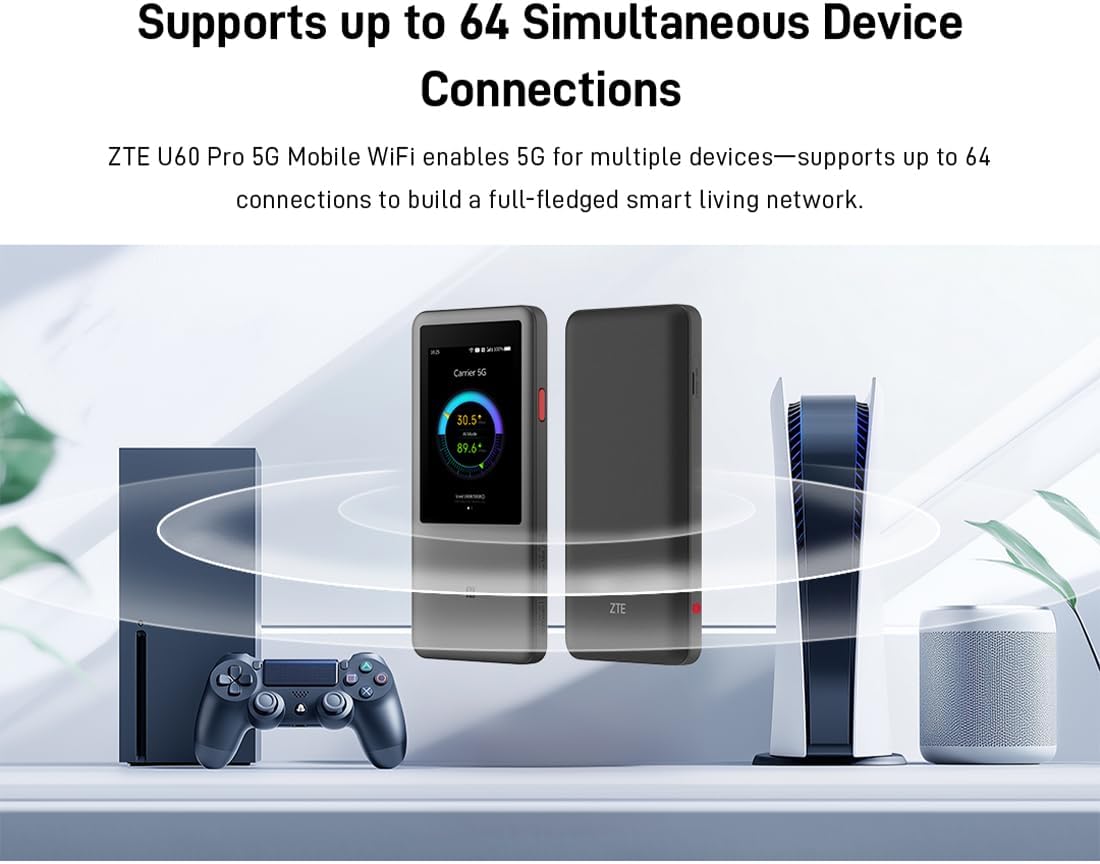
Image 3.1: The ZTE U60 Pro providing 5G Wi-Fi connectivity to various electronic devices.
3.3 AI Smart Scene Modes
The device features intelligent AI Scene technology with dynamic bandwidth allocation. It adjusts bandwidth and priority for applications based on user usage patterns to ensure smooth operation. Available modes include:
- Anchor Mode: Optimized for live streaming.
- Modo conferencia: Prioritizes video conferencing applications.
- Modo de vídeo: Enhances video playback and streaming.
- Modo de velocidade: Maximizes overall network speed.
- Modo de xogo: Reduces latency for online gaming.
3.4 AI Voice Management (via ZTE Smart Life APP)
The ZTE Smart Life APP enables effortless device management, including AI voice control. This feature allows for intelligent management of the router through voice commands. Download the ZTE Smart Life APP from your device's app store.

Image 3.2: The ZTE Smart Life APP interface demonstrating AI voice management capabilities.
3.5 Funcionalidade do banco de enerxía
The U60 Pro can also serve as a power bank. With its 10,000 mAh battery and 18W reverse fast charging, you can charge other electronic devices by connecting them to the router's appropriate port (e.g., USB-C).
4. Mantemento
4.1 Coidado coa batería
The device is equipped with a 10,000 mAh battery. To maximize battery life:
- Evita temperaturas extremas.
- Usa o cargador rápido de 27 W incluído para unha carga óptima.
- Para o almacenamento a longo prazo, cargue a batería aproximadamente ao 50 % e gárdea nun lugar fresco e seco.
4.2 General Device Care
To ensure the longevity and optimal performance of your ZTE U60 Pro:
- Manteña o dispositivo limpo e libre de po. Use un pano suave e seco para limpalo.
- Evite expoñer o dispositivo á auga ou a unha humidade excesiva.
- Non deixe caer o dispositivo nin someta o dispositivo a fortes impactos.
- Asegúrate de ventilar axeitadamente durante o uso para evitar o sobrequecemento.
5 Solución de problemas
If you encounter issues with your ZTE U60 Pro, refer to the following common solutions:
5.1 Sen conexión de rede
- Comproba a tarxeta SIM: Ensure the SIM card is correctly inserted and activated with a 5G data plan.
- Potencia do sinal: Verify the signal strength indicator on the device's screen. Move to an area with better 5G coverage if the signal is weak.
- Reiniciar o dispositivo: Power off and then power on the U60 Pro.
- Configuración de rede: Check network settings via the touchscreen or ZTE Smart Life APP to ensure APN settings are correct (usually automatic).
5.2 Problemas de conectividade Wi-Fi
- Contrasinal incorrecto: Double-check the Wi-Fi password displayed on the U60 Pro's screen.
- Límite de dispositivos: Ensure you have not exceeded the maximum of 64 connected devices.
- Restart Connected Device: Restart the device attempting to connect to the Wi-Fi.
- Reinicio do enrutador: Restart the ZTE U60 Pro.
5.3 Velocidade lenta de Internet
- Potencia do sinal: Un sinal 5G débil provocará velocidades máis lentas.
- Límite de datos: Check if your data plan has a fair usage policy or if you have exceeded a data cap, which might throttle speeds.
- AI Scene Mode: Ensure the appropriate AI Scene mode (e.g., Speed Mode) is selected for your activity.
- Interferencia: Afaste o dispositivo doutros dispositivos electrónicos que poidan causar interferencias.
6. Especificacións
The following table details the technical specifications of the ZTE U60 Pro MU5250:

Image 6.1: The Snapdragon X75 Flagship Chip-set Platform, central to the router's performance.
| Característica | Detalle |
|---|---|
| Marca | ZTE |
| Nome do modelo | MU5250 |
| Número de modelo do artigo | MU5250 |
| Fabricante | ZTE |
| Característica especial | 5G Connection, Wi-Fi 7, AI Scenes, Voice Control, Power Bank |
| Tecnoloxía de conectividade | 5G, wifi |
| Xeración Wi-Fi | Wi-Fi 7 |
| Estándar de comunicación sen fíos | 802.11a, 802.11ac, 802.11b, 802.11g, 802.11n |
| Clase de banda de frecuencia | Banda dual |
| Frecuencia | 5 GHz |
| Taxa de transferencia de datos | 4.29 Gigabits per second (Download) |
| Maximum Upstream Data Transfer Rate | 3600 Megabits per second (Wi-Fi 7 Peak Throughput) |
| Número de antenas | 9 (Omnidirectional 5G Array) |
| Cobertura | Wide and complete (360° full-band coverage) |
| Método de control | Toca |
| Sistema Operativo | Zinose |
| Protocolo de seguridade | WPA3 |
| Router Firewall Security Level | Básico |
| Batería(s) | 1 AAA - included (Note: Product description mentions 10,000 mAh, likely internal) |
| Peso do elemento | 435 gramos |
| Compoñentes incluídos | Adaptador de CA |
| Dispositivos compatibles | Game Console, various Wi-Fi enabled devices |
| Usos recomendados para o produto | Streaming, Gaming, Outdoor/Travel, Small Office |
| Conectividade a Internet | Si |
| Modem Compatible | No (Functions as a standalone 5G router) |
| Compatibilidade do fogar intelixente | Not Smart Home Compatible |
| Dispoñibilidade de Recambios | Información non dispoñible |
| Actualizacións de software garantidas ata | Información non dispoñible |

Image 6.2: Highlighting the 5G ultra-high-speed network of the ZTE U60 Pro MU5250.

Image 6.3: Illustration of the 9 omnidirectional 5G antennas providing 360° full-band coverage.
7. Asistencia e garantía
7.1 Atención ao cliente
For further assistance, technical support, or inquiries not covered in this manual, please refer to the official ZTE support channels or contact your retailer.
7.2 Información da garantía
Warranty terms and conditions may vary by region and retailer. Please refer to the warranty card included with your product or consult your point of purchase for detailed warranty information.