
Introdución
The JBL GRIP is a compact, portable Bluetooth speaker designed to deliver powerful JBL Pro Sound. It features AI Sound Boost technology for optimized audio output with minimal distortion. With its durable, dustproof, and waterproof design, the JBL GRIP is suitable for various environments and activities. This manual provides essential information for the proper use and maintenance of your speaker.

Image: The JBL GRIP speaker lineup in different colors, highlighting its portability.
O que hai na caixa
Upon unboxing your JBL GRIP speaker, please ensure all components are present:
- JBL GRIP Portable Bluetooth Speaker
- Guía de inicio rápido
- USB-C Charging Cable (Note: USB charging cable is not included in some regions, please check packaging)

Image: A purple JBL GRIP speaker, representing the main product.
Produto rematadoview
Familiarize yourself with the key features and components of your JBL GRIP speaker.
Controis e portos
- Botón de encendido: Located on the top panel.
- Botón de sincronización Bluetooth: Located on the top panel, for connecting to devices.
- Botón Reproducir/Pausa: Located on the top panel.
- Botóns subir / baixar volume: Located on the top panel.
- Porto de carga USB-C: Located on the side panel, protected by a cover.
- Luz ambiental: Integrated on the side panel, offering customizable lighting effects.

Imaxe: Arriba view of the JBL GRIP speaker, highlighting the control buttons.
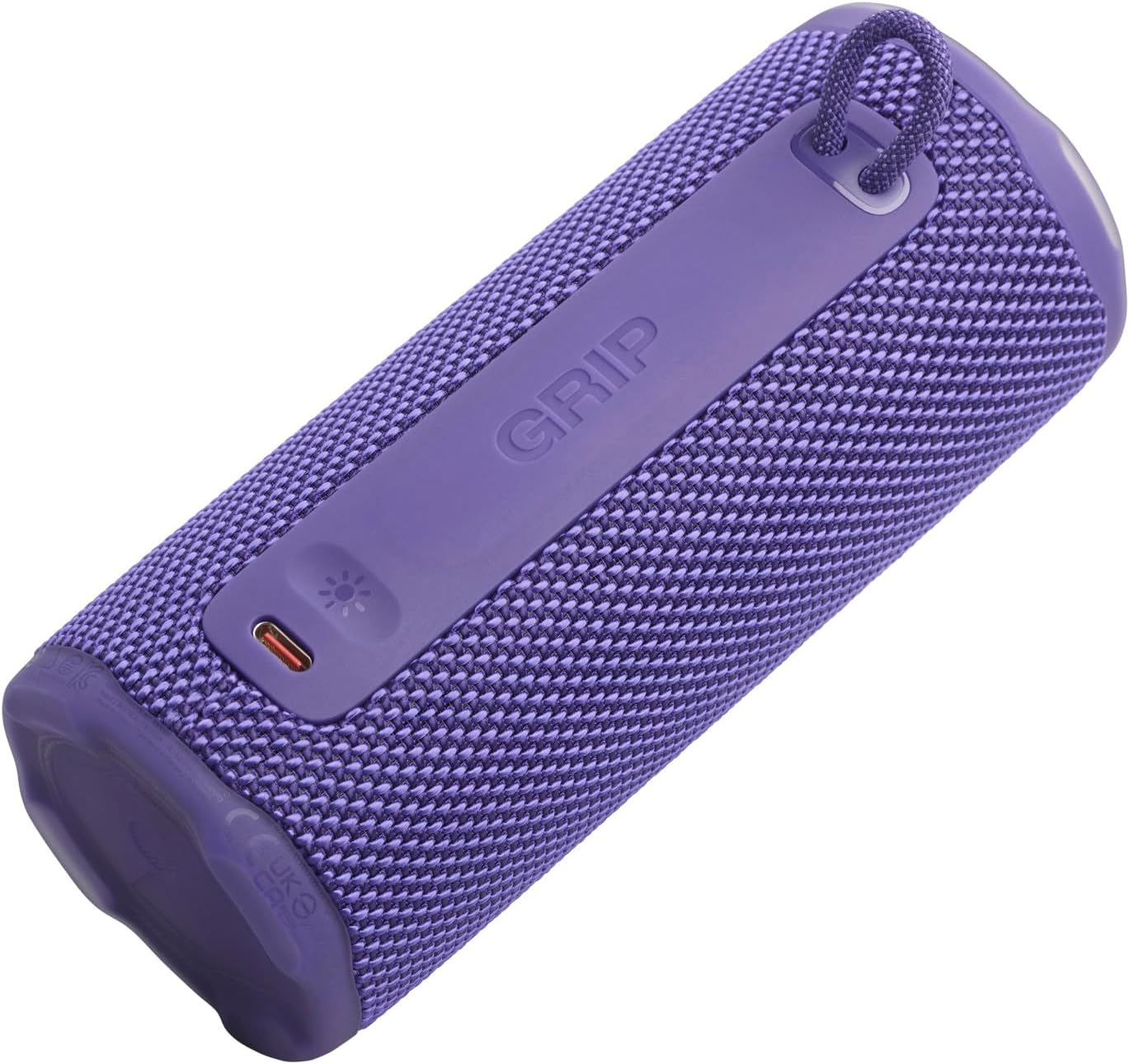
Imaxe: Lateral view of the JBL GRIP speaker, showing the USB-C charging port and the ambient light strip.
Características clave
- Impulso de son por IA: Real-time music analysis algorithm optimizes output and suppresses distortion for enhanced sound quality.
- IP68 Resistente ao po e á auga: Designed to withstand immersion in water and protect against dust ingress.
- Luz ambiental: Customizable LED light on the speaker's rear panel to set the mood.
- Tempo de reprodución longo: Up to 12 hours of continuous playback, extendable by an additional 2 hours with Playtime Boost.
- Aura Cast Multi-Speaker Connection: Connect multiple JBL GRIP speakers for a wider sound experience.
- JBL Portable App Compatibility: Control settings, customize ambient light, and manage features via the dedicated app.

Image: An internal diagram of the JBL GRIP speaker, illustrating the AI Sound Boost chip and dual passive radiators for enhanced bass.
Configuración
Cargando o altofalante
- Locate the USB-C charging port on the side of the speaker.
- Open the protective cover of the USB-C port.
- Connect one end of the USB-C charging cable to the speaker and the other end to a compatible USB power adapter (not included).
- O indicador LED mostrará o estado de carga. Unha carga completa tarda aproximadamente 3 horas.
- Unha vez cargado completamente, desconecte o cable e peche a tapa protectora de forma segura para manter a clasificación IP68.
Emparejamento Bluetooth
- Power on the JBL GRIP speaker by pressing the Power button.
- Press the Bluetooth button on the top panel. The LED indicator will flash, indicating pairing mode.
- On your device (smartphone, tablet, etc.), go to Bluetooth settings and select "JBL GRIP" from the list of available devices.
- Once connected, the LED indicator on the speaker will turn solid.
Instrucións de funcionamento
Reproducción básica
- Reproducir/Pausa: Preme o botón Reproducir/Pausa unha vez.
- Control de volume: Usa os botóns para subir o volume (+) e baixar o volume (-).
- Saltar pista: Double-press the Play/Pause button for next track. Triple-press for previous track.
Control de luz ambiental
The JBL GRIP features an ambient light that can be customized to match your mood.
- Default Modes: Cycle through pre-set light themes by pressing the dedicated light button (if available, otherwise use app).
- Personalización: For advanced customization of brightness and color, download and use the JBL Portable app.

Image: A JBL GRIP speaker displaying its customizable ambient light feature.
Aura Cast Multi-Speaker Connection
Aura Cast allows you to connect multiple JBL GRIP speakers for a synchronized audio experience.
- Ensure all JBL GRIP speakers are powered on and in pairing mode.
- Follow the instructions in the JBL Portable app to initiate Aura Cast pairing.
- Once connected, audio will play simultaneously across all linked speakers.

Image: A visual representation of multiple JBL speakers connected using Aura Cast for multi-room audio.
Aplicación portátil JBL
Download the JBL Portable app from your device's app store to unlock additional features and control options for your JBL GRIP speaker. The app allows you to:
- Axusta a configuración do ecualizador.
- Customize ambient light themes and brightness.
- Manage Aura Cast connections.
- Update speaker firmware.

Image: A screenshot of the JBL Portable app interface, showing customization options for sound and lighting.
Mantemento
Impermeable e resistente ao po (IP68)
The JBL GRIP speaker is rated IP68, meaning it is dust-tight and protected against continuous immersion in water up to 1.5 meters for up to 30 minutes. To maintain this rating:
- Ensure the USB-C port cover is securely closed before exposing the speaker to water or dust.
- Do not expose the speaker to salt water or other chemicals. If exposed, rinse with fresh water and dry thoroughly.
- Avoid using the speaker in extreme temperatures.

Image: A JBL GRIP speaker in water, demonstrating its IP68 waterproof capability.
Limpeza
Para limpar o altofalante, use un pano suave eamp pano. Non use produtos de limpeza ou disolventes abrasivos.
Resolución de problemas
| Problema | Posible Solución |
|---|---|
| O altofalante non se acende. | Asegúrate de que a batería estea cargada. Conecta o altofalante a unha fonte de alimentación mediante o cable USB-C. |
| Non se pode emparellar por Bluetooth. |
|
| Sen son ou volume baixo. |
|
| Ambient light not working. | Check settings in the JBL Portable app. Ensure the speaker is powered on. |
Especificacións
| Característica | Detalle |
|---|---|
| Nome do modelo | JBL GRIP |
| Número de modelo do produto | JBLGRIPPUR |
| Tipo de altofalante | Altofalante portátil |
| Tecnoloxía sen fíos | Bluetooth |
| Banda de frecuencia | 2400 MHz - 2483.5 MHz |
| Resposta en frecuencia | 20 kHz |
| Potencia máxima de saída | 16 W |
| Fonte de enerxía | Batería (ión de litio) |
| Duración da batería | Up to 12 hours (extendable by 2 hours with Playtime Boost) |
| Tempo de carga | Aproximadamente 3 horas |
| Clasificación impermeable/a prueba de po | IP68 |
| Dimensións do produto (P x A x A) | 6.5 x 6.4 x 15.3 cm |
| Peso do produto | 385 gramos |
| Método de control | Aplicación |
| Compoñentes incluídos | Guía de inicio rápido |

Image: A diagram illustrating the dimensions and weight of the JBL GRIP speaker.
Garantía e Soporte
The JBL GRIP speaker comes with a limited warranty. Please refer to the included Quick Start Guide or visit the official JBL websitio web para obter información detallada sobre a garantía e os contactos de asistencia.
For technical assistance, troubleshooting, or to register your product, please visit www.jbl.com/asistencia.