
1. Introdución
This instruction manual provides essential information for the safe and effective use of your Nikon D850 DSLR Camera. Please read this manual thoroughly before using the camera and keep it accessible for future reference. The Nikon D850 is a high-performance full-frame DSLR designed for professional photographers, featuring a 45.7MP BSI CMOS sensor, 4K UHD video recording, and a robust autofocus system.
This bundle includes the Nikon D850 camera body, a Nikon AF-S NIKKOR 24-120mm f/4G ED VR Lens, a Shot-Gun Microphone, a Photo Software Package, a camera case, 128GB memory, a slave flash, and a tripod.
2. Contido do paquete
Before proceeding with setup, verify that all items listed below are present in your package:
- Nikon D850 DSLR Camera Body
- Nikon AF-S NIKKOR 24-120mm f/4G ED VR Lens
- Nikon EN-EL15a Rechargeable Lithium-Ion Battery
- Extra High Capacity Battery
- Nikon MH-25A Battery Charger
- Nikon UC-E22 USB Cable
- Nikon AN-DC18 Camera Strap
- COMMANDER Deluxe Starter Kit (Mini Tripod, 5 Sensor Swabs, Cleaning Cloth, 2 Universal Screen Protectors, Memory Card Wallet, Lens Cap Keeper)
- COMMANDER 50 inch DSLR Tripod
- 2 x 64GB Sandisk Memory Cards (Total 128GB)
- Lector de tarxetas USB
- Funda de transporte para cámara
- 3PC Filter Kit (UV, CPL, FLD Filters) with Filter Case
- Shot-Gun Microphone
- Photo Software Package
- Lens Pen and Lens Blower
- Flash esclavo
- Nikon DK-17F Eyepiece Cap
- Nikon DK-19 Rubber Eyecup
- Nikon BF-1B Body Cap
- Nikon Snap-On Lens Cap
- Nikon LF-4 Rear Lens Cap
3. Configuración
3.1. Cargando a batería
- Insert the Nikon EN-EL15a battery into the MH-25A battery charger.
- Plug the charger into a power outlet. The charging lamp will blink during charging and turn off when charging is complete.
- Unha carga completa adoita tardar aproximadamente 2 horas.
3.2. Inserting the Battery and Memory Cards
Ensure the camera is turned off before inserting or removing batteries or memory cards.
- Open the battery chamber cover on the bottom of the camera.
- Insert the charged EN-EL15a battery with the contacts facing the correct direction until it clicks into place.
- Abra a tapa da ranura da tarxeta de memoria que se atopa no lateral da cámara.
- Insert the 64GB Sandisk memory cards into the designated slots (one XQD/CFexpress slot and one SD card slot) until they click. Ensure the cards are oriented correctly.
- Peche as dúas tapas de forma segura.
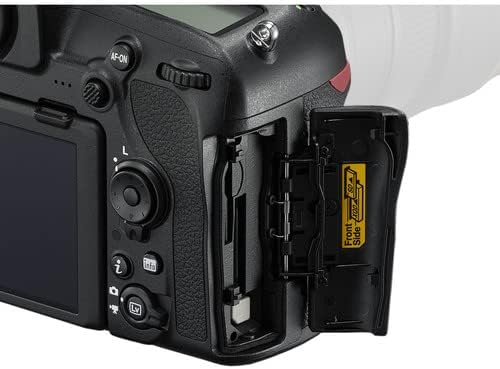
Image: Memory card and battery compartment access.
3.3. Colocación da lente
- Remove the body cap from the camera and the rear lens cap from the NIKKOR 24-120mm lens.
- Aliñe a marca de montaxe da lente coa marca de montaxe do corpo da cámara.
- Rotate the lens counter-clockwise until it clicks into place.

Image: Nikon AF-S NIKKOR 24-120mm f/4G ED VR Lens.
3.4. Initial Camera Settings
- Acenda a cámara usando o interruptor de alimentación.
- Siga as instrucións na pantalla para configurar o idioma, a data, a hora e o fuso horario.
4. Funcionamento da cámara
4.1. Controles básicos e pantalla
Familiarize yourself with the camera's buttons and dials. The D850 features a 3.2-inch tilting touchscreen LCD for intuitive control and review.

Imaxe: Traseira view of the Nikon D850 with its control layout.

Image: Nikon D850 with the tilting LCD screen in an extended position.
4.2. Realización de fotografías
- Selecciona un modo de disparo: Rotate the mode dial (P, S, A, M) to choose your desired exposure mode.
- P (Automático programado): A cámara axusta a velocidade de obturación e a apertura para unha exposición óptima.
- S (Automático con prioridade de obturación): Ti axustas a velocidade do obturador, a cámara axusta a apertura.
- A (Automático con prioridade de apertura): Ti axustas a apertura, a cámara axusta a velocidade do obturador.
- M (Manual): You control both shutter speed and aperture.
- Foco: Mira a través do viewbuscador ou usar Live View on the LCD. Press the shutter-release button halfway to activate autofocus. The D850 features a 153-point AF system for precise focusing.
- Compoñer: Enmarca a túa foto.
- Tiro: Press the shutter-release button fully to take the picture. The camera can shoot at 7 frames per second (fps) or up to 9 fps with an optional battery grip.
4.3. Gravación de vídeos
The Nikon D850 supports UHD 4K video recording at 30 fps.
- Switch to Live View mode using the Lv button.
- Press the red movie-record button to start recording.
- Preme o botón de novo para deixar de gravar.
4.4. Connecting to Smart Devices (SnapBridge)
The D850 features SnapBridge Bluetooth and Wi-Fi connectivity for transferring images to smart devices and remote control.
- Install the SnapBridge app on your smartphone or tablet.
- Enable Bluetooth and Wi-Fi on both the camera and your smart device.
- Follow the instructions in the SnapBridge app to pair your devices.
5. Mantemento
5.1. Limpeza da cámara e da lente
- Use un pano suave e sen fiapos para limpar o corpo da cámara.
- For the lens, use the included lens pen and blower to remove dust. For smudges, use a specialized lens cleaning solution and cloth.
- Avoid touching the sensor directly. If sensor cleaning is required, it is recommended to have it performed by a professional Nikon service center.
5.2. Coidado da batería
- Almacene as baterías nun lugar fresco e seco cando non esteas en uso.
- Non expoñas as baterías a temperaturas extremas.
- Recharge batteries before long periods of storage to maintain their health.
5.3. Almacenamento
- When storing the camera for extended periods, remove the battery.
- Store the camera and lens in a dry, well-ventilated area, preferably in the included camera case, to prevent mold and mildew.
6 Solución de problemas
If you encounter issues with your Nikon D850, refer to the following common solutions:
- A cámara non se acende: Ensure the battery is fully charged and correctly inserted. Check the power switch position.
- O enfoque automático non funciona: Verify the lens is securely attached and the AF/M switch on the lens is set to AF. Check camera's focus mode settings.
- As imaxes están borrosas: Check shutter speed (too slow can cause blur), aperture (too wide can reduce depth of field), and focus. Ensure Vibration Reduction (VR) is enabled on the lens if needed.
- Erro da tarxeta de memoria: Reinsert the memory card. If the error persists, try a different card. Ensure the card is not locked.
- No image on LCD: Check if the display is turned off or if the camera is in viewfinder-only mode.
For more detailed troubleshooting or issues not covered here, please consult the official Nikon D850 reference manual or contact Nikon support.
7. Especificacións
| Característica | Especificación |
|---|---|
| Tipo de sensor | 45.7MP FX-Format BSI CMOS |
| Procesador de imaxe | EXPEED 5 |
| Rango ISO | Native 64-25600, Extended 32-102400 |
| Gravación de vídeo | UHD 4K at 30 fps, 1080p |
| Sistema de enfoque automático | Multi-CAM 20K 153-Point AF System |
| Pantalla LCD | 3.2" 2.36m-Dot Tilting Touchscreen LCD |
| Tiro continuo | 7 fps (up to 9 fps with optional grip) |
| Montaxe da lente | Montura Nikon F |
| Lente incluída | Nikon AF-S NIKKOR 24-120mm f/4G ED VR Lens |
| Conectividade | SnapBridge Bluetooth and Wi-Fi, HDMI, USB |
| Almacenamento de memoria | 128GB (2 x 64GB SD cards) |
| Peso | Approx. 1.05 Pounds (Body Only) |
8. Garantía e soporte
8.1. Información da garantía
This Nikon D850 camera bundle comes with a 90-day limited warranty from the seller. Please retain your proof of purchase for any warranty claims. For specific details regarding coverage and terms, refer to the warranty documentation provided at the time of purchase or contact the seller directly.
8.2. Atención ao cliente
For technical assistance, additional product information, or service inquiries, please visit the official Nikon support website or contact their customer service department. You can find contact information and detailed resources at Nikon USA Support.