
1. Introdución
Welcome to the BLACK+DECKER FSM1620 1600-Watt Steam Mop user manual. This document provides essential information for the safe and effective operation, maintenance, and troubleshooting of your steam mop. Please read this manual thoroughly before first use and retain it for future reference.
The BLACK+DECKER FSM1620 Steam Mop is designed to clean and sanitize sealed hard floor surfaces using steam, eliminating up to 99.9% of germs and bacteria without the need for harsh chemicals. Its AutoSelect Technology allows for optimal steam output based on your floor type.
2. Información de seguridade
Always observe basic safety precautions when using electrical appliances to reduce the risk of fire, electric shock, and personal injury. Failure to follow these instructions may result in electric shock, fire, or serious injury.
- Lea atentamente todas as instrucións antes de utilizar o aparello.
- Non mergullo o aparello en auga ou outros líquidos.
- Do not leave the appliance unattended while plugged in or operating.
- Manteña o aparello fóra do alcance dos nenos e das mascotas.
- Empregue só auga destilada ou desmineralizada no depósito de auga para evitar a acumulación de minerais e prolongar a vida útil do electrodoméstico.
- Do not use the appliance on unsealed wooden floors, as steam may cause damage.
- Desconecte sempre o aparello antes de limpar ou realizar o mantemento.
- The steam produced is very hot. Avoid direct contact with skin.
3. Produto rematadoview
Familiarize yourself with the components of your BLACK+DECKER FSM1620 Steam Mop.
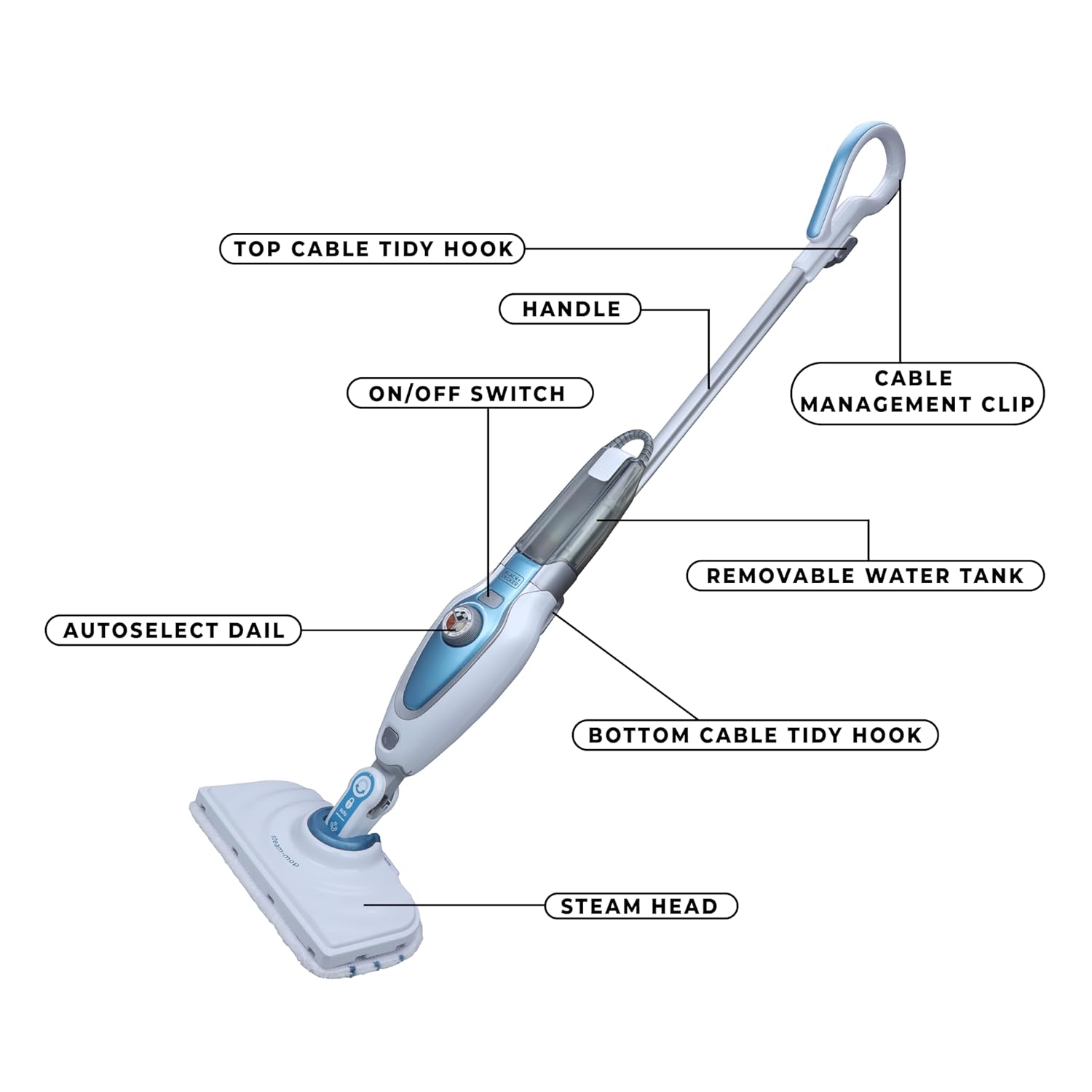
Figura 3.1: Main components of the FSM1620 Steam Mop.
This image displays the BLACK+DECKER FSM1620 Steam Mop with various parts labeled for identification. Key components include the handle, top cable tidy hook, cable management clip, ON/OFF switch, removable water tank, AutoSelect dial, bottom cable tidy hook, and steam head.
Compoñentes incluídos:
- 1 x FSM1620 Steam Mop Unit
- 2 x Microfiber Floor Pads
- 1 x Microfiber Delta Floor Pad
- 1 x Carpet Glider

Figura 3.2: Depósito de auga extraíble.
This image shows a close-up of the transparent, removable water tank on the steam mop, designed for easy refilling.

Figura 3.3: AutoSelect Dial.
Esta imaxe ofrece información detallada view of the AutoSelect dial, which allows users to select different steam settings for various floor types such as Tiles, Vinyl, Stone, Marble, Wood, and Laminate.
4. Configuración
4.1 Asemblea
- Insira a asa no corpo principal da mopa a vapor ata que encaixe firmemente no seu lugar.
- Asegúrese de que todas as conexións estean firmes antes de continuar.
4.2 Enchendo o depósito de auga
- Retire o depósito de auga da unidade principal.
- Open the tank cap and fill with distilled or demineralized water. Do not overfill. The tank capacity is 460 ml.
- Close the tank cap securely and reinsert the water tank into the steam mop until it locks.
4.3 Colocación da almofada de microfibra
- Place the microfiber cleaning pad on the floor with the white side facing up.
- Align the steam head over the pad and press down firmly to attach it using the hook and loop fasteners.

Figura 4.1: Steam Head with Cleaning Pad.
This image shows the steam head of the mop with a microfiber cleaning pad securely attached, ready for use.
5. Instrucións de funcionamento
5.1 Powering On and Selecting Steam Level
- Enchufe o cable de alimentación nunha toma eléctrica adecuada.
- Press the ON/OFF switch to power on the appliance.
- Rotate the AutoSelect dial to the desired floor type (e.g., Tiles, Wood, Stone). The mop will automatically adjust the steam output for optimal cleaning.
- Wait approximately 15-30 seconds for the steam mop to heat up and produce steam.

Figura 5.1: Operating the Steam Mop.
This image illustrates a user operating the BLACK+DECKER FSM1620 Steam Mop on a hard floor surface, demonstrating its ease of use and swivel steering capability.
5.2 Limpeza de superficies
- Move the steam mop slowly and steadily across the floor surface. The swivel steering allows for easy maneuverability around furniture and in tight spaces.
- For heavily soiled areas, hold the steam mop over the spot for a few seconds to allow the steam to penetrate and loosen dirt.
- Ensure the floor is dry before walking on it.
5.3 Using the Carpet Glider
- Attach the carpet glider over the microfiber pad and steam head.
- Use the steam mop with the carpet glider to refresh carpets and rugs. This is not intended for deep cleaning carpets, but for sanitizing and deodorizing.
6. Mantemento
6.1 Limpeza de almofadas de microfibra
- After each use, remove the microfiber cleaning pad from the steam head.
- The pads are machine washable. Wash them with similar colors at a low temperature. Do not use bleach or fabric softener.
- Allow pads to air dry completely before reattaching or storing.
6.2 Baleirar e limpar o depósito de auga
- Always empty any remaining water from the tank after each use.
- Enxágüe o tanque con auga limpa periodicamente para evitar a acumulación de residuos.
6.3 Descalcificación
To maintain optimal performance and prevent mineral buildup, especially if using tap water (though distilled water is recommended), descale the appliance every 3-6 months. Consult the manufacturer's websitio web ou o servizo de atención ao cliente para obter instrucións específicas de descalcificación.
6.4 Almacenamento
- Ensure the appliance is unplugged, cooled down, and the water tank is empty before storage.
- Wrap the power cord around the cable tidy hooks for neat storage.
- Store the steam mop in a dry, safe place, away from direct sunlight and extreme temperatures.
7 Solución de problemas
| Problema | Causa posible | Solución |
|---|---|---|
| Non se produce vapor | Depósito de auga baleiro Aparello non enchufado Not heated up sufficiently | Encher o depósito de auga Asegúrate de que o cable de alimentación estea ben conectado Wait 15-30 seconds after turning on |
| Raias no chan | Microfiber pad dirty Too much steam for surface Floor not pre-cleaned | Replace or wash microfiber pad Adjust AutoSelect dial to a lower steam setting Vacuum or sweep floor before steam cleaning |
| O aparello non se acende | Sen fonte de alimentación Interruptor de acendido/apagado non premido | Check power outlet and cord Press the ON/OFF switch firmly |
If you encounter issues not listed here, or if the problem persists, please contact customer support.
8. Especificacións
| Característica | Especificación |
|---|---|
| Marca | BLACK+DECKER |
| Nome do modelo | FSM1620 |
| Wattage | 1600 vatios |
| Peso do elemento | 3.06 kg |
| Volume/Capacidade do tanque | 460 mililitros |
| Voltage | 230 voltios (CA) |
| Característica especial | Filtrado |
| Recomendación de superficie | Piso |
| Factor de forma | Vertical |

Figura 8.1: Key Product Specifications.
This infographic visually summarizes the key specifications of the steam mop, including Voltage (230V), Power (1600W), Weight (3.06 KG), and Tank Capacity (460 ML).
9. Garantía e soporte
9.1 Información da garantía
Your BLACK+DECKER FSM1620 Steam Mop comes with a 1 ano de garantía desde a data de compra. Conserve o comprobante de compra para reclamacións de garantía. A garantía cobre defectos de fabricación en condicións de uso normal.
9.2 Atención ao cliente
Para calquera problema relacionado coa garantía, comentarios sobre o produto ou asistencia técnica, póñase en contacto co servizo de atención ao cliente de BLACK+DECKER:
- Teléfono: 1860-425-1111 (de luns a venres, de 10:00 a 17:00, agás festivos gobernamentais)
- Correo electrónico: COMUNICACIÓNS DO CLIENTE SBD@SBDINC.COM
- WhatsApp: +91 96060 55835

Figura 9.1: Total Care Contact Information.
This image provides comprehensive contact details for BLACK+DECKER Total Care, including phone numbers, email address, and a WhatsApp contact option with a QR code.