1. Introdución
This manual provides essential instructions for the safe and efficient operation of the Hilitand AT1-0750X Variable Frequency Drive (VFD). This device is designed to control the speed of three-phase AC motors, commonly used in applications such as pumps and fans. It utilizes advanced PWM control technology for precise speed regulation and features robust electromagnetic compatibility.
1.1 Características principais
- PWM Control Technology: Optimizes control and electromagnetic compatibility, reducing noise and interference.
- Unique Control Method: Achieves high torque, high precision, and a wide speed regulation range.
- Rendemento robusto: Good anti-drop performance and adaptability to sudden power interference, temperature, humidity, and dust.
- Operación sinxela: Easy to use with quick response for starting and stopping, and significant torque at low speeds.
- Protección Intelixente: Features intelligent protection against overcurrent, overvoltage, overheating, overload, and undervoltage.
1.2 Advertencias de seguridade
Failure to follow these safety instructions may result in death, serious injury, or property damage.
- Always read the entire instruction manual before operating the VFD.
- Ensure all wiring is correct and secure. Connecting AC power to the U/V/W output terminals will damage the inverter.
- Non conecte a fonte de alimentación CA aos terminais de saída (U, V, W).
- Ensure the VFD is properly grounded to prevent electrical shock.
- Do not install or operate the VFD in flammable or explosive environments.
- Only qualified and trained personnel should perform installation, wiring, and maintenance tasks.
- Do not open the VFD cover when power is applied. High voltage is present inside, even after power-off, due to capacitor discharge. Wait for the charge indicator to extinguish.
2. Configuración e instalación
2.1 Desembalaxe e inspección
Carefully unpack the VFD and inspect it for any signs of damage during transit. Verify that all components are present according to the packing list. If any damage or missing parts are found, contact your supplier immediately.
2.2 Montaxe
Mount the VFD in a vertical position on a stable, non-flammable surface. Ensure adequate clearance around the unit for proper ventilation and heat dissipation. The VFD is designed with a heatsink for efficient cooling.

Avoid locations with excessive dust, high humidity, direct sunlight, or corrosive gases. The operating temperature range should be maintained as specified in the technical data.
2.3 Cableado
All wiring must be performed by a qualified electrician in accordance with local and national electrical codes. Ensure power is disconnected before making any connections.

- Power Input (L, N): Connect the single-phase 220V AC power supply to the 'L' and 'N' terminals.
- Saída do motor (U, V, W): Connect the three-phase motor to the 'U', 'V', and 'W' terminals. Ensure correct phase sequence for desired motor rotation.
- Conexión a terra: Connect the ground terminal (marked with ⚧) to a reliable earth ground. This is crucial for safety.

3. Instrucións de funcionamento
3.1 Panel de control rematadoview
The VFD features an intuitive control panel for easy operation and parameter adjustment.
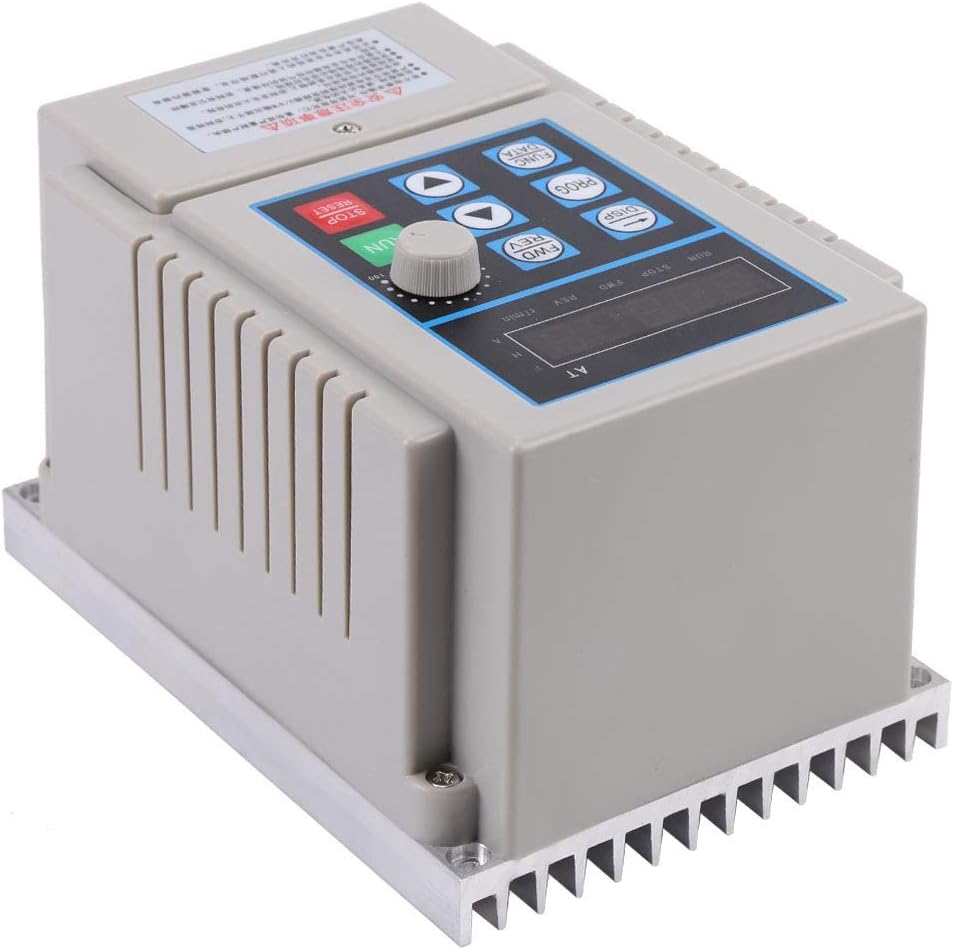
- Botón RUN (verde): Inicia o funcionamento do motor.
- STOP/RESET Button (Red): Stops motor operation and resets any fault conditions.
- FWD/REV Buttons: Changes the direction of motor rotation (Forward/Reverse).
- Botón DISP: Toggles between different display modes (e.g., frequency, current, voltage).
- Botón PROG: Enters or exits the parameter programming mode.
- FUNC/DATA Button: Used to select parameters or confirm data entry.
- Frechas cara arriba/abaixo: Navigates through parameters or adjusts values.
- Botón rotativo: Provides fine adjustment for frequency/speed in manual mode.
- Pantalla dixital: Shows operating status, frequency, and parameter values.
3.2 Funcionamento básico
- Encendido: After ensuring all wiring is correct and secure, apply 220V AC power to the VFD. The digital display will illuminate.
- Arranque do motor: Preme o CORRER button. The motor will start and accelerate to the set frequency.
- Axustar a velocidade: Use the rotary knob or the Up/Down arrow buttons to adjust the output frequency, thereby changing the motor speed. The display will show the current operating frequency.
- Cambiar dirección: Preme o FWD or REV button to change the motor's rotation direction. Ensure the motor is stopped or at a very low speed before changing direction to prevent mechanical stress.
- Parada do motor: Preme o PARAR / RESETAR button. The motor will decelerate and stop.
3.3 Configuración de parámetros
The VFD allows for customization of various operating parameters to suit specific application requirements. Refer to the detailed parameter list (usually provided in a separate, comprehensive manual) for specific codes and functions.
- Preme o PROG button to enter parameter programming mode.
- Use the Up/Down arrow buttons to navigate through parameter groups or individual parameters.
- Preme FUNC/DATA to select a parameter or enter its editing mode.
- Use the Up/Down arrows or rotary knob to adjust the parameter value.
- Preme FUNC/DATA again to save the new value.
- Preme PROG para saír do modo de programación.
4. Mantemento
Un mantemento regular garante a lonxevidade e o funcionamento fiable do seu variador de frecuencia.
- Limpeza: Periodically clean the VFD's exterior, especially the heatsink fins, to ensure proper heat dissipation. Use a soft, dry cloth. Do not use liquid cleaners.
- Comprobacións de conexión: Regularly inspect all wiring connections for tightness and signs of corrosion. Loose connections can lead to poor performance or damage.
- Condicións ambientais: Ensure the operating environment remains within specified temperature, humidity, and dust levels. Excessive dust or moisture can lead to internal damage.
- Ventilación: Confirm that ventilation openings are not obstructed.
5 Solución de problemas
Esta sección ofrece solucións para problemas comúns. Para problemas complexos, póñase en contacto co servizo de asistencia técnica.
| Problema | Causa posible | Solución |
|---|---|---|
| O variador de frecuencia non se acende | No input power; Blown fuse; Internal fault | Check power supply; Check fuses; Contact support if power is present and fuses are good. |
| O motor non funciona | Incorrect wiring; Motor fault; VFD in STOP mode; Fault code displayed | Verify motor and VFD wiring; Check motor condition; Press RUN button; Check display for fault codes and refer to parameter manual. |
| Motor speed is incorrect | Frequency setting incorrect; Parameter misconfiguration | Adjust frequency using rotary knob/arrows; Check relevant speed control parameters (e.g., max frequency, min frequency). |
| VFD displays an error code | Sobrecorrente, sobretensióntage, sobrequecemento, sobrecarga, subtensióntage etc. | Note the error code. Refer to the comprehensive parameter manual for specific error definitions and troubleshooting steps. Address the underlying cause (e.g., reduce load, check ventilation). Press STOP/RESET to clear. |
6. Especificacións
Technical specifications for the Hilitand AT1-0750X Variable Frequency Drive.
| Especificación | Valor |
|---|---|
| Fabricante | Hilitando |
| Nome do modelo | AT1-0750X (Internal Reference: Hilitandk6aftgnzyp) |
| Vol. De entradatage | 220 voltios (CA) |
| Vol. De saídatage | 220 voltios |
| Clasificación de potencia | 0.75 kW |
| Dimensións do produto (L x W x H) | 12 x 17 x 15 cm (aproximadamente 4.7 x 6.7 x 5.9 polgadas) |
| Peso do elemento | 1.03 quilogramos (aproximadamente 2.27 libras) |
| Material | Plástico |
| Usos recomendados | Workshop / Construction Site |
| UPC | 794419667717 |
7. Garantía e soporte
For warranty information, technical support, or service inquiries, please refer to the documentation provided with your purchase or contact the Hilitand customer service department. Keep your purchase receipt as proof of purchase.