
1. Introdución
This manual provides essential information for the safe and efficient use of your FUJITSU LIFEBOOK A573/G FMVA03003 laptop. Please read this manual thoroughly before operating the device and retain it for future reference. This document covers setup, operation, maintenance, and troubleshooting for your laptop.
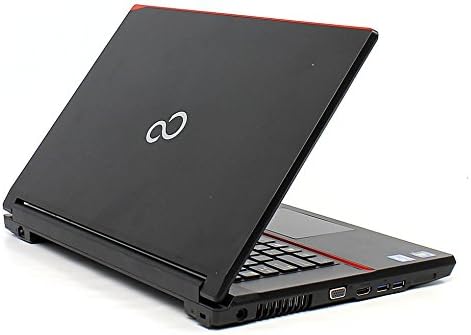
Figure 1: FUJITSU LIFEBOOK A573/G FMVA03003 Laptop. This image displays the laptop with its lid partially open, revealing the keyboard and the right-side ports including USB and HDMI connections. The Fujitsu logo is visible on the lid.
2. Configuración
2.1 Desembalaxe
- Retire con coidado o portátil e todos os accesorios da embalaxe.
- Verifique que estean presentes todos os compoñentes listados na nota de embalaxe.
- Retain the packaging materials for potential future transport or service.
2.2 Conexión de enerxía
- Connect the AC adapter to the power input port on the laptop.
- Enchufe o cable de alimentación a unha toma eléctrica conectada a terra.
- A batería comezará a cargarse automaticamente.
2.3 Arranque inicial e configuración do sistema operativo
- Preme o botón de acendido para acender o portátil.
- Follow the on-screen instructions to complete the initial setup of the Windows XP operating system. This typically includes setting up user accounts, language preferences, and network connections.
3. Instrucións de funcionamento
3.1 Acendido/apagado e modo de repouso
- Encendido: Prema o botón de acendido situado no portátil.
- Apagado: Click 'Start' > 'Turn Off Computer' > 'Turn Off' in Windows XP.
- Modo de suspensión: Close the laptop lid or click 'Start' > 'Turn Off Computer' > 'Stand By'.
3.2 Teclado e panel táctil
- The integrated keyboard functions like a standard desktop keyboard.
- The touchpad acts as a mouse. Use one finger to move the cursor and tap to click. Two-finger gestures may be supported for scrolling.
3.3 Conexión de periféricos
- Dispositivos USB: Insert USB devices (e.g., mouse, external drive) into the available USB ports.
- Pantalla HDMI: Connect an external monitor or TV using an HDMI cable to the HDMI port.
3.4 Conexión Wi-Fi
- Ensure Wi-Fi is enabled on the laptop (check for a physical switch or software setting).
- In Windows XP, click the wireless network icon in the system tray.
- Select your desired network and enter the security key if prompted.
4. Mantemento
4.1 Limpeza
- Use un pano suave e sen fiapos para limpar a pantalla e as superficies exteriores.
- Para marcas difíciles, d lixeiramenteampgl o pano con auga ou un limpador suave e non abrasivo.
- Avoid spraying liquids directly onto the laptop.
4.2 Coidado coa batería
- Para prolongar a duración da batería, evite temperaturas extremas.
- If storing the laptop for an extended period, ensure the battery is charged to approximately 50%.
4.3 Actualizacións de software e copia de seguridade de datos
- Regularly check for and install available operating system and driver updates to ensure optimal performance and security.
- Periodically back up important data to an external storage device or cloud service to prevent data loss.
5 Solución de problemas
5.1 Problemas comúns e solucións
- Sen enerxía:
Asegúrate de que o adaptador de CA estea conectado correctamente tanto ao portátil como a unha toma de corrente que funcione. Comproba a luz indicadora de acendido/apagado.
- Problemas de visualización:
If the screen is blank, try adjusting the brightness. If using an external monitor, ensure the cable is connected properly and the display output is configured correctly (e.g., using function keys to switch display modes).
- Problemas de conexión wifi:
Verify that Wi-Fi is enabled. Restart your router and the laptop. Ensure you have the correct network password.
- Rendemento lento:
Close unnecessary applications. Run a disk cleanup and defragmentation (if using HDD). Check for malware.
6. Especificacións
| Característica | Especificación |
|---|---|
| Marca | FUJITSU |
| Nome do modelo | A573/G (FMVA03003) |
| Tamaño da pantalla | 15.6 polgadas |
| Sistema Operativo | Windows XP |
| Tamaño da memoria RAM instalada | 320 GB (HDD) |
| Descrición do disco duro | HDD |
| Tecnoloxía de conectividade | HDMI, USB, Wi-Fi |
| Marca da CPU | FUJITSU (Intel Core i5 3340M 2.7GHz) |
7. Garantía e soporte
For information regarding warranty coverage, technical support, or service, please refer to the warranty card included with your product or visit the official FUJITSU support websitio. Garde o recibo da compra como xustificante de compra para reclamacións de garantía.