
Introdución
This manual provides essential instructions for the safe and effective use of your Panasonic Lumix DMC-LX100 Digital Camera. Please read this manual thoroughly before using the camera and retain it for future reference.
1. Configuración
1.1 Instalación e carga da batería
Insert the battery into the camera's battery compartment. Ensure it clicks into place. Use the provided external battery charger to charge the battery fully before first use. The charging indicator will show the charging status.
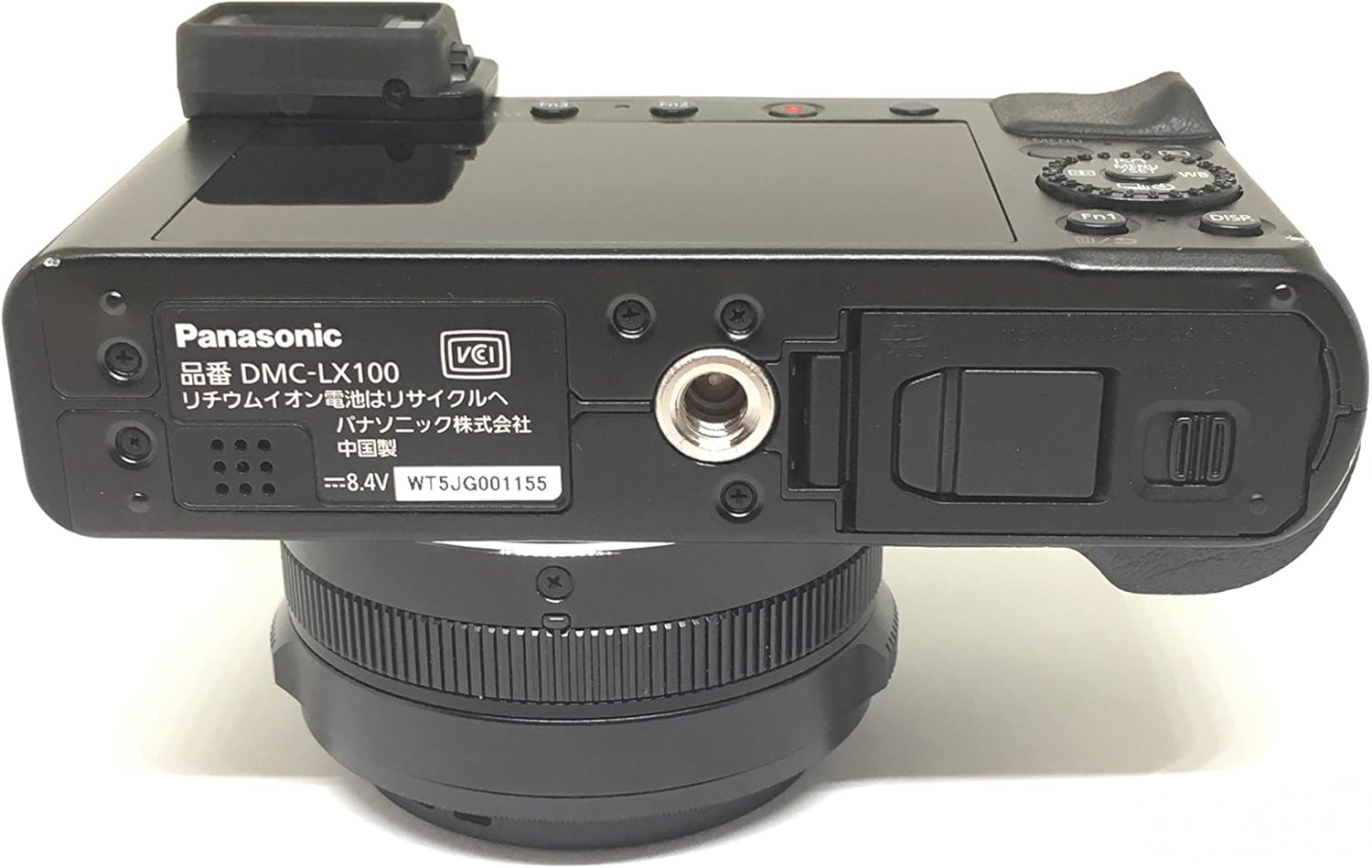
Imaxe: Parte inferior view of the camera, illustrating the battery compartment and tripod mount location. The battery should be inserted here.
1.2 Acendido inicial e configuración básica
After installing a charged battery, turn on the camera. The first time you power on, you will be prompted to set the language, time zone, and date. Follow the on-screen instructions to configure these settings.
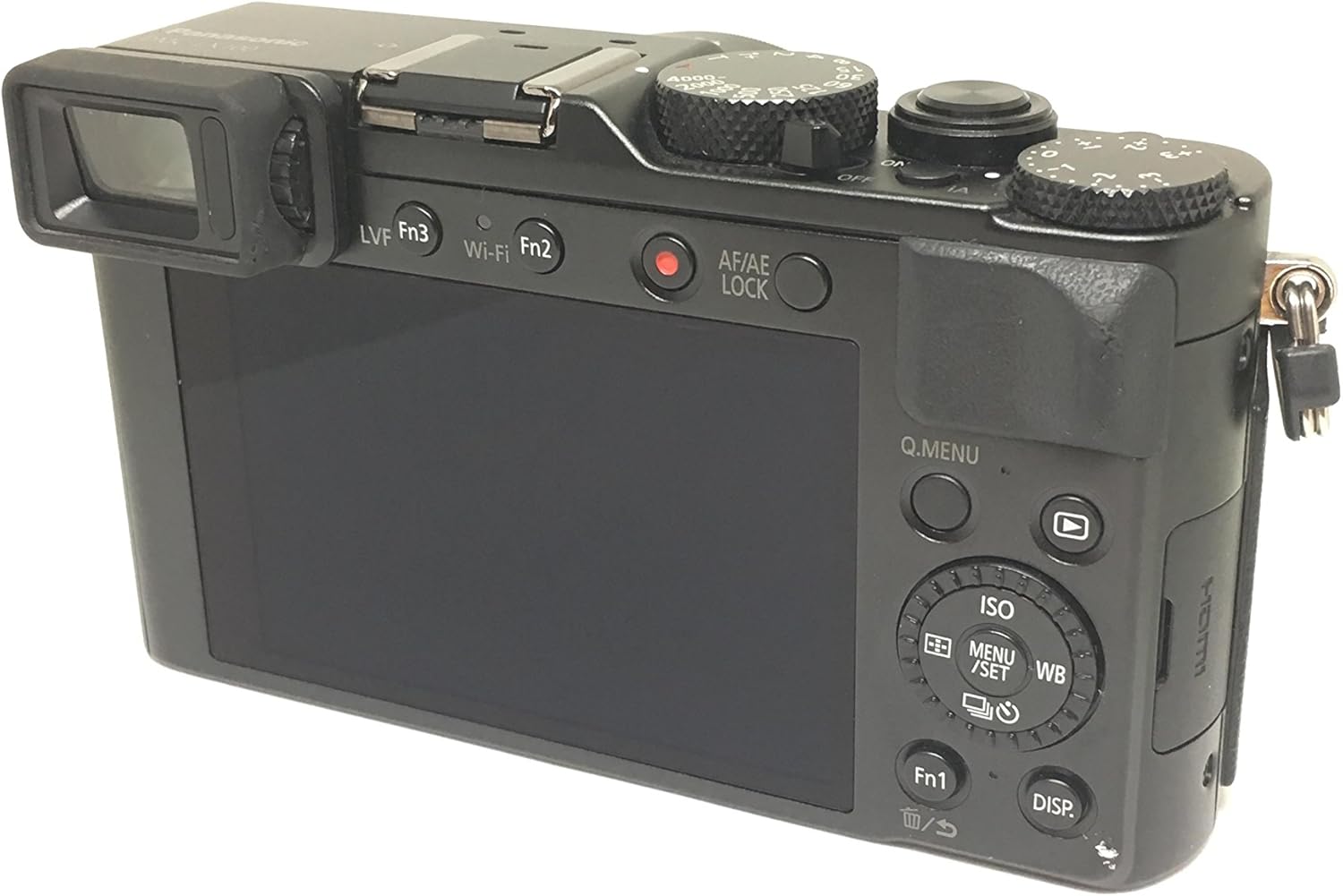
Imaxe: Traseira view of the camera, showing the LCD screen and various control buttons used for menu navigation and setting adjustments.
1.3 Inserción da tarxeta de memoria
Open the memory card slot cover, typically located near the battery compartment. Insert a compatible SDXC memory card (UHS Class 3, V30 recommended for 4K video) with the contacts facing the correct direction until it clicks into place. Close the cover securely.
2. Funcionamento da cámara
2.1 Fotografía básica
The DMC-LX100 offers extensive manual controls for photography. Key controls include:
- Marcación da velocidade de obturación: Located on the top plate, adjust this dial to control the exposure time.
- Anel de apertura: Located on the lens, rotate this ring to adjust the lens aperture (f/1.7-f/2.8).
- Dial de compensación da exposición: Also on the top plate, use this to fine-tune exposure.
- Focus Mode Selector: On the lens barrel, switch between AF (Autofocus) and MF (Manual Focus).

Imaxe: Arriba view of the camera, highlighting the physical dials for shutter speed, exposure compensation, and the aperture ring on the lens, designed for intuitive manual control.
To take a photo, compose your shot using either the electronic viewfinder (EVF) or the 3.0-inch display, then press the shutter button halfway to focus and fully to capture the image.
2.2 4K Ultra HD Video Recording
The camera supports 4K Ultra HD video recording at 30p. To start recording, press the dedicated video record button. Ensure you have a high-speed memory card (UHS Class 3 / V30) for optimal 4K performance.
2.3 Conectividade Wi-Fi e NFC
The DMC-LX100 features built-in Wi-Fi and NFC for wireless image transfer and remote control. Download the Panasonic Image App to your smartphone or tablet. Use NFC to quickly establish a connection with compatible devices, or connect via Wi-Fi through the camera's menu.
3. Mantemento
Un mantemento axeitado garante a lonxevidade e o rendemento da túa cámara.
- Limpeza de lentes: Use a soft, lint-free cloth specifically designed for camera lenses to clean the front element. Avoid touching the lens surface with your fingers.
- Limpeza corporal: Limpe o corpo da cámara cun pano seco e suave. Para a sucidade persistente, dóreo lixeiramenteampen o pano con auga.
- Sensor Dust: The DMC-LX100 has a fixed lens, which can make sensor cleaning challenging if dust accumulates. If you notice dust spots on your images, it is recommended to contact a professional service center for cleaning. Avoid attempting to clean the sensor yourself to prevent damage.
- Almacenamento: Cando non a use, garde a cámara nun lugar seco e fresco, lonxe da luz solar directa e de temperaturas extremas.
4 Solución de problemas
Esta sección aborda problemas comúns cos que podes atoparte.
- Lens Not Extending/Retracting: If the lens mechanism appears stuck, first ensure the battery is fully charged. Power the camera off and on again. If the issue persists, avoid forcing the lens and contact customer support.
- Autofocus Hunting: If the camera struggles to achieve focus, try focusing on an area with more contrast. Ensure sufficient lighting. In some situations, switching to manual focus (MF) may be necessary.
- Aperture Dial Not Functioning Correctly: If the aperture ring does not adjust the f-stop beyond a certain point (e.g., F2.5), try powering the camera off and on. If the problem continues, this may indicate a mechanical issue requiring professional service.
- A cámara non se acende: Check if the battery is correctly inserted and fully charged. Try using a different charged battery if available.
5. Especificacións
| Característica | Detalle |
|---|---|
| Nome do modelo | DMC-LX100-K |
| Resolución de sensor fotográfico | 12.8 MP |
| Tamaño do sensor fotográfico | Micro Catro Tercios |
| Lente | 24-75mm Leica DC Vario-Summilux f/1.7-2.8 |
| Zoom óptico | 3.1x |
| Tipo de visualización | 3.0-Inch OLED |
| Resolución de vídeo | 4K UHD 2160p |
| Conectividade | Wi-Fi, NFC, HDMI, USB |
| Estabilización da imaxe | Digital, Hybrid |
| Rango ISO (ampliado) | 100-25600 |
| Velocidade de obturación | 1/16000 a 1/4000 segundos |
| Soportado File Formato | JPEG, RAW |
| Peso | 0.35 quilogramos |
Note: Specifications are subject to change without notice. For the most current information, please refer to the official Panasonic websitio.
6. Información da garantía
This product may come with a manufacturer's warranty or a seller's warranty, depending on the region of purchase and retailer. Please refer to the warranty documentation included with your product or contact your point of purchase for specific details regarding warranty coverage, terms, and conditions. Keep your proof of purchase for warranty claims.
7. Atención ao cliente
For further assistance, technical support, or service inquiries, please visit the official Panasonic support website or contact their customer service department. You may need your camera's model number (DMC-LX100) and serial number when contacting support.