
1. Introdución
This manual provides detailed instructions for the safe and efficient operation of your Panasonic RX-D29 CD/Radio/Cassette Boombox. Please read this manual thoroughly before using the unit and retain it for future reference. The RX-D29 is a versatile audio system featuring a CD player with MP3 playback capability, an AM/FM radio tuner, and a cassette recorder/player.
2. Información de seguridade
- Non expoña esta unidade á choiva nin á humidade.
- Non retire a tapa. Encárguese da reparación só a persoal cualificado.
- Avoid placing the unit in direct sunlight, near heat sources, or in dusty/humid environments.
- Garantir unha ventilación adecuada ao redor da unidade.
- Use só a fonte de enerxía especificada.
- Manteña as pilas fóra do alcance dos nenos.
3. Contido do paquete
Verifique que todos os elementos que se indican a continuación estean incluídos no seu paquete:
- Panasonic RX-D29 Boombox Unit
- Control remoto
- Cable de alimentación de CA
- Manual do usuario (este documento)
4. Produto rematadoview
The Panasonic RX-D29 boombox features a compact design with integrated speakers and a clear display. The included remote control provides convenient access to various functions.
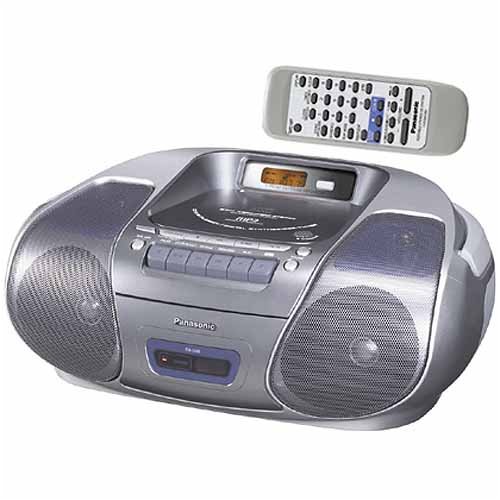
An image showing the silver Panasonic RX-D29 boombox with its top-loading CD compartment, front-facing speakers, cassette deck controls, and a separate remote control unit positioned above it.
4.1 Main Unit Controls and Components
- Compartimento de CD: Top-loading for audio CDs and MP3 CDs.
- Casete: Front-loading for cassette tapes.
- Relatores: Integrated 2-way speakers for stereo sound.
- Panel de visualización: Shows track information, radio frequency, and time.
- Botóns de función: Reproducir, Parar, Pausa, Avance rápido, Rebobinar para CD e casete.
- Controis do sintonizador: For AM/FM radio selection and tuning.
- Control de volume: Axusta o nivel de saída de audio.
- Antena: Telescopic FM antenna.
4.2 Control remoto
The remote control provides access to all primary functions, including power, volume, track selection, radio presets, and sound adjustments. Ensure 2 AA batteries (not included) are installed correctly in the remote control.
5. Configuración
5.1 Fonte de alimentación
The RX-D29 can be powered by AC current or batteries.
- Potencia CA: Conecte o cable de alimentación CA subministrado á toma de entrada CA da unidade e despois a unha toma de corrente estándar.
- Potencia da batería: For portable use, insert 6 C-cell batteries (not included) into the battery compartment on the bottom of the unit. Ensure correct polarity.
- Copia de seguranza da memoria: To retain time, timer settings, and radio presets when the unit is disconnected from AC power or main batteries are depleted, install 3 AA batteries (not included) in the memory backup compartment.
5.2 Configuración inicial
- Configuración do reloxo: Refer to the remote control section for instructions on setting the internal clock.
- Auto Scan Tuning: Upon first power-up, the unit may automatically scan and store radio presets.
6. Funcionamento do reprodutor de CD
- Cargando un CD: Open the top-loading CD compartment cover and place a CD (audio CD, CD-R/RW, or MP3 CD) with the label side facing up. Close the cover securely.
- Reprodución: Preme o XOGAR button. The unit will begin playing the first track.
- Selección de pistas: Usa o SALTAR botóns (<< / >>) para navegar entre as pistas.
- Pausa/Parar: Preme PAUSA to temporarily stop playback, and PARA para finalizar a reprodución.
- Modos de reprodución:
- Xogo normal: Reproduce as pistas en orde secuencial.
- Reprodución repetida: Repite a pista actual ou o disco enteiro.
- Xoga ao azar: Reproduce as pistas nunha orde aleatoria.
- Reprodución do programa: Allows you to program a specific sequence of tracks.
- MP3 CD Playback:
- The unit supports multi-session MP3 discs.
- Albums and tracks will play in alphanumeric order. Number your files and folders for desired playback sequence.
- The boombox does not support MP3 song and album title display.
- If a CD-ROM contains both MP3 and non-MP3 files, só o MP3 files será xogable.
7. Funcionamento da radio
- Selección dunha banda: Preme o BANDA botón para cambiar entre FM e AM.
- Sintonización manual: Usa o TUNING botóns para axustar manualmente a frecuencia.
- Sintonización automática: Manteña premido o TUNING botóns para buscar automaticamente a seguinte emisora dispoñible.
- Estacións predefinidas: The digital synthesizer tuner allows storage of up to 32 stations (20 FM, 12 AM). Use the PRESET buttons to recall stored stations.
- Axuste da antena: Extend and adjust the telescopic FM antenna for optimal FM reception. For AM reception, rotate the unit itself.
8. Operating the Cassette Player
- Loading a Cassette: Open the cassette compartment door and insert a cassette tape. Close the door.
- Reprodución: Preme o XOGAR botón.
- Gravación:
- CD Synchro Start: To record from a CD, ensure the CD is loaded and the cassette is ready to record. Press the RECORDAR button on the cassette deck. The CD will automatically start playing and recording.
- Gravación de radio: Tune to the desired radio station. Press the RECORDAR botón.
- Only normal-type cassette tapes are supported for recording and playback.
- Avance/Rebobinado rápido: Usa o FF / REW botóns.
- Parada automática: The unit features full auto stop, which automatically stops the tape mechanism at the end of playback or rewind to conserve battery life and tape wear.
- CD Cue and Review: For CDs, these controls help locate specific sections.
9. Axustes de son
- XBS (Extra Bass System): Activates a bass boost function for enhanced low-frequency sound. This can typically be toggled via a button on the unit or remote.
- Preset Equalizer Settings: Choose from four preset equalizer settings to tailor the sound to your preference:
- Vocal
- Limpar
- Suave
- (Default/Off)
- Sound Virtualizer Circuit: Simulates surround sound from the unit's two speakers, creating a wider soundstage. This function is typically controlled via the remote.
- Re-Master Circuit (for MP3): This feature reproduces treble frequencies that may be lost during MP3 compression, aiming to restore sound quality closer to the original source.
10. Mantemento
- Limpeza da unidade: Wipe the exterior with a soft, dry cloth. For stubborn stains, use a cloth lightly dampened with water and a mild detergent, then wipe dry. Do not use abrasive cleaners or solvents.
- Limpeza de lentes de CD: Empregue un limpador de lentes de CD dispoñible comercialmente se se producen problemas de reprodución debido a unha lente sucia.
- Limpeza da cabeza do casete: Periodically clean the cassette heads, pinch rollers, and capstans with a cotton swab lightly moistened with isopropyl alcohol to ensure optimal sound quality and prevent tape damage.
- Substitución da batería: Replace all batteries with new ones when they are depleted. Do not mix old and new batteries or different types of batteries.
11 Solución de problemas
| Problema | Causa posible | Solución |
|---|---|---|
| Sen poder | AC cord not connected; batteries depleted or incorrectly inserted. | Ensure AC cord is securely plugged in. Replace or correctly insert batteries. |
| O CD non se reproduce | CD inserted incorrectly; CD dirty or scratched; lens dirty; unit in wrong function mode. | Insert CD with label side up. Clean or replace CD. Clean CD lens. Select CD function. |
| Mala recepción de radio | Antenna not extended/adjusted; unit location. | Extend and adjust FM antenna. Rotate the unit for AM reception. Relocate the unit for better signal. |
| A cinta de casete non se reproduce/grava | Tape inserted incorrectly; tape damaged; cassette heads dirty. | Insert tape correctly. Use a different tape. Clean cassette heads. |
| O control remoto non funciona | Pilas esgotadas ou inseridas incorrectamente; obstrución entre o mando a distancia e a unidade. | Replace remote batteries. Ensure clear line of sight to the unit's sensor. |
12. Especificacións
- Modelo: RX-D29
- Marca: Panasonic
- Fonte de enerxía: AC 120V, 60Hz or 6 x C-cell batteries (DC 9V)
- Copia de seguranza da memoria: 3 x AA batteries (DC 4.5V)
- Dimensións (W x H x D): Aproximadamente 17 x 7 x 12 polgadas (43.2 x 17.8 x 30.5 cm)
- Peso: Approximately 3 pounds (1.36 kg) without batteries
- Reproductor de CD: Top-loading, CD-R/RW, MP3 playback compatible
- Sintonizador de radio: Digital Synthesizer AM/FM, 32 presets (20 FM, 12 AM)
- Casete: Front-loading, recording function, auto stop, normal tape type only
- Relatores: Estéreo de 2 vías
- Accesorios incluídos: Remote control, AC power cord
13. Garantía e soporte
For warranty information or technical support, please refer to the warranty card included with your product or visit the official Panasonic websitio. Garde o recibo da compra como xustificante de compra para reclamacións de garantía.
Atención ao cliente de Panasonic: For further assistance, please contact Panasonic customer service through their official channels.