
PROMETHEAN PRM-35
PROMETHEAN PRM-35 Short-Throw DLP Home Theater Projector User Manual
Model: PRM-35
Ro-ràdh
This manual provides detailed instructions for the setup, operation, and maintenance of your PROMETHEAN PRM-35 Short-Throw DLP Home Theater Projector. Please read this manual thoroughly before using the projector to ensure proper operation and to extend the life of your device. Keep this manual for future reference.
Fiosrachadh Sàbhailteachd
Lean na ceumannan sàbhailteachd a leanas gus casg a chur air teine, clisgeadh dealain no leòn:
- Na cuir bacadh air fosglaidhean fionnarachaidh. Dèan cinnteach gu bheil àite gu leòr timcheall air a’ phròiseictar airson sruth-adhair ceart.
- Na cuir am proiseactair fosgailte do uisge no taiseachd.
- Na fosgail am proiseactair casing. Thoir aire do luchd-obrach seirbheis teisteanasach airson a h-uile seirbheis.
- Seachain coimhead gu dìreach a-steach don lionsa proiseactair nuair a bhios an lamp air, oir faodaidh an solas soilleir cron a dhèanamh air do shùilean.
- Use only the power cord supplied with the projector or a suitable replacement.
- Tarraing am pluga den phròiseictar a-mach às a’ chumhachd mus glan thu e no nuair nach eilear ga chleachdadh airson ùine mhòr.
Susbaint pacaid
Dèan cinnteach gu bheil a h-uile rud anns a’ phacaid agad:
- PROMETHEAN PRM-35 Projector
- Corda cumhachd
- Smachd Iomallach
- HDMI Cable (may vary by region/bundle)
- Leabhar-làimhe cleachdaiche (an sgrìobhainn seo)

Image: The PROMETHEAN PRM-35 projector shown alongside its remote control, power cord, and an HDMI cable, illustrating the typical package contents.
Bathar seachadview
Aghaidh View

Ìomhaigh: Aghaidh view of the PROMETHEAN PRM-35 projector, highlighting the lens, brand logo, and various certifications.
The front of the projector features the main projection lens, which includes manual focus and digital zoom capabilities. The PROMETHEAN logo and other product identifiers are also visible.
Cùl View (Connectivity Ports)
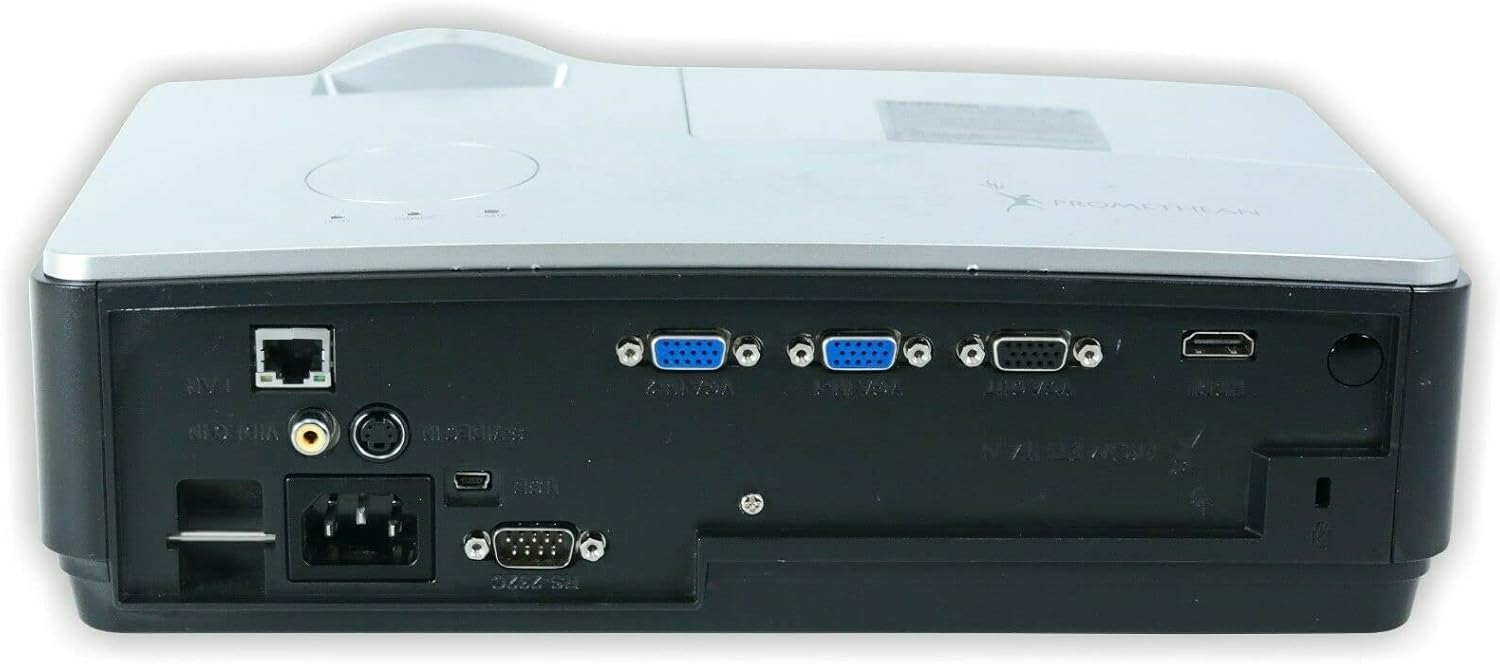
Ìomhaigh: Cùl view of the PROMETHEAN PRM-35 projector, displaying a variety of input and output ports including HDMI, VGA, USB, S-Video, and network connections.
The rear panel provides all the necessary input and output ports for connecting to various devices. These include HDMI, VGA, S-Video, USB Mini Type-A, RS232, RJ-45 (LAN), and audio jacks.
Taobh Views (Ventilation)

Ìomhaigh: Taobh view of the PROMETHEAN PRM-35 projector, showing the ventilation grilles for heat dissipation.

Dealbh: Taobh eile view of the PROMETHEAN PRM-35 projector, also featuring ventilation grilles.
Both sides of the projector feature ventilation grilles to ensure proper airflow and prevent overheating. It is crucial to keep these vents unobstructed during operation.
Barr View
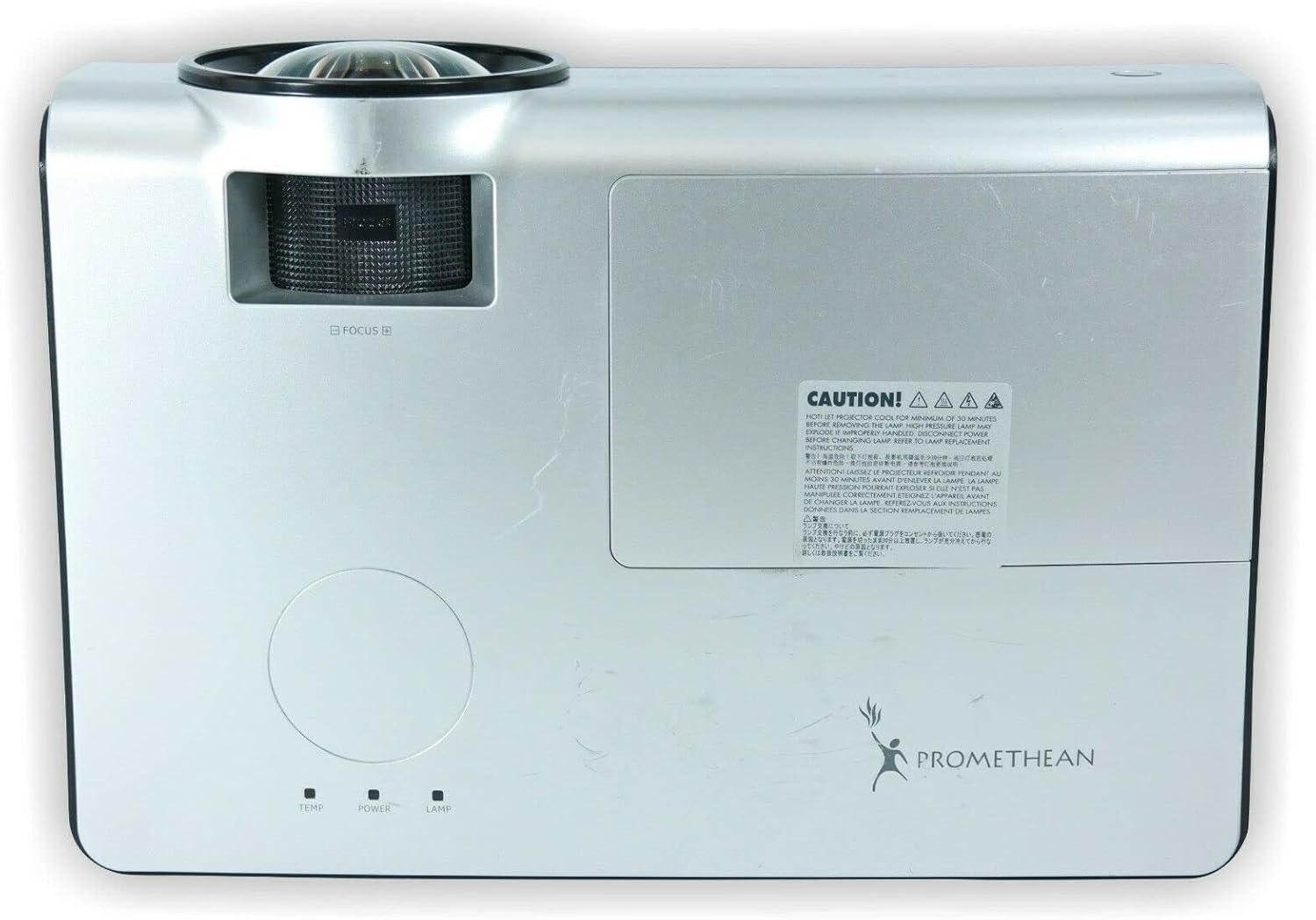
Ìomhaigh: Mullach view of the PROMETHEAN PRM-35 projector, showing the control panel area and lamp còmhdach ruigsinneachd.
The top panel includes indicator lights for temperature, power, and lamp status, along with a caution label regarding lamp teas.
Bun View

Ìomhaigh: Bun view of the PROMETHEAN PRM-35 projector, showing mounting points and regulatory labels.
The bottom of the projector features mounting points for ceiling or table top projection, along with product information and regulatory compliance labels.
Suidhich
1. Greis
Position the projector on a stable, flat surface or mount it securely. For short-throw projection, place the projector close to the screen. Ensure there is adequate space around the projector for ventilation.
- Table Top Projection: Cuir am proiseactair air bòrd air beulaibh an sgrion.
- Ceiling Projection: Use a compatible ceiling mount (sold separately) and ensure the projector is securely fastened.
- Ro-mheasadh Cùil: If your screen supports it, the projector can be placed behind the screen. Adjust settings in the projector menu for rear projection.
2. A ’ceangal ri cumhachd
- Connect the power cord to the projector's power input port on the rear panel.
- Plug ceann eile an t-sreang cumhachd a-steach do ionad dealain stèidhichte.
- The power indicator light on the projector should illuminate.
3. A’ ceangal stòran inntrigidh
The PRM-35 offers multiple connectivity options:
- HDMI: For high-definition digital video and audio. Connect an HDMI cable from your source device (e.g., Blu-ray player, game console, PC) to the HDMI port on the projector.
- VGA: For analog video connection from computers. Connect a VGA cable from your PC to one of the VGA/SVGA D-Sub ports.
- S-Bhidio: For standard definition video.
- USB Mini Type-A: For certain data or control functions.
- RS232 (DB-9pin): Airson smachd sreathach air a’ phroiseactair.
- RJ-45 (LAN): For network connectivity and control (e.g., Crestron RoomView).
- Fuaim: Use the headphone jack for audio output or connect external speakers if desired.
4. Focus and Digital Zoom Adjustment
Once the projector is powered on and displaying an image:
- Fòcas: Rotate the focus ring around the projector lens until the image appears sharp and clear on the screen.
- Zoom didseatach: Use the remote control or projector's on-screen display (OSD) menu to adjust the digital zoom. This feature allows you to enlarge or reduce the image size without moving the projector.
Ag obrachadh an projector
Cumhachd air / dheth
- Cumhachd air: Brùth an Cumhachd button on the projector's control panel or the remote control. The power indicator light will change to solid green.
- Cumhachd dheth: Brùth an Cumhachd putan a-rithist. Dh’fhaodadh teachdaireachd dearbhaidh nochdadh. Brùth Cumhachd a second time to confirm shutdown. The projector will enter a cooling cycle before fully powering off. Do not unplug the projector during the cooling cycle.
Menu Navigation (OSD)
Use the buttons on the projector's control panel or the remote control to navigate the On-Screen Display (OSD) menu:
- Cleachd an Clàr-taice button to open or close the OSD.
- Cleachd an Saighead putanan (Suas, sìos, clì, deas) to navigate through menu options.
- Brùth an Cuir a-steach or OK putan gus roghainn a thaghadh no suidheachadh a dhearbhadh.
- Cleachd an Ar-a-mach or Air ais putan gus tilleadh chun chlàr-taice roimhe no an OSD fhàgail.
Taghadh Stòr Inntrigidh
Gus gluasad eadar innealan ceangailte:
- Brùth an Stòr or Cuir a-steach button on the remote control or projector.
- A list of available input sources will appear on the screen.
- Cleachd an Saighead buttons to highlight the desired source and press Cuir a-steach or OK.
Atharrachaidhean dealbh
Access the Picture menu in the OSD to fine-tune image quality:
- Gile: Bidh seo ag atharrachadh soilleireachd no dorchadas iomlan na h-ìomhaigh.
- Coltas: Controls the difference between the lightest and darkest areas.
- Dath: A’ gleusadh dian nan dathan.
- Tint: Fine-tunes the color balance (primarily for NTSC video sources).
- Sharpness: Enhances or softens the edges of objects in the image.
- Co-mheas taobh: Selects the display format (e.g., 16:10, 16:9, 4:3). The native aspect ratio is 16:10.
Roghainnean claisneachd
The PRM-35 has built-in speakers. Adjust audio settings via the OSD:
- Meud: Controls the output level of the built-in speakers.
- Balbh: Cuiridh seo stad air a’ fhuaim airson greis.
3D Modes (PC 3D Ready)
The projector supports PC 3D Ready functionality. To experience 3D content:
- Ensure your PC's graphics card and software support 3D output.
- Use compatible 3D glasses (sold separately).
- Refer to your PC's 3D software instructions for specific setup.
Cumail suas
Regular maintenance ensures optimal performance and longevity of your projector.
A 'glanadh an projector
- Taobh a-muigh: Cleachd clò bog gun lint dampened with a mild, non-abrasive cleaner. Do not spray cleaner directly onto the projector.
- Lionsa: Use a professional lens cleaning kit or a soft, dry microfiber cloth specifically designed for optical lenses. Avoid touching the lens with your fingers.
- Fosglaidhean fionnarachaidh: Periodically check and gently clean the ventilation grilles to prevent dust buildup, which can impede airflow. Use a soft brush or compressed air (held upright to prevent propellant discharge).
Lamp Beatha agus Ath-chur
The PRM-35 projector lamp has a long lifespan, up to 6000 hours. When the lamp a' ruighinn deireadh a bheatha, an lamp indicator light on the projector will illuminate or flash, and a message may appear on the screen.
Note: This projector features a filter-free design, eliminating the need for filter replacement or cleaning, which reduces maintenance time and cost.
Airson lamp replacement, it is recommended to contact qualified service personnel or refer to the detailed lamp replacement guide available from Promethean support.
Stòradh
If storing the projector for an extended period:
- Power off the projector correctly and allow it to cool down completely.
- Disconnect a h-uile càball.
- Stòraich am proiseactair ann an àite fionnar, tioram, air falbh bho sholas dìreach na grèine agus teòthachd anabarrach.
- Cleachd am pacaigeadh tùsail no cùis dìon gus casg a chur air duslach is milleadh.
Fuasgladh thrioblaidean
This section addresses common issues you might encounter with your PRM-35 projector.
| Trioblaid | Adhbhar a dh’fhaodadh a bhith ann | Fuasgladh |
|---|---|---|
| Gun ìomhaigh air an sgrion |
|
|
| Tha an ìomhaigh blurry |
|
|
| Bidh am proiseactair a’ teasachadh ro mhòr no a’ dùnadh sìos |
|
|
| Chan eil smachd iomallach ag obair |
|
|
Sònrachaidhean
| Feart | Mion-fhiosrachadh |
|---|---|
| Brand | PROMETHEAN |
| Modail | PRM-35 |
| Seòrsa Taisbeanaidh | DLP |
| Fuasgladh Dùthchasach | 1280x800 |
| Gile Ìomhaigh | 2500 Lumens ANSI |
| Co-mheas coimeas | 2000:1 |
| Co-mheas taobh | 16: 10 (Dùthchasach) |
| Video Modes Supported | 720p, 1080i, 1080p |
| Modhan 3D | PC 3D Ready |
| Tilg air astar | Tilgeil Goirid |
| Ceangalachd | HDMI, VGA, USB Mini Type-A, RS232, S-Video, RJ-45 (LAN), Headphone Jack |
| Feartan sònraichte | Portable, Short Throw, 3D-Ready, Closed Captioning, Crestron RoomView, Built-in Speakers, Filter-free design |
| Cuideam nì | 6 lbs (timcheall air.) |
| Meudan toraidh | 11 x 12 x 4 òirleach (approx.) |
| Lamp Beatha | Suas ri 6000 uairean a thìde |
| Co-fhreagarrachd | PC and MAC computers |
Barantas agus Taic
For information regarding the warranty coverage for your PROMETHEAN PRM-35 projector, please refer to the warranty card included with your purchase or visit the official PROMETHEAN weblàrach. Faodaidh teirmichean barantais atharrachadh a rèir sgìre agus reiceadair.
For technical support, service, or to purchase replacement parts, please contact PROMETHEAN customer support through their official channels. You may need your product model number (PRM-35) and serial number when contacting support.
Official PROMETHEAN Weblàrach: www.prometheanworld.com (This is a placeholder link, please refer to actual manufacturer weblàrach airson taic.)