
Réamhrá
Welcome to the HP OmniDesk M03 AI Desktop PC. This manual provides essential information for setting up, operating, maintaining, and troubleshooting your new computer. The HP OmniDesk M03 is designed for performance and efficiency, featuring an Intel Core Ultra 7 265 processor with dedicated AI cores, 16GB DDR5 RAM, and a 2TB NVMe SSD, running on Windows 11 Home.
Cad atá sa Bhosca
Deimhnigh go bhfuil na comhpháirteanna uile i láthair sa phacáistiú:
- HP OmniDesk Desktop PC
- Méarchlár gan sreang
- Luch
- Treoir maidir le Socrú Tapa
- Cábla Cumhachta

Image: The HP OmniDesk M03 desktop PC, wireless keyboard, mouse, and power cable, illustrating the contents of the product box.
Socrú
1. Forimeallaigh a nascadh
Before powering on your PC, connect your monitor, keyboard, and mouse.
- Monatóir: Connect your monitor to the PC using an HDMI or DisplayPort cable. The ports are located on the rear of the PC.
- Méarchlár agus Luch: The included keyboard and mouse are wireless. Insert batteries (if not pre-installed) and connect their USB receiver to an available USB port on the PC.
- Cumhacht: Connect the power cable to the PC's power input on the rear and then to a wall outlet.
- Líonra (Roghnach): For a wired internet connection, connect an Ethernet cable from your router to the RJ45 port on the rear of the PC.

Image: Rear panel of the HP OmniDesk M03, highlighting the DisplayPort, HDMI, USB, and Ethernet ports for connecting external devices.

Íomhá: Taobh view of the HP OmniDesk M03 AI Desktop PC, showing its compact tower design.
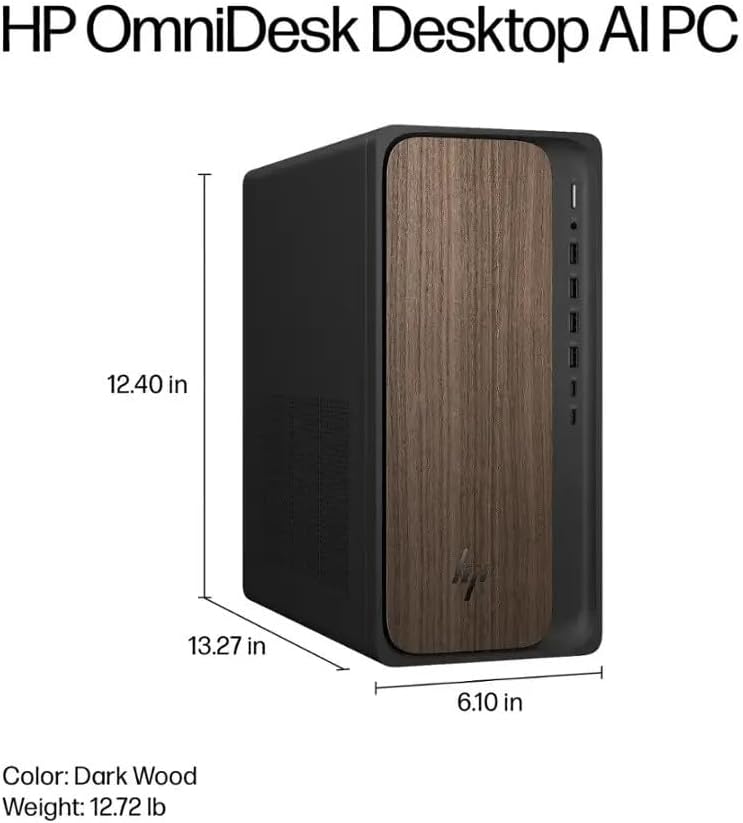
Image: Diagram illustrating the location and type of front and rear ports on the HP OmniDesk M03, including USB-A, USB-C, HDMI, DisplayPort, and audio jacks.
2. Cumhachtú Air agus Socrú Tosaigh
Nuair a bheidh na forimeallaigh go léir ceangailte:
- Brúigh an cnaipe cumhachta atá suite ar aghaidh an ríomhaire.
- Follow the on-screen instructions to complete the Windows 11 Home initial setup, including language selection, network connection (if not wired), account creation, and privacy settings.

Íomhá: Tosaigh view of the HP OmniDesk M03, showing the power button at the top right and various USB ports below it.
Ag Oibriú Do Ríomhaire
Windows 11 baile
Your HP OmniDesk M03 comes pre-installed with Windows 11 Home. Familiarize yourself with the operating system's interface, Start menu, and settings. Microsoft provides extensive online resources for Windows 11 usage.
Gnéithe AI
The Intel Core Ultra 7 265 processor includes dedicated AI cores and Intel AI Boost, enhancing performance for AI-driven applications and features within Windows 11, such as AI Copilot. These features can assist with tasks, content creation, and system optimization.
Nascacht
- Wi-Fi 6 (802.11ax): Connect to wireless networks for internet access. Manage Wi-Fi settings through the Windows 11 network settings.
- Bluetooth 5.4: Pair wireless devices such as headphones, speakers, or additional input devices. Access Bluetooth settings via the Windows 11 settings menu.
- Ethernet: For a stable, high-speed wired connection, ensure an Ethernet cable is connected to the RJ45 port.
Cothabháil
Glanadh Do Ríomhaire
- Taobh amuigh: Bain úsáid as éadach bog, saor ó lint beagán dampened with water or a mild cleaning solution to wipe down the exterior. Avoid harsh chemicals.
- Feannadh: Periodically clean dust from the ventilation grilles using compressed air to ensure proper airflow and prevent overheating.
- Poirt: Coinnigh calafoirt saor ó dheannach agus smionagar.
Nuashonruithe Bogearraí
Regularly update Windows 11 and device drivers to ensure optimal performance, security, and compatibility. Access Windows Update through the Settings menu.
Cúltaca Sonraí
Moltar cúltaca rialta de do shonraí tábhachtacha a dhéanamh chuig tiomántán seachtrach nó stóras scamall chun cailliúint sonraí a chosc.
Fabhtcheartú
Pléann an chuid seo fadhbanna coitianta a d'fhéadfadh teacht ort.
- Gan Cumhacht:
- Cinntigh go bhfuil an cábla cumhachta ceangailte go daingean leis an ríomhaire agus leis an asraon balla araon.
- Deimhnigh go bhfuil an asraon balla ag feidhmiú trí ghléas eile a phlugáil isteach.
- Gan Taispeáin:
- Check that the monitor is powered on and correctly connected to the PC via HDMI or DisplayPort.
- Cinntigh go bhfuil an fhoinse ionchuir cheart roghnaithe ar do mhonatóir.
- Gan nasc Idirlín:
- For Wi-Fi, check if the Wi-Fi adapter is enabled and if you are connected to the correct network with the right password.
- For wired connection, ensure the Ethernet cable is properly connected and your router is working.
- Méarchlár/Luch Gan Fhreagracht:
- Check battery levels for wireless devices.
- Ensure the USB receiver is plugged into a functional USB port.
- Déan iarracht an ríomhaire a atosú.
I gcás saincheisteanna níos casta, féach ar thacaíocht HP websuíomh nó déan teagmháil le seirbhís do chustaiméirí.
Sonraíochtaí
Detailed technical specifications for the HP OmniDesk M03 AI Desktop PC:
| Comhpháirt | Sonraíocht |
| Próiseálaí | Intel Core Ultra 7 265 (20-Core, up to 5.3 GHz, Intel AI Boost) |
| Córas Oibriúcháin | Windows 11 Baile (64-giotán) |
| Cuimhne (RAM) | 16GB DDR5 5600 MHz |
| Stóráil | SSD PCIe NVMe M.2 2TB |
| Grafaicí | Comhtháite Intel Graphics |
| Aschur Físeáin | 1x HDMI 2.1, 1x DisplayPort 1.4a |
| Calafoirt USB (Tosaigh) | 2x USB-A 5Gbps, 2x USB-A 10Gbps, 1x USB-C 5Gbps, 1x USB-C 10Gbps |
| Calafoirt USB (Cúl) | 4x USB 2.0 Cineál-A |
| Calafoirt Fuaime | 1x Headphone/Microphone Combo, 1x Line Input, 1x Line Output |
| Líonra | Wi-Fi 6 (802.11ax), Bluetooth 5.4, Gigabit Ethernet (RJ45) |
| Toisí (H x W x D) | 13.3" x 6.1" x 12.4" (33.8 cm x 15.5 cm x 31.5 cm) |
| Meáchan | 11.77 lb (5.34 kg) |

Image: Diagram showing the height (13.27 inches), width (6.10 inches), and depth (12.40 inches) of the HP OmniDesk M03 desktop PC.
Barántas agus Tacaíocht
Faisnéis Bharántas
Your HP OmniDesk M03 AI Desktop PC comes with a Barántas teoranta 90-lá. This warranty covers defects in materials and workmanship under normal use. For detailed terms and conditions, please refer to the warranty documentation included with your product or visit the official HP support websuíomh.
Tacaíocht do Chustaiméirí
For technical assistance, troubleshooting, or warranty claims, please contact HP Customer Support:
- Tacaíocht Ar Líne: Tabhair cuairt ar an oifigeach Tacaíocht HP Websuíomh le haghaidh tiománaithe, lámhleabhair, agus treoracha fabhtcheartaithe.
- Tacaíocht Fón: Refer to the Quick Setup Guide or HP's websuíomh le haghaidh uimhreacha teagmhála réigiúnacha.
When contacting support, please have your product model (M03) and serial number ready.