
Réamhrá
This manual provides detailed instructions for the setup, operation, and maintenance of your LIGE EF19-A Smartwatch. This device features a 1.85-inch HD display, Bluetooth calling capabilities, extensive health monitoring, and over 100 sports modes. It is designed for durability with IP68 waterproofing and a robust build. Please read this manual thoroughly to ensure proper use and to maximize the functionality of your smartwatch.
1. Socrú
1.1 Ábhar an Phacáiste
- 1 x LIGE EF19-A Smartwatch
- 2 x Watch Straps (1 steel, 1 silicone)
- 1 x Cábla Muirearú USB
- 1 x Cábla Muirir Cineál-C
- 1 x Strap Adjuster (Regulator)
- 1 x lámhleabhar úsáideora
1.2 Muirearú an Uaireadóra Chliste
Sula n-úsáidtear é den chéad uair, luchtaigh d’uaireadóir cliste go hiomlán.
- Ceangail an cábla luchtaithe maighnéadach leis na teagmhálacha luchtaithe ar chúl an uaireadóra chliste.
- Connect the other end of the charging cable (USB or Type-C) to a compatible power source (e.g., USB wall adapter, computer USB port, power bank, car charger).
- Léireoidh taispeáint an faire stádas an luchtaithe. Tógann muirearú iomlán thart ar 2 uair an chloig de ghnáth.

Image: The smartwatch connected to a charging cable, illustrating its 1000 mAh battery capacity and charging process.
A fully charged battery provides up to 7-15 days of normal use and up to 50 days in standby mode.
1.3 Suiteáil agus Péireáil Aipeanna
To access all features, download the companion app on your smartphone. The smartwatch is compatible with Android 5.1 and higher, and iOS 9.0 and higher.
- Scan the QR code provided in the manual or on the watch packaging, or search for the app name (usually specified in the quick start guide) in your phone's app store (Google Play Store for Android, Apple App Store for iOS).
- Suiteáil an aip agus cruthaigh cuntas má iarrtar ort é.
- Cinntigh go bhfuil Bluetooth cumasaithe ar do ghuthán cliste.
- Open the app and follow the on-screen instructions to add your device. The app will search for your smartwatch.
- Select your smartwatch (e.g., "EF19-A" or similar Bluetooth name) from the list of available devices to pair.
- Confirm the pairing request on both your smartphone and smartwatch if a prompt appears.
1.4 Strap Installation/Adjustment
The smartwatch comes with two interchangeable straps: a steel strap and a silicone strap.
- Chun strap a cheangal: Align the spring bar with the lug holes on the watch body and slide the pin into place.
- Chun strap a bhaint: Locate the small lever on the spring bar, pull it inwards, and gently detach the strap from the watch body.
- For the steel strap: Use the provided strap adjuster (regulator) to remove or add links for a comfortable fit. Refer to the specific instructions for the strap adjuster if needed.
2. Treoracha Oibriúcháin
2.1 Nascleanúint Bhunúsach
- Scáileán tadhaill: Svaidhpeáil ar chlé/ar dheis, suas/síos chun nascleanúint a dhéanamh trí na biachláir agus na gnéithe. Tapáil le roghnú.
- Cnaipe(í) Taobh: Typically, one button serves as a power on/off, back, or home button. Long press for power options, short press to return to the watch face or previous screen.
2.2 Glaonna agus Fógraí Bluetooth
Once paired with your smartphone, the smartwatch allows you to manage calls and receive notifications.
- Glaonna a Dhéanamh/a Fháil: When a call comes in, the watch will display the caller ID. You can answer or reject calls directly from the watch. You can also dial numbers or select contacts from the watch interface.
- Fógraí Teachtaireachta: Receive notifications for SMS, Facebook, WhatsApp, Twitter, TikTok, and other apps directly on your watch. Swipe down from the watch face to view fógraí le déanaí.

Image: The smartwatch showing an incoming call, message notifications, and the voice assistant interface.
2.3 Monatóireacht Sláinte
Déanann an uaireadóir cliste monatóireacht leanúnach ar mhéadrachtaí sláinte éagsúla.
- Ráta Croí: Access the heart rate monitoring function to view your current heart rate and historical data.
- Ocsaigin Fola (SpO2): Tomhais leibhéil ocsaigine do chuid fola.
- Cáilíocht Codlata: The watch automatically tracks your sleep patterns, including deep sleep, light sleep, and wake times. View tuarascálacha codlata mionsonraithe san aip tionlacain.
- Leibhéal Struis: Déan monatóireacht ar do leibhéil struis i rith an lae.
- Oiliúint análaithe: Engage in guided breathing exercises to help manage stress.

Image: A user wearing the smartwatch, with the display showing real-time heart rate, blood oxygen saturation, and breathing exercise prompts.
Nóta: This device is not a medical device. Health monitoring data is for reference only and should not be used for medical diagnosis or treatment.
2.4 Modh Spóirt
The smartwatch supports over 100 sports modes for tracking your physical activity.
- Navigate to the "Workout" or "Sports" menu on your watch.
- Select your desired activity (e.g., running, cycling, swimming, hiking, yoga, badminton, basketball, golf).
- The watch will begin tracking metrics such as steps, distance, calories burned, and heart rate.
- End the workout by following the on-screen prompts. Detailed summaries are available on the watch and in the companion app.

Image: A person cycling while wearing the smartwatch, with the display showing steps, distance, calories, and heart rate for different sports activities.
2.5 Torch Function
The smartwatch includes a built-in torch function for instant illumination.
- Access the torch function from the quick settings menu or app list.
- It offers different modes such as constant light, warning mode, and SOS mode.
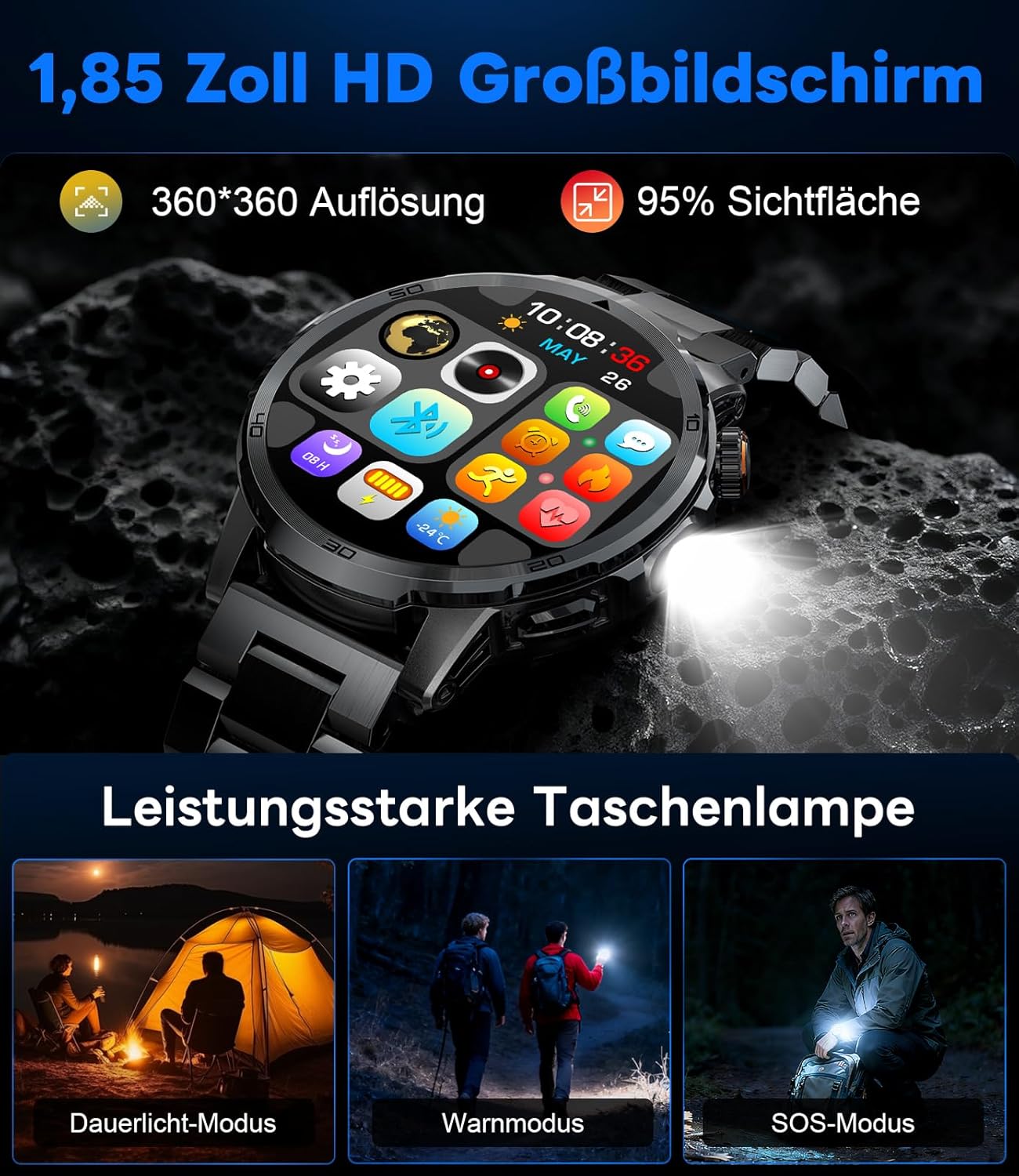
Image: The smartwatch displaying its 1.85-inch HD screen and demonstrating its powerful flashlight feature with different modes.
2.6 Feidhmeanna Eile
- Cúntóir Gutha: Activate the voice assistant to control your phone or get information (e.g., "What's the weather?").
- Rialú Ceoil: Control music playback on your smartphone (play, pause, skip tracks, adjust volume) directly from your watch.
- Rialú Ceamara: Bain úsáid as d’uaireadóir mar chomhla iargúlta do cheamara do ghutháin chliste.
- Réamhaisnéis na haimsire: View dálaí aimsire agus réamhaisnéisí reatha.
- Aláraim & Amairí: Set alarms and use stopwatch/timer functions.
- Meabhrúchán Dí: Socraigh meabhrúcháin chun uisce a ól.
- Aghaidheanna Faire: Customize your watch face from over 100 options or upload your own photos via the app.

Image: The smartwatch interface displaying icons for music control, flashlight, camera control, weather, alarm, and drink reminders.

Image: A selection of diverse watch faces available for customization on the LIGE EF19-A Smartwatch.
3. Cothabháil
3.1 Glanadh
- Regularly clean your smartwatch and straps with a soft, dry, lint-free cloth.
- Más gá, bain úsáid as beagán damp éadach le gallúnach éadrom, ansin tirim é.
- Seachain ceimiceáin ghéara, glantóirí scríobacha, nó tuaslagóirí a úsáid, mar is féidir leo seo damáiste a dhéanamh do chríoch agus do shéalaí an uaireadóra.
- Cinntigh go bhfuil na teagmhálacha luchtaithe glan agus tirim sula ndéantar iad a mhuirearú.
3.2 Friotaíocht Uisce (IP68)
The LIGE EF19-A Smartwatch is IP68 waterproof, meaning it is resistant to dust and can withstand immersion in water up to 1.5 meters for up to 30 minutes.
- It is suitable for daily use, such as hand washing, rain, and shallow water swimming.
- Avoid using the watch in hot water, saunas, or steam rooms, as steam can penetrate the seals and cause damage.
- Ná brúigh cnaipí faoi uisce.
- After exposure to water, wipe the watch dry before charging or using.

Image: The smartwatch highlighting its robust military-grade design, including resistance to temperature extremes, shock, dust, and IP68 water resistance.
4. Fabhtcheartú
4.1 Níl an faire ag casadh air
- Cinntigh go bhfuil an faire luchtaithe go hiomlán. Ceangail leis an luchtaire é ar feadh 30 nóiméad ar a laghad.
- Try long-pressing the side button for 10-15 seconds to force a restart.
4.2 Ní féidir péireáil le fón cliste
- Cinntigh go bhfuil Bluetooth cumasaithe ar do ghuthán cliste.
- Ensure the smartwatch is within Bluetooth range (typically 10 meters).
- Atosaigh do ghuthán cliste agus d’uaireadóir cliste araon.
- Check if the app has the necessary permissions (location, Bluetooth, etc.).
- If previously paired, try "forgetting" the device in your phone's Bluetooth settings and re-pairing through the app.
4.3 Sonraí Sláinte Mícheart
- Cinntigh go bhfuil an uaireadóir caite go docht ar do chaol na láimhe, thart ar leithead méire amháin os cionn chnámh na láimhe.
- Seachain gluaiseacht iomarcach le linn tomhais.
- Glan an braiteoir ar chúl an uaireadóra.
- Is féidir le tosca comhshaoil agus fiseolaíocht aonair tionchar a imirt ar léamha.
4.4 Fógraí nach bhfuil le feiceáil
- Deimhnigh go bhfuil an faire péireáilte go rathúil le do ghuthán cliste.
- Check notification settings within the companion app to ensure desired apps are enabled for notifications.
- Ensure your phone's notification settings allow the companion app to display notifications.
- Make sure your phone is not in "Do Not Disturb" mode.
5. Sonraíochtaí
| Gné | Sonraíocht |
|---|---|
| Uimhir Mhúnla | EF19-A |
| Taispeáin | 1.85-inch IPS HD Touch Screen, 360x360 pixels |
| Cumas Battery | 1000 mAh Litiam Polymer |
| Saol na Ceallraí (Gnáthúsáid) | 7-15 lá |
| Saol Ceallraí (Fuireachas) | Suas le 50 lá |
| Am Muirir | Thart. 2 n-uaire |
| Nascacht | Bluetooth 5.2 |
| Friotaíocht Uisce | IP68 (Uiscedhíonach) |
| Cumas Stórála Cuimhne | 128 MB |
| Gléasanna Comhoiriúnacha | Android 5.1+ / iOS 9.0+ Smartphones |
| Monatóireacht Sláinte | Heart Rate, Blood Oxygen, Sleep Quality, Stress Level |
| Modhanna Spóirt | 100+ (e.g., Running, Cycling, Swimming, Hiking, Yoga) |
| Gnéithe Breise | Bluetooth Calls, Message Notifications, Torch, Voice Assistant, Music Control, Camera Control, Weather, Alarms, Timers, Drink Reminder, Customizable Watch Faces |
| GPS | Trí Smartphone |
| Lucht Féachana Sprioc | Fir |
6. Faisnéis Bharántas
The LIGE EF19-A Smartwatch comes with a Barántas 2 bhliain ón dáta ceannaigh. Clúdaíonn an bharántas seo lochtanna déantúsaíochta agus mífheidhmeanna faoi ghnáthúsáid.
Ní chlúdaíonn an bharántas:
- Damage caused by improper use, accident, abuse, neglect, or unauthorized modification.
- Normal wear and tear, including scratches, dents, or cosmetic damage.
- Damage caused by exposure to extreme temperatures, liquids (beyond IP68 rating), or corrosive environments.
- Damage to accessories (straps, charging cables) unless defective upon receipt.
To claim warranty service, please retain your proof of purchase and contact customer support.
7. Tacaíocht do Chustaiméirí
If you encounter any issues or have questions regarding your LIGE EF19-A Smartwatch that are not covered in this manual, please contact our customer support team.
- Refer to the contact information provided on the product packaging or the official LIGE websuíomh.
- When contacting support, please provide your product model number (EF19-A) and a detailed description of the issue.