
1. Táirge Tharview
The Daylight Slimline 4 LED Table Lamp is designed to provide high-quality, adjustable illumination for various tasks. It features ultra-bright 6,000K LEDs, 4 brightness levels, a flexible design, an anti-glare diffuser, and a convenient USB-C charging port.

Image 1: The Slimline 4 LED Table Lamp, featuring a flexible arm and a clamp le haghaidh gléasta slán.
2. Socrú agus Suiteáil
The Slimline 4 Table Lamp comes with a 2-in-1 Table Clamp and Screwable Tabletop Mount for versatile installation.
2.1 Attaching the Clamp Sliabh
- Díphacáil na comhpháirteanna uile as an mbosca.
- Sainaithin an lamp unit and the clamp tionól.
- Scaoil an scriú ar an clamp until the opening is wide enough to fit over your desired table or desk edge.
- Sleamhnaigh an clamp onto the table edge and tighten the screw securely until the clamp tá sé daingean agus cobhsaí.
- Cuir isteach bonn an lamp into the designated slot on the clampCinntigh go bhfuil sé ina shuí go hiomlán agus go bhfuil sé cobhsaí.

Image 2: The secure clamp mount for attaching the lamp to a desk or table edge.
2.2 Using the Screwable Tabletop Mount (Optional)
For a more permanent installation, the clamp can be converted into a screwable tabletop mount. Consult the separate instructions provided with the mount for detailed steps on drilling and securing it to a surface.
2.3 Ceangal Cumhachta
- Connect the provided power adapter to the lampport ionchuir cumhachta 's.
- Plug an cuibheoir cumhachta isteach in asraon leictreach oiriúnach.
3. Treoracha Oibriúcháin
The Slimline 4 LED Table Lamp is designed for ease of use with intuitive controls.
3.1 Powering On/Off and Adjusting Brightness
- Locate the tactile micro-switch button on the lamp's stem.
- Press the button once to turn the lamp on to its lowest brightness setting.
- Subsequent presses will cycle through the 4 available brightness levels.
- After the highest brightness level, pressing the button again will turn the lamp as.

Image 3: Illustration of the 4 brightness levels, demonstrating the range from soft to ultra-bright illumination.
3.2 Positioning the Lamp
An lamp features a flexible arm and dual flexible joints, allowing you to adjust the light precisely where needed. Gently bend the arm to direct the light beam. The anti-glare diffuser ensures even light distribution and reduces eye strain.

Image 4: The flexible arm allows for precise positioning of the light.
3.3 Using the USB-C Charging Port
A high-power 5V/2A USB-C port is integrated into the lamp for convenient charging of mobile devices.
- Cinntigh an lamp ceangailte le foinse cumhachta.
- Plug your USB-C compatible device's charging cable into the USB-C port on the lamp's stem.
- Tosóidh do ghléas ag luchtú.
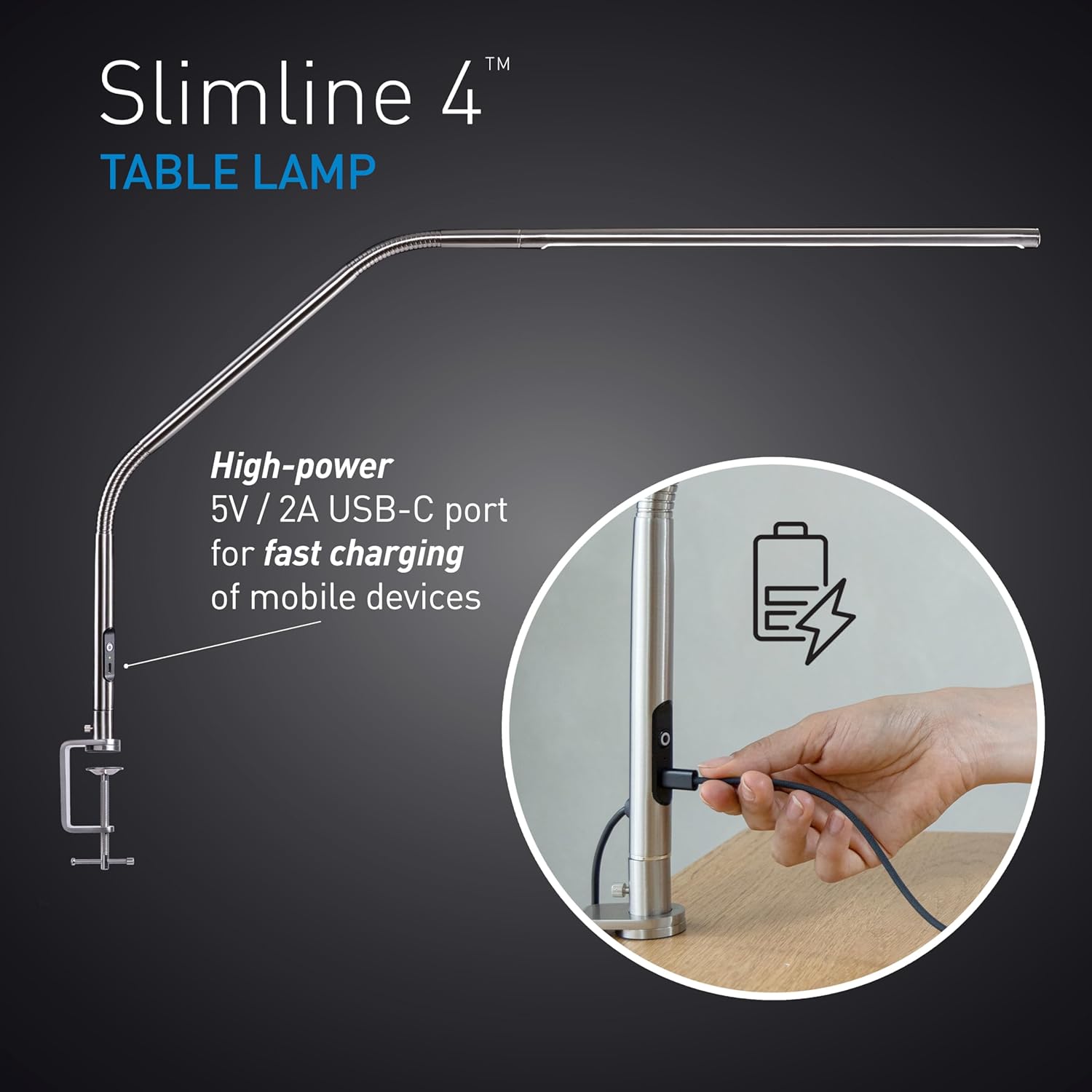
Image 5: The USB-C port located on the lamp's stem for charging devices.
4. Cothabháil
Proper care will ensure the longevity and optimal performance of your Slimline 4 LED Table Lamp.
- Glanadh: Dícheangail an lamp from the power source before cleaning. Use a soft, dry cloth to wipe down the lamp's surfaces. Avoid abrasive cleaners or solvents, as these can damage the finish.
- Láimhseáil: Cé go bhfuil an lamp has a flexible arm, avoid excessive force or sharp bends that could damage internal wiring.
- Stóráil: Má tá an lamp for an extended period, ensure it is clean, dry, and stored in a safe place to prevent damage.
5. Fabhtcheartú
Má bhíonn fadhbanna agat le do lamp, féach ar na réitigh choitianta seo a leanas:
| Fadhb | Cúis Féideartha | Réiteach |
|---|---|---|
| Lamp ní casann air. | Gan soláthar cumhachta; nasc scaoilte; asraon lochtach. | Seiceáil an bhfuil an t-oiriúntóir cumhachta plugáilte go daingean isteach sa dá phlug.amp and the wall outlet. Test the outlet with another device. |
| USB-C port not charging device. | Lamp not powered; faulty cable; device incompatibility. | Cinntigh an lamp is powered on. Try a different USB-C cable. Verify your device is compatible with 5V/2A charging. |
| Tá an solas ag preabadh nó tá sé neamhréireach. | Unstable power supply; internal issue. | Ensure the power connection is stable. If the problem persists, contact customer support. |
If these solutions do not resolve the issue, please refer to the warranty and support section for further assistance.
6. Sonraíochtaí
| Gné | Sonraigh |
|---|---|
| Ainm an tSamhail | Slimline 4 Table - Brushed Steel |
| Uimhir Mhúnla | U35109 |
| Foinse Solais | stiúir |
| Teocht Dath | 6,000K (Solas an Lae) |
| Gile | 3,200 Lux at 30cm (12") |
| Innéacs Rindreála Dathanna (CRI) | 95+ |
| Leibhéil Gile | 4 (Inchoigeartaithe) |
| Tomhaltas Cumhachta | 13.6 Watts |
| Aschur USB-C | 5V/2A |
| Toisí Táirge | 22"D x 10"W x 16.5"H |
| Ábhar | Miotal |
| Cineál Críochnaigh | Polished Brushed Steel |
| Cineál Gléasta | Tabletop (Clamp & Screwable Mount) |
| Modh Rialaithe | Touch (Push Button) |
| UPC | 809802351095 |
7. Barántas agus Tacaíocht
7.1 Barántas an Mhonaróra
This Daylight Slimline 4 LED Table Lamp clúdaithe ag a Barántas monaróra 2 bhliain ón dáta ceannaigh. Clúdaíonn an bharántas seo lochtanna in ábhair agus i gceardaíocht faoi ghnáthúsáid. Ní chlúdaíonn sé damáiste de dheasca mí-úsáide, timpistí, modhnuithe neamhúdaraithe, nó caitheamh agus cuimilt gnáth.
7.2 Tacaíocht do Chustaiméirí
For warranty claims, technical assistance, or any questions regarding your product, please contact Daylight customer support. Refer to the product packaging or the official Daylight websuíomh gréasáin le haghaidh an fhaisnéis teagmhála is déanaí.
When contacting support, please have your model number (U35109) and proof of purchase readily available.