
MATIHUNO TC06
MATIHUNO TC06 Neck Air Conditioner User Manual
Múnla: TC06
1. Réamhrá
The MATIHUNO TC06 Neck Air Conditioner is a portable, wearable device designed to provide personal cooling and heating. Featuring a triple-core semiconductor cooling system and a powerful fan, it offers efficient temperature regulation for various environments. This manual provides detailed instructions for the safe and effective use of your device.
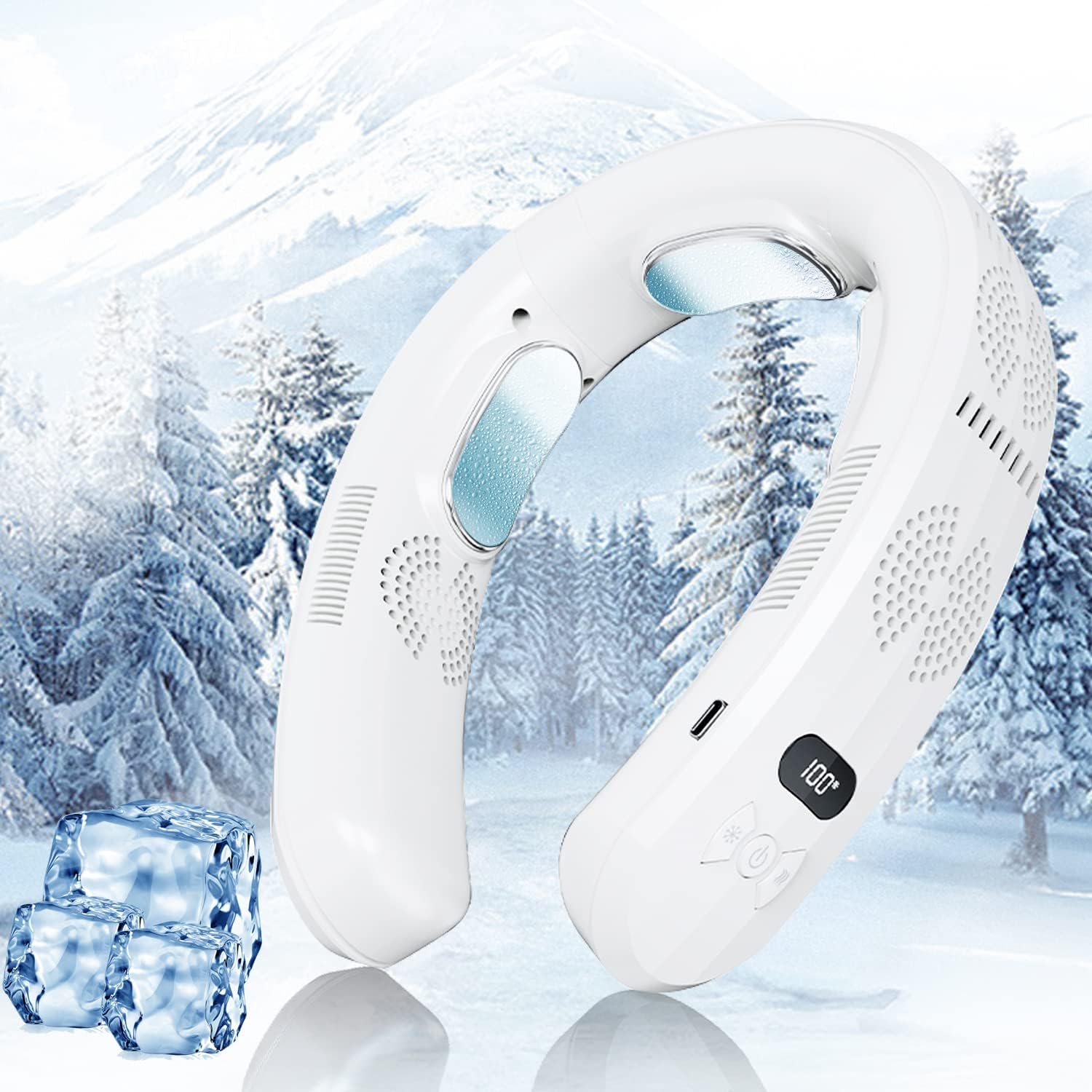
Figure 1.1: The MATIHUNO TC06 Neck Air Conditioner, a portable device for personal cooling and heating.
2. Faisnéis Sábháilteachta
Léigh na rabhaidh sábháilteachta agus na treoracha go léir go cúramach sula n-úsáideann tú an táirge seo chun gortú nó damáiste a chosc.
- Do not disassemble, repair, or modify the device. Unauthorized modifications may cause malfunction or electric shock.
- Keep the device away from water and other liquids. Do not use in wet environments.
- Seachain an gléas a nochtadh do sholas díreach na gréine nó do theocht ard ar feadh tréimhsí fada.
- Do not insert foreign objects into the air inlets or outlets.
- Ensure the charging cable is properly connected and disconnected to prevent damage to the port.
- Coinnigh as teacht leanaí agus peataí.
- If the device malfunctions or emits smoke/unusual odors, immediately stop use and disconnect power.
3. Ábhar Pacáiste
Deimhnigh go bhfuil na míreanna uile i láthair sa phacáiste:
- MATIHUNO TC06 Neck Air Conditioner (1 unit)
- Cábla Muirir USB Cineál-C (1 aonad)
- Lámhleabhar Úsáideora (an doiciméad seo)
4. Táirge Tharview
Familiarize yourself with the components of your MATIHUNO TC06 Neck Air Conditioner.
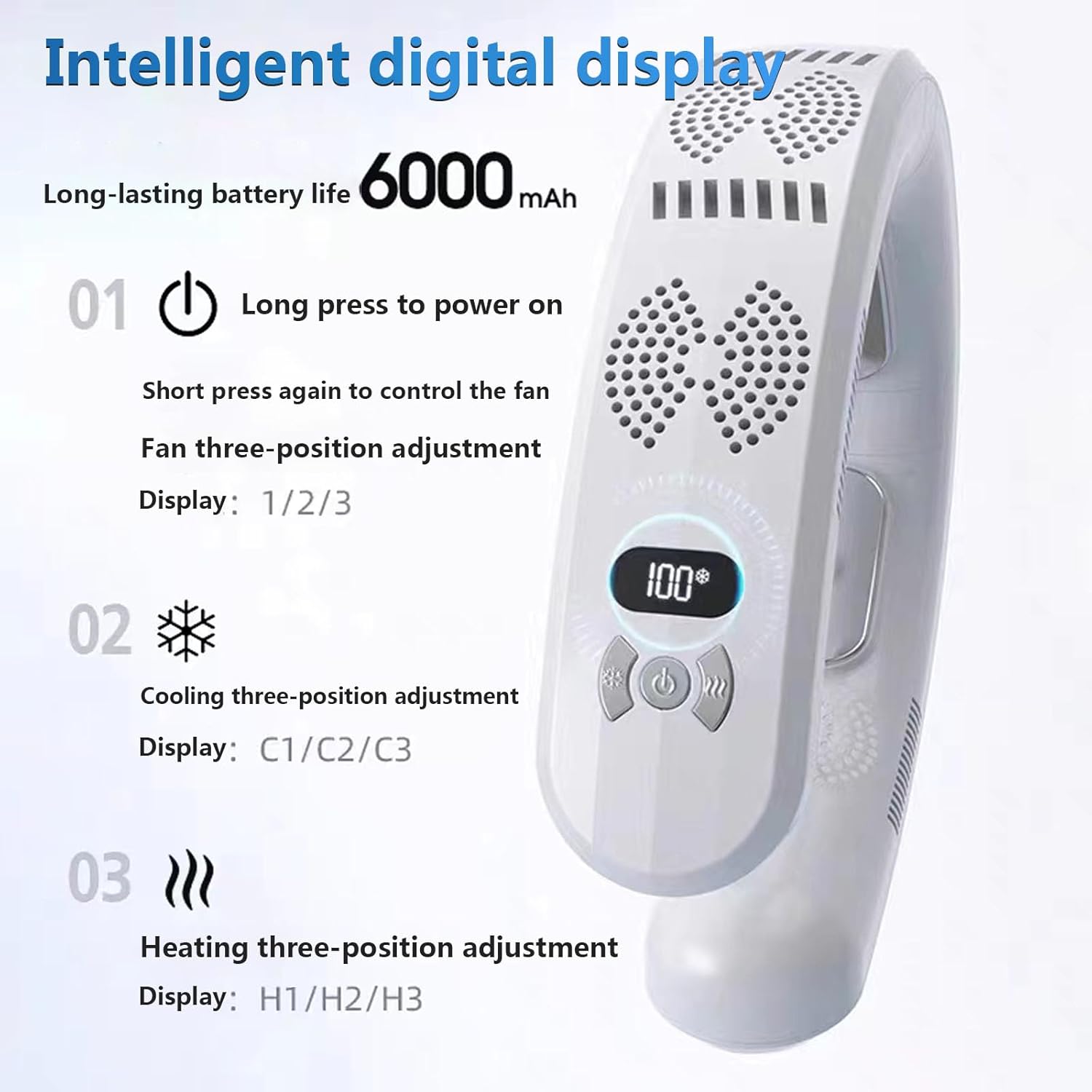
Figure 4.1: Intelligent Digital Display and Control Buttons.
- Taispeántas Digiteach: Shows current mode and battery level.
- Cnaipe Cumhachta: Long press to power on/off. Short press to control fan speed.
- Cnaipe Fuarú: Adjusts cooling levels (C1/C2/C3).
- Cnaipe Teasa: Adjusts heating levels (H1/H2/H3).
- Plátaí Fuarú: Semiconductor cooling elements that provide direct cooling to the neck.
- Asraonta Aeir: Direct airflow for fan function.
- Port Muirearú USB-C: Chun an gléas a mhuirearú.

Figure 4.2: Illustration of the cooling, heating, and air supply mechanisms.
5. Socrú agus Muirearú
5.1 Muirear Tosaigh
Before first use, fully charge the device. The digital display will indicate the battery level.
- Ceangail an cábla USB Cineál-C atá ar fáil leis an gcalafort luchtaithe ar an bhfeiste.
- Connect the other end of the cable to a compatible USB power adapter (5V/2A recommended, not included).
- The digital display will show charging progress. A full charge typically takes approximately 2.5 hours.

Figure 5.1: The device features multiple battery protection mechanisms including anti-over-voltage, anti-overcurrent, anti-leakage, anti-discharge, and no heat generation during operation.
6. Treoracha Oibriúcháin
6.1 Cumhacht ar siúl / as
To power on the device, long press the Power Button. Long press again to power off.
6.2 Oibriú Fan
After powering on, short press the Power Button to cycle through fan speeds. There are three fan speed levels (1, 2, 3) indicated on the digital display.
6.3 Feidhm Fuaraithe
Press the Cooling Button (snowflake icon) to activate the cooling function. Each press cycles through three cooling levels (C1, C2, C3). The cooling plates will become cold, providing direct cooling to your neck.

Figure 6.1: The device's cooling technology effectively reduces body temperature, as shown by thermal imaging before and after use.
6.4 Feidhm Téimh
Press the Heating Button (wave icon) to activate the heating function. Each press cycles through three heating levels (H1, H2, H3). The heating plates will warm up, providing comfortable warmth to your neck.

Figure 6.2: The device offers a heating function, making it suitable for use in colder conditions.
6.5 An Gléas a Chaitheamh
The MATIHUNO TC06 is designed for comfortable wear around the neck. Its ergonomic design ensures a secure fit during various activities.

Figure 6.3: The ergonomic design ensures comfortable and stable wear, even during movement.
7. Cothabháil agus Cúram
Cinntíonn cothabháil cheart fad saoil agus feidhmíocht is fearr is féidir do ghléis.
- Glanadh: Cuimil an gléas le héadach bog tirim. Ná húsáid glantóirí scríobacha agus ná tum in uisce é.
- Stóráil: Stóráil an gléas in áit fhionnuar, thirim ar shiúl ó sholas díreach na gréine nuair nach bhfuil sé in úsáid.
- Feadáin Aeir: Periodically check and gently clean the air inlets and outlets to ensure unobstructed airflow.
8. Fabhtcheartú
Má bhíonn fadhbanna agat le do ghléas, féach ar na fadhbanna agus na réitigh choitianta seo a leanas:
| Fadhb | Cúis Féideartha | Réiteach |
|---|---|---|
| Ní chuireann an gléas cumhacht ar. | Ceallraí íseal; níl an gléas luchtaithe. | Muirearaigh an gléas go hiomlán ag baint úsáide as an gcábla USB-C a chuirtear ar fáil. |
| Cooling/Heating not effective. | Incorrect mode selected; low battery; obstructed cooling plates/air vents. | Ensure correct mode (Cooling/Heating) is selected. Charge the device. Clean cooling plates and air vents. |
| Fan not working or weak airflow. | Low battery; obstructed air inlets/outlets. | Charge the device. Clear any obstructions from air inlets and outlets. |
| Déanann an gléas torann neamhghnách. | Foreign object in fan; internal malfunction. | Power off the device and check for any visible obstructions. If noise persists, discontinue use and contact support. |
9. Sonraíochtaí
| Gné | Sonraigh |
|---|---|
| Ainm an tSamhail | TC06 |
| Branda | MATIHUNO |
| Dath | White-6000mAh |
| Foinse Cumhachta | Ceallraí Powered |
| Cumas Battery | 6000mAh |
| Wattage | 10 vata |
| Imltage | 3.7 Volta |
| Leibhéal Torainn | 30 dB |
| Toisí (D x W x H) | 1.7"D x 6.8"W x 8.2"H |
| Meáchan Mír | 1.1 Punt (0.5 kg) |
| Modh Rialaithe | Dteagmháil |
| Líon na Leibhéal Cumhachta | 9 (3 fan, 3 cooling, 3 heating) |
| Ábhar | Plaisteach |
10. Barántas agus Tacaíocht
For warranty information or technical support, please contact MATIHUNO customer service through the retailer where you purchased the product. Keep your purchase receipt as proof of purchase.
For further assistance, you may also refer to the official MATIHUNO website or contact their support channels if available.