
1. Ynlieding
This manual provides detailed instructions for the assembly, operation, and maintenance of your PAKASEPT 55.12" Large Makeup Vanity. Please read all instructions carefully before assembly and use to ensure safe and optimal performance of your product.
Feiligens warskôgings
- Handle with care due to sharp edges and fragile components. Avoid injury by being cautious during assembly and use.
- Soargje derfoar dat alle skroeven en befestigingen goed oandraaid binne foar gebrûk.
- Oerlêde laden of planken net om kantelen of skea te foarkommen.
- Keep electrical components (LED lights, power outlets) away from water.
- Adult assembly is recommended.
2. Package Ynhâld
Kontrolearje oft alle hjirûnder neamde ûnderdielen oanwêzich binne foardat jo begjinne mei de gearstalling. As der ûnderdielen ûntbrekke of skansearre binne, nim dan kontakt op mei de klanttsjinst.
- Vanity Desk Frame (Engineered Wood)
- Large Rectangular Mirror with Built-in LED Light Strip
- 5 Storage Drawers
- 4 Opslachplanken
- Small Storage Compartments (integrated)
- Built-in Power Supply with 2 USB Ports and 2 AC Outlets
- Hardware Pack (screws, cam bolts, etc.)
- Montage-ynstruksjes Hânlieding
3. Opset en gearkomste
Assembly of the PAKASEPT Makeup Vanity requires careful attention to detail. It is recommended to have at least two people for certain steps. Follow the detailed installation instructions provided in the included manual, as each part has a label number.
Gearkomst oerview
- Utpakke en identifisearje ûnderdielen: Liz alle ûnderdielen en hardware út. Fergelykje se mei de ûnderdielenlist yn jo hantlieding.
- Lades gearstalle: Construct the 5 drawers first. This is often the most time-consuming part.
- Haadburoframe gearstalle: Connect the side panels, bottom, and top sections of the vanity desk.
- Install Mirror and Shelves: Secure the large mirror with LED lights and attach the storage shelves.
- Yntegrearje stopkontakt: Ensure the power outlet and USB ports are correctly installed and connected.
- Finale oanpassingen: Place the drawers into their respective slots. Check all connections and stability.
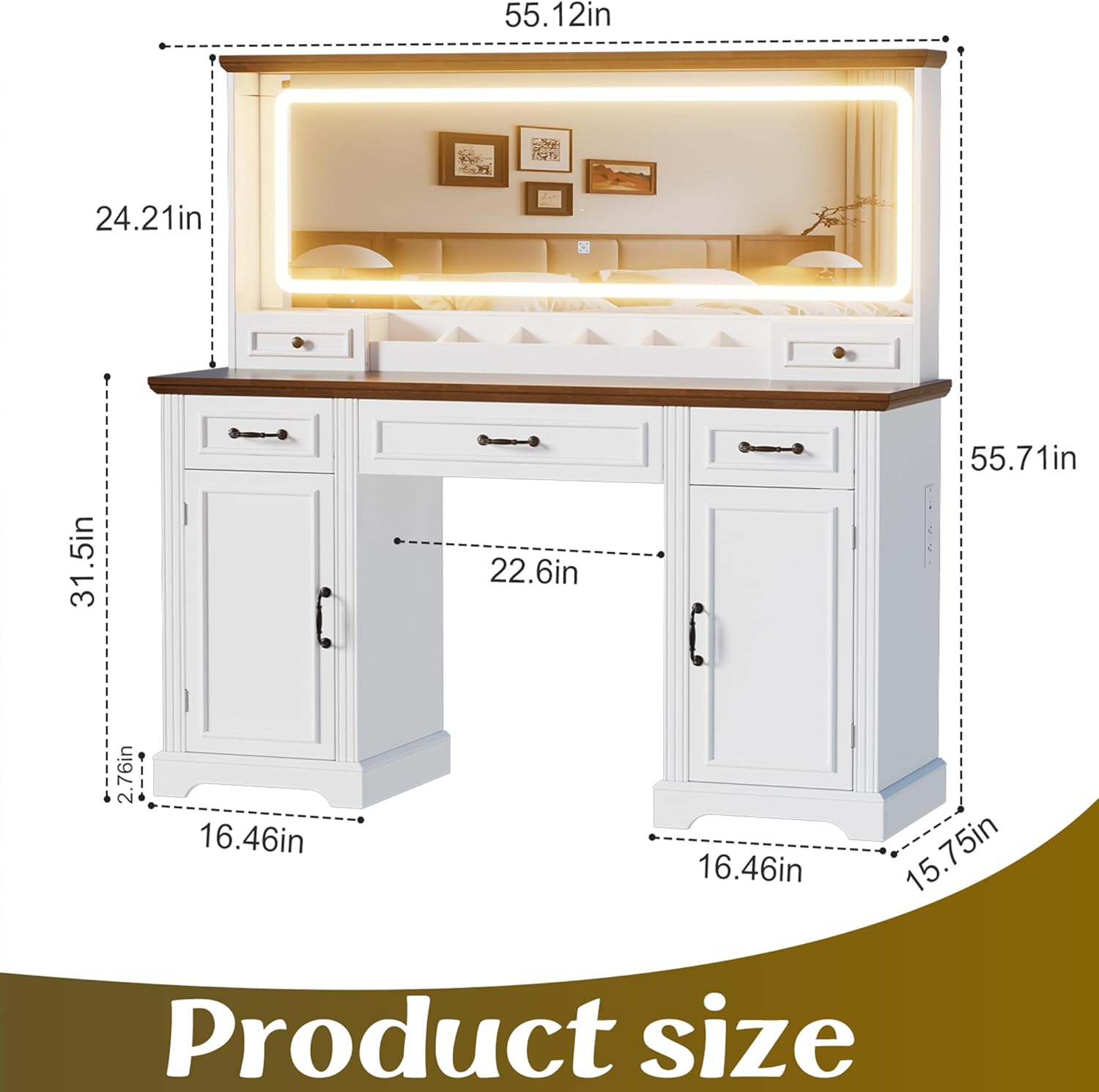
Ofbylding 3.1: Product Dimensions. The vanity measures 55.12 inches in length, 15.75 inches in width, and 55.71 inches in height.
Ofbylding 3.2: Multi-functional design elements, highlighting adjustable partitions within cabinets, ergonomic drawer grips, and smooth-gliding drawers.
Gearstalling fideogids
Fideo 3.1: Assembly process for a similar vanity. This video demonstrates the general steps involved in putting together the vanity, including drawer construction and mirror installation. Note that specific parts may vary slightly from your model.
4. Bedriuwsinstruksjes
LED Mirror Lights
The large rectangular mirror features a built-in LED light strip with three color modes and adjustable brightness.
- Power On/Off: Locate the touch sensor on the mirror surface. Tap once to turn the lights on or off.
- Ljochtkleur feroarje: With the lights on, short press the touch sensor to cycle through the three color modes: warm yellow, warm white, and cool white.
- Helderheid oanpasse: With the lights on, long press the touch sensor to adjust the brightness level. Release when the desired brightness is achieved.

Ofbylding 4.1: Multiple light settings available on the LED mirror, demonstrating white, cold, and intense light options.
Yntegreare stopkontakt en USB-poarten
The vanity is equipped with a built-in power supply for convenience.
- AC Outlets: Twa 125V/12A AC-stopkontakten binne foarsjoen foar it oandriuwen fan hierdrogers, curlstrijkizers, of oare lytse apparaten.
- USB-poarten: Two 5V/2A USB ports are available for charging mobile phones, tablets, or other USB-powered devices.
- Gebrûk: Simply plug your device into the appropriate port. Ensure the vanity is connected to a power source.

Ofbylding 4.2: Charging station with 2 AC outlets and 2 USB ports, conveniently located on the side of the vanity.
Storage Features
The vanity offers extensive storage solutions to keep your items organized.
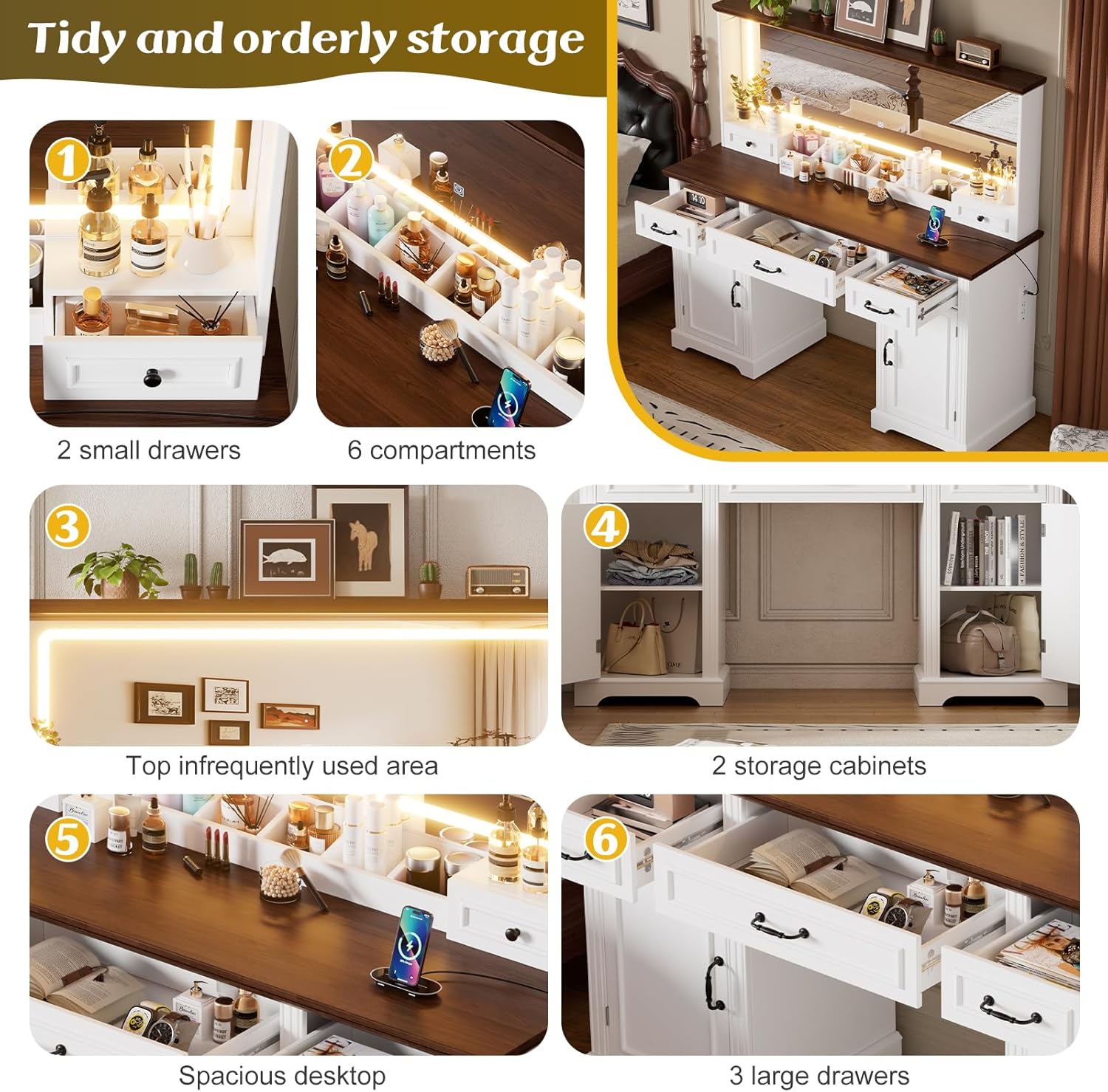
- Drawers: Utilize the 5 drawers for storing makeup, jewelry, and other accessories.
- Shelves & Compartments: The 4 storage shelves and small integrated compartments are ideal for displaying frequently used items or decorative pieces.
- Boppeste opslach: The top surface of the vanity provides additional space for dolls, books, or makeup boxes.

Ofbylding 4.3: Tidy and orderly storage options, illustrating two small drawers, six compartments, a top infrequently used area, two storage cabinets, a spacious desktop, and three large drawers.
Produkt yn gebrûk fideo
Fideo 4.1: A user demonstrating the PAKASEPT vanity in a bedroom setting, showcasing its size, storage, and lighting features. This video provides a real-world perspective on the product's functionality.
5. Underhâld
Regular maintenance will help prolong the life and appearance of your vanity.
- Reinigingsflakken: Feie oerflakken fan yngenieurshout ôf mei in sêfte, damp doek. Foarkom skealike gemikaliën of skuurmiddels.
- Spegelsoarch: Clean the mirror with a glass cleaner and a lint-free cloth. Do not spray cleaner directly onto the LED light strip.
- Drawer Slides: Kontrolearje de ladegeleiders geregeldwei op soepele wurking. Tapasse as it nedich is in lytse hoemannichte silikonsmeermiddel.
- Elektryske komponinten: Ensure all plugs and cords are free from damage. Do not attempt to repair electrical components yourself.
6. Probleemoplossing
Hjir binne oplossingen foar faak foarkommende problemen dy't jo tsjinkomme kinne:
| Probleem | Mooglike oarsaak | Oplossing |
|---|---|---|
| LED-ljochten geane net oan. | Net ynstutsen; losse ferbining; stroom úttage; faulty sensor. | Check power cord connection; ensure outlet has power; re-plug connections; contact support if sensor is unresponsive. |
| Drawers are sticking or not sliding smoothly. | Misaligned slides; debris in tracks; overloaded drawer. | Empty drawer and check alignment; clean tracks; redistribute weight. |
| Stopkontakten/USB-poarten wurkje net. | Vanity not plugged in; circuit breaker tripped; faulty unit. | Ensure vanity is plugged into a live outlet; check household circuit breaker; test with another device; contact support. |
| Idelheid fielt ynstabyl. | Losse befestigingen; ûneven flier. | Tighten all assembly screws; adjust levelers on the bottom of the vanity (if applicable) or place shims under legs. |
7. Spesifikaasjes
| Eigenskip | Detail |
|---|---|
| Produkt Ofmjittings | 55.12"L x 15.75"B x 55.71"H |
| Materiaal | Yngenieur hout |
| Kleur | White (Large) |
| Item Gewicht | 120 pûn sterling |
| Oantal Drawers | 5 |
| LED Light Modes | 3 (Warm Yellow, Warm White, Cool White) with adjustable brightness |
| Stopkontakt | 2 AC-útgongen (125V/12A) |
| USB Ports | 2 USB-poarten (5V/2A) |
| Gearstalling Required | Ja |
| Styl | Eigentiidsk |
8. Garânsje & Support
Warranty Information
This product comes with a standard manufacturer's warranty. Please refer to the warranty card included in your package for specific terms, conditions, and duration. Keep your proof of purchase for warranty claims.
Klant Support
For any questions, missing parts, or assistance with assembly or operation, please contact PAKASEPT customer support. Contact information can typically be found on the product packaging or the brand's official website.
Jo kinne ek besykje de PAKASEPT Store on Amazon foar ekstra produktynformaasje en stipeboarnen.