
1. Introduction
This manual provides essential information for setting up, operating, and maintaining your NiPoGi P2-3300U Mini PC. Please read it thoroughly before using the device to ensure optimal performance and longevity.
Un plusview présentation vidéoasing the compact design, AMD Ryzen 3300U processor, memory and storage expansion, multiple display output, various ports, efficient cooling, and diverse usage scenarios of the NiPoGi P2-3300U Mini PC.
Caractéristiques principales :
- Processeur: AMD Ryzen 3 3300U (up to 3.5GHz, 4 Cores/4 Threads)
- Système opérateur: Windows 11 Pro
- Mémoire: 16 Go DDR4 (extensible jusqu'à 32 Go)
- Stockage: SSD M.2 2280 de 512 Go (extensible jusqu'à 4 To)
- Graphique: Integrated Graphics with 4K@60Hz support
- Affichage de sortie : Supports up to 3 screens simultaneously (HDMI 2.0, DisplayPort 1.4, USB 3.2 Gen1 Type-C)
- Connectivité : USB 3.2 x6, USB 3.2 Gen1 Type-C x1, 1000Mbps Wired LAN, Wi-Fi 5GHz, Bluetooth 4.2
- Refroidissement: Efficient and silent cooling fan system
- Sécurité: TPM 2.0 chip for enhanced data protection
- Conception: Ultra-compact and lightweight (approx. 128.2×128.2×44mm), VESA mount compatible

Diagram showing the compact size and key features like 4K output, Windows 11 Pro, 512GB SSD, 16GB DDR4, LAN, Bluetooth 4.2, and WiFi 5.
2. Contenu du colis
Avant de procéder à l'installation, veuillez vérifier que tous les éléments énumérés ci-dessous sont inclus dans votre colis :
- NiPoGi P2-3300U Mini PC
- Adaptateur secteur
- Câble HDMI
- VESA Mount
- Vis pour support VESA
- Manuel d'utilisation

Image showing the package contents, including the mini PC, power adapter, HDMI cable, VESA mount, and user manual.
3. Guide de configuration
3.1 Connexion de périphériques
Identify the various ports on your Mini PC to connect your display, keyboard, mouse, and other devices.

Détaillé view of the mini PC's ports, including USB, HDMI, DP, LAN, and Type-C.
- Pouvoir: Connect the power adapter to the DC port on the Mini PC and then to a power outlet.
- Afficher: Connect your monitor(s) using the HDMI 2.0, DisplayPort 1.4, or USB 3.2 Gen1 Type-C ports. The Mini PC supports up to three displays simultaneously.
- Clavier souris: Connect your USB keyboard and mouse to any of the available USB 3.2 ports.
- Réseau: For a wired connection, connect an Ethernet cable to the RJ45 LAN port. For wireless, the device supports Wi-Fi 5GHz.
- Audio: Branchez des écouteurs ou des haut-parleurs à la prise audio 3.5 mm.
3.2 Installation du support VESA
The Mini PC can be mounted on the back of a VESA-compatible monitor to save desk space.
- Fixez le support de montage VESA à l'arrière de votre moniteur à l'aide des vis fournies.
- Faites glisser le mini PC sur le support fixé jusqu'à ce qu'il s'enclenche correctement.

Mini PC mounted on the back of a monitor using a VESA mount.
3.3 Démarrage initial et configuration de Windows 11 Pro
After connecting all necessary peripherals and power, press the power button to turn on the Mini PC. Follow the on-screen instructions to complete the initial setup of Windows 11 Pro.
4. Mode d'emploi
4.1 Fonctionnement de base
The NiPoGi P2-3300U Mini PC is designed for smooth performance across various daily tasks:
- Web Navigation : Enjoy fast and stable internet access with Wi-Fi 5GHz or wired LAN.
- Création de documents : Efficiently work on office applications for documents, spreadsheets, and presentations.
- Réunions en ligne : Participate in video conferences with reliable connectivity.
- Lecture vidéo: Stream 4K content smoothly.

Various usage scenarios: video conferencing, light gaming, data analysis, and movie watching.
4.2 Multitasking and Multi-Display
The AMD Ryzen 3 3300U processor ensures efficient multitasking, allowing you to run multiple applications simultaneously without significant slowdowns.

Multiple application windows open on a screen, illustrating the mini PC's multitasking capabilities.
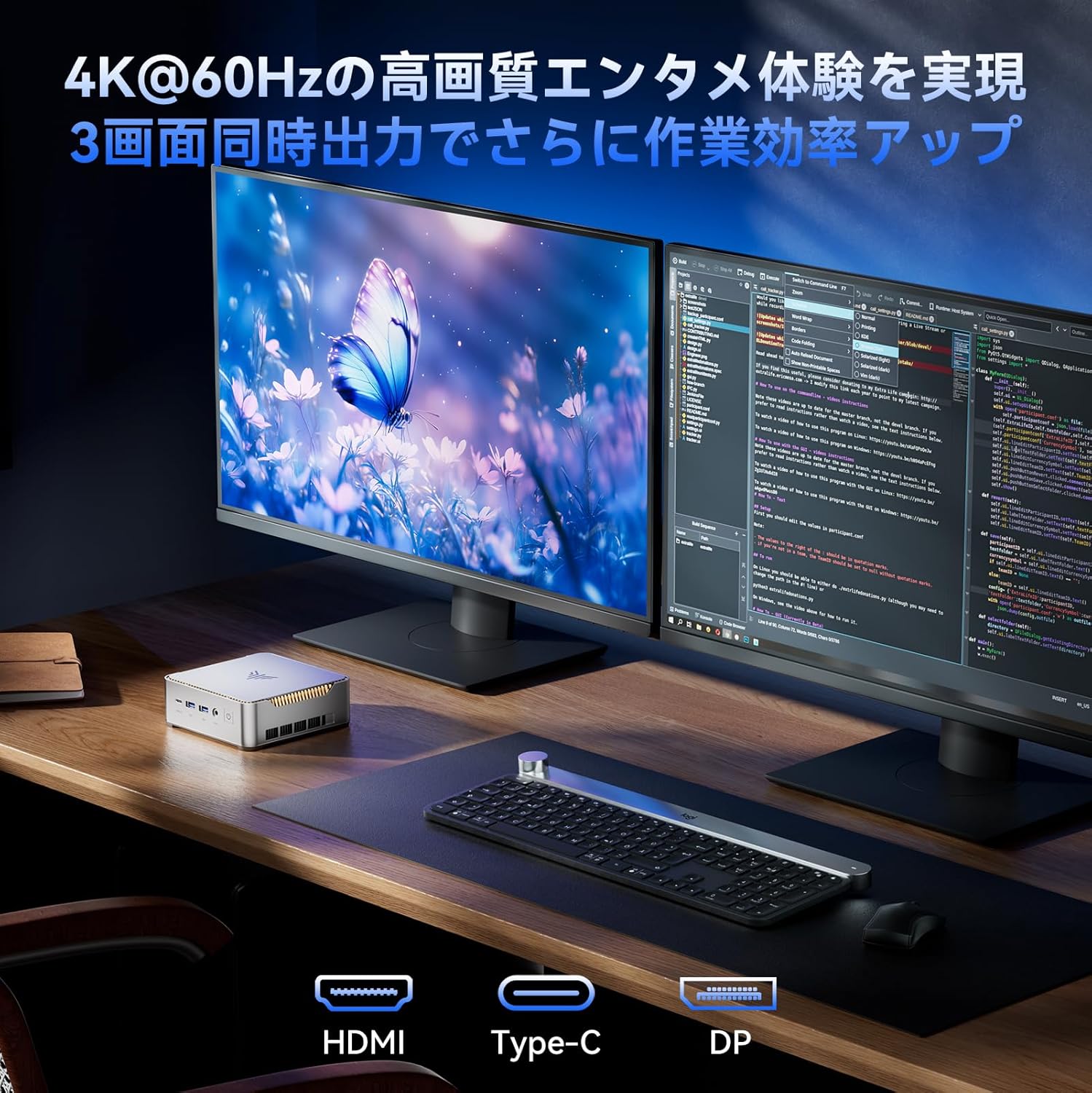
With support for up to three 4K@60Hz displays, you can expand your workspace for enhanced productivity.

Mini PC connected to multiple monitors, demonstrating multi-display capability.
4.3 Paramètres avancés du BIOS
The unlocked BIOS provides access to advanced settings, including:
- Auto-boot: Configure the system to automatically power on when connected to power.
- Réveil RTC : Schedule the PC to wake up at a specific time.
- Réveil sur LAN : Power on the PC remotely over a network connection.
5. Maintenance et mises à niveau
5.1 Système de refroidissement efficace
The Mini PC features an efficient and silent cooling fan system to prevent overheating and maintain stable performance even during extended use. The design ensures heat is effectively dissipated from the interior.
Interne view of the mini PC highlighting the cooling fan and heat dissipation system.

Image depicting a user working on the mini PC at night while a child sleeps, emphasizing silent operation.
5.2 Extension de stockage et de mémoire
The Mini PC comes with 16GB DDR4 RAM and a 512GB M.2 2280 SSD. Both can be upgraded:
- Mémoire: Expandable up to 32GB DDR4 SO-DIMM.
- Stockage: The M.2 2280 SSD can be replaced with a larger capacity drive, up to 4TB.
For detailed instructions on how to access and upgrade these components, please refer to the technical support section or contact customer service.

Diagram illustrating the internal memory (DDR4) and storage (M.2 2280 SSD) expansion capabilities.
6. Dépannage
If you encounter any issues with your NiPoGi P2-3300U Mini PC, please try the following general troubleshooting steps:
- Pas d'alimentation : Assurez-vous que l'adaptateur secteur est bien branché à la fois au mini PC et à une prise de courant fonctionnelle. Essayez une autre prise si nécessaire.
- Pas d'affichage : Verify that the monitor is powered on and the display cable (HDMI, DP, or Type-C) is firmly connected to both the Mini PC and the monitor. Try a different cable or port.
- Périphérique non détecté : Ensure USB devices are properly plugged into the correct ports. Try connecting them to different USB ports.
- Performances lentes : Close unnecessary applications. Check for available Windows updates. Ensure the cooling vents are not obstructed.
- Problèmes de réseau : For wired connections, check the Ethernet cable and router. For Wi-Fi, ensure you are connected to the correct network and the signal is strong.
Si le problème persiste, veuillez consulter la section Garantie et assistance pour obtenir de l'aide supplémentaire.
7. Spécifications
| Fonctionnalité | Détail |
|---|---|
| Marque | NiPoGi |
| Numéro de modèle | P2-3300U-16+512-NEW |
| Dimensions du produit | 128.2 x 128.2 x 44 mm |
| Poids de l'article | 1.11 kilogrammes |
| Marque de CPU | DMLA |
| Type de processeur | Ryzen 3 3300U |
| Vitesse du processeur | 2.1 GHz (up to 3.5 GHz Max Turbo) |
| Nombre de processeurs | 4 |
| Type de mémoire RAM | Mémoire SDRAM DDR4 |
| Taille de la RAM installée | 16 Go |
| Mémoire maximale prise en charge | 32 Go |
| Taille du disque dur | 512 Go |
| Type de disque dur | SSD (M.2 2280) |
| Interface du disque dur | eSATA (Note: M.2 is NVMe/SATA, eSATA is an external interface, likely a translation error in source data) |
| Accélérateur graphique | Graphiques intégrés |
| Description de la carte graphique | Intégré |
| Type de VRAM | Mémoire SDRAM DDR4 |
| Interface de la carte graphique | Intégré |
| Résolution | 3840 x 2160 (4K) |
| Ports USB 3.0 | 6 |
| Ports HDMI | 1 |
| Type de lecteur optique | Aucun |
| Système opérateur | Windows 11 Pro |
| Connectivité | Wi-Fi 5, Bluetooth 4.2, réseau local 1000 Mbps |
| Caractéristiques spéciales | VESA Support, TPM 2.0 |
8. Garantie et assistance
Your NiPoGi P2-3300U Mini PC comes with an Garantie de 18 mois from the date of purchase. This warranty covers manufacturing defects and malfunctions under normal use. In the event of a defect or malfunction, NiPoGi offers free replacement or return services.
For technical support, warranty claims, or any questions regarding your product, please contact NiPoGi customer service through the official channels provided at the time of purchase or on the NiPoGi webVeuillez vous munir du modèle de votre produit et des informations relatives à votre achat lorsque vous contactez l'assistance.