
1. Introduction
This manual provides comprehensive instructions for the Ivation Replacement Remote Control, model JID0TPT01. This remote is specifically designed to operate various Ivation Large Digital LED Timer Clocks. Please read this manual thoroughly to ensure proper setup and operation of your remote control.
2. Compatibilité du produit
This replacement remote control is compatible exclusively with the following Ivation Large Digital LED Timer Clock models. It is not a universal remote and will not function with other devices.
- JID0124TBLU, JID0124TRED, JID0124TWHT
- JID0136TBLU, JID0136TRED, JID0136TWHT
- JID0148TRED, JID0148TBLU, JID0148TWHT
- JID0160TRED, JID0160TBLU, JID0160TWHT
- JID0172TBLU, JID0172TRED, JID0172TWHT
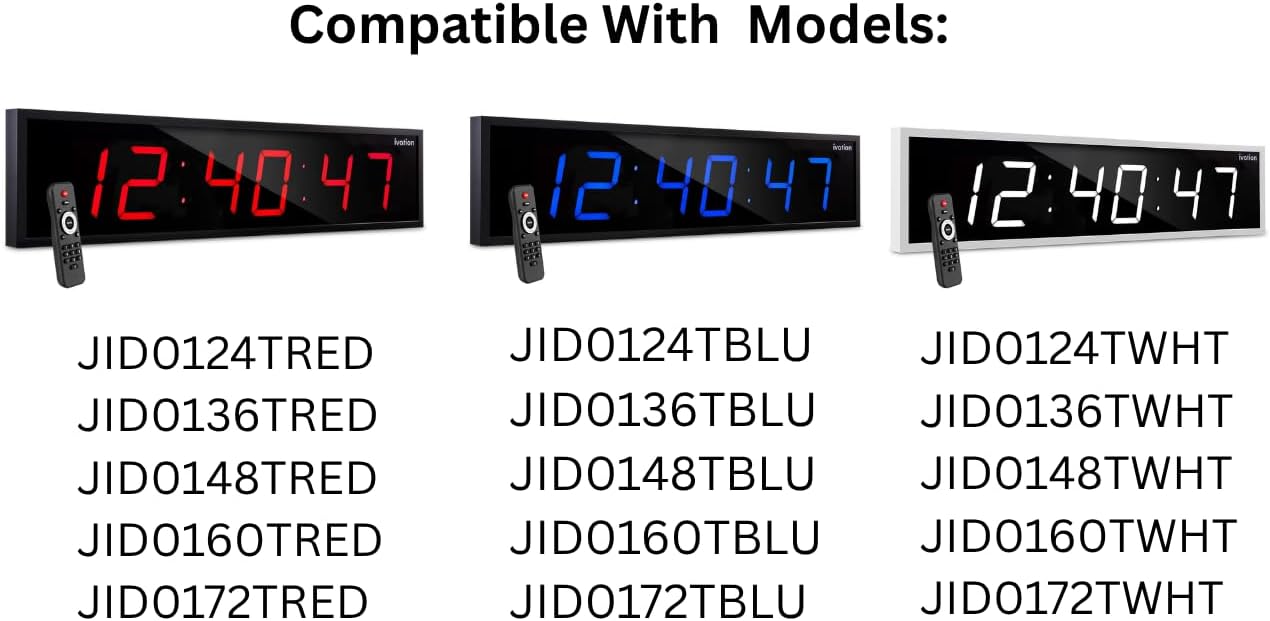
This image illustrates the various Ivation Large Digital LED Timer Clock models that are compatible with this replacement remote control. The clocks are shown in red, blue, and white display colors, each paired with the remote. Below the clocks, a comprehensive list of compatible model numbers is provided for reference.
3. Installation
3.1 Installation de la batterie
- Localisez le compartiment à piles à l'arrière de la télécommande.
- Faites glisser le couvercle du compartiment à piles pour l'ouvrir.
- Insérez deux (2) piles alcalines AAA, en veillant à respecter la polarité (+ et -) comme indiqué à l'intérieur du compartiment.
- Fermez soigneusement le couvercle du compartiment à piles.
Note: Remplacez toujours les deux piles en même temps. N'utilisez pas simultanément des piles neuves et usagées, ni des piles de types différents. Retirez les piles si vous n'utilisez pas la télécommande pendant une période prolongée.
4. Mode d'emploi
The Ivation replacement remote control features a straightforward button layout for easy operation of your compatible Ivation Large Digital LED Timer Clock. Refer to the diagram below for button identification and functions.

This image provides a clear, labeled diagram of the Ivation replacement remote control. Each button is identified with its name and a brief description of its function, such as 'Clock' for showing time, 'Display' for cycling through time, date, and temperature, 'Mute' for toggling alert sounds, 'Brightness' for adjusting display intensity, 'Timer Functions' for stopwatch, countdown, or alarms, 'F/C' for temperature unit toggle, 'AM/PM 12/24' for time format, and the 'Number Pad' for manual settings.
4.1 Fonctions des boutons
- Horloge: Displays the current time on the clock.
- Afficher: Cycles through different display modes, such as time, date, and temperature.
- Muet: Toggles alert sounds (e.g., alarm beeps) on or off.
- Luminosité: Cycles through 6 different brightness levels for the clock display.
- Alarme: Accesses alarm settings. Press to set or activate alarms.
- Démarrer/Arrêter : Initiates or pauses stopwatch and countdown timer functions.
- Compte à rebours: Active la fonction de compte à rebours.
- Set/Enter: Confirms selections or enters settings within menus.
- F/C : Toggles the temperature display between Fahrenheit and Celsius.
- AM/PM 12/24: Cycles the time display between 12-hour (AM/PM) and 24-hour formats.
- Pavé numérique (0-9) : Used to manually input numbers for setting time, date, alarms, or timer durations.
5. Dépannage
Si vous rencontrez des problèmes avec votre télécommande, veuillez consulter les solutions courantes suivantes :
- La télécommande ne répond pas :
- Ensure the remote has fresh AAA alkaline batteries installed correctly.
- Check for any obstructions between the remote and the clock's infrared receiver.
- Assurez-vous d'être dans la zone de fonctionnement efficace de la télécommande (généralement jusqu'à 20 mètres).
- Les boutons ne fonctionnent pas :
- Appuyez fermement sur les boutons.
- Clean the remote's surface if there is any debris that might be obstructing button presses.
- Fonctionnement intermittent :
- Remplacez les piles par des neuves.
- Avoid strong light sources (like direct sunlight) that might interfere with the infrared signal.
If problems persist after attempting these solutions, please contact Ivation customer support.
6. Spécifications
| Nom du modèle | JID0TPT01 |
| Marque | Ivation |
| Technologie de connectivité | Infrarouge |
| Appareils compatibles | Ivation Large Digital LED Timer Clocks (listed in Section 2) |
| Quantité de boutons | 3 (referring to main function buttons, not including number pad) |
| Type de contrôleur | Contrôle des boutons |
| Type de batterie | Alkaline AAA (x2) |
| Couleur | Noir |
7. Garantie et assistance
For warranty information and customer support, please refer to the documentation provided with your original Ivation Large Digital LED Timer Clock or visit the official Ivation website. Conservez votre reçu d’achat pour les réclamations au titre de la garantie.