
1. Introduction
The ACEMAGIC M1 Mini PC is a compact and powerful desktop computer designed for gaming, business, and everyday use. Featuring an AMD Ryzen 7 7735HS processor, integrated AMD Radeon Graphics, 24GB DDR5 RAM, and a 1TB PCIe SSD, it delivers high performance in a small form factor. This manual provides essential information for setting up, operating, maintaining, and troubleshooting your ACEMAGIC M1 Mini PC.

Image 1 : Terminéview of the ACEMAGIC M1 Mini PC and its core features.
2. Contenu du colis
Veuillez cocher la case correspondant aux éléments suivants :
- 1 x ACEMAGIC M1 Mini PC
- 1 x adaptateur secteur
- 1 x câble HDMI
- 1 x Mounting Bracket with Screws
- 1 x Manuel d'utilisation
3. Produit terminéview
The ACEMAGIC M1 Mini PC is designed for efficiency and connectivity. Its compact size (5.04 x 1.61 x 5.04 inches) makes it ideal for various setups.
Panneau avant
- 1 x USB-C Port (Data/Display Output)
- 2 ports USB-A 3.2
- 1 x Audio Jack (Headphone/Microphone)
- 1 x bouton d'alimentation
Panneau arrière
- 4 ports USB-A 3.2
- 1 port HDMI (4K à 60 Hz)
- 1 x DisplayPort (4K@60Hz)
- 1 x 2.5G LAN Port
- 1 x DC-in Port (Power)

Image 2 : Avant et arrière view of the ACEMAGIC M1 Mini PC highlighting available ports.
4. Guide de configuration
- Connectez les périphériques : Connect your keyboard, mouse, and any other USB devices to the available USB-A ports on the front or rear panel.
- Connecter l'écran : Connect your monitor(s) to the HDMI, DisplayPort, or USB-C ports using appropriate cables. The Mini PC supports up to three 4K displays simultaneously.
- Connecter l'alimentation : Plug the power adapter into the DC-in port on the rear panel of the Mini PC, then plug the adapter into a power outlet.
- Mise sous tension : Appuyez sur le bouton d'alimentation situé sur le panneau avant pour allumer le mini PC.
- Configuration initiale de Windows : Follow the on-screen instructions to complete the Windows 11 Pro setup, including network connection (Wi-Fi 6 or 2.5G LAN), user account creation, and privacy settings.
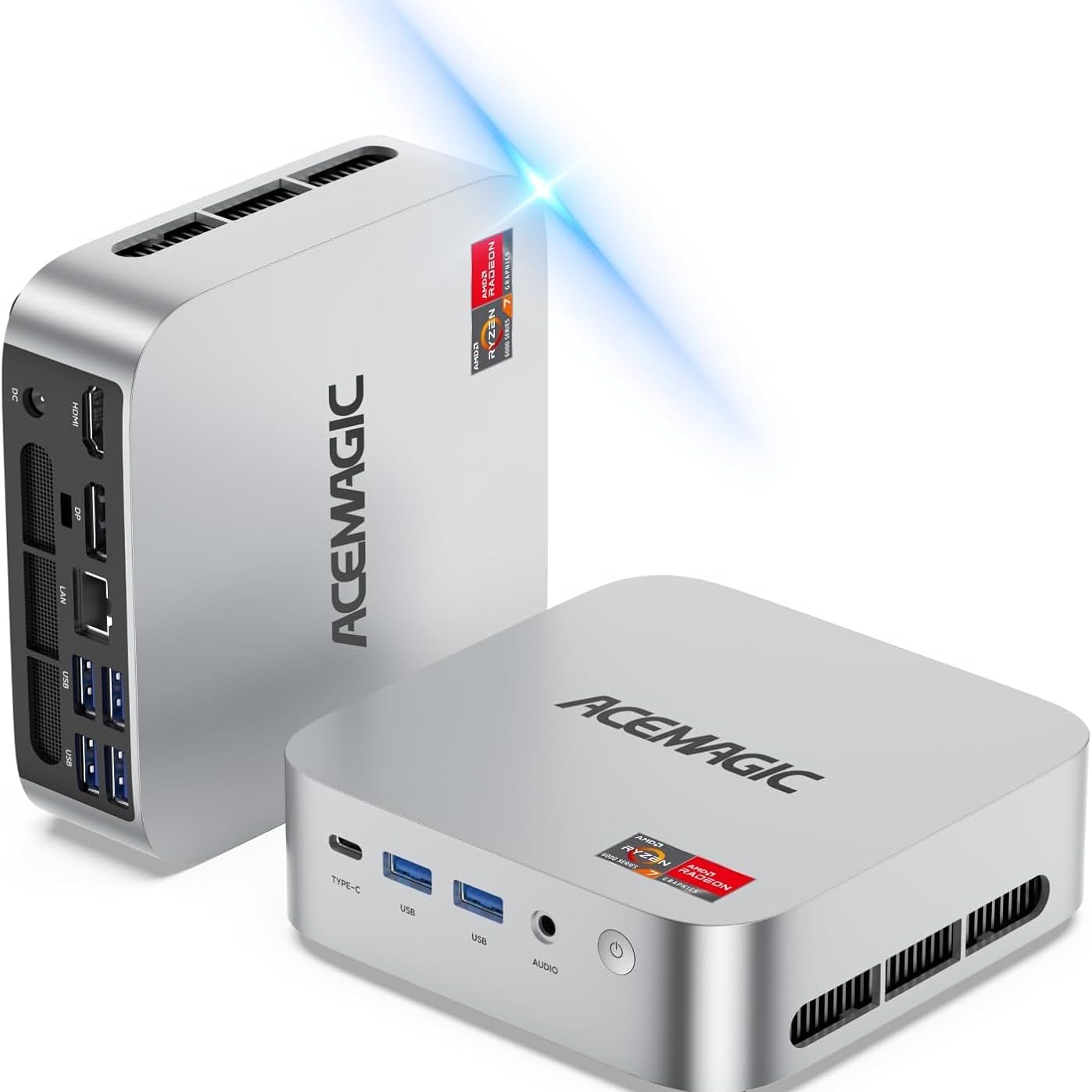
Image 3: ACEMAGIC M1 Mini PC connected and ready for initial setup.
5. Mode d'emploi
Your ACEMAGIC M1 Mini PC comes pre-installed with Windows 11 Pro, offering a familiar and intuitive user experience. Use your connected keyboard and mouse for navigation.
- Marche/Arrêt : Press the power button once to turn on or off the device.
- Redémarrage: From the Windows Start Menu, select Power > Restart.
- Mode veille: From the Windows Start Menu, select Power > Sleep.
- Connectivité réseau : Connect to the internet via built-in Wi-Fi 6 (802.11ax) or the 2.5G LAN port for stable and high-speed connections.
- Périphériques Bluetooth : Pair Bluetooth 5.2 compatible devices like headphones, speakers, or game controllers through Windows Settings.
6. Extension de stockage
The ACEMAGIC M1 Mini PC includes a fast 1TB PCIe SSD. For additional storage, you can expand it:
- 2.5" SSD/HDD Slot: The device features an internal slot for a 2.5-inch SSD or HDD (not included), allowing expansion up to 4TB. Refer to the detailed user manual for installation steps.

Image 4: Illustration of the internal storage expansion capabilities.
7. Configuration de l'affichage
Enhance your productivity or gaming experience by connecting multiple displays:
- Prise en charge de trois écrans 4K : Connect up to three 4K monitors simultaneously using the HDMI, DisplayPort, and USB-C outputs.
- Configuration: Once connected, configure your display settings through Windows Display Settings (Right-click on desktop > Display settings) to extend or duplicate your desktop.

Image 5 : Example of a triple 4K display setup for enhanced work efficiency.
8. Performance & Cooling
The ACEMAGIC M1 Mini PC is engineered for high performance and quiet operation:
- Processeur: AMD Ryzen 7 7735HS (8-core/16-thread, up to 4.75GHz boost clock) for seamless multitasking.
- Graphique: Integrated AMD Radeon Graphics (12CU, 2200MHz GPU Frequency) for immersive visuals.
- BÉLIER: 24GB LPDDR5 5500MT/s memory for smooth operations.
- Circuit de refroidissement: Features an ultra-quiet, low-noise cooling system with efficient cooling, a high-speed fan, and dual exhaust, maintaining noise levels around 38 decibels.

Image 6 : Interne view highlighting the efficient and quiet cooling system.
9. Spécifications
| Marque | ACEMAGIQUE |
| Modèle | M1 |
| Système opérateur | Windows 11 Pro |
| Modèle de processeur | AMD Ryzen 7 7735HS (jusqu'à 4.75 GHz) |
| Graphique | Integrated AMD Radeon Graphics (12CU, 2200MHz) |
| BÉLIER | 24 Go LPDDR5 5500 MT/s |
| Stockage | 1TB PCIe SSD (M.2 2280, expandable up to 4TB with 2.5" SSD) |
| Sortie d'affichage | HDMI, DisplayPort, USB-C (Triple 4K Display) |
| Connectivité | 2.5G LAN, WiFi 6 (802.11ax), Bluetooth 5.2 |
| Ports | 1x USB-C, 6x USB-A, 1x Audio, 1x HDMI, 1x DisplayPort, 1x LAN, 1x DC-in |
| Dimensions | 5.04 x 1.61 x 5.04 pouces |
| Poids | 1.2 kilogrammes |
10. Dépannage
- Pas d'affichage : Vérifiez que tous les câbles d'affichage sont correctement connectés et que le moniteur est allumé et réglé sur la source d'entrée appropriée.
- Pas d'alimentation : Verify the power adapter is correctly plugged into both the Mini PC and a working power outlet.
- Problèmes de réseau : Check Wi-Fi settings in Windows or ensure the Ethernet cable is properly connected to the LAN port and your router.
- Performances lentes : Fermez les applications inutiles, vérifiez les mises à jour Windows et assurez-vous d'avoir suffisamment d'espace de stockage libre.
11. Garantie et assistance
Your ACEMAGIC M1 Mini PC is covered by a complete 12-month assurance. For any questions or technical assistance, please contact ACEMAGIC customer service through Amazon, available 7 days a week, 24 hours a day.


