
1. Introduction
The OUKITEL P5000 Pro Portable Power Station is a high-capacity, high-output solar generator designed to provide reliable power for various applications, from home backup during outages à l'extérieur camping and off-grid living. Featuring a robust LiFePO4 battery and multiple charging options, it ensures your essential devices remain powered.
Qu'y a-t-il dans la boîte
- 1 x P5000 Pro Power Station
- 1 x 500W Solar Panel (if purchased as a bundle)
- 1 x câble de charge CA
- 1 câble de charge solaire
- 1 x Chargeur de voiture
- 1 x Manuel d'utilisation
Remarque : En raison du poids du produit, la centrale électrique et les panneaux solaires peuvent être livrés dans des colis séparés.
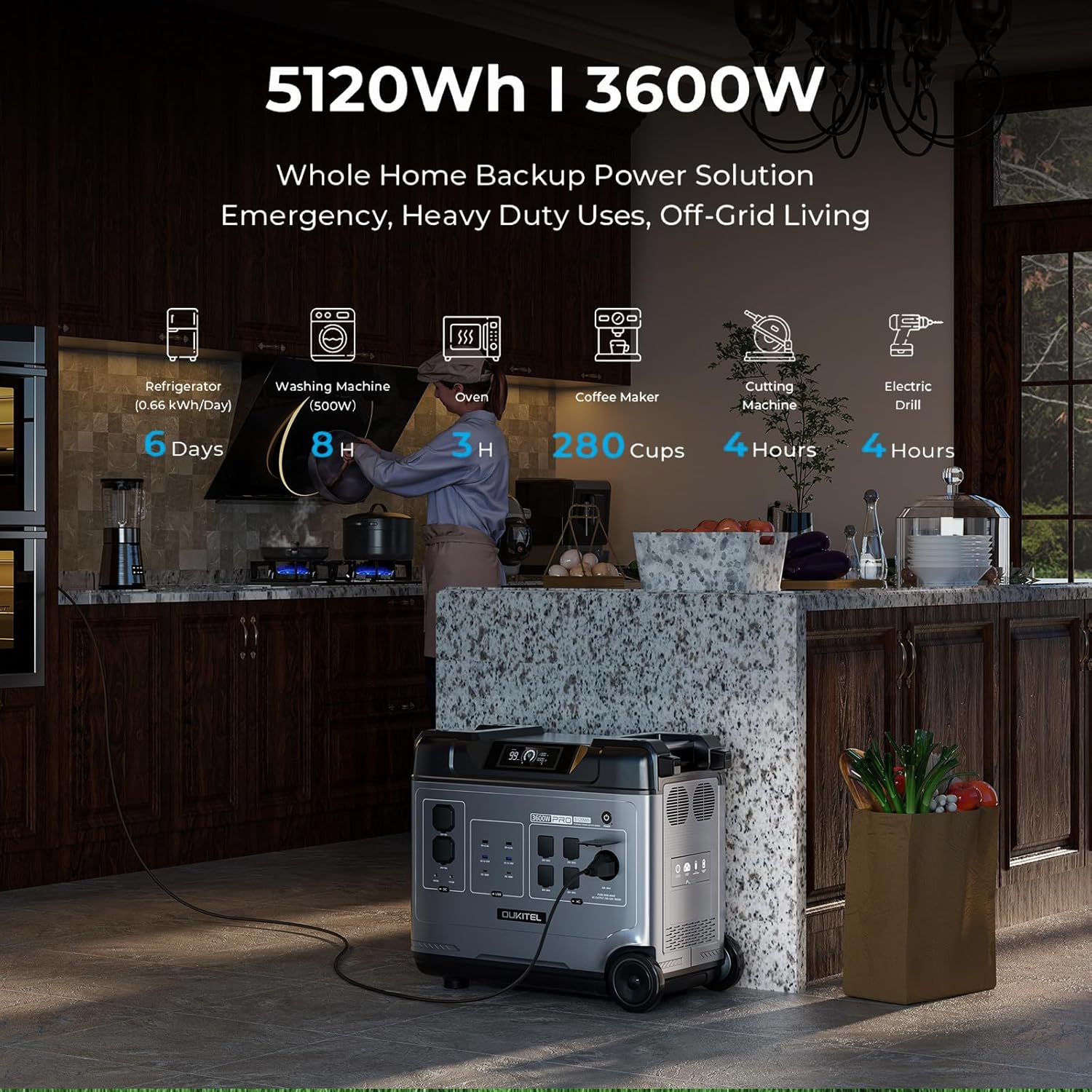
Image: OUKITEL P5000 Pro Portable Power Station with its various ports and accessories.
2. Consignes de sécurité
Veuillez lire attentivement toutes les consignes de sécurité et les instructions avant d'utiliser ce produit. Le non-respect de ces instructions peut entraîner un choc électrique, un incendie ou des blessures graves.
- Ne démontez pas, ne réparez pas ou ne modifiez pas l'unité.
- Tenez l'appareil éloigné du feu, des sources de chaleur et de la lumière directe du soleil.
- Ne pas utiliser ni entreposer l'appareil dans une salle de bain ou dans un endroit exposé à l'eau ou à l'humidité.
- Utilisez uniquement des câbles et accessoires d'origine ou certifiés.
- Assurer une ventilation adéquate pendant l’utilisation pour éviter la surchauffe.
- Tenir hors de portée des enfants et des animaux domestiques.
- Éliminer le produit conformément aux réglementations locales.
3. Installation et charge initiale
Initial AC Charging
Before first use, fully charge the P5000 Pro using the provided AC charging cable. The unit supports 1800W fast charging, allowing a full charge in approximately 2.5 hours.
- Branchez le câble de charge CA au port d'entrée CA de la station d'alimentation.
- Branchez l'autre extrémité du câble dans une prise murale standard.
- The display will show the charging status and estimated time to full charge.
Video: Demonstrates connecting the AC charging cable to the OUKITEL P5000 Pro for fast charging.
Chargement par panneau solaire
The P5000 Pro features a built-in MPPT controller for optimized solar charging. It supports up to 1000W solar input, allowing a full charge in approximately 5 hours when combined with AC hybrid charging.
- Unfold the solar panels and place them in direct sunlight.
- Connect the solar charging cable to the solar input port on the power station.
- Raccordez l'autre extrémité du câble de charge solaire aux panneaux solaires.
- The display will indicate solar input wattage et l'état de charge.
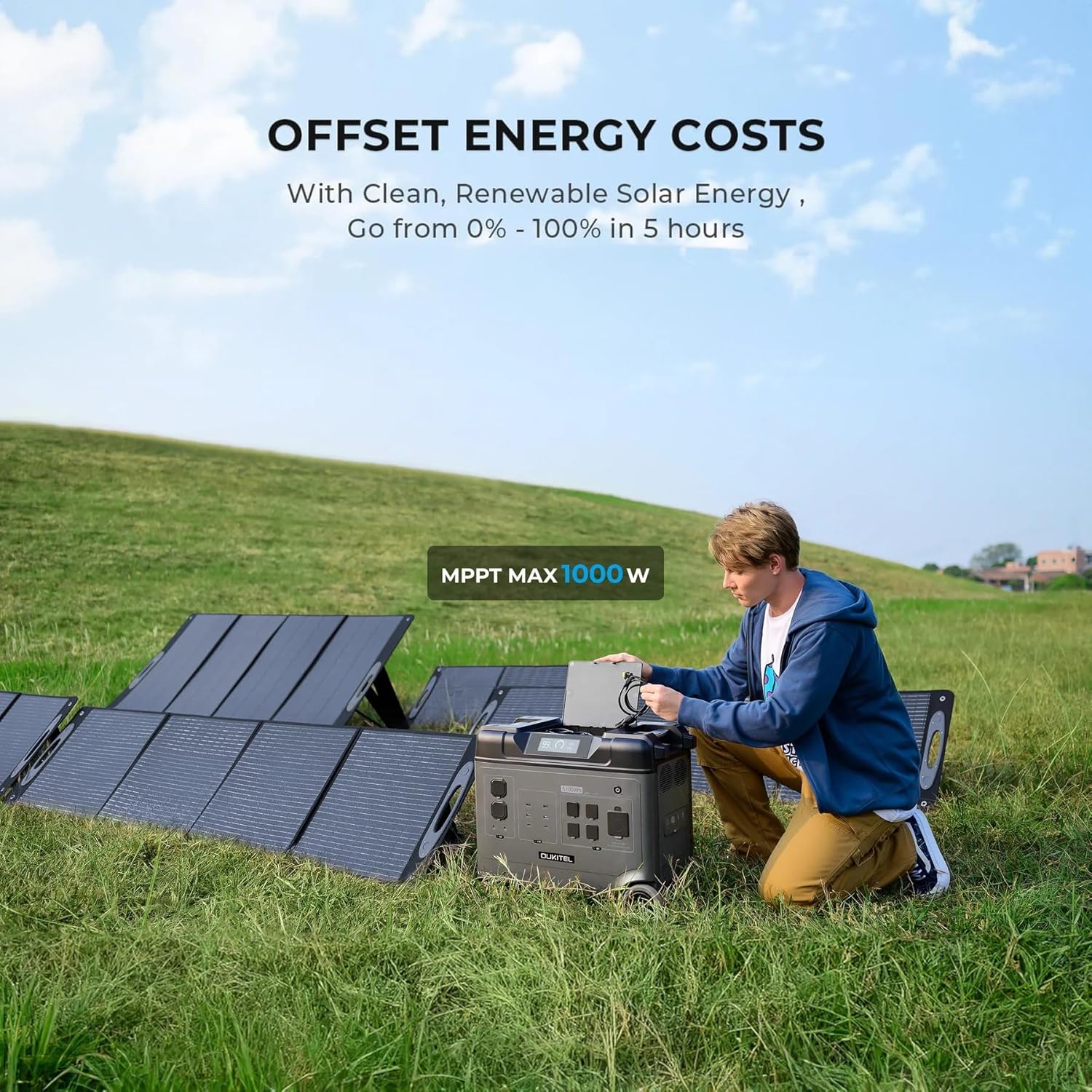
Image: OUKITEL P5000 Pro connected to solar panels for charging in an outdoor setting.
4. Fonctionnement
Appareils d'alimentation
The P5000 Pro offers 15 versatile outlets to power a wide range of devices simultaneously.
- Prises secteur (x5) : Pour les hautes tensionstage appliances like refrigerators, space heaters, power tools, microwaves, and electric kettles.
- Ports USB-A (4x) : Pour recharger les smartphones, les tablettes et autres appareils alimentés par USB.
- Ports USB-C (2x) : Pour les appareils compatibles avec la charge rapide.
- DC Ports (2x): Pour les appareils alimentés en courant continu.
- Port allume-cigare (1x) : Pour les accessoires automobiles.
- Airline Port (1x): Pour des applications CC haute puissance spécifiques.

Image: The OUKITEL P5000 Pro with various cables connected, illustrating its ability to charge multiple devices simultaneously.
Contrôle intelligent des applications
Monitor and control your P5000 Pro remotely via the mobile app. Connect using Bluetooth or Wi-Fi to check battery levels, manage input/output, and schedule charging.
- Download the OUKITEL app from your device's app store.
- Ensure the P5000 Pro is powered on.
- Open the app and follow the instructions to connect via Bluetooth or Wi-Fi.
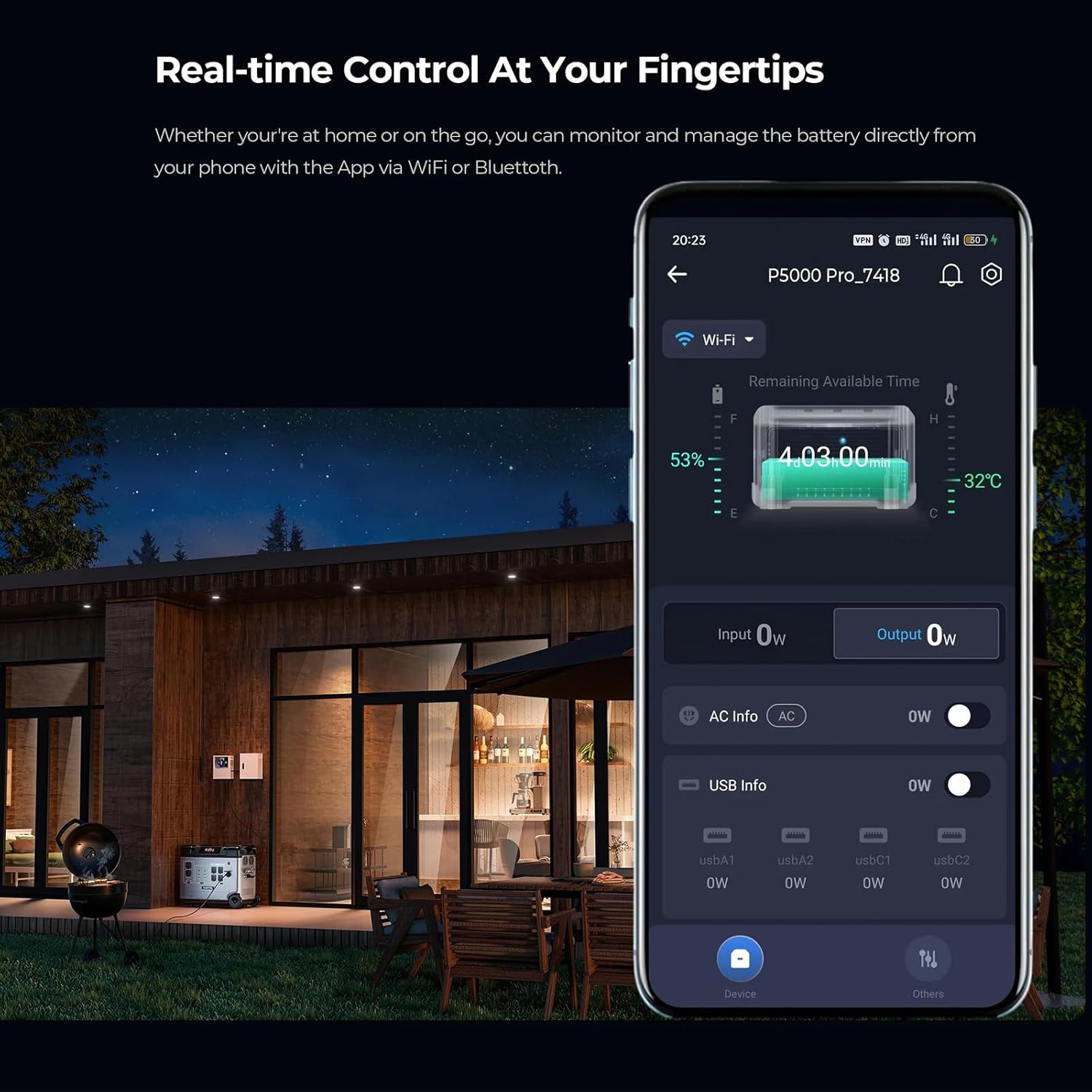
Image: A smartphone displaying the OUKITEL P5000 Pro app, showing real-time control and monitoring features.
Fonction d'alimentation sans interruption (UPS)
The EPS function provides seamless power transition (<0.01s) during power outages, protecting sensitive electronics like computers, Wi-Fi routers, and medical equipment.
- Connect the P5000 Pro to a wall outlet using the AC charging cable.
- Connect your devices to the AC output ports of the P5000 Pro.
- En cas de coupure de couranttage, the P5000 Pro will automatically switch to battery power, ensuring continuous operation for connected devices.
Video: Illustrates the seamless UPS function of the OUKITEL P5000 Pro during a power outage, keeping devices running.
Electric Vehicle (EV) Charging
The P5000 Pro can provide emergency power to electric vehicles, offering approximately 24 miles of range for a Tesla.
- Ensure the P5000 Pro is adequately charged.
- Connect the appropriate EV charging cable (not included) to the P5000 Pro's AC output and your EV's charging port.
- Monitor the charging status on both the power station and your vehicle's display.
Video: Shows the OUKITEL P5000 Pro being used to charge an electric vehicle, highlighting its versatility.
5. Entretien
Entretien de la batterie
The P5000 Pro uses a LiFePO4 battery, known for its longevity (6000+ cycles, 10-year lifespan). Proper care ensures maximum performance and lifespan.
- Chargement régulier : Pour une durée de vie optimale de la batterie, chargez complètement l'appareil au moins une fois tous les 3 à 6 mois, même s'il n'est pas utilisé.
- Stockage: Store the power station in a cool, dry place, away from direct sunlight and extreme temperatures. Maintain a charge level between 50% and 80% for long-term storage.
- Nettoyage: Utilisez un chiffon doux et sec pour nettoyer l'extérieur de l'appareil. N'utilisez pas de produits chimiques agressifs ni de matériaux abrasifs.
6. Dépannage
If you encounter issues with your OUKITEL P5000 Pro, refer to the following common problems and solutions:
| Problème | Cause possible | Solution |
|---|---|---|
| L'appareil ne s'allume pas | Batterie faible ; bouton d'alimentation mal enfoncé | Chargez l'appareil ; appuyez sur le bouton d'alimentation et maintenez-le enfoncé pendant 3 secondes. |
| La sortie CA ne fonctionne pas | Sortie CA non activée ; protection contre les surcharges déclenchée | Press the AC output button; Reduce connected load, then restart AC output. |
| La charge solaire ne fonctionne pas | Insufficient sunlight; Incorrect connection; Damaged solar panel/cable | Ensure direct sunlight; Check cable connections; Test with another solar panel/cable if possible. |
| Problèmes de connexion à l'application | Bluetooth/Wi-Fi off; App not updated; Interference | Ensure Bluetooth/Wi-Fi is on; Update app to latest version; Move closer to the unit. |
Si le problème persiste, veuillez contacter le service client.
7. Spécifications
| Fonctionnalité | Détail |
|---|---|
| Marque | Keenergy (OUKITEL) |
| Nom du modèle | P5000 Pro |
| Capacité | 5120 Wh |
| Sortie CA (nominale) | 3600 W (onde sinusoïdale pure) |
| Sortie CA (crête) | 6000 W |
| Type de batterie | LiFePO4 |
| Durée de vie | Plus de 6000 cycles (à 80 % de la capacité) |
| Entrée CA (charge rapide) | 1800 W |
| Apport solaire (Max) | 1000 W (MPPT) |
| Fonction UPS | Seamless transition (<0.01s) |
| Contrôle | Smart App (Bluetooth/Wi-Fi) |
| Dimensions (L x l x H) | 22"L x 12"l x 19"H |
| Poids de l'article | 48 livres |
| Nombre total de prises de courant | 15 (5x AC, 4x USB-A, 2x USB-C, 2x DC, 1x Cigarette Lighter, 1x Airline Port) |
8. Garantie et assistance
The OUKITEL P5000 Pro Portable Power Station comes with a Garantie constructeur d'un an, garantissant ainsi la tranquillité d'esprit quant à la qualité et aux performances du produit.
For technical assistance, troubleshooting, or warranty claims, please contact OUKITEL customer service through the official website ou votre revendeur.
Please have your purchase receipt and product model number (P5000 Pro) ready when contacting support.