
Introduction
This manual provides comprehensive instructions for the CAMECHO Android Carplay Autoradio, model 4G+128G, specifically designed for FIAT Bravo vehicles manufactured between 2008 and 2013. It covers essential information regarding product overview, installation, operation, maintenance, troubleshooting, and technical specifications to ensure optimal performance and user experience.
Produit terminéview
The CAMECHO Autoradio is an advanced in-car entertainment system featuring a 9-inch touchscreen, Android 15 operating system, 4GB RAM, and 128GB ROM. It integrates seamlessly with your FIAT Bravo (2008-2013 models) to enhance your driving experience with modern connectivity and multimedia capabilities.
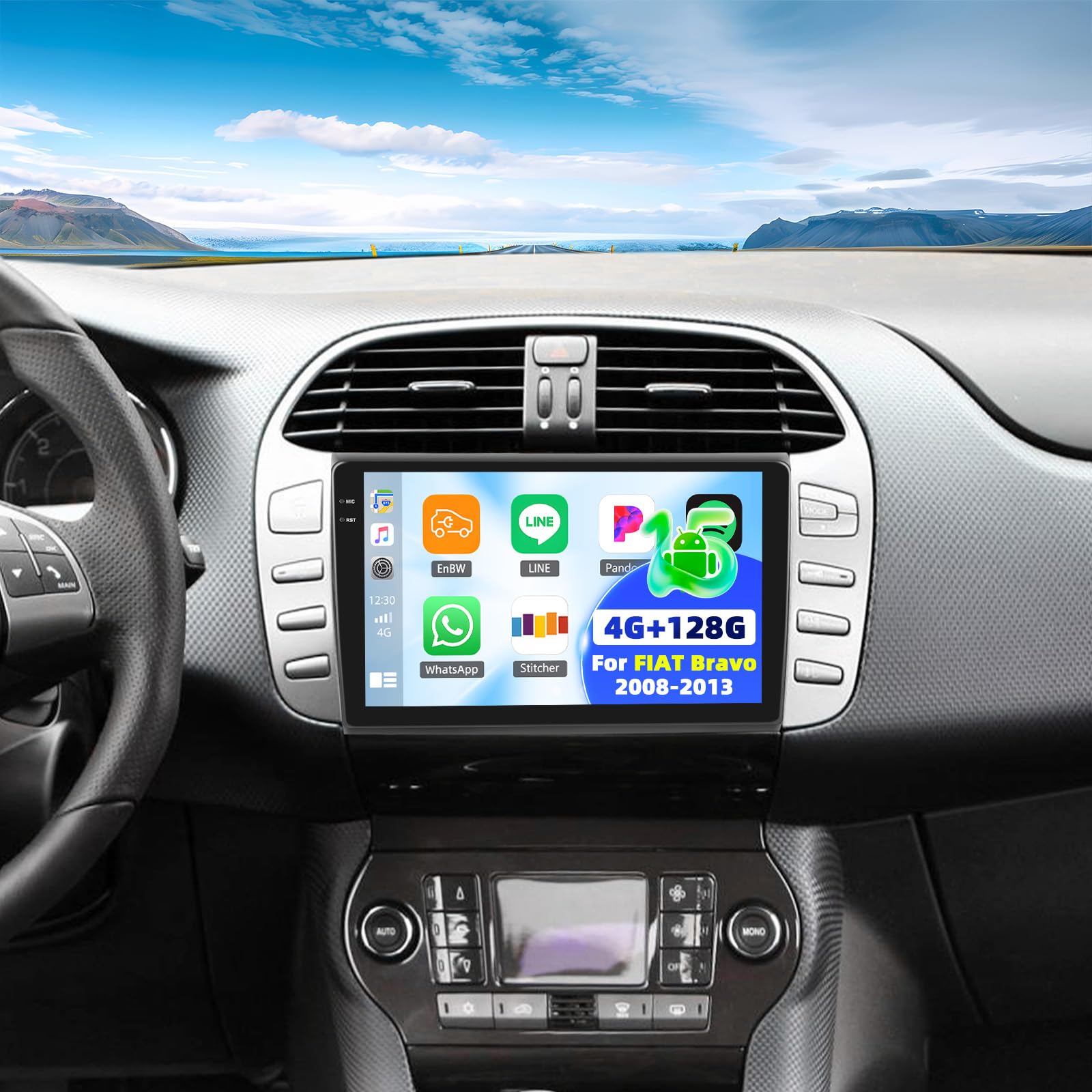
Image: Comparison of the FIAT Bravo dashboard before and after installing the CAMECHO 9-inch touchscreen autoradio.
Video: A brief product demonstration showcasing the CAMECHO Autoradio's display and various angles.
Packing List and Dimensions
Please verify that all components listed below are present in the package before proceeding with installation.

Image : détaillée view of the packing list and the physical dimensions of the autoradio unit and its mounting frame.
Contenu du colis :
- CAMECHO Autoradio Unit
- Supports de montage et vis
- Câble d'alimentation
- CANBUS Decoder Box
- Wired Microphone with Clip
- Câble RCA
- Câbles USB (6 broches et 4 broches)
- Câble de caméra arrière
- Antenne GPS
- AHD arrièreview Caméra
- Câble d'extension de caméra arrière
- Removal Tool for old autoradio
- Petit tournevis cruciforme
- Manuel d'utilisation (anglais)
Dimensions du produit :
The autoradio unit measures approximately 23 cm (length) x 14 cm (width) x 4 cm (thickness). The display is 9 inches. The overall package dimensions are 26 x 17 x 10 cm, with a total weight of 1.4 kg. Refer to the diagram above for detailed measurements of the unit and frame.
Configuration et installation
Professional installation is highly recommended to ensure correct wiring and functionality. Always disconnect the vehicle's battery before beginning any electrical work.
Connexions de câblage :
- Câble d'alimentation: Connect the main power harness to the vehicle's power supply. Ensure all connections are secure.
- Décodeur CANBUS : If your vehicle requires a CANBUS decoder for steering wheel controls or other vehicle data, connect the CANBUS box before powering on the unit. Then, navigate to Apps > Car Settings > Factory Settings (1234) > Protocol settings > Choose Canbus Brand Name > Choose Car's style to configure the SWC properly. Select the matching model and year according to your vehicle's specifications.
- Antenne GPS: Connect the GPS antenna and mount it in a location with a clear, unobstructed view du ciel pour une réception optimale du signal.
- Câbles USB : Connect the provided USB cables for data transfer, media playback, or charging external devices.
- Câbles RCA : Use RCA cables for connecting external audio/video input or output devices, such as amplifiers or additional displays.
- Microphone: Connect the external microphone to the designated input for improved hands-free calling clarity.
Arrièreview Câblage de la caméra :
Proper wiring of the rearview camera is crucial for its automatic activation and display.
Image: Wiring diagram for connecting the AHD rearview camera to the autoradio system.
- Red Cable 1 and 3: Connect these cables to the positive terminal of your car's reverse light power supply.
- Câble noir 2 : Connect this cable to the negative terminal (ground) of your car's reverse light power supply.
- Câble noir 4 : Connect this cable to the reverse trigger wire on the autoradio's power harness. This signal tells the unit to switch to the camera view lorsque la marche arrière est engagée.
Mode d'emploi
CarPlay et Android Auto sans fil :
L'appareil prend en charge CarPlay et Android Auto sans fil pour une intégration parfaite des smartphones.

Image: The Carplay interface displayed on the 9-inch autoradio screen.
- Assurez-vous que Bluetooth et Wi-Fi sont activés sur votre smartphone.
- On the autoradio, navigate to the Carplay or Android Auto application.
- Suivez les instructions à l'écran pour jumeler votre smartphone via Bluetooth.
- Once connected, you can use voice commands or the touchscreen to access navigation, music, calls, and other compatible apps.
Mirror Link (Wired/Wireless):
Mirror Link allows you to display your smartphone's screen directly onto the autoradio display.

Image: The Mirror Link feature in action, mirroring a smartphone's display to the autoradio.
- For wireless Mirror Link, ensure both the autoradio and your smartphone are connected to the same Wi-Fi network.
- For wired Mirror Link, connect your smartphone to the autoradio using a USB cable.
- Open the Mirror Link application on the autoradio and follow the pairing instructions specific to your smartphone's operating system.
Bluetooth 5.0:
The integrated Bluetooth 5.0 module enables hands-free calling and wireless audio streaming.

Image: The Bluetooth interface, showing options for phone calls and music streaming.
- Enable Bluetooth on both the autoradio and your smartphone.
- Rechercher available devices on your smartphone and select the autoradio (e.g., "CAMECHO Carplay").
- Confirmez le code d'appairage si vous y êtes invité.
- Une fois connecté, vous pouvez passer/recevoir des appels, accéder à votre répertoire téléphonique et écouter de la musique sans fil.
Radio FM/RDS :
Profitez d'une radio FM de haute qualité avec la fonctionnalité RDS (Radio Data System).

Image: The FM/RDS radio interface, displaying current frequency and options for station management.
- Accédez à l'application Radio depuis le menu principal.
- Use the scan function to automatically find and save available stations, or manually tune to a specific frequency.
- The RDS feature will display station information (e.g., station name, song title) where available.
Égaliseur 32 bandes (32EQ) :
Personnalisez votre expérience audio grâce à l'égaliseur intégré à 32 bandes.

Image: The 32-band equalizer interface, allowing detailed audio customization.
- Navigate to the Sound Settings or EQ application.
- Adjust individual frequency bands to fine-tune the audio output to your preference.
- Pre-set equalizer modes (e.g., Pop, Rock, Jazz) may also be available for quick adjustments.
GPS Navigation and WiFi:
The autoradio features integrated GPS for navigation and Wi-Fi for online connectivity.

Image: The GPS navigation interface and Wi-Fi connection capabilities of the autoradio.
- GPS: The unit supports both online and offline navigation. Ensure the GPS antenna is properly installed. You can download offline maps for navigation without an internet connection.
- Wi-Fi: Connect to a Wi-Fi hotspot (e.g., from your smartphone) to access online applications, stream media, browse the internet, and download software updates.
Commandes au volant (SWC) :
Program your vehicle's steering wheel buttons for convenient control of the autoradio functions.

Image: Instructions for configuring steering wheel controls on the autoradio.
- Accédez aux paramètres des commandes au volant dans le menu système.
- Follow the on-screen instructions to map your vehicle's steering wheel buttons (e.g., volume up/down, track skip, mode) to the corresponding autoradio functions.
- If your vehicle uses a CANBUS decoder, ensure it is correctly connected and configured as described in the Setup section for automatic SWC recognition.
Caméra de recul :
L'arrière AHD inclusview la caméra offre un grand angle view pour des manœuvres de stationnement et de marche arrière plus sûres.

Image : L'arrièreview camera display with parking guidelines, activated when reversing.
- Ensure the camera is properly installed and wired according to the "Rearview Camera Wiring" instructions in the Setup section.
- L'écran basculera automatiquement sur la caméra. view lorsque le véhicule est passé en marche arrière.
- The camera features HD resolution, a wide viewing angle, and night vision capabilities for enhanced visibility.
Entretien
Regular maintenance helps ensure the longevity and optimal performance of your CAMECHO Autoradio.
- Nettoyage de l'écran : Utilisez un chiffon doux et non pelucheux, légèrement dampened with water or a screen-safe cleaner, to clean the touchscreen. Avoid using abrasive materials, alcohol, or chemical solvents, as these can damage the screen surface.
- Mises à jour logicielles : Periodically check for available software updates through the system settings (requires a Wi-Fi connection). Keeping the software updated ensures you have the latest features, performance improvements, and security patches.
- Soins généraux: Évitez d'exposer l'appareil à des températures extrêmes, à la lumière directe du soleil pendant une période prolongée ou à une humidité excessive. Assurez une ventilation adéquate autour de l'appareil pour éviter toute surchauffe.
Dépannage
Cette section aborde les problèmes courants que vous pourriez rencontrer. Pour les problèmes plus complexes, veuillez contacter le service client.
| Problème | Cause possible | Solution |
|---|---|---|
| L'unité ne s'allume pas | Incorrect wiring; Blown fuse in vehicle or unit; Loose connection | Check all power connections. Inspect vehicle fuses and the unit's fuse (if accessible). Ensure the ignition wire is correctly connected. |
| Pas de sortie audio | Volume too low; Incorrect audio source selected; Speaker wiring issue; Mute activated | Increase volume. Verify the correct audio source (e.g., FM, Bluetooth, USB). Check speaker connections. Ensure the unit is not muted. |
| Signal GPS perdu ou imprécis | GPS antenna obstruction; Poor satellite reception; Antenna not connected | Assurez-vous que l'antenne GPS dispose d'une vue dégagée et sans obstruction. view of the sky. Relocate the antenna if necessary. Verify the antenna is securely connected. |
| La connexion Bluetooth est instable ou ne parvient pas à se connecter. | Interference; Device compatibility; Out of range; Bluetooth on phone/unit off | Ensure both devices have Bluetooth enabled and are within range. Restart both the autoradio and your smartphone. Clear previous pairings and try again. |
| Les commandes au volant ne fonctionnent pas | Incorrect CANBUS setup; Wiring issue; Buttons unprogrammed | Verify CANBUS connection and configuration in settings. Ensure buttons are programmed correctly in the SWC settings. Check wiring to the steering wheel control interface. |
| Arrièreview la caméra ne s'affiche pas | Incorrect wiring; Faulty camera; Reverse trigger wire not connected | Check camera power and video signal connections. Ensure the reverse trigger wire is correctly connected to the vehicle's reverse light circuit. Test the camera if possible. |
Spécifications techniques
Below are the key technical specifications for the CAMECHO 4G+128G Carplay Autoradio.
| Fonctionnalité | Détail |
|---|---|
| Marque | CAMÉCHO |
| Modèle | 4G+128G Carplay |
| Système opérateur | Android 15 |
| BÉLIER | 4 Go |
| ROM | 128 Go |
| Taille de l'écran | 9 pouces |
| Résolution de l'écran | 1280 * 720 IPS |
| Connectivité | Bluetooth 5.0, Wi-Fi, GPS |
| Périphériques compatibles | Smartphone |
| Mode de sortie audio | Stereo, Surround (5.1) |
| Caractéristiques spéciales | Wireless Carplay, Android Auto, Mirror Link, FM/RDS Radio, 32-Band EQ, AHD Rearview Caméra, commande au volant |
| Dimensions | 26 x 17 x 10 cm (emballage) |
| Poids | 1.4 kilogrammes |
Garantie et assistance
CAMECHO s'engage à fournir un excellent service client et un support de qualité pour votre produit.

Image : Terminéview of CAMECHO's customer support and warranty terms.
- Garantie: Ce produit est couvert par une garantie de 24 mois à compter de la date d'achat.
- Politique de remplacement : Une politique de remplacement de 30 jours est offerte pour les produits admissibles.
- Réponse en ligne : We offer an 18-hour online response service for all your inquiries.
- Support technique : Enjoy lifetime technical support for your CAMECHO Autoradio.
Contacter le support :
Pour toute question, assistance technique ou réclamation au titre de la garantie, veuillez contacter notre service clientèle :

Image : Informations de contact du service client.
E-mail: CAMECHOVIP@126.com