
Introduction
The CORSAIR AIR 5400 RS-R ARGB Mid-Tower PC Case is engineered with an innovative triple-chamber design to provide exceptional cooling performance and a distinctive aesthetic for DIY PC builds. This case features a dedicated 360mm radiator chamber to isolate CPU cooling heat, ensuring optimal thermal management. Airflow ducts on the top and bottom fan arrays enhance air velocity for efficient cooling with minimal noise. The wraparound glass exterior offers a panoramic view of your components, complemented by three pre-installed RS120-R ARGB fans that deliver powerful cooling and vibrant, unobstructed RGB lighting.
Caractéristiques principales
- Triple-Chamber Design: Superior cooling performance is achieved through isolated chambers for the CPU, GPU, and PSU, minimizing thermal interference.
- Isolated CPU Cooling Chamber: A separate chamber at the front accommodates a 360mm radiator for CPU cooling, preventing heat from affecting other components.
- GPU and Motherboard Chamber: The central chamber is designed for massive vertical airflow, effectively cooling the GPU and motherboard before exhausting hot air.
- PSU and Storage Chamber: A third chamber houses the power supply, storage drives, and cables, featuring dedicated intake and exhaust points.
- Airflow Ducts: Innovative ducts on the bottom fan array accelerate airflow into a narrow channel, increasing velocity without requiring higher fan speeds, thus improving cooling efficiency quietly.
- Panoramic Glass Exterior: Wraparound glass panels provide a stunning view of your system's internals.
- Pre-Installed RS120-R ARGB Fans: Includes three reverse-rotor RS120-R ARGB fans for powerful, low-noise intake airflow and dazzling RGB visuals.
Configuration et installation
1. Triple-Chamber Design Overview
The CORSAIR AIR 5400 RS-R ARGB features a unique triple-chamber layout to optimize thermal performance and simplify the building process. Components are separated into distinct zones to prevent heat transfer.

Image: An internal diagram of the CORSAIR AIR 5400 RS-R ARGB case highlighting its triple-chamber design. The diagram labels distinct areas for the GPU, PSU, and CPU, illustrating how components are isolated for improved thermal management.
2. Optimisation du flux d'air
The case incorporates specialized airflow ducts to channel cool air efficiently. These ducts ensure continual upward airflow through the main chamber, directing cool air from outside the chassis directly to the GPU for maximum performance.

Image: A cutaway diagram of the CORSAIR AIR 5400 RS-R ARGB case, visually representing the dual airflow ducts. Arrows indicate the path of cool air entering the chassis and being directed towards the GPU, emphasizing optimized cooling.
3. CPU AIO Chamber
The dedicated CPU chamber is designed for all-in-one (AIO) liquid coolers. It allows the AIO to draw fresh air from outside the case and immediately exhaust heated air through a wide side opening, ensuring peak CPU performance without impacting other components.

Image : Une image détaillée view of the CPU AIO chamber within the CORSAIR AIR 5400 RS-R ARGB case. The image shows the radiator and fans, with panels removed to illustrate the dedicated space for liquid cooling components.
4. Fan Installation and Compatibility
The CORSAIR AIR 5400 RS-R ARGB comes with three pre-installed RS120-R ARGB fans in the bottom for powerful, low-noise intake. The case supports extensive fan configurations, including up to 10x 120mm fans and multiple radiators for comprehensive cooling.
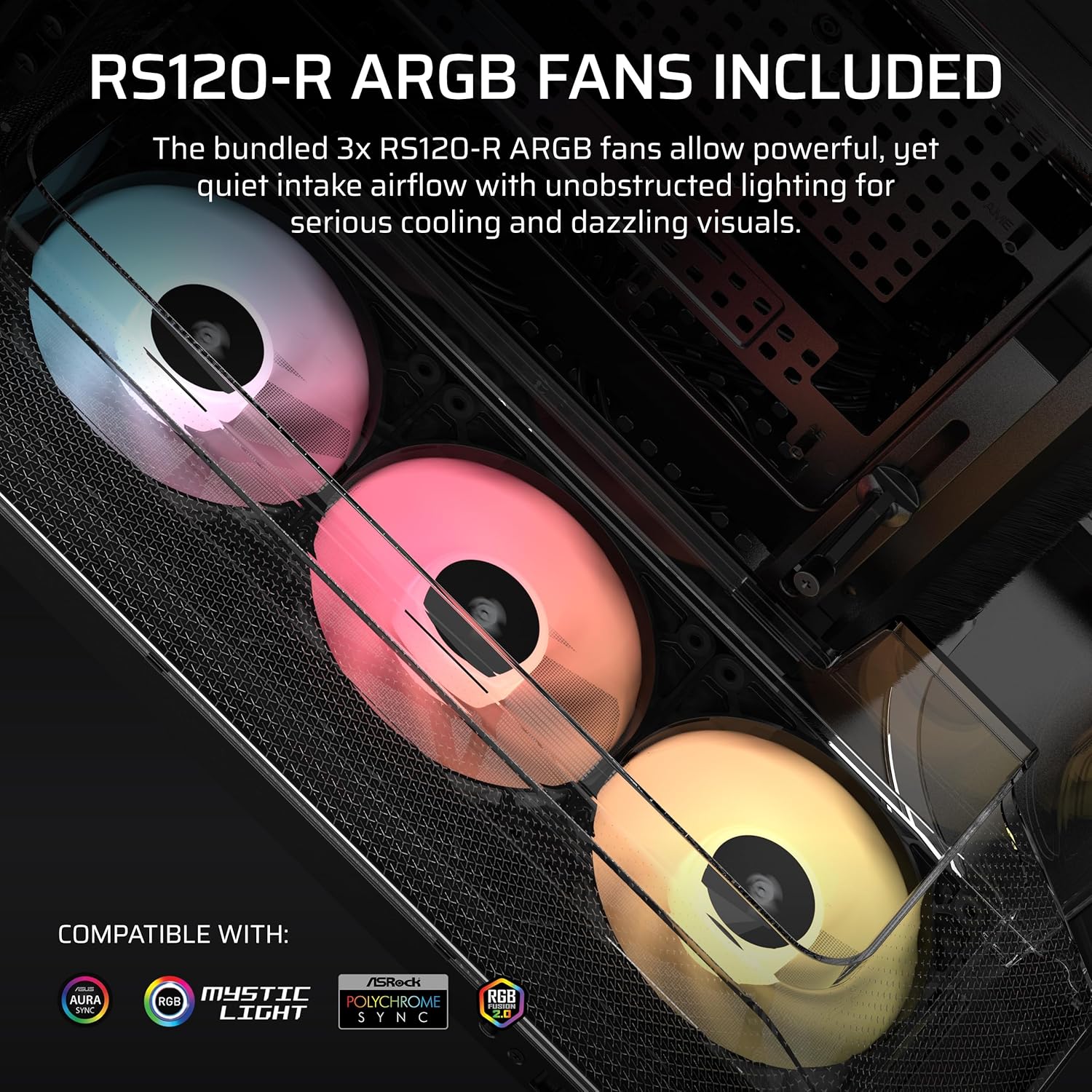
Image: A close-up shot of the three RS120-R ARGB fans installed in the CORSAIR AIR 5400 RS-R ARGB case. The fans feature a reverse-rotor design for optimal intake airflow and are illuminated with vibrant RGB lighting.
5. Component Access and Cable Management
The case features dual curved French door glass panels that swing open for easy access to your hardware. The RapidRoute 2.0 cable management system, with its pegboard motherboard tray and ratcheting cable ties, ensures a super-clean build in the third chamber.

Image: The CORSAIR AIR 5400 RS-R ARGB case is shown with its dual curved French door glass panels swung open, providing a clear view of the internal components and emphasizing ease of access.
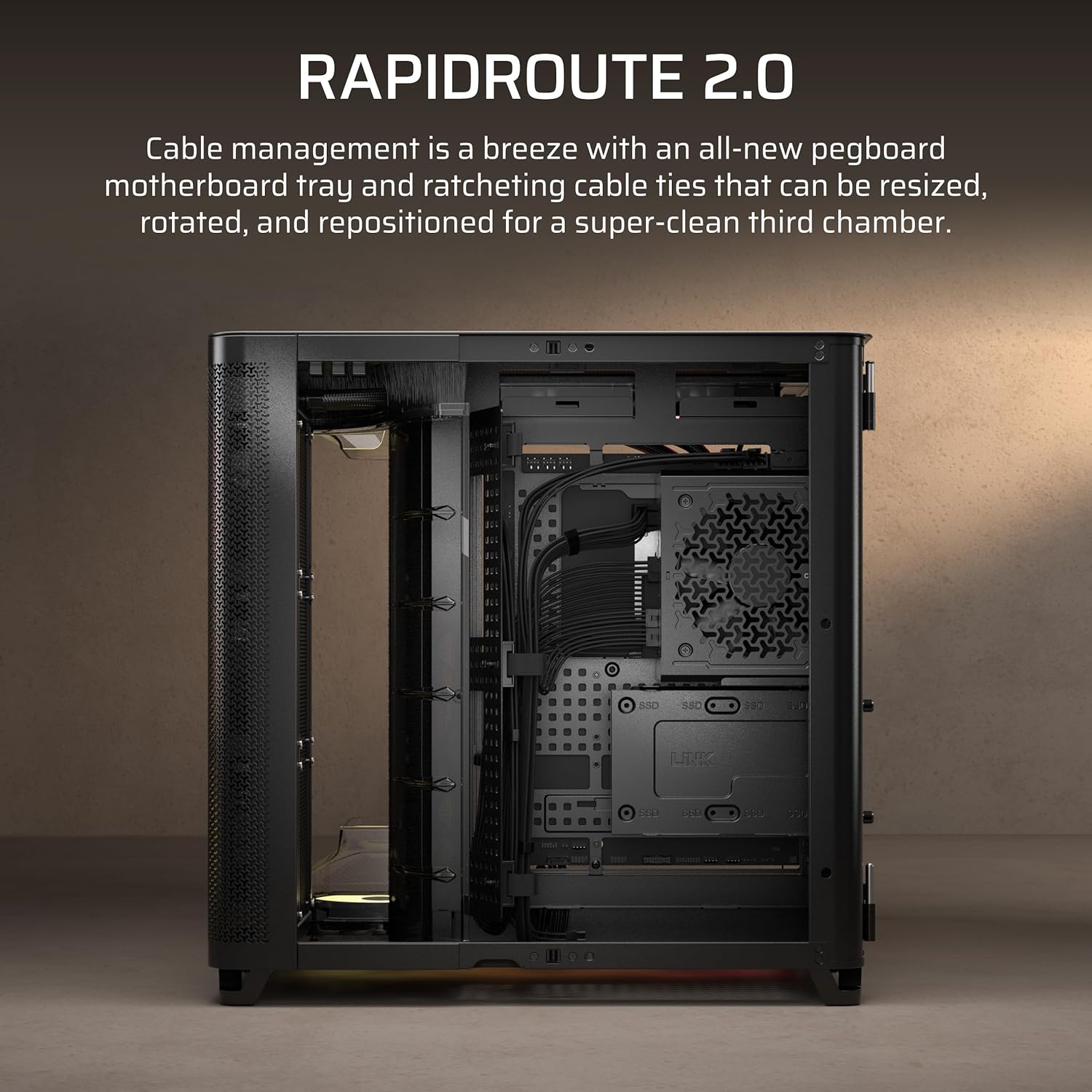
Image : Un arrière view of the CORSAIR AIR 5400 RS-R ARGB case, showcasing the RapidRoute 2.0 cable management system. Cables are neatly routed and secured behind the motherboard tray, demonstrating the case's clean build potential.
6. Panneau d'E/S avant
The easily accessible top-mounted front I/O panel provides versatile connectivity options for your peripherals.
- 1x port USB 3.2 Gen 2 Type-C
- 2 port USB 3.2 Gen 1 Type-C
- Prise audio combinée 3.5 mm
- Bouton d'alimentation
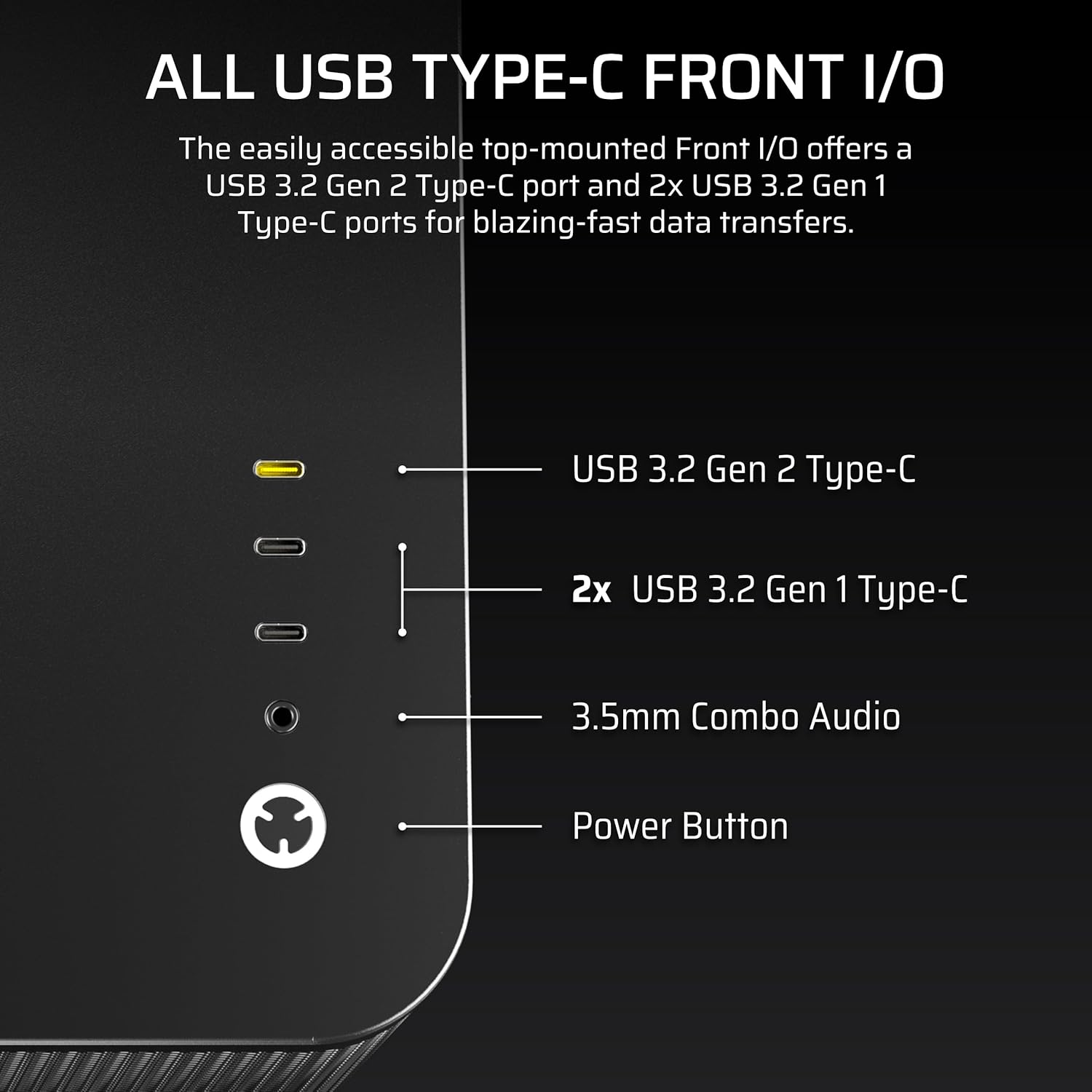
Image: A close-up of the top-mounted front I/O panel of the CORSAIR AIR 5400 RS-R ARGB case. The image clearly labels the USB 3.2 Gen 2 Type-C port, two USB 3.2 Gen 1 Type-C ports, the 3.5mm combo audio jack, and the power button.
7. GPU Support and Clearance
The spacious interior of the AIR 5400 easily accommodates oversized graphics cards. An included GPU Anti-sag Stabilization Arm keeps your GPU steady, preventing damage to your PCIe slot.
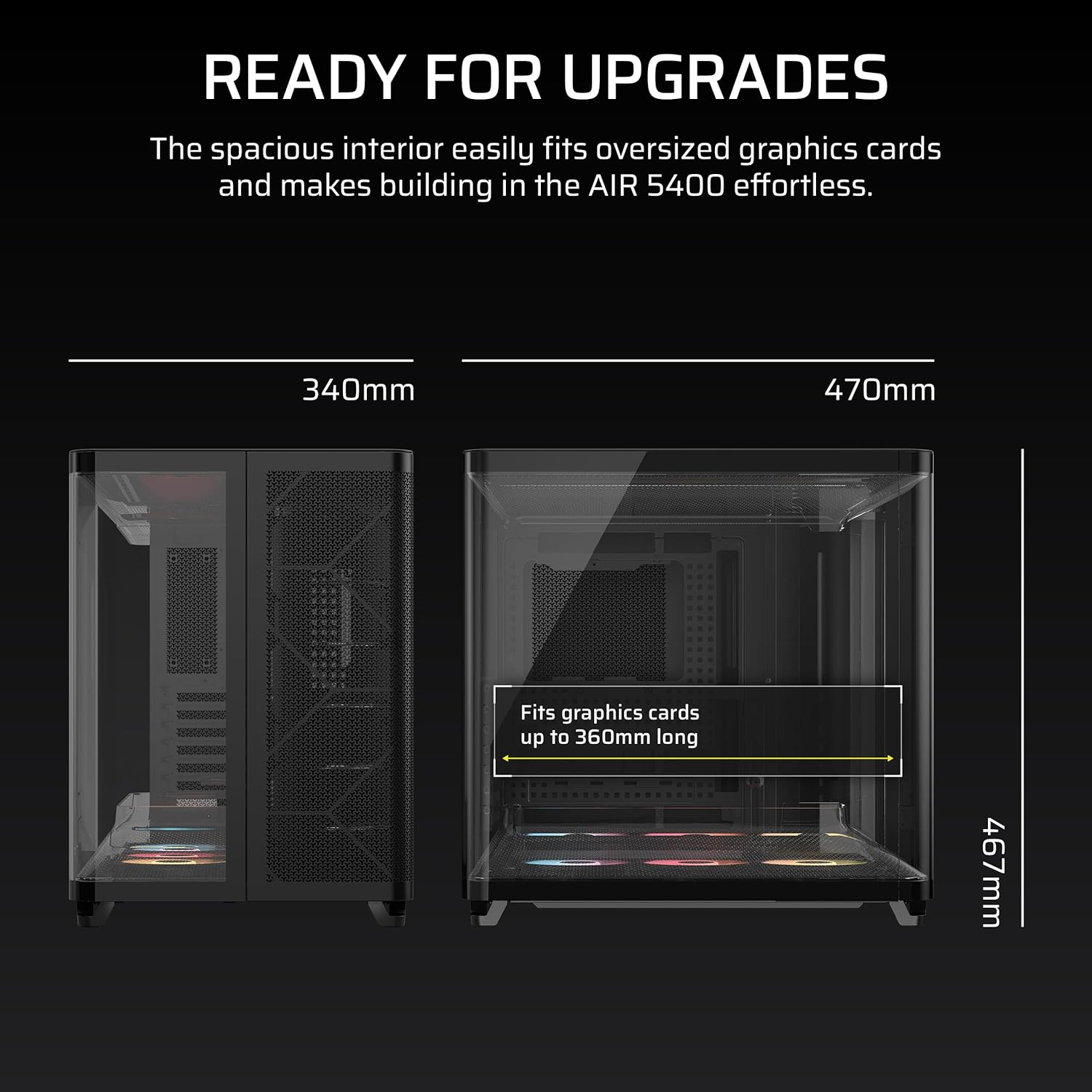
Image : Un diagramme montrantasing the internal dimensions and GPU clearance of the CORSAIR AIR 5400 RS-R ARGB case. It indicates that the case can fit graphics cards up to 360mm long, highlighting its readiness for upgrades.
8. Installation de stockage
The PSU and storage chamber provides dedicated space for your storage drives. The case supports 4 internal bays, allowing for flexible storage configurations.
Mode d'emploi
Once your system is fully assembled, connect all necessary peripherals and power cables. Press the power button on the top I/O panel to start your PC. The pre-installed RS120-R ARGB fans will provide immediate cooling and customizable RGB lighting. Fan speeds and RGB effects can typically be controlled via motherboard software or dedicated Corsair iCUE software, depending on your system configuration.
Entretien
Regular maintenance ensures optimal performance and longevity of your PC components. The CORSAIR AIR 5400 RS-R ARGB is designed for easy cleaning and access.
- Filtres à poussière : The case includes dust filters to prevent dust buildup. Regularly remove and clean these filters to maintain optimal airflow.
- Nettoyage intérieur: The hinged glass panels and removable components allow for easy access to the interior. Use compressed air to clear dust from fans, radiators, and other components.
- Entretien des panneaux de verre : Clean glass panels with a soft, lint-free cloth and a mild glass cleaner to avoid scratches and maintain clarity.
Dépannage
If you encounter issues with your CORSAIR AIR 5400 RS-R ARGB PC case, consider the following:
- Pas d'alimentation : Ensure all power supply unit (PSU) cables are securely connected to the motherboard, GPU, and peripherals. Verify the PSU switch is in the 'ON' position and the power cable is firmly plugged into both the PSU and a working outlet.
- Surchauffe: Check that all case fans and CPU cooler fans are spinning correctly. Ensure dust filters are clean and there are no obstructions to airflow. Verify thermal paste application on the CPU.
- Problèmes d'éclairage RVB : Confirm that all ARGB fan cables are correctly connected to your motherboard's ARGB headers or a dedicated RGB controller. Update motherboard RGB software or Corsair iCUE software to the latest version.
- Bruit du ventilateur: If fans are excessively loud, check for obstructions or loose mounting screws. Adjust fan curves in your motherboard's BIOS or fan control software to a quieter profile.
Caractéristiques
| Fonctionnalité | Détail |
|---|---|
| Marque | Corsaire |
| Nom du modèle | AIR 5400 RS-R ARGB |
| Numéro de modèle | CC-9011318-WW |
| Type de cas | Mid Tower |
| Couleur | Noir |
| Matériel | Acrylic, Plastic, Tempered Glass |
| Compatibilité de la carte mère | ATX |
| Méthode de refroidissement | Air |
| Type de montage de l'alimentation | Montage par le bas |
| Total USB 3.0 Ports | 2 |
| Other Special Features | Built-In Fan, Dust Filter, RGB Lighting |
| Internal Bays Quantity | 4 |
| Poids de l'article | 13.92 kilogrammes |
| Dimensions de l'article P x L x H | 18.5"P x 13.39"L x 18.39"H |
Informations sur la garantie
This CORSAIR AIR 5400 RS-R ARGB Mid-Tower PC Case is covered by a Garantie constructeur de 2 ans. Please retain your proof of purchase for warranty claims. For detailed terms and conditions, refer to the official Corsair website ou contacter le support client.
Soutien
For further assistance, technical support, or to access additional resources, please visit the official Corsair support webSur ce site, vous trouverez une FAQ, des pilotes à télécharger et les coordonnées du service client.
Vidéo officielle du produit
Vidéo : Une bande-annonce officielleasing the CORSAIR AIR 5400 RS-R ARGB Mid-Tower PC Case, highlighting its design, features, and cooling capabilities.