
1. Introduction
This manual provides detailed instructions for the installation, operation, and maintenance of your AQUBT Smart RGB Ceiling Fan with Lights and Remote, Model 1065. Please read this manual thoroughly before installation and use to ensure safe and efficient operation. Keep this manual for future reference.

Image 1.1: The AQUBT Smart RGB Ceiling Fan with Lights and Remote.
2. Consignes de sécurité
Veuillez respecter les consignes de sécurité suivantes afin d'éviter toute blessure ou tout dommage au produit :
- Assurez-vous que l'alimentation électrique est débranchée avant toute installation, nettoyage ou maintenance.
- L'installation doit être effectuée par un électricien qualifié conformément aux normes électriques locales.
- Fixez solidement le ventilateur à une solive de plafond ou à une structure de support appropriée capable de supporter son poids.
- Do not connect the fan to a dimmer switch or a variable speed switch designed for traditional fans. Use only a standard on/off switch.
- Pendant le fonctionnement du ventilateur, tenez vos mains, vos cheveux et vos vêtements éloignés des pales.
- Ce ventilateur est conçu pour une utilisation en intérieur uniquement.
- The protective grille is designed to prevent accidental contact with rotating blades, making it suitable for rooms with children and pets.

Image 2.1: Correct and incorrect switch types for installation.
3. Contenu du colis
Avant de commencer l'installation, vérifiez que tous les composants sont présents et en bon état. Si des pièces sont manquantes ou endommagées, contactez le service client.
- AQUBT Smart RGB Ceiling Fan (Model 1065)
- Télécommande
- Mounting Hardware (Self-tapping screws, Expansion tubes, Expansion screws, Junction box screws, Washers, Wire connectors)
- Manuel d'instructions (ce document)

Image 3.1: Included accessories and fan components.
4. Configuration et installation
The AQUBT Smart RGB Ceiling Fan is designed for flush mount installation. No assembly of fan blades is required as it features a bladeless design with a protective grille.
4.1 Liste de contrôle de pré-installation
- Ensure power is turned off at the circuit breaker before starting.
- Vérifiez que vous disposez de tous les outils nécessaires (tournevis, pince à dénuder, échelle, etc.).
- Verify the mounting location can support the fan's weight (approximately 6 pounds).
4.2 étapes d'installation
- Installation du support de montage : Fixez le support de montage à la boîte de jonction au plafond à l'aide des vis et rondelles fournies. Assurez-vous qu'il est bien fixé.
- Câblage : Connect the fan's electrical wires to the household wiring according to standard electrical codes (e.g., black to black, white to white, ground to ground). Use the included wire connectors.
- Fixation du boîtier du ventilateur : Carefully lift the fan housing and attach it to the mounting bracket. Secure it with the appropriate screws.
- Restauration de puissance : Once the fan is securely mounted and wired, restore power at the circuit breaker.
5. Mode d'emploi
Your AQUBT Smart RGB Ceiling Fan offers multiple control methods for convenience.
5.1 Fonctionnement de la télécommande
The included remote control provides direct access to all fan and light functions.

Image 5.1 : Fonctions de la télécommande.
- Bouton marche/arrêt : Permet d'allumer ou d'éteindre le ventilateur et la lumière.
- Marche/arrêt du ventilateur : Controls the fan motor independently.
- Vitesse du ventilateur (1-6) : Adjusts the fan speed from 1 (low) to 6 (high).
- Avant/Arrière : Changes the direction of airflow (summer/winter mode).
- Main Light ON/OFF: Controls the main white light independently.
- Luminosité +/- : Adjusts the brightness of the light (10% to 100%).
- Température de couleur +/- : Cycles through warm, neutral, and cool white light temperatures.
- Lumière ambiante RVB : Activates and cycles through 1000+ RGB color modes.
- Mode veilleuse: Active un mode d'éclairage à faible luminosité.
- Timer Mode (1-4H): Sets a timer for the fan and/or light to turn off automatically after 1, 2, 3, or 4 hours.
5.2 Contrôle des applications (Tuya Smart Life)
For advanced features and remote access, download the Tuya Smart Life app on your smartphone.
- Téléchargez l'application: Rechercher Recherchez « Tuya Smart » ou « Smart Life » dans votre boutique d'applications.
- Jumelage : Follow the in-app instructions to pair your fan with your 2.4GHz Wi-Fi network.
- Caractéristiques: The app allows for global remote control, one-touch preset modes (Away/Home/Sleep), precision countdown timers, customizable recurring timer functions, and access to 1000+ RGB color modes. The power outage mode ensures lights remain off after restoration.

Image 5.2: Remote control via mobile application.

Image 5.3: App-controlled timer function.
5.3 Commande vocale (Alexa/Google Home)
The fan is compatible with Amazon Alexa and Google Home for convenient voice commands.
- Se connecter à l'assistant vocal : Link your Tuya Smart Life account to your Alexa or Google Home app.
- Commandes vocales : Use commands such as "Alexa, turn on the ceiling fan," "Hey Google, set the fan speed to 3," or "Alexa, change the ceiling fan light to blue."

Image 5.4: Voice control integration with smart home devices.
5.4 Fonctionnalités d'éclairage
- LED dimmable : Réglez la luminosité de 10% à 100%.
- Température de couleur: Choose from warm, neutral, or cool white light (e.g., 3000K-6500K range).
- Lumière ambiante RVB : Access over 1000 vibrant RGB color modes to set various moods.

Image 5.5: Lighting features including brightness, RGB, and color temperature adjustments.
5.5 Fan Features
- Vent à 6 vitesses : Choisissez parmi six vitesses de ventilation pour un confort optimal.
- Flux d'air réversible : Change fan direction for summer (downward airflow for cooling) or winter (upward airflow for better air circulation).
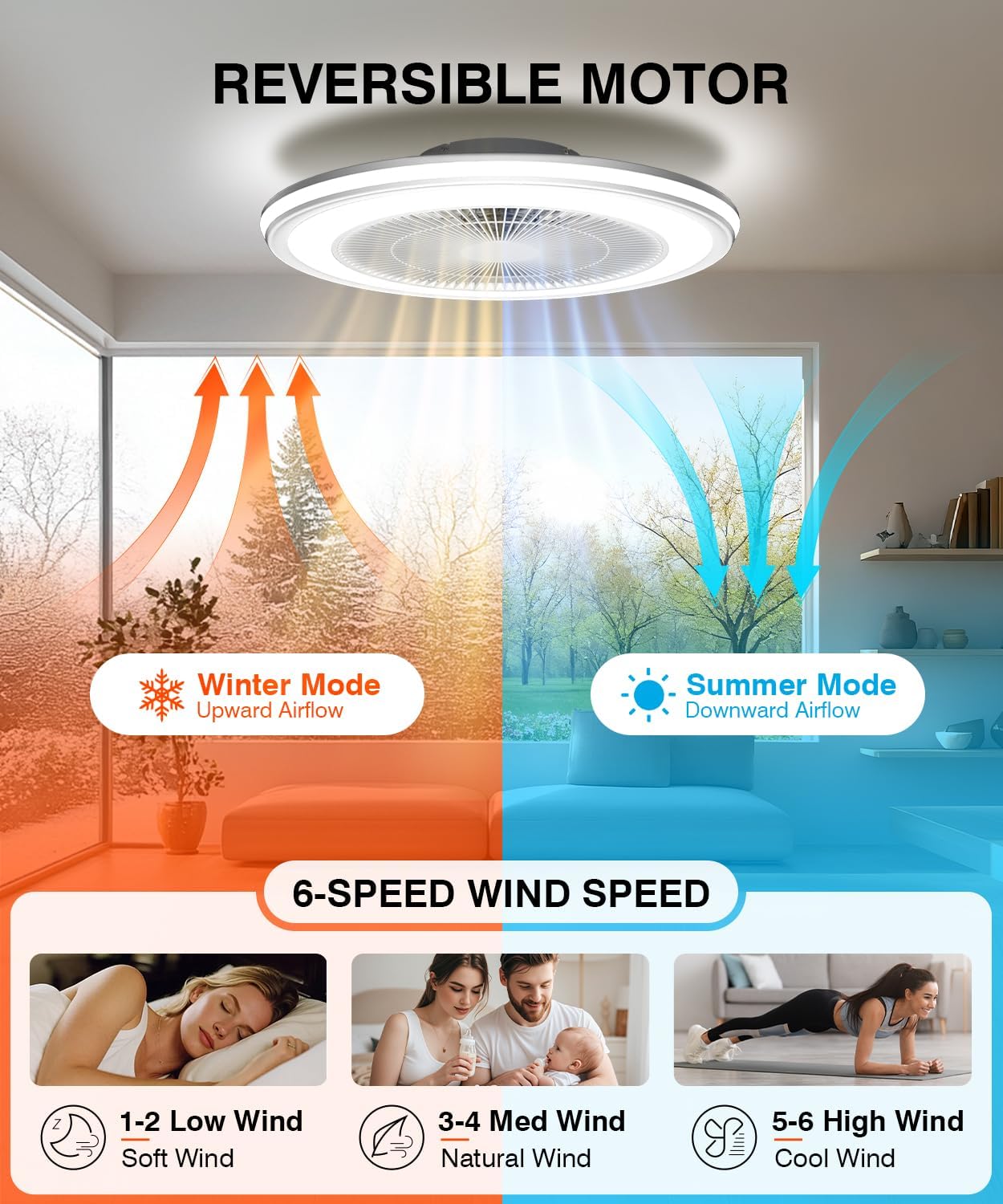
Image 5.6: Reversible motor and 6-speed fan settings.
6. Entretien
Un entretien régulier garantit la longévité et les performances optimales de votre ventilateur de plafond.
- Nettoyage: Débranchez l'alimentation avant le nettoyage. Utilisez un chiffon doux et sec.amp cloth to wipe down the fan housing and grille. Do not use abrasive cleaners or solvents.
- Inspection: Vérifiez régulièrement toutes les vis de fixation et les connexions pour vous assurer qu'elles sont bien serrées.
- Aucune lubrification requise : Le moteur du ventilateur est lubrifié en permanence et ne nécessite aucun huilage supplémentaire.
7. Dépannage
Si vous rencontrez des problèmes avec votre ventilateur, consultez les problèmes courants et leurs solutions ci-dessous :
| Problème | Cause possible | Solution |
|---|---|---|
| Le ventilateur ne s'allume pas. | Pas d'alimentation électrique ; câblage desserré ; pile de la télécommande faible. | Vérifiez le disjoncteur ; assurez-vous que tous les fils sont bien connectés ; remplacez les piles de la télécommande. |
| La lumière ne s'allume pas. | No power supply; loose wiring; light function off on remote/app. | Check power; verify wiring; ensure light is activated via remote or app. |
| La télécommande ne fonctionne pas. | Low battery; obstruction; pairing issue. | Replace remote batteries; ensure no obstructions between remote and fan; re-pair remote if necessary (refer to specific pairing instructions if provided separately). |
| Le contrôle de l'application ne fonctionne pas. | Problème de connexion Wi-Fi ; appariement incorrect ; application obsolète. | Ensure 2.4GHz Wi-Fi is active; re-pair fan with app; update app to the latest version. |
| Le ventilateur fait un bruit inhabituel. | Fixation desserrée ; problème de composant interne. | Check mounting screws for tightness; if noise persists, contact customer support. |
8. Spécifications
| Fonctionnalité | Spécification |
|---|---|
| Modèle | 1065 |
| Marque | AQUBT |
| Dimensions (L x l x H) | 20" x 20" x 6.5" |
| Matériel | Acrylique |
| Source de lumière | LED intégrée |
| Luminosité | Up to 4800 Lumens (Dimmable 10%-100%) |
| Température de couleur | Warm/Neutral/Cool (3000K-6500K) |
| Modes RVB | 1000+ Ambient Light Colors |
| Vitesses des ventilateurs | 6 vitesses |
| Direction du flux d'air | Reversible (Summer/Winter) |
| Méthodes de contrôle | Remote Control, Mobile App (Tuya Smart Life), Voice Control (Alexa/Google Home) |
| Compatibilité Wi-Fi | 2.4 GHz |
| Poids de l'article | 6 livres |
| Assemblage requis | Non |
9. Garantie et assistance
AQUBT is committed to providing quality products and customer satisfaction.
- Garantie: This product includes a two-year quality guarantee service from the date of purchase.
- Support technique : We offer 24-hour online technical support. For assistance, please refer to the contact information provided with your purchase or visit the official AQUBT website.

Image 9.1: AQUBT Warranty and Support Information.