
1. Introduction
The FUJIFILM X-T5 is a high-performance mirrorless digital camera designed for photographers and videographers seeking exceptional image quality and intuitive control. It features the latest 40.2-megapixel X-Trans CMOS 5 HR sensor, delivering stunning detail and vibrant colors. The camera incorporates a 7-stop in-body image stabilization (IBIS) system, ensuring sharp images even in challenging conditions. With its classic, dial-based layout, the X-T5 offers a tactile and efficient user experience. Advanced capabilities include Pixel Shift Multi-Shot for 160-megapixel files and versatile video recording up to 6.2K in 4:2:2 10-bit color internally, with support for 12-bit Apple ProRes RAW and Blackmagic RAW via HDMI.
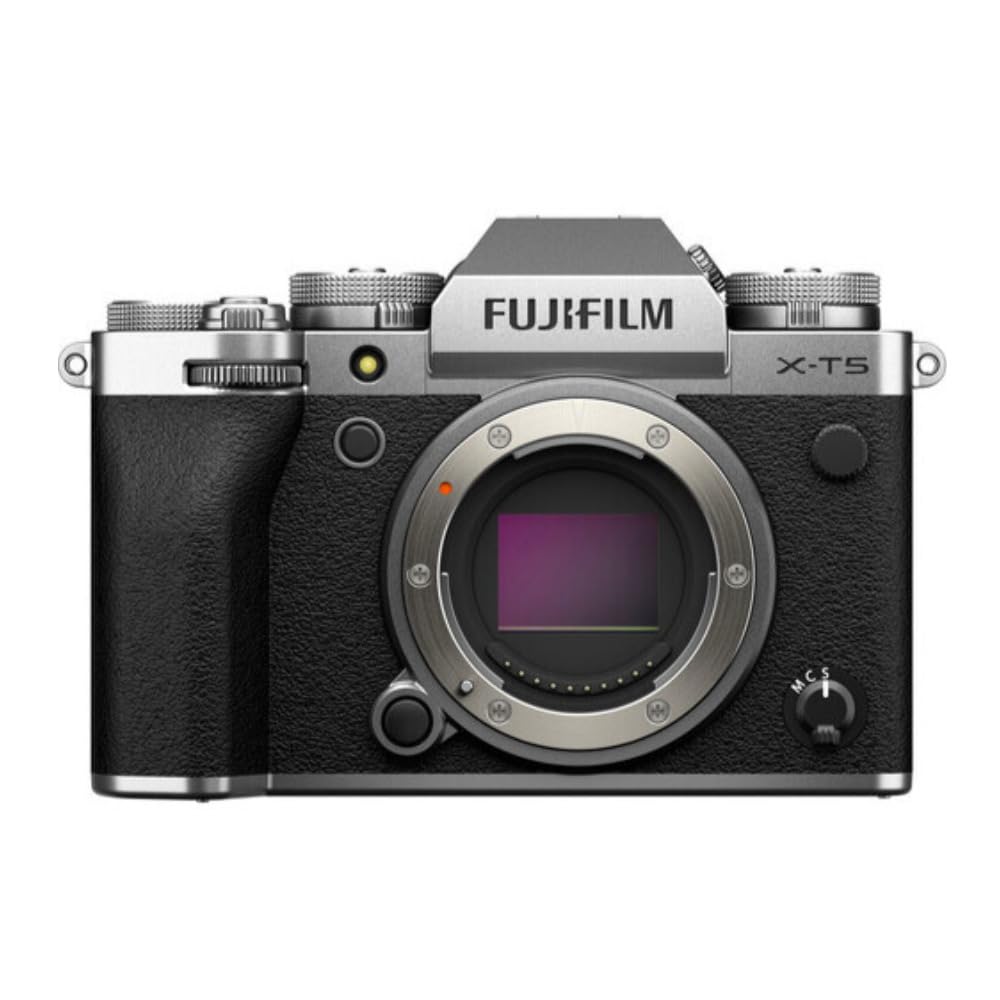
Figure 1.1 : Face avant view of the FUJIFILM X-T5 Mirrorless Digital Camera Body.
2. Contenu de la boîte
À l'ouverture du colis, vérifiez que tous les éléments suivants sont inclus :
- FUJIFILM X-T5 Camera Body
- Batterie (lithium-ion)
- Charger with multiple international adapters
- Câble USB-C
- Wide Camera Strap
3. Installation
3.1 Installation et charge de la batterie
To install the battery, open the battery compartment cover located on the bottom of the camera. Insert the supplied Lithium Ion battery with the contacts facing the correct direction, then close the cover securely. For charging, connect the camera to the supplied charger using the USB-C cable. The charging indicator will illuminate during the charging process and turn off when complete. A full charge typically takes approximately 3 hours.

Figure 3.1: Left side of the camera, showing the battery and memory card compartment.
3.2 Insertion de la carte mémoire
The X-T5 supports dual SD card slots. Open the compartment cover on the left side of the camera. Insert the SD cards into the designated slots until they click into place. Ensure the cards are inserted with the correct orientation to prevent damage. Close the cover firmly.

Figure 3.2: Left side of the camera with memory card slots open.
3.3 Fixation d'un objectif
Align the white dot on the lens with the white dot on the camera's lens mount. Gently push the lens into the mount and rotate it clockwise until it clicks into place. To remove the lens, press the lens release button on the camera body and rotate the lens counter-clockwise.

Figure 3.3 : Face avant view of the camera, highlighting the lens mount.
3.4 Mise sous tension initiale et paramètres de base
Turn the camera on using the power switch. The first time you power on, you will be guided through initial setup steps, including selecting your language, setting the date and time, and configuring basic regional settings. Follow the on-screen prompts to complete this process.
4. Utilisation de l'appareil photo
4.1 contrôles surview
The X-T5 features a classic, dial-based control layout for quick and intuitive adjustments. Key controls include:
- Cadran de vitesse d'obturation : Located on the top plate, this dial allows direct control over shutter speed.
- Cadran ISO : Also on the top plate, for adjusting the camera's sensitivity to light.
- Cadran de compensation d'exposition : Used to fine-tune exposure levels.
- Still/Movie Switch: A dedicated switch for quickly transitioning between still photography and video recording modes.
- Écran LCD arrière : A 3-inch, three-way tilting LCD with 1.84 million pixels for framing and reviewtirs.

Figure 4.1: Top plate controls of the FUJIFILM X-T5.

Figure 4.2 : Arrière view of the camera with the LCD screen and various control buttons.

Figure 4.3: The three-way tilting LCD screen for flexible viewangles d'inclinaison.
4.2 Modes de prise de vue
The X-T5 offers a variety of shooting modes to suit different photographic scenarios. These include:
- Coutume: User-defined settings for specific shooting preferences.
- Paysage: Optimized for capturing expansive outdoor scenes.
- Macro: Pour la photographie rapprochée de petits sujets.
- Manuel: Contrôle total de l'ouverture, de la vitesse d'obturation et de l'ISO.
- Film: Mode dédié à l'enregistrement vidéo.
- Portrait: Enhances skin tones and blurs backgrounds for flattering portraits.
- Priorité à l'obturateur : Allows manual control of shutter speed while the camera sets aperture.
- Sportif: High-speed continuous shooting for capturing fast-moving subjects.
4.3 Image Stabilization (IBIS)
The X-T5 features a 7-stop in-body image stabilization (IBIS) system. This system compensates for camera shake, allowing for sharper handheld shots at slower shutter speeds and smoother video footage. IBIS works with any attached lens, providing stabilization benefits across your entire lens collection.

Figure 4.4 : Interne view of the IBIS system.
4.4 Système autofocus
The camera utilizes a Hybrid Autofocus system with 425 phase detection sensor points, ensuring fast and accurate focusing. This system is effective for both still photography and video recording, with various focus modes including Continuous-Servo AF (AF-C) for tracking moving subjects.

Figure 4.5: Autofocus system demonstrating eye detection.
4.5 Enregistrement vidéo
The X-T5 is capable of recording high-quality video up to 6.2K resolution. It supports internal recording in 4:2:2 10-bit color. For professional workflows, 12-bit Apple ProRes RAW and Blackmagic RAW can be output via HDMI to compatible external recorders.
5. Fonctionnalités avancées
5.1 Pixel Shift Multi-Shot
The Pixel Shift Multi-Shot mode allows the camera to capture multiple images, shifting the sensor by a small increment between each shot. These images are then combined to create a single, ultra-high-resolution 160-megapixel file, ideal for subjects requiring maximum detail and color accuracy.
5.2 Film Simulation Modes
Fujifilm's renowned Film Simulation modes allow you to replicate the look of classic photographic films directly in-camera. These modes apply distinct color and tonal characteristics to your images, offering creative flexibility without extensive post-processing.

Figure 5.1: Film Simulation icon.
5.3 Connectivité
The X-T5 features both Bluetooth and Wi-Fi connectivity. Use these wireless functions to transfer images to your smartphone or tablet, control the camera remotely, or connect to other compatible devices for seamless workflow integration.
6. Entretien
6.1 Nettoyage de l'appareil photo et de l'objectif
Regular cleaning helps maintain your camera's performance and longevity. Use a soft, lint-free cloth to wipe the camera body. For the lens, use a lens brush or air blower to remove dust, followed by a specialized lens cleaning solution and cloth if necessary. Avoid touching the sensor directly. Always power off the camera before cleaning.
6.2 mises à jour du micrologiciel
Fujifilm periodically releases firmware updates to improve camera performance, add new features, and fix bugs. Check the official Fujifilm website for the latest firmware versions for your X-T5. Follow the provided instructions carefully when performing an update to avoid damaging the camera.
7. Dépannage
7.1 Problèmes courants et solutions
| Problème | Cause/solution possible |
|---|---|
| La caméra ne s'allume pas. | Assurez-vous que la batterie est complètement chargée et correctement insérée. Vérifiez que l'interrupteur d'alimentation est en position « ON ». |
| Les images sont floues | Check focus settings (autofocus or manual focus). Ensure sufficient shutter speed for the lighting conditions. Verify that the lens is clean and properly attached. Image stabilization may be off or ineffective in extreme conditions. |
| Erreur de carte mémoire | Réinsérez la carte mémoire. Essayez une autre carte mémoire compatible. Formatez la carte (cela effacera toutes les données). |
| Wi-Fi/Bluetooth connection fails | Ensure Wi-Fi/Bluetooth is enabled on both the camera and the connecting device. Check network settings and password. Restart both devices. |
8. Spécifications
Key technical specifications for the FUJIFILM X-T5 camera body:
| Fonctionnalité | Spécification |
|---|---|
| Résolution du capteur photo | 40.2 MP |
| Type de capteur | X-Trans CMOS 5 HR BSI |
| Stabilisation d'image | Sensor-shift (7-stop IBIS) |
| Montages compatibles | Fujifilm X |
| Vitesse d'obturation maximale | 1/180,000 sec (Electronic Shutter) |
| Prise de vue en continu | 15 FPS (Mechanical Shutter) |
| Résolution vidéo | Up to 6.2K (4320p) |
| Type d'affichage | 3-inch Tilting LCD |
| Technologie de connectivité | Bluetooth, Wi-Fi |
| Type de batterie | Lithium-ion |
| Numéro de modèle | 16953883 |
| Code UPC | 074101212594 |
9. Garantie et assistance
9.1 Garantie du fabricant
The FUJIFILM X-T5 Mirrorless Digital Camera Body comes with a 1-year manufacturer's warranty. This warranty covers defects in materials and workmanship under normal use. Please retain your proof of purchase for warranty claims.
9.2 Assistance clientèle
For technical assistance, troubleshooting beyond this manual, or warranty service, please contact Fujifilm customer support. You can find contact information and additional resources on the official Fujifilm website: Assistance Fujifilm.