
Introduction
Thank you for choosing the AOSU Solar Wall Light Camera System. This system integrates a security camera with a solar-powered wall light, offering comprehensive surveillance and illumination for your property. This manual provides detailed instructions for installation, operation, maintenance, and troubleshooting to ensure optimal performance of your device.
Contenu du colis
Please check the package for the following items. If any items are missing or damaged, please contact AOSU customer support.
- AOSU Solar Wall Light Camera Unit
- Detachable Solar Panel
- Support de montage
- Mounting Screw Kit (screws, wall anchors)
- Câble de chargement USB
- Guide de démarrage rapide
- Gabarit de perçage
Produit terminéview
Familiarize yourself with the components of your AOSU Solar Wall Light Camera System.
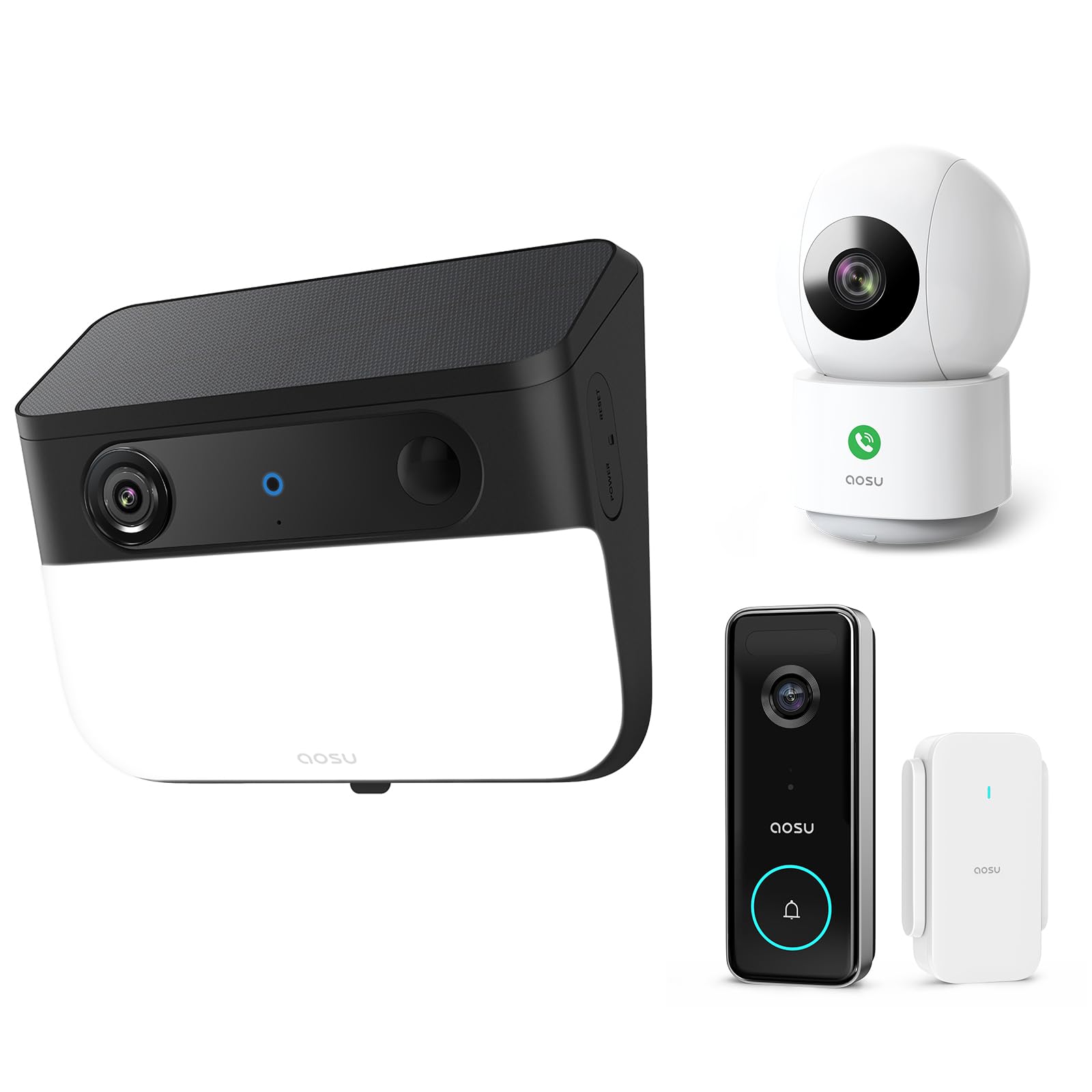
Image 1: AOSU Solar Wall Light Camera System. This image displays the main camera unit integrated with a wall light, alongside its detachable solar panel.
- Objectif de l'appareil photo : Capture une vidéotage.
- Panneau lumineux LED : Provides 400-lumen illumination.
- Capteur PIR : Detects passive infrared motion.
- Capteur radar : Enhances motion detection accuracy.
- Microphone: Enregistre le son.
- Conférencier: Enables two-way audio communication and siren.
- Port pour panneau solaire : Connects the detachable solar panel for charging.
- Bouton de réinitialisation : Used for factory reset (typically located under a cover).
- Voyant d'état : Shows device status (e.g., charging, connected, recording).
Installation
1. Charge initiale
Before installation, fully charge the camera unit using the provided USB cable. Connect the USB cable to the charging port on the camera and a standard 5V/2A USB power adapter (not included). The status indicator light will show charging progress.
2. Installation de l'application et création du compte
- Download the "AOSU Security" app from the Apple App Store or Google Play Store.
- Ouvrez l'application et créez un nouveau compte, ou connectez-vous si vous en avez déjà un.
3. Couplage de l'appareil
- Dans l'application AOSU Security, appuyez sur l'icône « + » pour ajouter un nouvel appareil.
- Select "Solar Wall Light Camera" from the list of devices.
- Follow the on-screen instructions to power on the camera and scan the QR code displayed in the app using the camera's lens.
- Connect the camera to your 2.4GHz Wi-Fi network. Ensure your Wi-Fi signal is strong at the installation location.
- Once connected, name your device and complete the pairing process.
4. Montage de la caméra et du panneau solaire
Choisissez un emplacement de montage qui offre une vue dégagée. view de la zone que vous souhaitez surveiller et reçoit ampla lumière directe du soleil pour le panneau solaire.
- Marquage: Use the drill template to mark the screw positions on the wall.
- Forage: Drill holes at the marked positions. Insert wall anchors if mounting on masonry or stucco.
- Support de montage: Fixez le support de montage au mur à l'aide des vis fournies.
- Attacher la caméra : Slide the camera unit onto the mounting bracket until it clicks into place. Adjust the camera angle as needed.
- Installation de panneaux solaires :
- Mount the detachable solar panel in a location that receives maximum direct sunlight throughout the day.
- Connect the solar panel cable to the solar panel port on the camera unit. Ensure a secure connection.
Mode d'emploi
En direct View et enregistrement
- Open the AOSU Security app and select your camera to access the live view.
- Du direct view, you can manually record video, take screenshots, and use two-way audio.
- Recorded events are stored in the cloud or on a local storage card (if installed).
Détection de mouvement et alertes
- The camera utilizes advanced radar and PIR motion sensors for accurate detection.
- Configure motion detection sensitivity and activity zones within the app settings.
- Activez les notifications push pour recevoir des alertes sur votre smartphone en cas de détection de mouvement.
- Suivi intelligent des mouvements : Activate this feature in the app to allow the camera to automatically follow detected objects within its field of view.
Wall Light Operation
- The 400-lumen wall light automatically activates at night when motion is detected.
- Adjust light duration and brightness settings via the AOSU Security app.
Vision nocturne en couleur
The camera provides vivid, full-color images even in low-light conditions or complete darkness, thanks to its advanced color night vision technology. This feature activates automatically.
Doorbell Camera Functionality (if applicable)
If your model includes doorbell functionality, visitors can press the doorbell button. This will trigger a notification on your phone, allowing you to see and speak to the visitor via the app.
Entretien
- Nettoyage: Regularly wipe the camera lens, light panel, and solar panel with a soft, damp Utiliser un chiffon pour enlever la poussière et la saleté. Ne pas utiliser de produits chimiques agressifs.
- Efficacité des panneaux solaires : Veillez à ce que le panneau solaire reste dégagé de tout obstacle (feuilles, neige, etc.) afin d'optimiser l'efficacité de la charge.
- Mises à jour du micrologiciel : Periodically check the AOSU Security app for available firmware updates. Keeping your device's firmware up-to-date ensures optimal performance and security. Follow the in-app instructions for updates.
- Entretien de la batterie: While solar-powered, extreme cold or prolonged periods without sunlight may reduce battery performance. Ensure the solar panel receives adequate sunlight.
Dépannage
La caméra ne se connecte pas au Wi-Fi
- Assurez-vous que votre réseau Wi-Fi fonctionne en 2.4 GHz. La caméra n'est pas compatible avec le Wi-Fi 5 GHz.
- Check Wi-Fi signal strength at the camera's location. Move the router closer or use a Wi-Fi extender if necessary.
- Vérifiez que le mot de passe Wi-Fi saisi dans l'application est correct.
- Try resetting the camera by pressing the reset button for 5 seconds until you hear a prompt.
Mauvaise qualité d'image
- Nettoyez l'objectif de l'appareil photo pour enlever toute trace de doigts ou saleté.
- Ensure there is adequate lighting in the monitored area, especially for color night vision.
- Vérifiez la vitesse de votre connexion internet. Une connexion lente peut affecter le direct. view qualité.
Motion Detection Not Working or Too Many False Alerts
- Ajustez les paramètres de sensibilité de la détection de mouvement dans l'application.
- Define specific activity zones to focus detection on critical areas and ignore irrelevant movements.
- Assurez-vous que la caméra view n'est pas obstrué par des objets en mouvement comme des branches d'arbres.
Le panneau solaire ne charge pas
- Vérifiez que le câble du panneau solaire est bien connecté à la caméra.
- Ensure the solar panel is positioned to receive direct sunlight for several hours daily, free from shade.
- Nettoyez la surface du panneau solaire pour enlever toute saleté ou débris.
Caractéristiques
| Résolution | 5MP Ultra HD (3K) |
| Vision nocturne | Vision nocturne couleur avancée |
| Rendement lumineux | 400 lumens |
| Détection de mouvement | Triple Motion Detection (Radar + PIR + Human Detection) |
| Suivi | Suivi de mouvement intelligent |
| Connectivité | Wi-Fi 2.4 GHz |
| Source d'énergie | Batterie rechargeable, panneau solaire |
| Lentille optique | 7-piece ultra-clear optical glass lens |
| ASIN | B0F7Y1PRVT |
| Premier disponible | 25er mars 2025 |
Garantie et assistance
AOSU provides a limited warranty for this product. For detailed warranty information, please refer to the warranty card included in your package or visit the official AOSU website. For technical support, product inquiries, or warranty claims, please contact AOSU customer service through the contact information provided on the official websur le site ou dans l'application AOSU Security.
Officiel Website: www.aosu.com (Remarque : Ceci est un espace réservé URLVeuillez vous référer à la documentation de votre produit pour connaître les informations correctes. website.)