
Introduction
The Wurkkos DL03 is a versatile 2-in-1 scuba diving light designed for underwater exploration and signaling. It features a powerful 2800 lumen white light with a focused 26° beam for illumination up to 480 meters, and a 5mW green laser beam for signaling up to 1000 meters. This manual provides detailed instructions for the safe and effective use of your DL03 dive light.
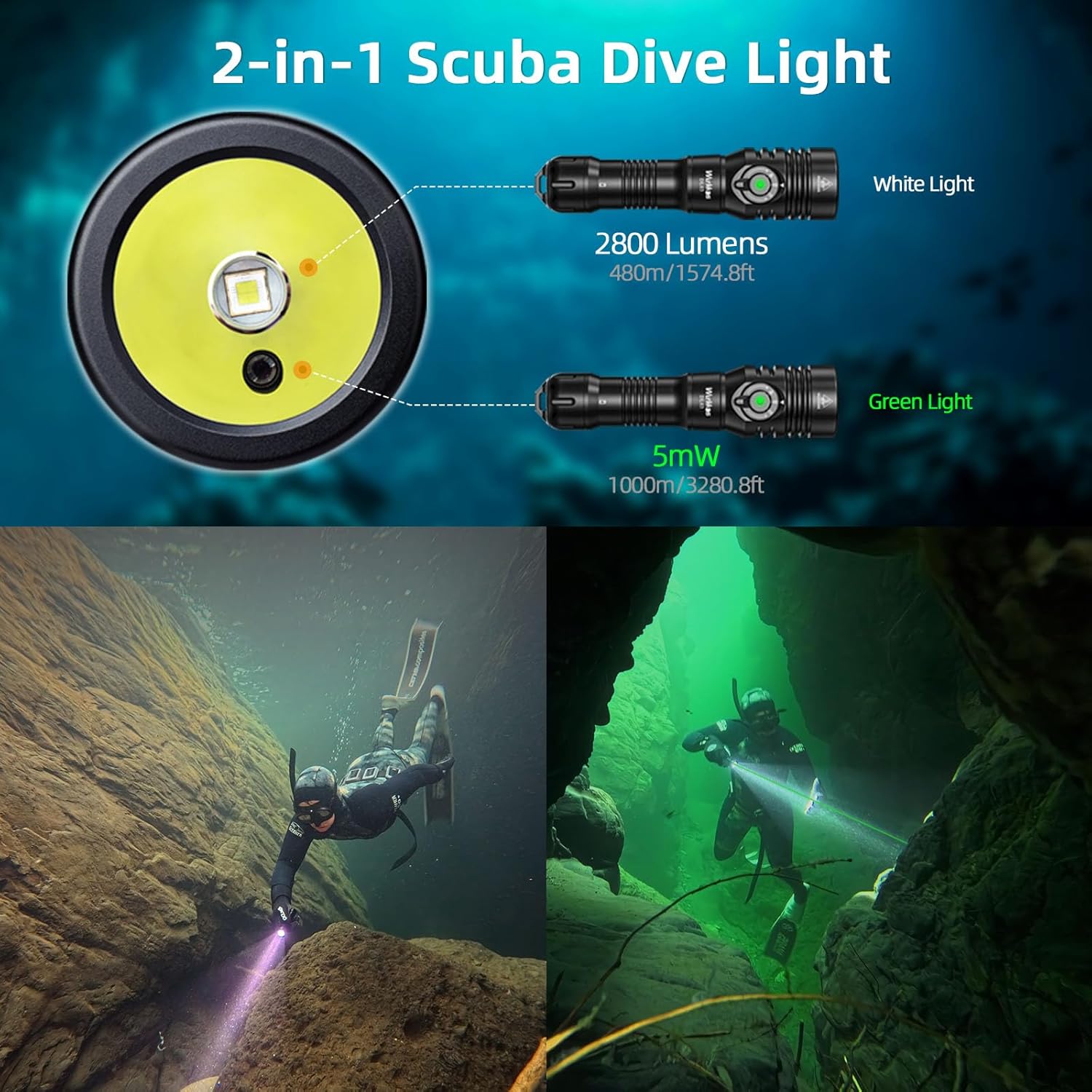
Image: Wurkkos DL03 Dive Light demonstrating its 2-in-1 white light and green laser functions underwater.
Contenu du colis
Upon unboxing your Wurkkos DL03 Dive Light, please ensure all the following items are present:
- Wurkkos DL03 Dive Light x 1
- 21700 5000mAh Lithium-Ion Battery x 1 (pre-installed or separate)
- Câble de charge USB-C x 1
- Longe x 1
- 2 joints toriques de rechange
- Manuel d'utilisation x 1

Image: Wurkkos DL03 Dive Light package contents.
Installation
Installation de la batterie
- Unscrew the tail cap of the dive light.
- Remove any insulation film from the battery.
- Insérez la batterie 21700 avec la borne positive (+) orientée vers la tête de la lampe torche.
- Revissez fermement le capuchon arrière pour assurer un bon contact et une étanchéité parfaite.
Charge initiale
Before first use, fully charge the battery. The DL03 features a hidden USB-C charging port for convenience.
- Dévissez la tête de la lampe torche pour accéder au port de chargement USB-C.
- Connect the provided USB-C cable to the port and a power source.
- The power indicator LED will show charging status (see 'Power Indicator' section).
- Once fully charged, disconnect the cable and securely tighten the head.
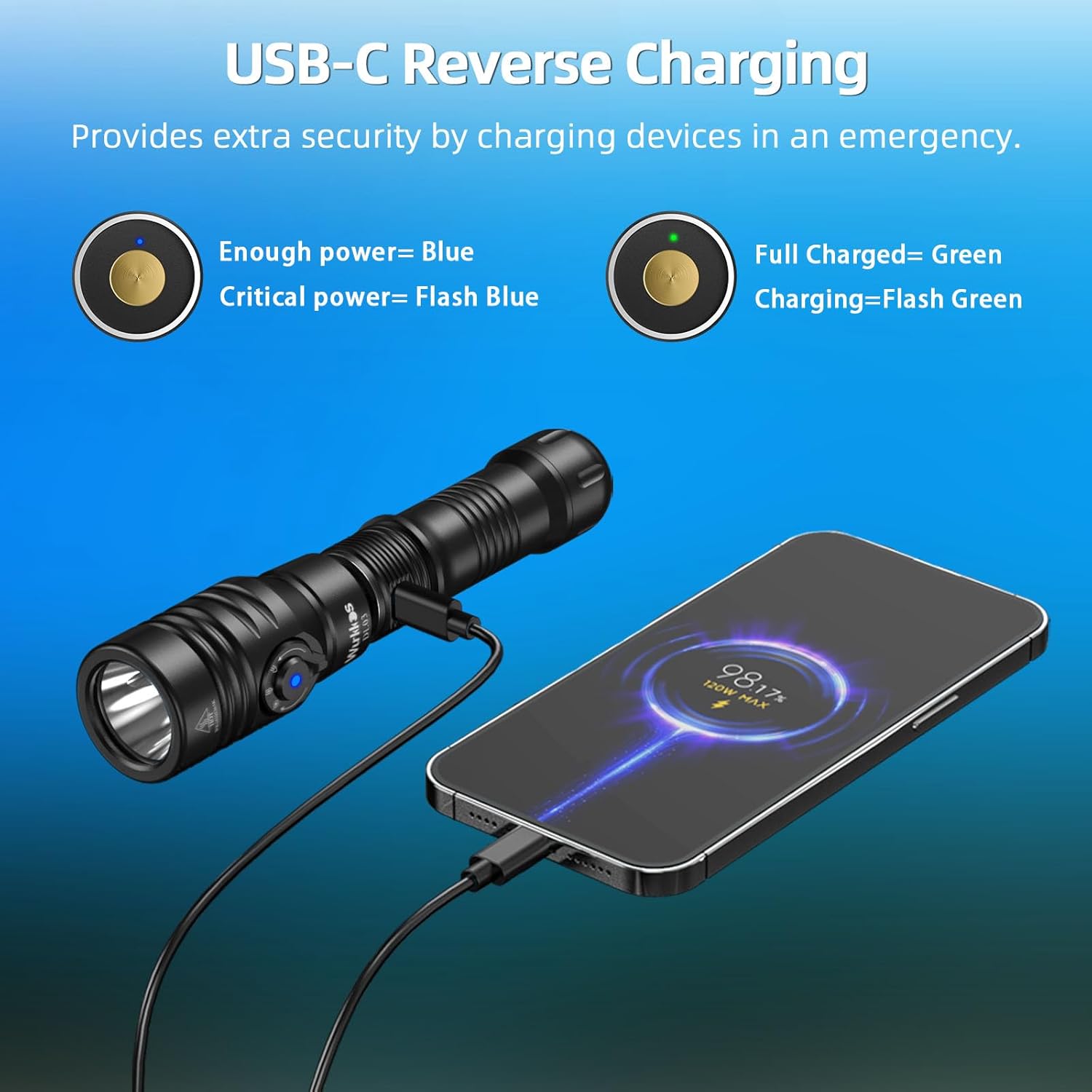
Image: USB-C charging port and reverse charging function.
Mode d'emploi
The DL03 features a side-mounted electronic switch and a magnetic rotary dial for intuitive operation.
Power On/Off and Brightness Adjustment (White Light)
- Pour activer/désactiver : Single-click the side electronic switch.
- Pour régler la luminosité : While the white light is on, long-press the side electronic switch to cycle through Low (100 Lumens), Medium (500 Lumens), High (1200 Lumens), and Turbo (2800 Lumens). The light has a memory function for the last used white light brightness mode.
Mode Switching (Green Beam, White Light, Dual-Beam)
Use the magnetic rotary dial to select the desired light mode:
- Green Beam Mode: Rotate the dial to the green light icon. The green laser will activate.
- Mode lumière blanche : Rotate the dial to the white light icon. The white LED will activate.
- Dual-Beam Mode: Rotate the dial to the combined green and white light icon. Both the green laser and white LED will activate simultaneously.

Image: Easy Operation Interface for Wurkkos DL03.
Video: Demonstration of the Wurkkos DL03 dive light's functions and brightness underwater.
Chargement et chargement inversé
The DL03 features a convenient hidden USB-C charging port and supports reverse charging to power other devices.
Charging the Dive Light
- Unscrew the head of the flashlight to expose the USB-C port.
- Connect the USB-C charging cable to the port and a compatible power adapter.
- The indicator light will show charging status (see 'Power Indicator' section). A full charge typically takes about 2 hours.
- Once charging is complete, disconnect the cable and securely tighten the head to maintain waterproof integrity.
Fonction de charge inversée
In emergencies, the DL03 can act as a power bank to charge other USB-C compatible devices.
- Unscrew the head of the flashlight to expose the USB-C port.
- Connectez votre appareil au port USB-C à l’aide d’un câble compatible.
- The DL03 will begin charging your device.

Image: USB-C Reverse Charging feature.
Indicateur de puissance
The side switch features a built-in battery indicator LED to display the real-time power level:
- Vert uni : 75 % - 100 % de batterie restante.
- Vert clignotant : 50 % - 75 % de batterie restante.
- Rouge uni : 25 % - 50 % de batterie restante.
- Rouge clignotant : Less than 25% battery remaining. Recharge immediately.

Image: Power Indicator and Dual Switch Design.
Entretien
Proper maintenance ensures the longevity and performance of your Wurkkos DL03 Dive Light.
- Joints toriques: Regularly inspect the O-rings for any signs of wear or damage. Lubricate them with silicone grease periodically to maintain the waterproof seal. Replace damaged O-rings with the provided spares.
- Fils: Gardez les filetages propres et légèrement lubrifiés.
- Nettoyage: After each dive, rinse the flashlight thoroughly with fresh water to remove salt and debris. Wipe dry with a soft cloth.
- Stockage: Store the flashlight in a cool, dry place away from direct sunlight and corrosive materials. Remove the battery if storing for extended periods.
Consignes de sécurité
- Indice d'étanchéité : The DL03 is IPX8 rated and can withstand underwater pressure up to 100 meters (3937 ft). Ensure all parts are tightly screwed before diving.
- Sécurité laser: Avoid direct eye exposure to the green laser beam. Do not point the laser at aircraft or people.
- Chaleur: The flashlight may become warm during prolonged use on high or turbo modes. This is normal.
- Sécurité des batteries : Use only recommended 21700 Lithium-Ion batteries. Do not disassemble, short-circuit, or dispose of batteries in fire.
Caractéristiques
| Fonctionnalité | Spécification |
|---|---|
| Modèle | DL03 |
| Type de source lumineuse | LED (White Light) + Green Laser |
| Luminosité blanche | Max 2800 Lumens |
| Green Beam Illumination | Jusqu'à 1000 m (3280.8 pi) |
| White Light Irradiation Distance | Jusqu'à 480 m (1574.8 pi) |
| Angle du faisceau | 26 Degrees (White Light) |
| Source d'énergie | 21700 Lithium Ion Battery (5000mAh) |
| Chargement | USB-C Rechargeable (supports reverse charging) |
| Niveau de résistance à l'eau | IPX8 (100m underwater) |
| Matériel | Aviation Grade High-Quality Aluminum |
| Dimensions | 13 po P x 3 po L x 3 po H (dimensions approximatives) |
| Poids de l'article | 0.65 kilogrammes (1.43 livres) |
Dépannage
If you encounter issues with your DL03 Dive Light, please refer to the following common solutions:
- La lumière ne s'allume pas : Ensure the battery is correctly installed with the positive terminal facing the head. Check if the tail cap is fully tightened. The battery might be depleted; try charging it.
- Fonctionnement intermittent : Clean the battery contacts and threads with a clean cloth. Ensure the battery is fully charged and properly installed.
- Fuite d'eau: Immediately cease use. Inspect O-rings for damage or misalignment. Replace O-rings if necessary and ensure all connections are tightly sealed before resuming use underwater.
- Problèmes de charge : Verify the USB-C cable is securely connected to both the flashlight and the power source. Check the power indicator for charging status. Try a different USB-C cable or power adapter.
If problems persist, please contact Wurkkos customer support for further assistance.
Garantie et assistance
Wurkkos products are designed for durability and performance. For warranty information, product support, or service inquiries, please refer to the contact details provided in your product packaging or visit the official Wurkkos webConsultez le site. Conservez votre reçu d'achat comme preuve d'achat pour toute réclamation au titre de la garantie.