
1. Introduction
Thank you for choosing the ORIA Wireless Indoor Outdoor Weather Station. This device is designed to provide accurate and real-time monitoring of indoor and outdoor temperature and humidity, along with weather forecasts and barometric pressure readings. With its three remote sensors, you can monitor conditions in up to four different locations simultaneously. Please read this manual carefully to ensure proper setup and operation.
2. Contenu de la boîte
- 1 x Main Display Unit (Digital Thermometer Hygrometer)
- 3 x capteurs à distance sans fil
- 1 x Câble d'alimentation USB
- 1 x Manuel d'utilisation
Note: 3 AAA batteries for the main unit and 2 AAA batteries for each remote sensor are non inclus et doit être acheté séparément.
3. caractéristiques du produit
- Surveillance multi-sites : Simultaneously monitors temperature and humidity in four locations (one indoor, three outdoor) using the main unit and three remote sensors.
- Portée sans fil étendue : Sensors transmit data up to 100 meters (328 feet) in open areas.
- Écran LCD couleur : Features a clear, color-coded LCD screen for easy reading of indoor and outdoor data.
- Temperature Alarm Function: Set maximum and minimum temperature alerts for both indoor and outdoor sensors. The main unit measures -9.9°C to 50°C (14.2°F to 122°F), and sensors measure -40°C to 70°C (-40°F to 158°F).
- Prévisions météorologiques: Provides 12-hour weather predictions based on barometric pressure trends, displaying seven weather conditions: sunny, partly cloudy, cloudy, light rain, heavy rain, light snow, and heavy snow.
- Enregistrements MAX/MIN : View maximum and minimum temperature and humidity values recorded over a 24-hour period.
- Indicateur de confort intérieur : Displays comfort levels (Dry, Average, Humid) for the indoor environment.
- Options de double alimentation : The main unit can be powered by the included USB cable or 3 AAA batteries (not included). Each sensor requires 2 AAA batteries (not included).
- Rétroéclairage réglable : When powered by USB, the backlight has three adjustable brightness levels (high, medium, off). When powered by batteries only, the backlight activates for 10 seconds with a button press.

Image : Terminéview of the ORIA Wireless Weather Station, highlighting its multi-functionality including temperature, humidity, weather forecast, air pressure, and MAX/MIN records.

Image: Visual representation of the seven weather forecast icons: Sunny, Partly Cloudy, Overcast, Rain, Thunderstorm, Snow, and Heavy Snowfall.

Image: The comfort indicator feature, showing icons for Dry (<40% humidity), Average (40%~70% humidity), and Humid (>70% humidity).
4. Guide de configuration
4.1. Installation de la batterie
- Unité principale : Open the battery compartment cover on the back of the main unit. Insert 3 new AAA batteries, ensuring correct polarity (+/-). Alternatively, connect the USB power cable to the main unit and a suitable USB power adapter (not included).
- Capteurs à distance: Open the battery compartment cover on the back of each remote sensor. Insert 2 new AAA batteries into each sensor, ensuring correct polarity (+/-).

Image: Illustration of the main unit's dual power supply: 3 AAA batteries (not included) for temporary use with 10-second backlight, and USB power (cable included) for continuous backlight with 3 adjustable levels.

Image: Detailed diagram showing battery compartments for the main unit (3 AAA batteries) and a remote sensor (2 AAA batteries).
4.2. Emplacement du capteur
Place the remote sensors in desired outdoor locations or other rooms you wish to monitor. Ensure sensors are protected from direct sunlight and heavy rain for accurate readings and extended lifespan. The main unit can be placed on a desktop or mounted on a wall.

Image: Depiction of the 100-meter (328 feet) monitoring range, showing the main unit and three remote sensors placed around a house to cover different zones.

Image: Demonstrates both wall-mount and desktop stand options for the main display unit, along with its dimensions (6.2 inches / 156mm width, 4.2 inches / 106mm height).
4.3. Synchronisation des capteurs
After installing batteries in both the main unit and sensors, the main unit will automatically search for and connect to the sensors. Ensure all sensors are within range. If a sensor does not connect, press the 'CH' button on the main unit to cycle through channels or re-insert batteries in the sensor.
5. Mode d'emploi
5.1. Afficher plusview
The color LCD screen displays indoor temperature and humidity, outdoor temperature and humidity for each of the three sensors, weather forecast icons, barometric pressure, and MAX/MIN records.
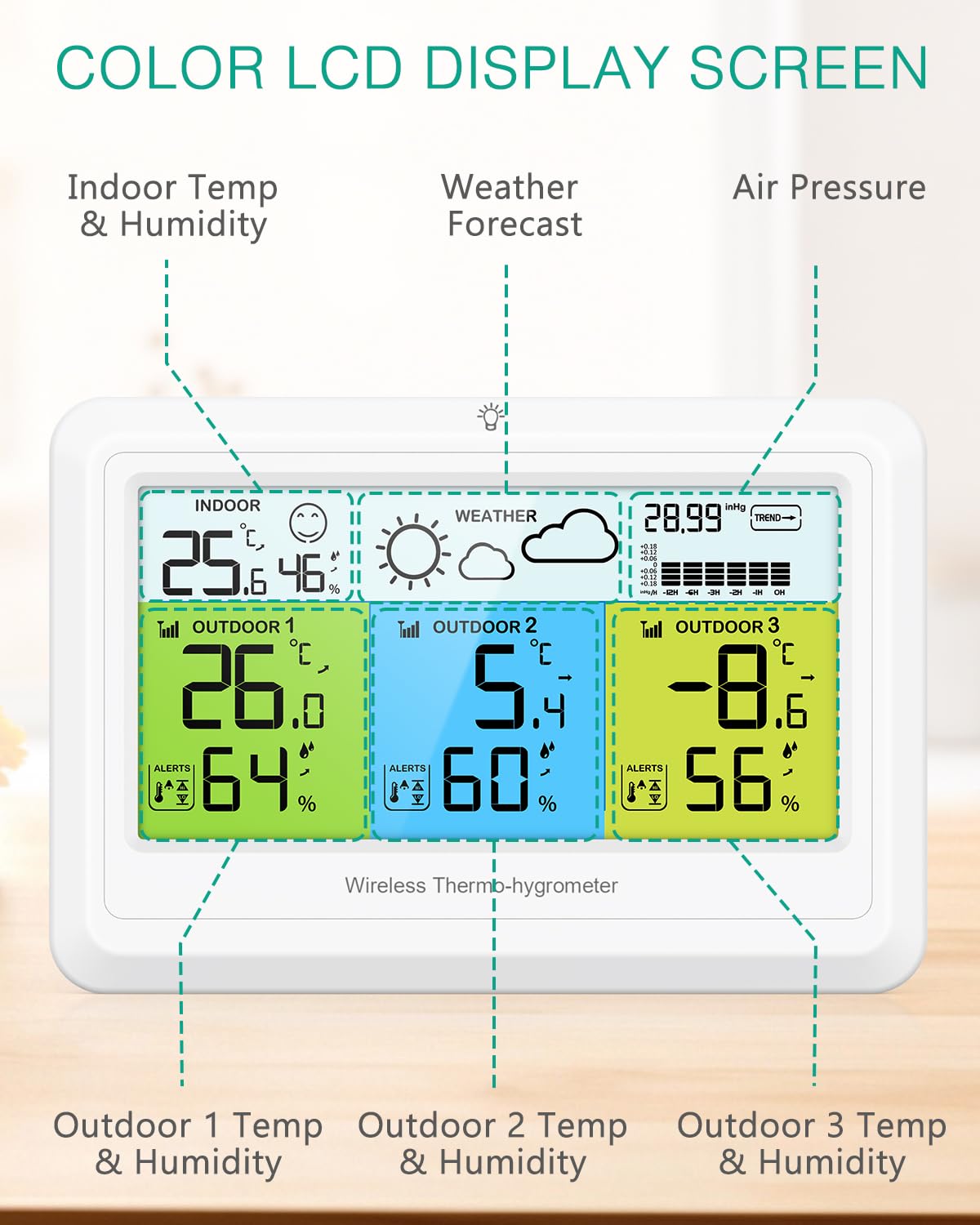
Image : Un gros plan view of the main display unit, clearly showing indoor temperature and humidity, outdoor temperature and humidity for three sensors, weather forecast, and barometric pressure.
5.2. Réglage des alarmes de température
Press the 'ALERT' buttons (ALERT1, ALERT2, ALERT3) to set high and low temperature alarms for each outdoor channel. Use the 'UP' and 'DOWN' buttons to adjust the alarm thresholds. An alarm icon will appear when activated. The device will alert you if the temperature exceeds the set thresholds.

Image: The main display unit with the 'ALERTS' section highlighted, indicating the ability to set high (HI) and low (LO) temperature alerts for each sensor.
5.3. Weather Forecast Adjustment
The weather forecast is automatically calibrated over 7 to 10 days. If the default weather icon is cloudy, you can manually adjust it by pressing the 'WEATHER' button. Use the 'UP' and 'DOWN' buttons to select the current weather condition. This helps the station to calibrate more accurately over time.
5.4. ViewEnregistrements MAX/MIN
Press the 'MAX/MIN' button to cycle through the maximum and minimum temperature and humidity records for the past 24 hours. Press again to return to current readings.
5.5. Fonctionnement du rétroéclairage
If the main unit is powered by USB, briefly press the 'LIGHT' button to adjust the backlight brightness through three levels: high, medium, and off. If powered by batteries only, a short press of the 'LIGHT' button will activate the backlight for 10 seconds before it automatically turns off.
5.6. Sélection de l'unité de température
Press the '°C/°F' button to switch between Celsius and Fahrenheit temperature units.
6. Entretien
- Remplacement de la batterie : Remplacez les piles de l'unité principale et des capteurs lorsque le voyant de batterie faible s'affiche.
- Nettoyage: Wipe the display and unit surfaces with a soft, dry cloth. Do not use abrasive cleaners or immerse the unit in water.
- Placement: For optimal performance, ensure remote sensors are placed in shaded, well-ventilated areas, away from direct heat sources or extreme cold.
7. Dépannage
| Problème | Cause possible | Solution |
|---|---|---|
| Aucun affichage de la température/humidité extérieure | Sensors out of range, low battery, or interference. | Move sensors closer to the main unit. Replace sensor batteries. Press 'CH' button on main unit to re-sync. |
| Lectures inexactes | Sensors exposed to direct sunlight, rain, or heat sources. | Relocate sensors to a shaded, protected area. Allow time for readings to stabilize. |
| L’affichage est sombre ou vide | Low battery in main unit or no USB power. | Remplacez les piles de l'unité principale ou connectez le câble d'alimentation USB. |
| Weather forecast is incorrect | Initial calibration period not complete or manual adjustment needed. | Allow 7-10 days for auto-calibration. Manually adjust the current weather icon if necessary using the 'WEATHER' button. |
8. Spécifications
- Marque: ORIA
- Modèle: WA165KM
- Dossier spécial : Ultra-clear color LCD screen
- Couleur: Blanc
- Matériau extérieur : Polypropylène
- Type d'affichage : Numérique
- Plage de température intérieure : -9.9°C à 50°C (14.2°F à 122°F)
- Plage de température extérieure : -40°C à 70°C (-40°F à 158°F)
- Plage d'humidité: 20% à 95% HR
- Portée de transmission sans fil : Jusqu'à 100 mètres (328 pieds) en espaces ouverts
- Source d'alimentation (unité principale) : 3 x AAA batteries (not included) or USB power cable (included)
- Source d'alimentation (capteurs) : 2 piles AAA par capteur (non incluses)
- Conformité: CE
- Usage: Intérieur/Extérieur
9. Garantie et assistance
- Garantie: Garantie d'un an
- Remplaçants: 90 Days Free Replacements
- Retours : Retours gratuits sous 30 jours
- Assistance clientèle : Assistance clientèle 24h/7 et XNUMXj/XNUMX
- Assistance technique: Assistance technique à vie
For any questions or assistance, please contact ORIA customer service through the retailer's platform or visit the official ORIA website.
10. Vidéo produit
Video: An official ORIA product video demonstrating the features and usage of the Wireless Indoor Outdoor Weather Station, including its multi-sensor monitoring, weather forecasting, and display capabilities.