
1. Produit terminéview
The zelotes C-12 Professional Wired Gaming Mouse is designed for high-performance gaming and office use. It features an ergonomic design, 12 programmable buttons, adjustable DPI settings, multi-modes RGB backlighting, and a customizable weight system.

Image 1.1: The zelotes C-12 Professional Wired Gaming Mouse, showcasing its ergonomic shape and customizable RGB lighting.
Contenu du colis :
- 1 x zelotes C-12 Gaming Mouse
- 1 x Manuel d'instructions
- 1 x CD de logiciel
- 1 x Foot Pad Set
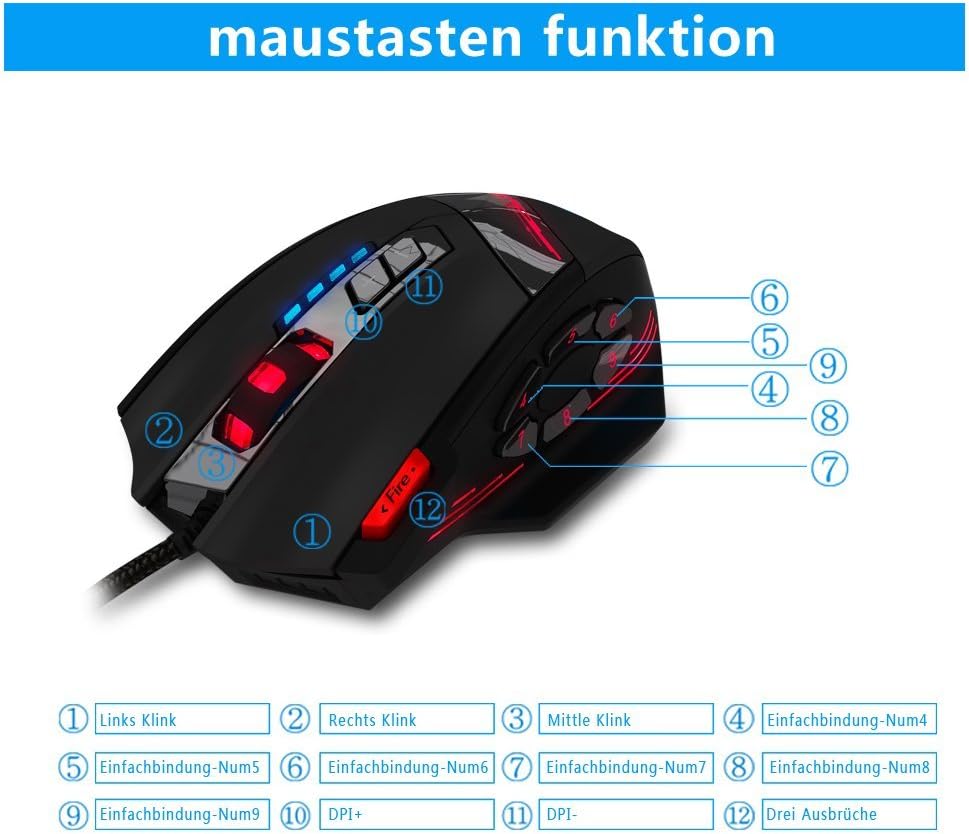
Image 1.2: The complete package contents of the zelotes C-12 Gaming Mouse.
2. Installation
2.1 Connexion de la souris
Connect the USB cable of the zelotes C-12 Gaming Mouse to an available USB port on your computer. The mouse is plug-and-play for basic functionality.
2.2 Installation du logiciel (facultatif)
For full customization of buttons, DPI, and lighting, install the provided software from the included CD. Insert the CD into your computer's optical drive and follow the on-screen instructions. If your computer does not have an optical drive, please visit the official zelotes website to download the latest software driver.
Note: The programming software is not fully compatible with Mac operating systems.
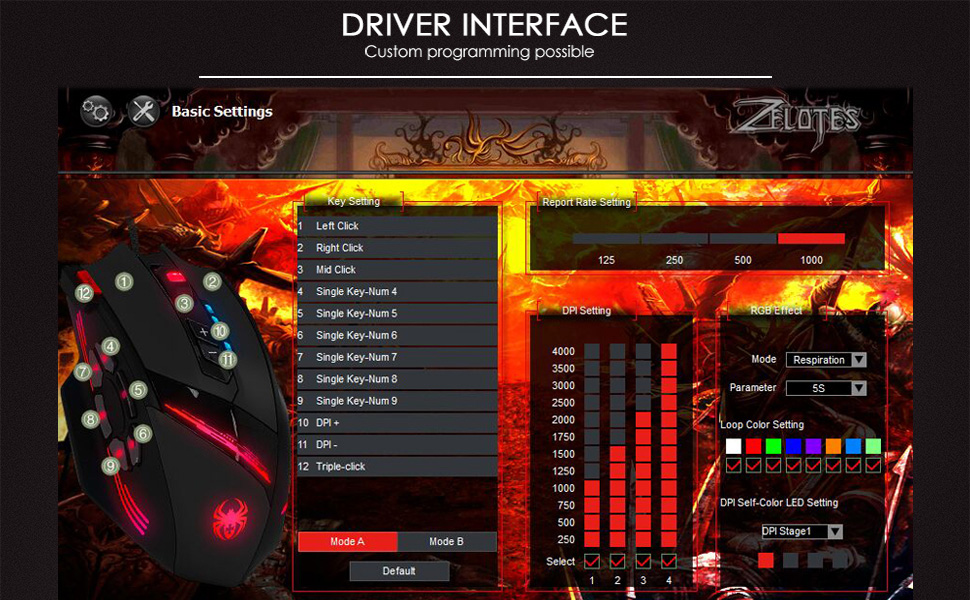
Image 2.1: The software interface for customizing the zelotes C-12 Gaming Mouse.
2.3 Weight Tuning
The mouse includes 8 removable weight blocks, each weighing 2.5 grams, located in a compartment on the underside of the mouse. To adjust the mouse's weight:
- Gently twist and remove the circular cover on the bottom of the mouse.
- Add or remove the 2.5g weight blocks as desired to achieve your preferred mouse feel.
- Replace the circular cover by twisting it back into place.
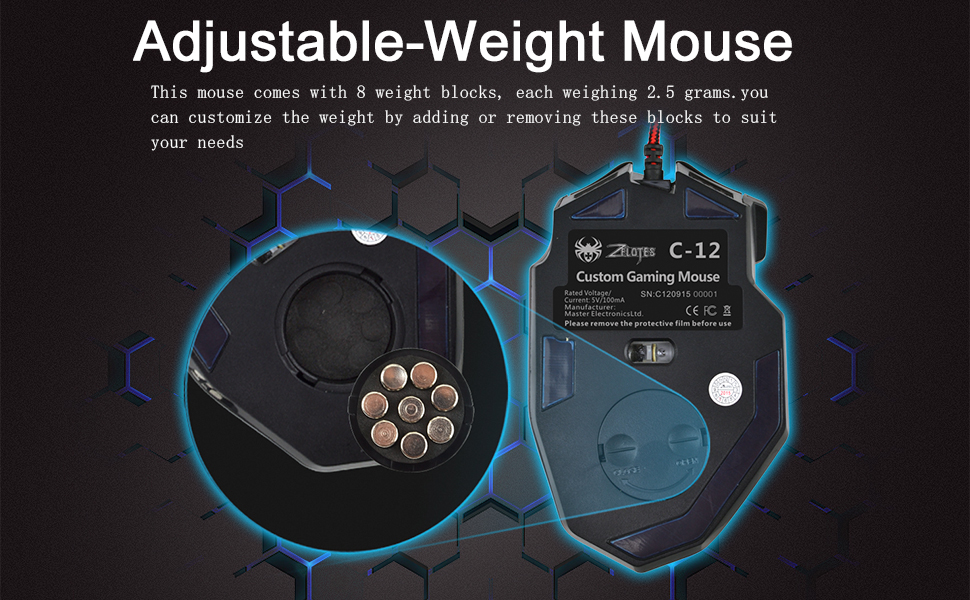
Image 2.2: Adjusting the weight of the zelotes C-12 mouse by adding or removing the 2.5g blocks.
Video 2.1: A demonstration of the weight tuning feature and programmable buttons on the zelotes C-12 Gaming Mouse.
3. Mode d'emploi
3.1 Fonctions des boutons
The zelotes C-12 mouse features 12 programmable buttons. The default functions are:
- Clic gauche (Bouton 1)
- Clic droit (Bouton 2)
- Clic central/molette de défilement (Bouton 3)
- Boutons latéraux (Buttons 4-9): Default to various functions, customizable via software.
- PPP+ (Button 10): Increases DPI sensitivity.
- DPI- (Button 11): Decreases DPI sensitivity.
- Bouton de feu (Button 12): Default to triple-click, customizable via software.

Image 3.1: Labeled diagram of the zelotes C-12 mouse buttons.
3.2 Ajustement PPP
The mouse offers 4 default DPI levels: 1000/1500/2000/4000 DPI. You can cycle through these levels using the dedicated DPI+ and DPI- buttons. For finer control and to reach up to 8000 DPI, use the included software.
3.3 éclairages RVB
The mouse features multi-modes RGB backlighting, including 7-color cycle breathing and monochromatic constant bright modes. Lighting effects can be customized through the software to match your preferences.
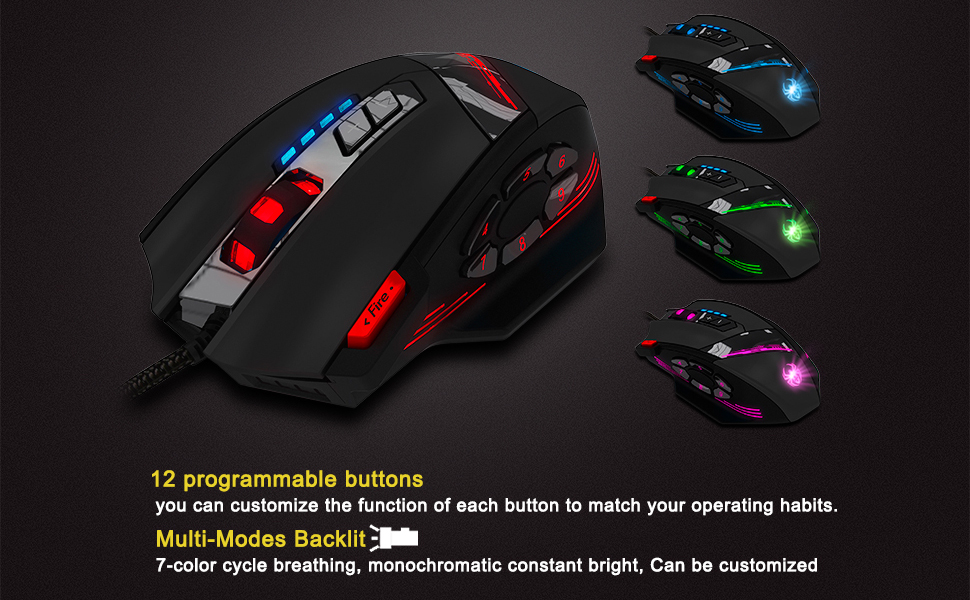
Image 3.2: The zelotes C-12 mouse showcasing its multi-color RGB lighting options.
3.4 Conception ergonomique
The mouse is designed for comfort during extended use, featuring a sweat-resistant and anti-slip rubber surface. Its ergonomic shape helps prevent wrist fatigue.

Image 3.3: The ergonomic design of the zelotes C-12 mouse provides a comfortable grip.
4. Entretien
To ensure the longevity and optimal performance of your zelotes C-12 Gaming Mouse, follow these maintenance guidelines:
- Nettoyage: Utilisez un chiffon doux et sec pour essuyer la surface de la souris. Pour les saletés tenaces, frottez légèrement avec un chiffon doux et sec.ampNettoyez le chiffon avec de l'eau ou une solution nettoyante douce. Évitez les produits chimiques agressifs et les matériaux abrasifs.
- Entretien du capteur : Veillez à ce que le capteur optique situé sous la souris reste propre et exempt de poussière et de débris. Utilisez un coton-tige ou de l'air comprimé si nécessaire.
- Gestion des câbles: Évitez les coudes brusques ou les tractions excessives sur le câble USB afin de prévenir tout dommage.
- Stockage: Lorsqu'elle n'est pas utilisée, rangez la souris dans un endroit propre et sec, à l'abri des températures extrêmes.
5. Dépannage
5.1 Souris ne répondant pas
- Assurez-vous que le câble USB est correctement connecté à votre ordinateur.
- Essayez de connecter la souris à un autre port USB.
- Testez la souris sur un autre ordinateur pour exclure tout problème lié à votre ordinateur.
- Redémarrez votre ordinateur.
5.2 DPI or Button Settings Not Changing
- Ensure the zelotes C-12 software is correctly installed and running.
- Check if the settings are saved within the software after making changes.
- For Mac users, note that the programming software has limited compatibility. Basic DPI changes via mouse buttons should still function.
5.3 L'éclairage RVB ne fonctionne pas ou est incorrect
- Verify lighting settings within the zelotes C-12 software.
- Vérifiez que la souris est correctement connectée et alimentée.
5.4 Mouse Movement Is Erratic
- Nettoyez le capteur optique situé sous la souris.
- Veillez à utiliser la souris sur une surface adaptée (par exemple, un tapis de souris). Évitez les surfaces très réfléchissantes ou transparentes.
6. Spécifications
| Fonctionnalité | Description |
|---|---|
| Marque | zélotes |
| Nom du modèle | C-12 |
| Technologie de connectivité | Câble USB |
| Technologie de détection de mouvement | Optical (A3050 Gaming Chip) |
| Paramètres PPP | 1000/1500/2000/4000 (Adjustable up to 8000 DPI via software) |
| Quantité de boutons | 12 boutons programmables |
| Réglage du poids | 8 x 2.5g removable weights |
| Orientation de la main | Droitier |
| Compatibilité du système d'exploitation | Win11, Win10, Win8, Win7, Mac OS (limited software compatibility for Mac) |
| Dimensions (L x l x H) | 130 mm x 81.5 mm x 39.8 mm |
| Taux de sondage | 125-1000 Hz |
| Longueur du câble | 1.8 m |
| Matériel | Plastique (finition mate) |

Image 6.1: Detailed technical specifications and dimensions of the zelotes C-12 Gaming Mouse.
7. Informations sur la garantie
The zelotes C-12 Professional Wired Gaming Mouse comes with a Garantie constructeur de 1 ans À compter de la date d'achat, cette garantie couvre les défauts de matériaux et de fabrication dans des conditions normales d'utilisation. Elle ne couvre pas les dommages causés par une mauvaise utilisation, un accident, une modification non autorisée ou des causes externes.
Veuillez conserver votre preuve d'achat pour les réclamations au titre de la garantie.
8. Assistance
For further assistance, technical support, or warranty inquiries, please refer to the contact information provided with your product packaging or visit the official zelotes website.