
Introduction
This manual provides detailed instructions for the assembly, operation, and maintenance of your new FLEXISPOT L-Shaped Electric Height Adjustable Standing Desk. Please read this manual thoroughly before assembly and use to ensure proper function and safety.
- Bureau spacieux : Le vaste plan de travail en forme de L est réalisé sans joint apparent à partir de panneaux de jonction issus de sources écologiques et mesure 70.9 po x 63.0 po. Il offre ampl'espace pour les projets en cours et les fournitures de bureau.
- Orientation polyvalente : Ce bureau à hauteur réglable est doté d'un plateau plus large qui peut être positionné à gauche ou à droite, vous permettant ainsi de personnaliser l'agencement pour l'adapter au mieux à votre espace.
- Construction solide : Le cadre en acier de qualité industrielle et le plateau solide (1") se combinent pour supporter une capacité de poids maximale de 220 lbs, gérant sans effort votre configuration de travail idéale.
- Panneau de commande LED personnalisable : Le panneau de commande LED vous permet de personnaliser la hauteur du bureau grâce à 4 réglages mémorisables différents, facilitant ainsi le passage d'une position debout à une position assise.
Consignes de sécurité
Always ensure the desk is properly assembled and anchored to the floor to prevent tipping. Do not exceed the maximum weight capacity of 220 lbs (100 kg) to maintain stability. Follow the assembly instructions carefully to avoid injury.
The product ships in two separate packages which may arrive separately. Ensure all packages are received before beginning assembly.
Configuration et assemblage
Assembly requires two people. Tools recommended for assembly include a drill. Please refer to the detailed video instructions for visual guidance.
L'Assemblée passe à autre choseview:
- Install Middle Column Connecting Joining Plate: Attach the joining plate to the middle column using the provided screws.
- Installer les pieds du bureau : Secure the long and short side desk feet to the columns.
- Installer les traverses : Attach the long and short crossbeams between the desk legs.
- Extend Crossbeam: Loosen the screws on the crossbeam and extend it to the desired length.
- Install Drive Rods: Loosen the drive rod, insert it into the mechanism, spin, and tighten.
- Install Support Plate: Attach the support plate to the frame.
- Installer le bureau : Insert dowels and connect the desktop sections. Secure them with the provided plates and screws.
- Fixer le cadre au bureau : Carefully place the assembled frame, adapter holder, and support tube onto the desktop. Adjust the frame to align with pilot holes and attach it securely.
- Secure Crossbeams and Drive Rods: Ensure all crossbeams and drive rods are firmly secured.
- Install Controller and Wiring: Mount the control panel and power adapter. Connect all necessary wiring for the motors and control panel.
- Install Baffle: Attach the baffle to cover the wiring.
- Turn Over the Desk: With assistance, carefully turn the desk upright.
Guides visuels :
Vidéo: Installation of Right L-Shaped Desk. This video demonstrates the step-by-step assembly process for the right-hand L-shaped configuration of the desk.
Vidéo: Installation of Left L-Shaped Desk. This video guides you through the assembly process for the left-hand L-shaped configuration of the desk.
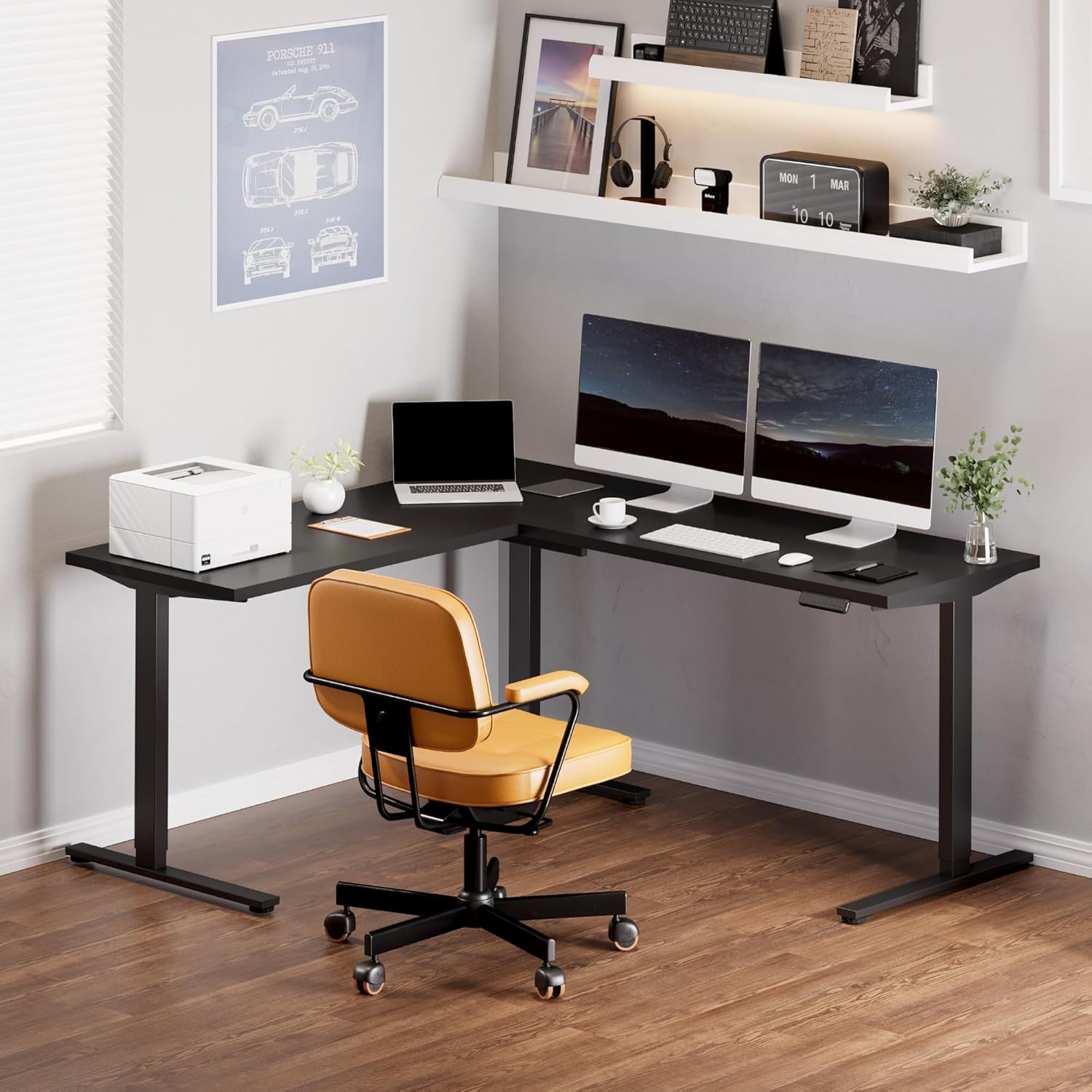
Image: Fully assembled FLEXISPOT L-Shaped Standing Desk in a modern office environment, showcasing its spacious design and functionality.

Image: Detailed dimensions of the L-shaped desk, highlighting its width, depth, and adjustable height range.
Mode d'emploi
Fonctions du panneau de contrôle :

Image: The smart control panel with buttons for height adjustment and memory presets.
- Boutons Haut/Bas (flèches) : Press and hold the up or down arrow to adjust the desk height. Release the button to stop at the desired height.
- Préréglages de mémoire (1, 2, 3, 4) : To save a height setting, adjust the desk to your preferred height, then press the 'M' button followed by the desired number (1, 2, 3, or 4). The display will show 'S-' and then the number to confirm. To recall a saved height, simply press the corresponding number button.
- Fonction anti-collision : Le bureau est équipé d'un système anti-collision. Si le plateau rencontre un obstacle lors de son déplacement, il s'arrête automatiquement et effectue une légère marche arrière afin d'éviter tout dommage.
Entretien
- Vérifiez régulièrement le serrage de toutes les vis et fixations. Resserrer si nécessaire.
- Nettoyez la surface du bureau avec un chiffon doux et sec.amp Chiffon. Évitez les nettoyants abrasifs ou les produits chimiques agressifs.
- Protégez le moteur et les composants électriques de la poussière et de l'humidité.
- Ensure cables are neatly managed to prevent snagging or damage during height adjustments.
Dépannage
| Problème | Cause possible | Solution |
|---|---|---|
| Le bureau ne bouge pas et ne répond pas aux commandes. | Power cable disconnected; control panel cable loose; motor cable loose. | Check all power and motor connections. Ensure they are securely plugged in. Reset the system by unplugging for 10 seconds and plugging back in. |
| Le bureau bouge de façon irrégulière ou fait des bruits inhabituels. | Loose connections; uneven load; drive rod not properly installed. | Check all frame connections and ensure they are tightened. Distribute weight evenly on the desktop. Verify drive rod installation as per assembly video. |
| Le système anti-collision se déclenche fréquemment. | Obstruction in desk's path; sensitivity setting too high. | Remove any objects from the desk's path. Consult the full user manual for instructions on adjusting anti-collision sensitivity (if applicable). |
| Les sections du bureau ne sont pas parfaitement alignées. | Assembly error; pilot holes not used correctly. | Révisez soigneusementview assembly instructions and videos. Ensure all desktop connecting plates are correctly installed and tightened. Some users have noted that pilot holes are for reference and may require minor adjustments or re-drilling for perfect alignment. |
Caractéristiques
- Marque: FLEXIPOT
- Forme: Rectangulaire (configuration en forme de L)
- Conception du bureau : Bureau debout
- Dimensions du produit : 63"P x 70.9"L x 45.9"H
- Couleur: Cadre noir + dessus noir
- Style: Moderne
- Matériau de base : Acier allié
- Type de matériau supérieur : Bois
- Type de finition: Brillant
- Dossier spécial : Cordonné
- Épaisseur du plateau de table : 1 pouces
- Hauteur maximale : 45.9 pouces
- Hauteur minimale : 28 pouces
- Recommandation de poids maximum: 220 livres
- Nombre de positions de hauteur : 4 (Préréglages de mémoire)
- Assemblage requis : Oui (Recommandé pour 2 personnes)
- Outils recommandés pour l'assemblage : Percer
Garantie et assistance
Garantie FLEXISPOT de 5 ans : Bénéficiez d'une tranquillité d'esprit grâce à notre garantie de 5 ans sur le cadre et le moteur du bureau, et de 2 ans sur le panneau de commande et les composants électroniques.
Pour toute assistance supplémentaire, dépannage ou réclamation au titre de la garantie, veuillez contacter le service client de FLEXISPOT via leur site officiel. website ou le détaillant où le produit a été acheté.