
1. Introduction
This manual provides detailed instructions for the installation, operation, and maintenance of the TMEZON MZ-VDP-NE160 4-wire doorbell camera. This outdoor station is designed to work seamlessly with compatible TMEZON videophone monitors, such as the MZ-IP-V728TW, to provide secure and convenient visitor management for your property.
2. Consignes de sécurité
Veuillez lire et comprendre toutes les consignes de sécurité avant d'installer ou d'utiliser cet appareil. Le non-respect de ces consignes peut entraîner un choc électrique, un incendie ou endommager le produit.
- Sécurité électrique : Installation should be performed by a qualified electrician or technician. Ensure power is disconnected before any wiring work.
- Exposition à l'eau : While designed for outdoor use, avoid direct high-pressure water jets. Ensure all connections are properly sealed.
- Température: N’exposez pas l’appareil à des températures extrêmes en dehors de sa plage de fonctionnement.
- Nettoyage: Utilisez un chiffon doux et sec pour le nettoyage. N'utilisez pas de nettoyants abrasifs ni de solvants.
3. Contenu du colis
Vérifiez que tous les composants sont présents dans le package :
- 1 x TMEZON MZ-VDP-NE160 Doorbell Camera Unit
- Vis de fixation et chevilles
- Connecteurs de câblage
- Manuel de l'utilisateur (ce document)
4. Produit terminéview
The TMEZON MZ-VDP-NE160 is an outdoor doorbell camera unit. It features a camera for video surveillance, a microphone for audio input, a speaker for audio output, and a call button to initiate communication with the indoor monitor.
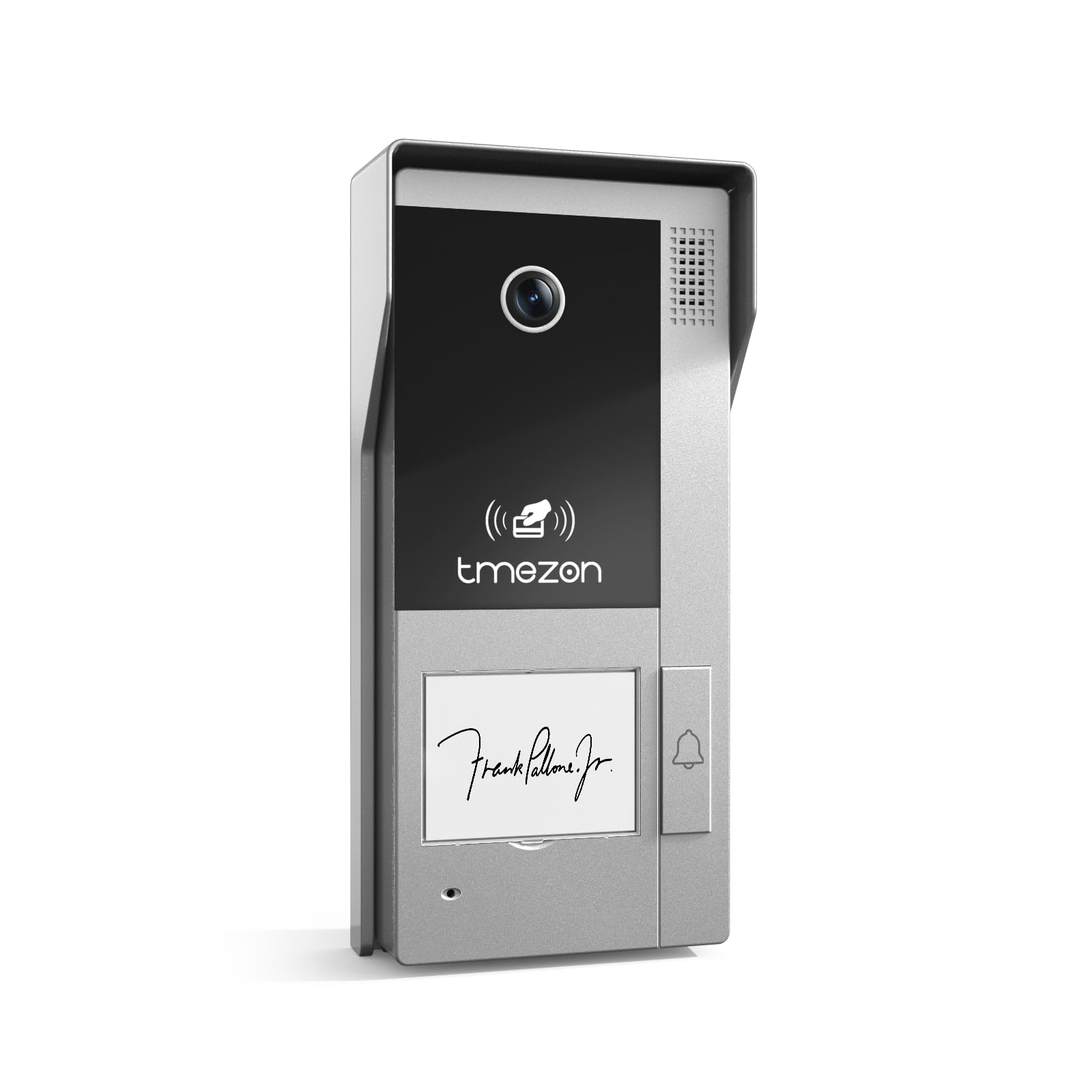
Figure 1 : Face avant view of the TMEZON MZ-VDP-NE160 doorbell camera, showing the camera lens, call button, microphone, and speaker grille.
Les principaux composants comprennent :
- Objectif de l'appareil photo : Capture le flux vidéo.
- Bouton d'appel: Activates the indoor monitor and initiates communication.
- Microphone: Captures audio from visitors.
- Conférencier: Allows two-way audio communication.
- Wiring Terminal (Rear): For connecting the 4-wire cable to the indoor monitor and power supply.
5. Configuration et installation
The MZ-VDP-NE160 is a 4-wire system. Proper wiring is crucial for correct operation. It is recommended to consult a professional for installation if you are unfamiliar with electrical wiring.
5.1 Emplacement de montage
- Choose a location near your entrance, typically at a height of 1.4 to 1.6 meters (4.6 to 5.2 feet) from the ground, ensuring a clear view des visiteurs.
- Avoid direct sunlight or strong light sources that could cause glare on the camera.
- Assurez-vous que la surface de montage est plane et stable.
5.2 Schéma de câblage (Général)
The doorbell camera connects to the indoor monitor (e.g., MZ-IP-V728TW) using a 4-wire cable. The typical connections are:
- Fil 1 : Audio
- Fil 2 : Vidéo
- Fil 3 : Terre (GND)
- Fil 4 : Alimentation (CC 12V)
Note: Refer to the specific wiring diagram provided with your indoor monitor for precise connection details. Ensure polarity is correct for power connections.
5.3 étapes d'installation
- Débrancher l'alimentation : Before starting, ensure all power to the existing doorbell system and the indoor monitor is turned off at the circuit breaker.
- Support de montage: Secure the mounting bracket (if applicable, or the unit directly) to the wall using the provided screws and wall plugs.
- Connexion du fil : Connect the 4-wire cable from the indoor monitor to the corresponding terminals on the rear of the MZ-VDP-NE160 doorbell camera. Ensure connections are secure.
- Unité sécurisée : Attach the doorbell camera unit to the mounting bracket or directly to the wall, ensuring it is firmly in place.
- Restaurer l'alimentation : Une fois toutes les connexions effectuées et sécurisées, rétablissez l'alimentation électrique du système.
- Système de test: Test the doorbell functionality by pressing the call button and verifying communication with the indoor monitor.
6. Mode d'emploi
The TMEZON MZ-VDP-NE160 doorbell camera operates in conjunction with your TMEZON indoor monitor.
- Visitor Call: When a visitor presses the call button on the MZ-VDP-NE160, the indoor monitor will ring and display the video feed from the doorbell camera.
- Communication bidirectionnelle : On the indoor monitor, you can answer the call to engage in two-way audio communication with the visitor.
- Door Release (if connected): If an electronic door lock is connected to your indoor monitor system, you can typically unlock the door from the indoor monitor during a call.
- Surveillance: Some indoor monitors allow you to manually view the live video feed from the doorbell camera at any time, even without a visitor pressing the button.
7. Entretien
Regular maintenance helps ensure the longevity and optimal performance of your doorbell camera.
- Nettoyage: Periodically wipe the camera lens and the front panel with a soft, slightly damp Utiliser un chiffon pour enlever la poussière et la saleté. Ne pas utiliser de produits chimiques agressifs ni de matériaux abrasifs.
- Inspecter les connexions : Annually, inspect the wiring connections for any signs of corrosion or loosening. Ensure the unit is securely mounted.
- Mises à jour logicielles : While this specific unit does not have user-updatable software, ensure your indoor monitor's firmware is up to date for best compatibility and features.
8. Dépannage
If you encounter issues with your MZ-VDP-NE160 doorbell camera, refer to the following common problems and solutions:
| Problème | Cause possible | Solution |
|---|---|---|
| No video/audio on indoor monitor |
|
|
| Le bouton d'appel ne répond pas |
|
|
| Mauvaise qualité vidéo |
|
|
If the problem persists after attempting these solutions, please contact TMEZON customer support.
9. Spécifications
| Fonctionnalité | Détail |
|---|---|
| Modèle | MZ-VDP-NE160 |
| Marque | TMEZON |
| Dimensions du produit (L x l x H) | 1 x 1 x 1 cm |
| Type de câblage | Système à 4 fils |
| Vol d'exploitationtage | 240 Volts (System dependent, typically 12V DC for the unit itself, 240V might refer to power supply input) |
| Consommation d'énergie | 5 watts |
| Couleur | Gris |
| Composants inclus | Unité de sonnette |
10. Garantie et assistance
For warranty information and technical support, please refer to the documentation provided with your complete TMEZON videophone system or visit the official TMEZON webConsultez le site. Conservez votre reçu d'achat comme preuve d'achat pour toute réclamation au titre de la garantie.
For direct assistance, you may contact TMEZON customer service through their official channels.