
1. Introduction
This manual provides essential information for the safe and efficient use of your BESTHERM ILLO CONNECT 1000W Ceramic Dry Inertia Electric Radiator. This appliance combines thermal comfort with advanced technology, featuring a ceramic heating core for homogeneous heat distribution and Wi-Fi connectivity for remote management. Please read these instructions carefully before installation and operation, and retain them for future reference.

Figure 1 : Plusview of the ILLO CONNECT 1000W Radiator's key features.
2. Consignes de sécurité
Respectez toujours les consignes de sécurité suivantes afin de réduire les risques d'incendie, d'électrocution ou de blessure :
- Assurer l'alimentation voltage correspond à l'étiquette de puissance sur le radiateur.
- Ne couvrez pas le radiateur et n'obstruez pas ses aérations. Cela pourrait provoquer une surchauffe.
- Gardez les matériaux inflammables (rideaux, meubles, etc.) à une distance de sécurité de l'appareil.
- Do not operate the radiator with a damaged cord or plug. Contact qualified service personnel for repairs.
- This appliance is for indoor use only. Do not use in bathrooms or other areas where it may come into contact with water, unless specifically rated for such environments (IP24 rating indicates protection against splashing water).
- N'insérez aucun objet dans les ouvertures.
- Unplug the radiator before cleaning or performing any maintenance.
- L'appareil comporte un Protection contre la surchauffe system, which automatically shuts off the unit if it becomes too hot. If this occurs, unplug the unit, allow it to cool, and check for obstructions before restarting.
- Le Verrouillage de sécurité pour enfants feature prevents accidental changes to settings.
3. Contenu du colis
Vérifiez que tous les composants sont présents dans l'emballage :
- BESTHERM ILLO CONNECT 1000W Electric Radiator
- supports et fixations murales
- Manuel de l'utilisateur (ce document)
4. Installation
The ILLO CONNECT radiator is designed for wall mounting. Ensure the installation location is suitable and provides adequate clearance around the unit for proper heat circulation.
4.1 Montage du radiateur
- Choose a suitable wall location, away from direct drafts and flammable materials.
- Use the provided mounting brackets as a template to mark drilling points on the wall.
- Percez des trous et insérez des chevilles (si nécessaire, selon le type de mur).
- Securely attach the mounting brackets to the wall using the provided screws.
- Carefully hang the radiator onto the mounted brackets, ensuring it is level and securely seated.

Figure 2 : Arrière view avec supports de montage.
4.2 Connexion électrique
Connect the radiator to a suitable electrical outlet. Ensure the outlet is properly grounded and can handle the 1000W power consumption of the unit. If using a pilot wire system, consult a qualified electrician for proper connection.
4.3 Dimensions et poids
Consider the following dimensions and weight for installation planning:
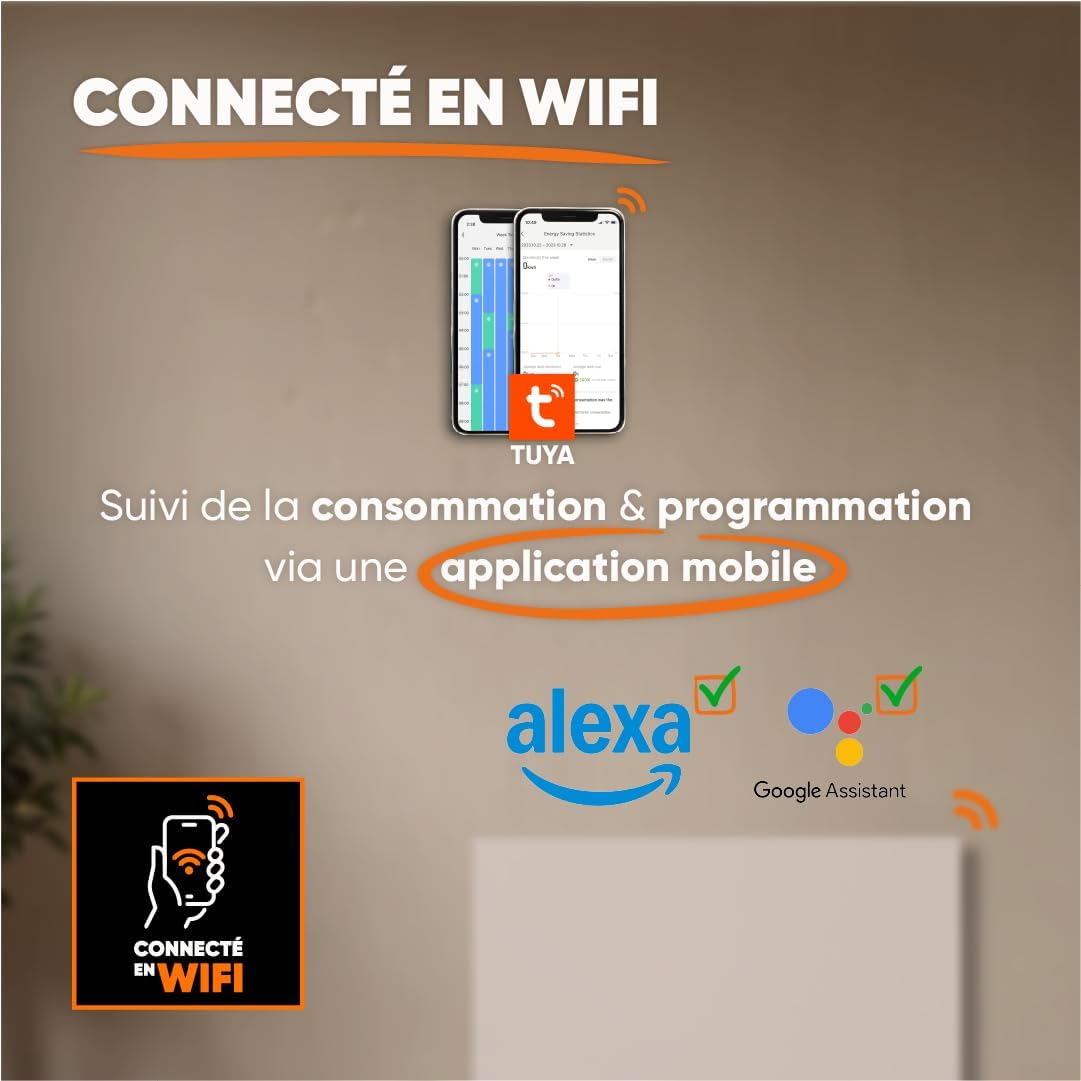
Figure 3: Radiator dimensions and weight.
For detailed visual instructions on installation, scan the QR code below or visit the official YouTube channel:

Figure 4: Scan for installation and programming videos.
Chaîne YouTube officielle : youtube.com/channel/UC-sOfckFt_UyYxoDYUZ95Ew
5. Mode d'emploi
The ILLO CONNECT radiator features an electronic control panel with touch buttons and an intuitive LCD display for easy management.
5.1 Mise sous tension initiale
After connecting the radiator to the power supply, the LCD display will illuminate. You may need to set the current time and date before proceeding with other settings.
5.2 Panneau de configuration terminéview
The control panel typically includes buttons for mode selection, temperature adjustment, programming, and Wi-Fi pairing. Refer to the on-screen prompts for specific button functions.
Modes de fonctionnement 5.3
The radiator offers four primary operating modes:
- Mode Confort : Maintains the desired set temperature.
- Mode économique : Operates at a slightly reduced temperature compared to Comfort mode, saving energy.
- Mode antigel : Maintient une température minimale (par exemple, 7°C) pour éviter le gel.
- Standby Mode (Off): The radiator is off but remains connected to power.
5.4 Programmation
Customize your heating schedule for optimal comfort and energy efficiency:
- Pre-recorded Weekly Programs (P1/P2/P3): Select from three factory-set weekly programs designed for common usage patterns.
- Custom Weekly Program: Create and save your own personalized heating schedule for each day of the week.
5.5 Pilot Wire Modes (if applicable)
If your electrical installation includes a 6-order pilot wire, the radiator can be controlled via these modes:
- Confort
- Confort -1°C
- Confort -2°C
- Éco
- Antigel
- Désactivé
5.6 Connectivité Wi-Fi et contrôle par application
The ILLO CONNECT radiator can be controlled remotely via Wi-Fi using the Tuya or Smart Life mobile application.
- Téléchargez l'application Tuya Smart ou Smart Life depuis la boutique d'applications de votre smartphone.
- Inscrivez-vous ou connectez-vous à votre compte.
- Follow the in-app instructions to add your radiator. This typically involves putting the radiator into pairing mode (refer to the radiator's display or specific app instructions).
- Once connected, you can monitor energy consumption, adjust settings, change modes, and set schedules from anywhere.
Figure 5 : Connectivité Wi-Fi et contrôle par application.
6. Smart Features & Safety
The ILLO CONNECT radiator incorporates several intelligent features for enhanced safety and energy efficiency:
- Détecteur de fenêtre ouverte : The radiator automatically detects an open window and adjusts its operation to prevent energy waste.
- Verrouillage enfant : This function prevents children from accidentally changing the radiator settings. Activate/deactivate via the control panel or mobile app.
- Protection contre la surchauffe : The radiator automatically shuts down if it detects an internal temperature exceeding safe limits, ensuring user safety.
7. Entretien
Un entretien régulier garantit des performances optimales et une longue durée de vie à votre radiateur.
7.1 Nettoyage
- Always unplug the radiator from the power supply before cleaning.
- Allow the radiator to cool completely.
- Essuyez les surfaces extérieures avec un chiffon doux, damp Chiffon. N’utilisez pas de nettoyants abrasifs, de solvants ou de produits chimiques agressifs, car ils pourraient endommager la finition.
- Veillez à ce qu'aucune eau ne pénètre dans les composants internes.
- Periodically clean the air vents to prevent dust accumulation, which can affect efficiency.
7.2 Stockage
If storing the radiator for an extended period, ensure it is clean, dry, and stored in a cool, dry place, protected from dust and moisture.
8. Dépannage
Si vous rencontrez des problèmes avec votre radiateur, consultez les problèmes et solutions courants suivants :
| Problème | Cause possible | Solution |
|---|---|---|
| Le radiateur ne s'allume pas. | Pas d'alimentation électrique ; interrupteur éteint ; protection contre la surchauffe activée. | Check power outlet and plug; Ensure power switch is on; Unplug, allow to cool, and check for obstructions. |
| Le radiateur ne chauffe pas correctement. | Incorrect mode selected; Temperature setting too low; Open window detected. | Select Comfort mode or increase temperature; Close windows/doors. |
| La connexion Wi-Fi échoue. | Incorrect Wi-Fi password; Radiator too far from router; Router issues. | Verify Wi-Fi password; Move radiator closer to router or use a Wi-Fi extender; Restart router. |
| Panneau de commande non réactif. | Child lock activated; Temporary software glitch. | Deactivate child lock; Unplug the radiator for a few minutes, then plug it back in. |
Si le problème persiste après avoir essayé ces solutions, veuillez contacter le service client.
9. Spécifications techniques
| Fonctionnalité | Spécification |
|---|---|
| Modèle | ILLO CONNECT 1000W |
| Puissance de sortie | 1000 watts |
| Méthode de chauffage | Céramique à inertie sèche |
| Couverture de chauffage | Up to 10 m² (recommended for 5-10 m²) |
| Dimensions (H x L x P) | 45 cm x 55 cm x 11 cm |
| Poids | 7.3 kg |
| Matériel | Acier |
| Contrôle | Electronic with touch buttons, LCD display |
| Connectivité | Wi-Fi (Tuya/Smart Life app compatible) |
| Caractéristiques de sécurité | Open Window Detector, Child Lock, Overheat Protection |
| Type de montage | Support mural (fixations incluses) |
| Indice de protection IP | IP24 |
| Certifications | CE |
10. Garantie
The BESTHERM ILLO CONNECT 1000W Electric Radiator comes with a Garantie de 2 ans À compter de la date d'achat, cette garantie couvre les défauts de fabrication dans des conditions normales d'utilisation. Veuillez conserver votre preuve d'achat pour toute réclamation au titre de la garantie. La garantie ne couvre pas les dommages résultant d'une installation incorrecte, d'une mauvaise utilisation, d'une négligence ou de réparations non autorisées.
11. Assistance
Pour toute question, assistance technique ou réclamation au titre de la garantie, veuillez contacter notre service clientèle :
- FAQ en ligne : Visite www.bestherm.fr/pages/faq
- Assistance téléphonique : 03 20 47 05 37
- Assistance par e-mail : sav@hom-y.fr
Our responsive after-sales service is based in France to ensure efficient support.