
Consignes de sécurité importantes
- Keep fingers and other body parts away from the blade at all times.
- Ensure the blade lock is engaged when the paper cutter is not in use or during storage.
- Always operate the paper cutter on a stable, flat, and non-slip surface.
- This device is designed for cutting paper and cardstock only. It is not suitable for cutting fabric, leather, metal, or other hard materials.
- Keep the paper cutter out of reach of children. Adult supervision is required if children are near the device.
- Do not attempt to cut more than the recommended sheet capacity to prevent damage to the blade and ensure clean cuts.
Composants du produit
The TIANSE 12-inch guillotine paper cutter includes the following main components:
- Base with Measurement Grid: The main cutting surface featuring precise measurement markings.
- Guillotine Blade Arm: The movable arm with the cutting blade.
- Safety Guard Rail: A transparent plastic rail designed to hold paper and protect fingers.
- Poignée: Ergonomically designed for comfortable operation (requires assembly).
- Blade Latch Hook: Secures the blade arm in the closed position for safety.
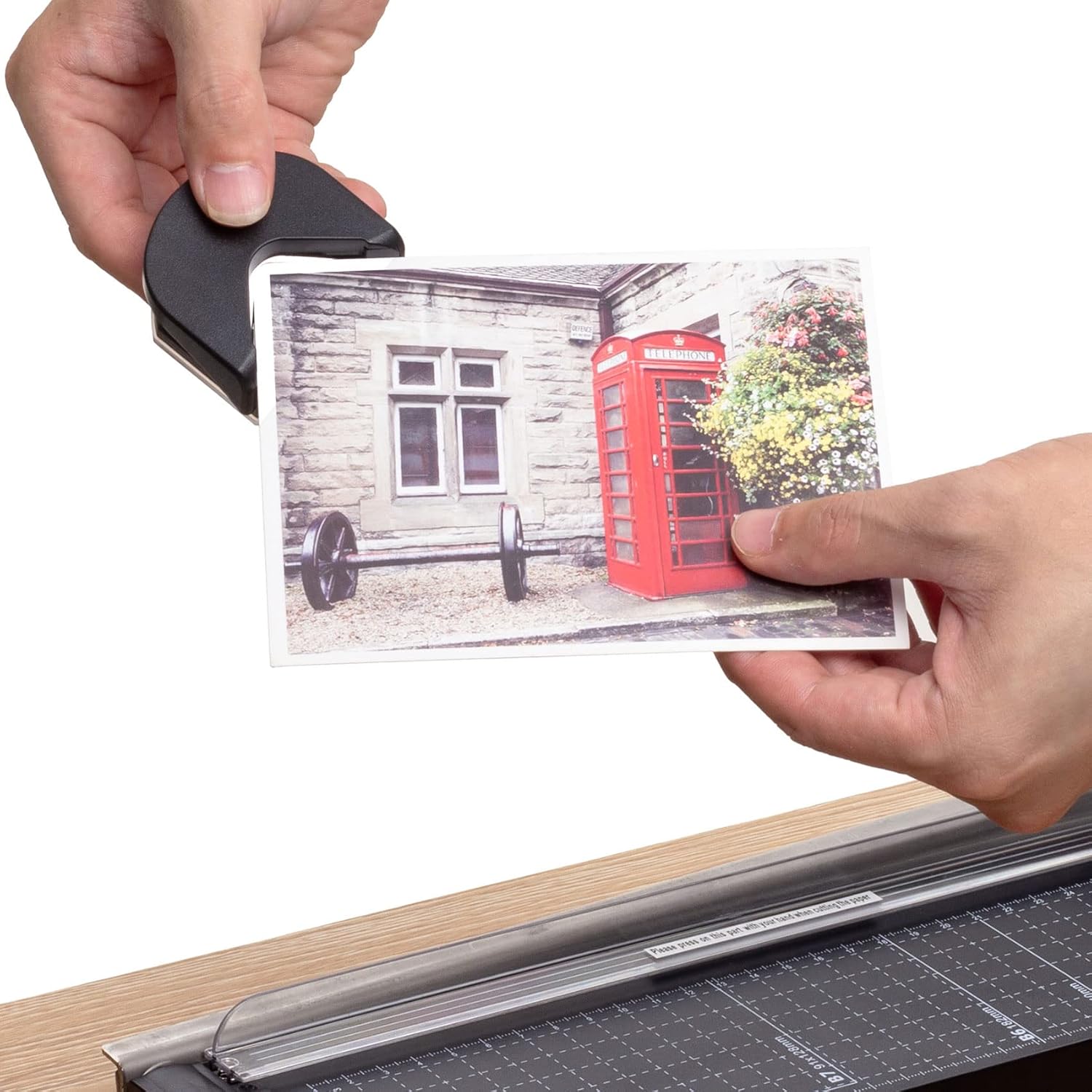
- Corner Trimmer: An accessory for rounding paper corners.


Configuration et assemblage
The paper cutter requires minimal assembly before its first use. Please follow these steps carefully:
- Déballer les composants : Retirez soigneusement toutes les pièces de l'emballage. Vérifiez que tous les composants énumérés dans la section « Composants du produit » sont présents.
- Attachez la poignée : The handle needs to be attached to the blade arm. Align the handle with the pre-drilled holes on the blade arm. Use the provided screws and screwdriver to securely fasten the handle. Ensure it is firmly attached and does not wobble.

Prudence: The blade is sharp. Exercise extreme care during assembly to avoid injury. Keep fingers away from the blade edge.
- Positionnez le coupeur : Place the assembled paper cutter on a stable, flat, and clean surface, ensuring it does not slide during operation.
Mode d'emploi
Follow these steps for safe and effective paper cutting:
- Unlock the Blade: If the blade arm is locked down, gently lift the blade latch hook to release it.
- Lift the Blade Arm: Raise the guillotine blade arm to its upright, open position.
- Document de position : Place the paper or cardstock onto the cutting board. Align the edge you wish to cut with the desired measurement marks on the grid. The integrated transparent guard rail helps hold the paper in place and keeps fingers safely away from the blade path.

The base features precise measurement markings in inches and centimeters, along with guides for common paper sizes (B7, B6, A5, B5, A4) to ensure accurate alignment.

- Effectuez la découpe : While holding the paper firmly with one hand (ensuring fingers are clear of the blade path and behind the guard rail), swiftly and firmly bring the blade arm down with the other hand to cut the paper.

- Capacité de coupe : The cutter is designed to efficiently cut 8 to 10 sheets of standard 80g A4 paper at one time. For optimal results and to extend blade life, it is recommended to cut fewer sheets per pass.
- Lock the Blade: After each use, return the blade arm to its fully closed position and engage the blade latch hook to secure it. This prevents accidental injury and keeps the blade protected.

Using the Corner Trimmer
The included corner trimmer accessory can be used to round the corners of your cut paper, photos, or cards for a professional finish.
- Insert the corner of the paper into the designated slot on the trimmer.
- Press down firmly on the trimmer to cut and round the corner.
Entretien
Proper maintenance ensures the longevity and optimal performance of your paper cutter.
- Nettoyage: After each use, wipe the cutting board and blade with a dry, soft cloth to remove any paper dust or debris. Do not use abrasive cleaners, solvents, or harsh chemicals, as these can damage the surfaces or blade.
- Entretien de la lame : The stainless steel blade is designed for durability and sharpness. To maintain its cutting edge, avoid cutting materials other than paper or cardstock. If the blade becomes dull after extensive use, professional sharpening or replacement may be considered if available from the manufacturer.
- Stockage: Always store the paper cutter in a safe, dry place with the blade locked down. Keep it away from direct sunlight, moisture, and out of reach of children.
- Vis de serrage : Periodically inspect the screws on the blade arm and handle. If any appear loose, gently tighten them with a screwdriver to ensure stability and safe operation.
Dépannage
If you encounter issues with your TIANSE paper cutter, refer to the table below for common problems and solutions.
| Problème | Cause possible | Solution |
|---|---|---|
| Coupes irrégulières ou grossières | Too many sheets cut at once; dull blade; paper not held firmly; misaligned paper. | Reduce the number of sheets to within the recommended capacity (8-10 sheets). Ensure paper is held firmly against the guide and aligned correctly. If the blade is dull after extended use, consider professional sharpening or replacement. |
| Blade arm is stiff or difficult to move | Accumulated paper debris or dust around the pivot point; lack of lubrication. | Clean around the blade pivot point and hinges with a dry cloth. Apply a small amount of silicone-based lubricant to the pivot if necessary, ensuring it does not get on the cutting surface. |
| Paper slips during cutting | Paper not properly aligned or held; worn anti-slip feet on the base. | Ensure paper is firmly pressed against the guard rail and the cutting surface before lowering the blade. Check if the anti-slip feet on the base are intact and providing sufficient grip. |
| La poignée est desserrée | Screws securing the handle have loosened over time. | Tighten the screws that attach the handle to the blade arm using a screwdriver. |
Spécifications du produit
| Marque | TIANSE |
| Numéro de modèle | TS-1424 |
| Longueur de coupe | 12 pouces (environ 30 cm) |
| Capacité de coupe | 8-10 sheets of 80g A4 paper |
| Matériel | Metal blade, plastic base |
| Poids de l'article | 1.23 livre (environ 0.56 kg) |
| Dimensions du colis | 14.06 x 5.71 x 2.36 pouces |
| Accessoires inclus | Corner trimmer, assembly tools (screwdriver, screws, screw nuts) |
Garantie et assistance
For detailed warranty information and customer support, please refer to the retailer where the product was purchased. Warranty terms and conditions may vary by region and retailer.
Keep your purchase receipt or proof of purchase as it may be required for warranty claims.
Fabricant: TIANSE
Contact: For the most current contact information and support resources, please visit the official TIANSE webconsultez votre site web ou contactez votre distributeur local.