
AUSDOM Sofkeys Air3
AUSDOM Sofkeys Air3 Foldable Bluetooth Keyboard
Manuel d'utilisation
Introduction
Thank you for choosing the AUSDOM Sofkeys Air3 Foldable Bluetooth Keyboard. This portable keyboard is designed for convenience and versatility, featuring a built-in touchpad and a numeric keypad. It supports seamless connection with up to three devices across various operating systems, including Windows, Mac OS, iOS, and Android. Its compact, tri-fold design makes it ideal for travel and on-the-go productivity.
This manual provides detailed instructions on how to set up, operate, and maintain your keyboard to ensure optimal performance.
Contenu du colis
- AUSDOM Sofkeys Air3 Foldable Bluetooth Keyboard
- Câble de chargement USB-C
- Manuel d'utilisation
Video: Unboxing and initial unfolding of the AUSDOM Sofkeys Air3 keyboard.
Installation
1. Charger le clavier
Before first use, fully charge the keyboard. Connect the provided USB-C charging cable to the keyboard's USB-C port and the other end to a USB power source (e.g., computer USB port, wall adapter). The charging indicator light will show the charging status.

Image: The AUSDOM Sofkeys Air3 keyboard being charged via its USB-C port.
A full charge takes approximately 2 hours and provides over 30 days of standby time.
2. Mise sous/hors tension
- To power on: Unfold the keyboard. The power indicator will light up.
- To power off: Fold the keyboard. The power will automatically turn off.
3. Couplage Bluetooth
The keyboard can connect to up to 3 devices simultaneously using Bluetooth 5.1 technology.
- Dépliez le clavier pour l'allumer.
- Appuyez et maintenez enfoncé le Fn clé et l'une des clés du canal Bluetooth (BT1, BT2, ou BT3Maintenez le clavier en mode appairage pendant 3 à 5 secondes, jusqu'à ce que le voyant Bluetooth correspondant clignote rapidement.
- Sur votre appareil (PC, tablette, smartphone), accédez aux paramètres Bluetooth et recherchez de nouveaux appareils.
- Select "AUSDOM Sofkeys Air3" from the list of available devices.
- Suivez les instructions à l'écran pour terminer le processus d'appairage. Le voyant cessera de clignoter une fois la connexion établie.
- Pour basculer entre les appareils appairés, appuyez simplement sur Fn key and the desired Bluetooth channel key (BT1, BT2, ou BT3) une fois.

Image: The keyboard demonstrating its ability to connect to multiple devices simultaneously.
Mode d'emploi
Touchpad and Numeric Keypad Switching
The right-hand section of the keyboard functions as both a touchpad and a numeric keypad. To switch between these two modes, press Fn + barre d'espace.
- Mode pavé tactile : Use multi-touch gestures for navigation, scrolling, managing files, en parcourant le web, and switching applications.
- Mode pavé numérique : Use the keys as a standard 10-key numeric pad for data entry.

Image: The integrated touchpad with an overlay illustrating multi-touch gesture support.

Image: The keyboard in use, demonstrating the numeric keypad function.
Touches de raccourci multimédia
The keyboard features a full row of multimedia shortcut keys. These keys are used in combination with the Fn key to perform various functions quickly.

Image: An illustration highlighting the multimedia shortcut keys and their functions.
Common functions include volume control, media playback, screen lock, and more. Refer to the key legends for specific functions.
Expérience de frappe
The keyboard utilizes sensitive and quiet scissor switches, providing a comfortable typing experience similar to a laptop keyboard. The distinctive leather jacket not only protects the keyboard but also increases friction with the desktop, preventing movement during typing.

Image : Une image détaillée view of the scissor switch key mechanism.
Compatibilité
The AUSDOM Sofkeys Air3 is compatible with a wide range of devices and operating systems, including:
- Windows PCs and Laptops
- Mac OS devices (MacBook, iMac)
- iOS devices (iPad, iPhone)
- Android devices (Tablets, Smartphones)

Image: Visual representation of the keyboard's compatibility with different device types.
Entretien
Un entretien approprié garantit la longévité et les performances optimales de votre clavier.
- Nettoyage: Utilisez un chiffon doux, sec et non pelucheux pour essuyer la surface du clavier. Pour les saletés tenaces, frottez légèrement avec un chiffon doux.ampNettoyez le chiffon avec de l'eau ou un nettoyant doux non abrasif. Évitez l'humidité excessive.
- Stockage: Lorsqu'il n'est pas utilisé, repliez le clavier pour protéger les touches et les composants internes. Rangez-le dans un endroit frais et sec, à l'abri de la lumière directe du soleil et des températures extrêmes.
- Évitez les liquides : Do not expose the keyboard to liquids. While durable, liquid damage can impair functionality.
- À manipuler avec précaution : Évitez de laisser tomber le clavier ou de le soumettre à des chocs violents.
Dépannage
If you encounter issues with your AUSDOM Sofkeys Air3 keyboard, please refer to the following common solutions:
| Problème | Solution |
|---|---|
| Le clavier ne s'allume pas. |
|
| Impossible de coupler via Bluetooth. |
|
| Keys or touchpad are unresponsive. |
|
| Le pavé numérique ne fonctionne pas. |
|
Caractéristiques
| Fonctionnalité | Détail |
|---|---|
| Numéro de modèle | Sofkeys Air3 |
| Technologie de connectivité | Bluetooth 5.1 |
| Appareils compatibles | PC, Tablet, Smartphone (Windows, Mac OS, iOS, Android) |
| Description du clavier | Flexible, Foldable |
| Caractéristiques spéciales | Portable, Bluetooth connection, Foldable, Numeric Keypad, Trackpad |
| Nombre de clés | 64 |
| Type de batterie | 1 batterie Lithium Polymère (incluse) |
| Port de chargement | USB-C |
| Temps de charge | Environ 2 heures |
| Temps de veille | Plus de 30 jours |
| Dimensions dépliées (L x l x H) | 11.98 x 3.86 x 0.31 pouces (30.43 x 9.80 x 0.79 cm) |
| Dimensions plié (L x l x H) | 5.98 x 3.86 x 0.65 pouces (15.19 x 9.80 x 1.65 cm) |
| Poids de l'article | 10.8 onces (306 grammes) |
| Couleur | Noir |
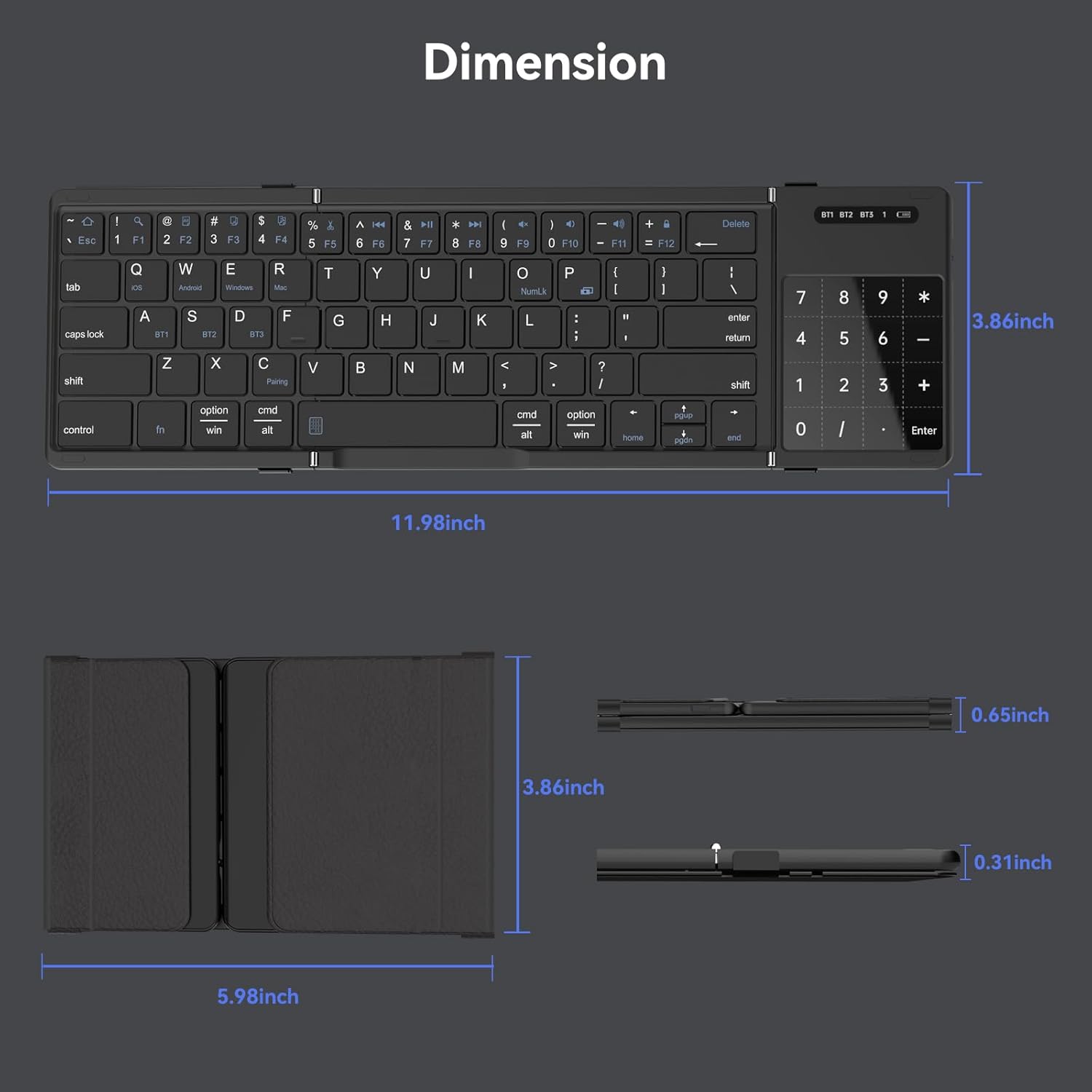
Image: Detailed dimensions of the keyboard in both unfolded and folded states.
Garantie et assistance
AUSDOM products are designed and manufactured to the highest quality standards. This product is covered by a limited warranty from the date of purchase. Please refer to the warranty card included in your package for specific terms and conditions.
For technical support, warranty claims, or general inquiries, please contact AUSDOM customer service through the official website ou les coordonnées fournies sur l'emballage de votre produit.
Website: www.ausdom.com
Please have your model number (Sofkeys Air3) and purchase details ready when contacting support.