
1. Produit terminéview
The STUDIOFINIX 4-Channel Mini Bluetooth Amplifier is designed to power passive speakers, offering versatile connectivity options including Bluetooth 5.1, TWS, AUX, MIC, and USB. Its compact design allows for easy integration into various audio setups, from home entertainment to marine applications.
Caractéristiques principales
- Compatibilité universelle: Suitable for wall-mounted, ceiling-mounted, marine, bookshelf, and other passive speakers.
- Bluetooth 5.1: Ensures faster transmission speed, longer distance, and stable performance for wireless audio streaming.
- Installation facile : Small and lightweight design for convenient placement on flat surfaces or within pre-cut speaker openings.
- Multifonctionnel : Supports Bluetooth, TWS (True Wireless Stereo), AUX, MIC, and USB inputs, along with MONO output.
Qu'y a-t-il dans la boîte
- Bluetooth 4 canaux Amplifier Box (x1)
- Adaptateur secteur 24V5A (x1)
- Manuel d'utilisation (x1)
- Tournevis (x1)
- Vis (x2)
- Cordon d'alimentation (x1)

Image: Contents of the package, including the amplifier, power adapter, power cord, screwdriver, screws, and user manual.
2. Schéma du produit et commandes
Familiarisez-vous avec le amplifier's layout and control functions.
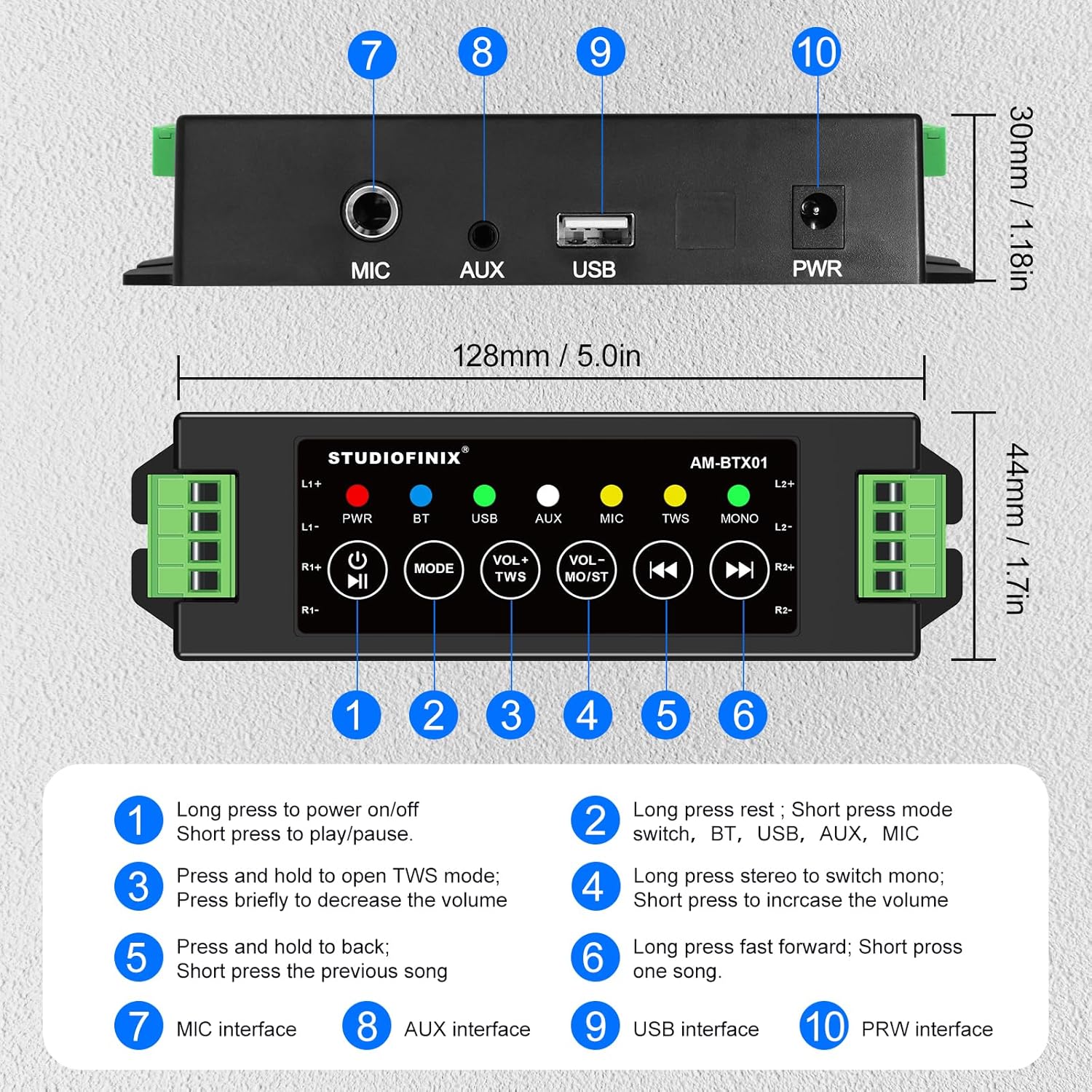
Image : Vue de dessus et de dos view de la amplifier, highlighting numbered controls and interfaces.
Fonctions de contrôle
| Non. | Control/Interface | Fonction |
|---|---|---|
| 1 | Power Button / Play/Pause | Long press to power on/off. Short press to play/pause audio. |
| 2 | Bouton de mode | Long press to reset. Short press to switch between BT, USB, AUX, and MIC modes. |
| 3 | VOL- / TWS Button | Press and hold to open TWS mode. Briefly press to decrease the volume. |
| 4 | VOL+ / MONO Button | Long press to switch between stereo and mono output. Briefly press to increase the volume. |
| 5 | Bouton de piste précédente | Press and hold to fast backward. Short press for the previous song. |
| 6 | Bouton de piste suivante | Appuyez longuement pour avancer rapidement. Appuyez brièvement pour passer à la chanson suivante. |
| 7 | Interface MIC | Input for microphone connection. |
| 8 | Interface AUX | Input for auxiliary audio devices. |
| 9 | Interface USB | Input for USB audio sources. |
| 10 | Interface REP | Power input for the 24V5A adapter. |
3. Configuration et installation
Connexion de haut-parleurs passifs
Le amplifier supports up to four passive speakers. Ensure proper polarity when connecting speaker wires.
- Identify the positive (+) and negative (-) terminals on your passive speakers.
- Connect the positive (+) wire from each speaker to the corresponding L1+, L2+, R1+, R2+ terminals on the amplifier.
- Connect the negative (-) wire from each speaker to the corresponding L1-, L2-, R1-, R2- terminals on the amplifier.
- Use the included screwdriver to secure the speaker wires in the terminal blocks.
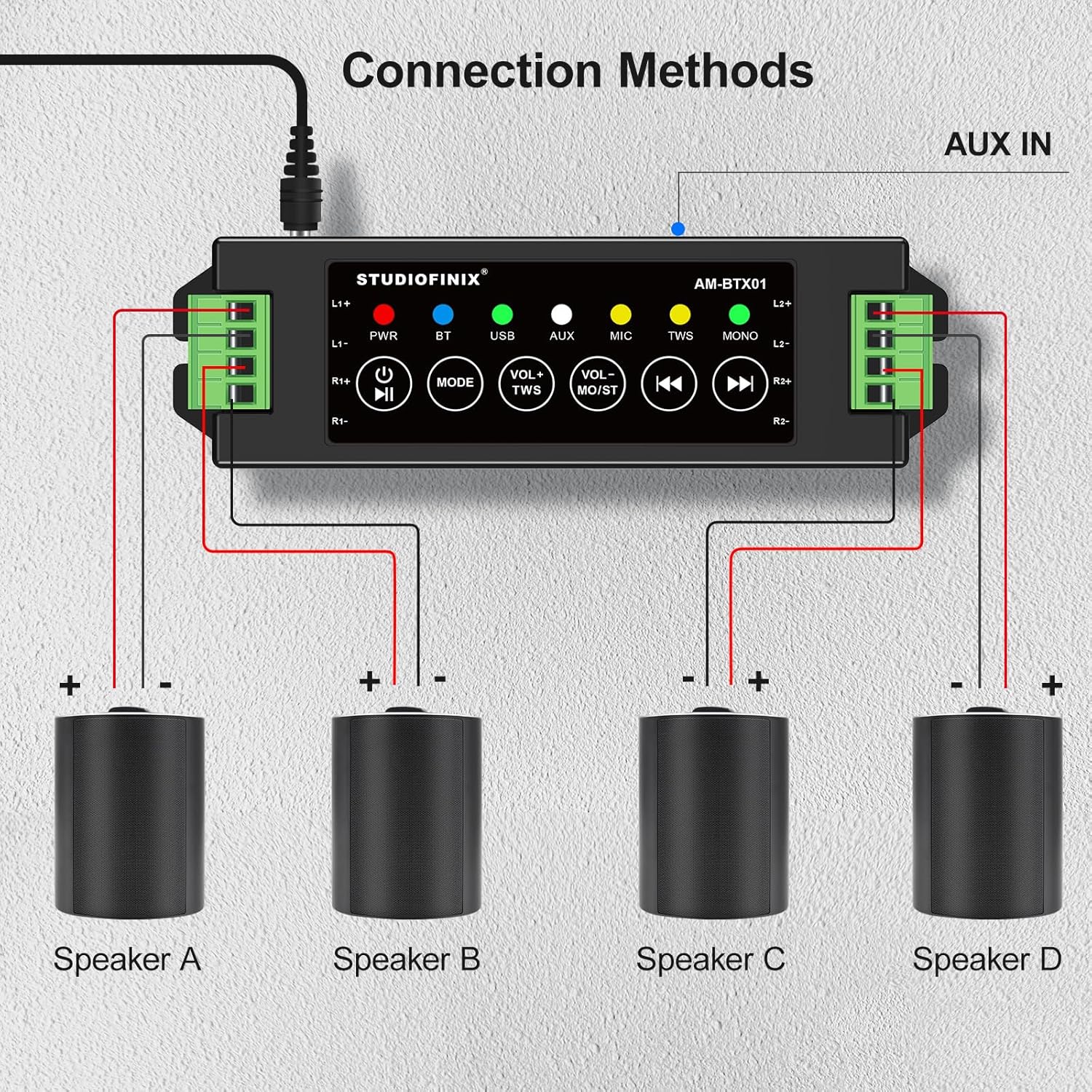
Image: Visual guide for connecting four speakers to the amplifier's output terminals.
Connexion électrique
Connect the provided 24V5A power adapter to the PWR interface (10) on the ampBranchez ensuite l'amplificateur sur une prise de courant appropriée.

Image: Detail of the amplifier's power input (PWR) and auxiliary input (AUX) ports.
4. Fonctionnement
Marche/Arrêt
Long press the Power Button (1) to turn the amplifier on or off. The PWR indicator light will illuminate when the device is powered on.
Appariement Bluetooth
- Assurez-vous que amplifier is powered on and in Bluetooth (BT) mode. The BT indicator light will flash, indicating it's ready for pairing.
- Sur votre appareil mobile (smartphone, tablette, etc.), activez le Bluetooth et recherchez les appareils disponibles.
- Select "STUDIOFINIX" or a similar name from the list of devices to pair.
- Once paired, the BT indicator light will become solid, and you will hear a confirmation tone.
Mode TWS (True Wireless Stereo)
TWS mode allows you to pair two STUDIOFINIX amplifiers for a true wireless stereo experience.
- Assurez-vous que les deux amplifiers are powered on and not connected to any Bluetooth device.
- Sur un amplifier, press and hold the VOL- / TWS Button (3) until you hear a confirmation tone, indicating TWS pairing mode.
- Les deux amplifiers will automatically search and pair with each other. Once paired, one amplifier will act as the master and the other as the slave.
- Now, connect your mobile device to the master amplifier via Bluetooth as described above. Audio will play through both amplifiers in stereo.

Image: Visual representation of two amplifiers being paired using the TWS function.
Input Mode Selection (AUX, USB, MIC)
Short press the Mode Button (2) to cycle through the available input modes: Bluetooth (BT), USB, AUX, and MIC. The corresponding indicator light will illuminate for the active mode.
Contrôle du volume et lecture
- Réglage du volume : Briefly press the VOL- / TWS Button (3) to decrease volume, and the VOL+ / MONO Button (4) to increase volume.
- Lecture/Pause : Short press the Power Button (1) to play or pause audio.
- Piste précédente/suivante : Short press the Previous Track Button (5) for the previous song, and the Next Track Button (6) for the next song.
- Avance/Retour rapide : Long press the Previous Track Button (5) to fast backward, and the Next Track Button (6) to fast forward.
Commutation mono/stéréo
Long press the VOL+ / MONO Button (4) to switch the audio output between stereo and mono modes. The MONO indicator light will show the current setting.
5. Dépannage
| Problème | Cause possible | Solution |
|---|---|---|
| Pas de courant | Adaptateur secteur non connecté ou défectueux. | Assurez-vous que l'adaptateur secteur est correctement connecté à l' amplifier and a working power outlet. Check if the power adapter is functional. |
| Aucun son des haut-parleurs | Incorrect speaker wiring; volume too low; wrong input mode selected; device not paired. | Verify speaker wire connections for correct polarity. Increase volume. Ensure the correct input mode (BT, AUX, USB, MIC) is selected. Confirm Bluetooth device is paired. |
| Bluetooth ne se connecte pas | AmpAmplificateur non en mode appariement ; appareil trop éloigné ; interférences. | Assurez-vous que amplifier is in BT mode and the BT indicator is flashing. Move your device closer to the amplifier. Avoid strong electromagnetic interference. Try resetting Bluetooth on both devices. |
| Échec de l'appairage TWS | One or both amplifiers already paired; incorrect TWS activation. | Assurez-vous que les deux amplifiers are unpaired from other Bluetooth devices. Follow TWS pairing instructions carefully, initiating TWS mode on only one amplifier d'abord. |
| Mauvaise qualité sonore | Low quality audio source; speaker impedance mismatch; loose connections. | Utilisez un son de haute qualité files. Ensure speakers are compatible with the amplifier's output. Check all cable connections. |
6. Spécifications
| Fonctionnalité | Détail |
|---|---|
| Marque | STUDIOFINIX |
| Numéro de modèle | RM |
| Puissance de sortie maximale du haut-parleur | 120 watts |
| Technologie de connectivité | Bluetooth |
| Mode de sortie audio | Stéréo |
| Type de montage | Montage mural, montage au plafond |
| Matériau de l'enceinte | Plastique ou métal |
| Nombre de canaux audio | 4.0 |
| Technologie sans fil | Bluetooth |
| Protocole de connectivité | AUX, Bluetooth |
| Méthode de contrôle | Touche |
| Poids de l'article | 0.53 kilogrammes |
| Appareils compatibles | Ordinateur portable, smartphone, tablette |
| Source d'énergie | Électrique avec fil |
7. Consignes de sécurité
- N'exposez pas le amplifier à l'eau ou à une humidité excessive.
- Évitez de placer l'appareil à proximité de sources de chaleur ou à la lumière directe du soleil.
- Utilisez uniquement l'adaptateur secteur fourni afin d'éviter tout dommage.
- N’essayez pas d’ouvrir ou de réparer l’appareil vous-même. Veuillez faire appel à un technicien qualifié.
- Tenir hors de portée des enfants.
8. Vidéo produit
Video: An official product video from Studiofinix Direct demonstrating the 4-Channel Mini Bluetooth Amplifier for Passive Speakers, showcasinet ses caractéristiques et fonctionnalités.
9. Garantie et assistance
This STUDIOFINIX product comes with a limited warranty. For detailed warranty information or technical support, please refer to the contact information provided in your product packaging or visit the official STUDIOFINIX website.