
Introduction
Merci pour votre achatasing the Muse M-780 BTB Bluetooth Speaker. This portable speaker features 20W output, colored lights, IPX5 splash resistance, hands-free calling, and stereo pairing capabilities. It supports Bluetooth, Auxiliary input, and USB MP3 playback. Please read this manual carefully before use to ensure proper operation and to maximize your listening experience.
Consignes de sécurité
- N’exposez pas l’appareil à des températures extrêmes, à la lumière directe du soleil ou à une forte humidité.
- Évitez de laisser tomber l’enceinte ou de la soumettre à des chocs violents.
- The speaker is IPX5 splash-resistant. Do not immerse it in water or expose it to strong jets of water.
- Ne tentez pas de démonter ou de modifier l'enceinte. Cela annulera la garantie.
- Utilisez uniquement le câble de chargement fourni ou approuvé.
- Tenir hors de portée des enfants.
Contenu du colis
Veuillez vérifier que tous les articles sont présents :
- Muse M-780 BTB Bluetooth Speaker
- Câble de chargement USB-C
- Câble d'entrée auxiliaire
- Manuel d'instructions (ce document)
Produit terminéview
Familiarisez-vous avec les commandes et les ports de l'enceinte.
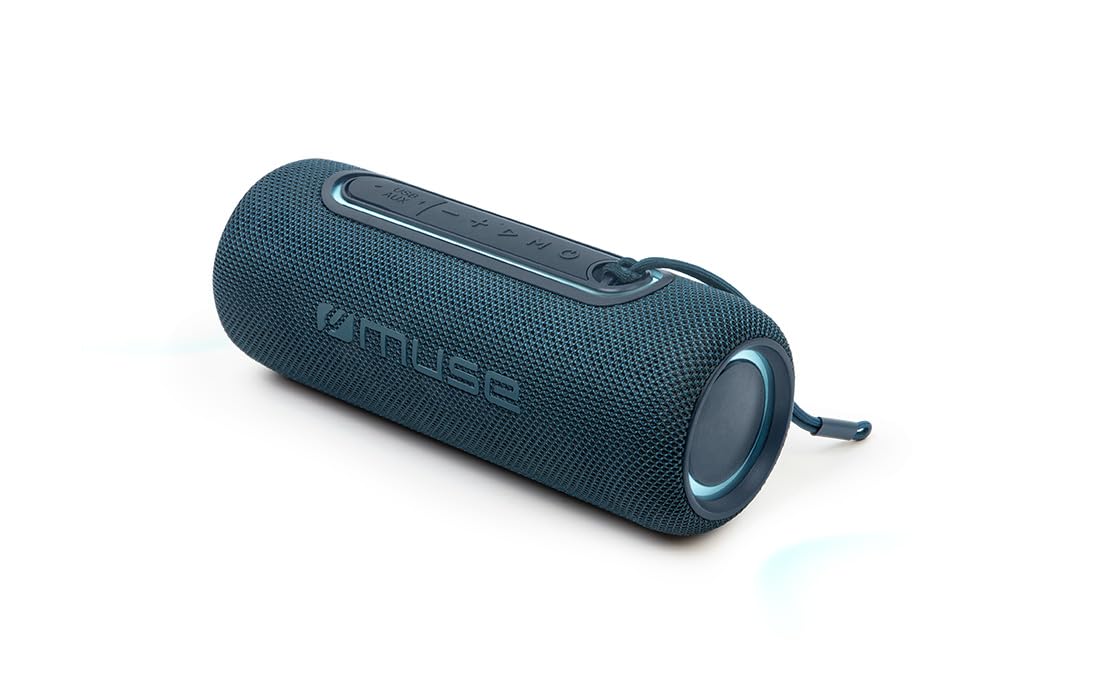
Figure 1 : Devant view of the Muse M-780 BTB Bluetooth Speaker, showing the speaker grille and control buttons on top.
Commandes et indicateurs :
- Bouton d'alimentation : Appuyez et maintenez pour allumer/éteindre.
- Bouton Lecture/Pause : Appuyez pour lire ou mettre en pause la musique. Répondre/mettre fin aux appels.
- Augmenter le volume (+): Appuyez pour augmenter le volume. Appuyez longuement pour passer à la piste suivante.
- Baisser le volume (-): Appuyez pour baisser le volume. Appuyez longuement pour revenir à la piste précédente.
- Bouton de mode (M) : Press to switch between Bluetooth, Aux-in, and USB modes.
- Bouton de mode d'éclairage : Press to cycle through different colored light effects.
- Bluetooth Pairing LED Indicator: Affiche l'état de la connexion Bluetooth.
- Indicateur LED de charge : Affiche l'état de charge de la batterie.
Ports:
- Port de chargement USB-C : Pour recharger la batterie interne.
- Port AUX-IN : Pour connecter des périphériques audio externes via un câble de 3.5 mm.
- Port USB : Pour la lecture de fichiers MP3 à partir d'une clé USB.
Installation
1. Charge initiale
Before first use, fully charge the speaker. Connect the supplied USB-C cable to the speaker's USB-C charging port and the other end to a USB power adapter (not included) or a computer's USB port. The Charging LED indicator will illuminate during charging and turn off when fully charged. A full charge provides up to 10 hours of music playback.
2. Mise sous/hors tension
Appuyez et maintenez enfoncé le Bouton d'alimentation pendant environ 3 secondes pour allumer ou éteindre le haut-parleur.
Mode d'emploi
Appariement Bluetooth
- Turn on the speaker. It will automatically enter Bluetooth pairing mode, and the Bluetooth Pairing LED indicator will flash.
- Enable Bluetooth on your smartphone, tablet, or other Bluetooth-compatible device.
- Rechercher "M-780 BTB" in the list of available devices and select it to connect.
- Once successfully paired, the Bluetooth Pairing LED indicator will stop flashing and remain solid. You can now stream music wirelessly from your device within a range of up to 10 meters.
Entrée auxiliaire (AUX-IN)
- Connect one end of the supplied 3.5mm auxiliary cable to the AUX-IN port on the speaker.
- Branchez l'autre extrémité à la prise casque ou à la sortie audio de votre périphérique audio externe.
- Appuyez sur le Bouton Mode (M) to switch to AUX-IN mode.
- Contrôlez la lecture et le volume depuis votre appareil externe.
Lecture MP3 USB
- Insérez une clé USB contenant un fichier audio MP3. files dans le port USB du haut-parleur.
- Appuyez sur le Bouton Mode (M) pour passer en mode USB.
- The speaker will automatically begin playing MP3 files à partir de la clé USB.
- Utilisez les boutons Lecture/Pause, Volume + et Volume - pour contrôler la lecture.
Appels mains libres
Une fois connecté à votre smartphone via Bluetooth :
- Répondre/Terminer l'appel : Appuyez sur le Bouton Lecture/Pause une fois.
- Rejeter l'appel : Appuyez et maintenez enfoncé le Bouton Lecture/Pause pendant 2 secondes.
Appairage stéréo (TWS - True Wireless Stereo)
You can pair two M-780 BTB speakers together for a true wireless stereo sound experience.
- Ensure both M-780 BTB speakers are turned on and not connected to any Bluetooth device.
- Sur l'une des enceintes (qui sera l'enceinte principale), appuyez et maintenez enfoncé le bouton Bouton Mode (M) for 2-3 seconds until you hear a confirmation tone. The speakers will attempt to pair with each other.
- Once successfully paired, you will hear another confirmation tone. The Bluetooth LED on the primary speaker will flash, and the LED on the secondary speaker will be solid.
- Now, connect your Bluetooth device to the primary speaker as described in the "Bluetooth Pairing" section. Both speakers will play audio in stereo.
Lumières colorées
Appuyez sur le Bouton de mode d'éclairage to cycle through various colored light effects. Press again to change the effect or turn the lights off.
Charger l'enceinte
When the battery is low, the speaker may emit an audible alert. Connect the USB-C charging cable to the speaker and a power source. The Charging LED indicator will show the charging status. Disconnect the cable once fully charged to preserve battery life.
Entretien
- Nettoyage: Utilisez un chiffon doux et sec pour nettoyer la surface du haut-parleur. N'utilisez pas de produits nettoyants abrasifs ni de solvants.
- Résistance à l'eau : The M-780 BTB has an IPX5 splash-resistant rating, meaning it can withstand splashes of water. Do not submerge the speaker in water or expose it to running water. Ensure the port cover is securely closed to maintain water resistance.
- Stockage: Rangez l'enceinte dans un endroit frais et sec lorsqu'elle n'est pas utilisée pendant une période prolongée.
Dépannage
| Problème | Cause possible | Solution |
|---|---|---|
| Le haut-parleur ne s'allume pas. | La batterie est épuisée. | Chargez l'enceinte à l'aide du câble USB-C. |
| Pas de son. | Le volume est trop faible ou coupé. Mode d'entrée incorrect. | Increase volume on both the speaker and the connected device. Press the Mode button to select the correct input (Bluetooth, AUX, USB). |
| Impossible de coupler via Bluetooth. | L'enceinte n'est pas en mode appairage. L'appareil est trop éloigné. Interférences. | Ensure speaker is in pairing mode (flashing LED). Move device closer to speaker (within 10m). Turn off other Bluetooth devices. |
| L'appairage stéréo ne fonctionne pas. | Speakers not correctly paired. | Ensure both speakers are disconnected from other devices. Follow the stereo pairing instructions carefully. |
Caractéristiques
| Nom du modèle : | M-780 BTB |
| Marque: | Muse |
| Puissance de sortie : | 20 watts |
| Connectivité : | Bluetooth, USB, entrée auxiliaire |
| Gamme Bluetooth: | Jusqu'à 10 mètres (33 pieds) |
| Résistance à l'eau : | Résistant aux éclaboussures IPX5 |
| Durée de lecture : | Jusqu'à 10 heures (à volume modéré) |
| Port de charge : | USB-C |
| Dimensions (L x l x H) : | 24.2 x 9.2 x 9.2 cm (9.5 x 3.6 x 3.6 pouces) |
| Poids: | 1 kg (2.2 lb) |
| Appareils compatibles : | Smartphones, tablettes, ordinateurs portables |
| Caractéristiques spéciales : | Colored Lights, Hands-Free Calling, Stereo Pairing (TWS) |
Garantie et assistance
This product is covered by a standard manufacturer's warranty. For detailed warranty terms and conditions, please refer to the warranty card included with your purchase or contact your retailer. For technical support or service inquiries, please contact Muse customer service through their official weble site ou les coordonnées fournies avec votre produit.