
CAMECHO CAMA3041A3MI2
CAMECHO Android 13 Car Radio (Model CAMA3041A3MI2) User Manual
Instructions complètes pour l'installation, le fonctionnement et l'entretien.
Introduction
This manual provides detailed instructions for the installation, operation, and maintenance of your CAMECHO Android 13 Car Radio. Please read this manual thoroughly before using the product to ensure proper functionality and safety. This unit features a 9-inch capacitive touchscreen, Android 13 operating system, 2GB RAM, 64GB ROM, built-in Wireless Carplay & Android Auto, GPS, WiFi, Bluetooth, FM/RDS radio, and supports steering wheel control and a rear view caméra.
Compatibilité des véhicules
This CAMECHO car radio is designed for specific Volkswagen, Skoda, and Seat models. Please refer to the compatibility chart below to ensure your vehicle is supported. The image also illustrates the visual transformation from a standard car console to one with the CAMECHO unit installed.

Image: Compatibility chart for various Volkswagen, Skoda, and Seat models, including Golf, Polo, Passat, Octavia, and Leon. The image also displays a comparison of the car console before and after the CAMECHO car radio installation.
Modèles compatibles :
Pour Volkswagen
- Amarok (2010-2013)
- Caddy (2003-2013)
- Golf V (2003-2008)
- Golf VI (2008-2013)
- Golf Plus (2003-2013)
- Golf Cabriolet (2011-2013)
- Golf Wagon (2010-2013)
- Golf GTI (2010-2012)
- Golf R (2010-2013)
- Domaine de golf (2009-2012)
- Passat (2005-2013)
- Passat Estate (2005-2013)
- Passat Berline (2006-2013)
- Passat Break (2007-2013)
- Passat Alltrack (2012-2013)
- Passat CC (2008-2013)
- Jetta (2005, 2007-2013)
- Jetta GLI (2006-2013)
- Touran (2003-2013)
- Tiguan (2007-2013)
- Sharan (2010-2013)
- Scirocco (2008-2013)
- EOS (2006-2013)
- Transporteur WT5 (2010-2014)
- Polos (2009-2013)
- Polo Berline (2012-2013)
- Polo V 6R (2009-2013)
- Nouvelle Beetle 2 (2011-2013)
- Lapin (2007-2013)
- Transporteur T5 (2010-2013)
- WT5 Caravelle 2010 Multivan T5 (2010-2013)
- Coccinelle (2011-2013)
Pour Skoda
- Octavia Limousine (2004-2006)
- Octavia II III (jusqu'en 2010)
- Octavia Combi (2004-2006)
- Octavia (2009-2012)
- Fabia Limousine (2004-2008)
- Fabia (2011-2013)
- Roomster (2006-2010)
- Patrick (2004-2008)
- Superbe (2008-2013)
- Yeti (2009-2015)
Pour le siège
- Altea (2004, 2005, 2007-2012)
- Altea XL (2007-2013)
- Léon (2006-2013)
- Tolède (2004-2015)
- Alhambra (2010-2016)
Principales caractéristiques du produit
- Système Android 13 : Equipped with the latest Android 13 operating system, 4-core processor, 2GB RAM, and 64GB ROM for fast and smooth performance.
- Écran tactile capacitif de 9 pouces : High-resolution 1024x600 display for clear visuals and responsive touch control.
- CarPlay et Android Auto sans fil : Seamlessly integrate your smartphone for navigation, music, messages, and voice control (Siri/Google Assistant) via Bluetooth and WiFi.
- Navigation GPS: Supports offline maps (e.g., Here Wego) and online navigation via WiFi connection, allowing access to Play Store apps like YouTube and Facebook.
- Arrière View Prise en charge de la caméra: Includes an AHD rear camera with waterproof, 170° wide-angle, and night vision capabilities. Automatically displays the camera feed when reversing.
- Commandes au volant (SWC) : Compatible with original steering wheel buttons for convenient and safe operation of radio functions.
- Connectivité Bluetooth : Built-in Bluetooth with an external microphone for hands-free calling, music streaming, and phonebook synchronization.
- Radio FM/RDS : High-quality FM/RDS radio tuner with 18 preset channels.
- HiFi Audio Effect: Features an equalizer for customized audio output.
- Fonction écran partagé : Permet d'exécuter deux applications simultanément à l'écran.
Configuration et installation
Installation of the CAMECHO Android 13 Car Radio requires technical knowledge and experience with car electronics. It is highly recommended to have the unit installed by a qualified professional to ensure correct wiring and avoid damage to your vehicle or the product.
Étapes générales d'installation :
- Préparation: Débranchez la batterie du véhicule avant d'entreprendre tout travail électrique.
- Retirer l'ancienne unité : Carefully remove your existing car radio and trim panels.
- Connecter le câblage : Connect the provided power cables, RCA cables, USB cables, GPS antenna, and camera input to the corresponding ports on the new unit and your vehicle's wiring harness. The included Canbus decoder ensures compatibility with your vehicle's systems, including steering wheel controls.
- Installation d'une caméra de recul (en option) : If installing the rear camera, route the camera cable from the back of the vehicle to the head unit and connect it to the camera input.
- Unité de montage : Securely mount the CAMECHO car radio into the dashboard opening.
- Rebranchez la batterie : Rebranchez la batterie du véhicule.
- Mise sous tension et test initiaux : Turn on the ignition and power on the unit. Test all functions, including audio, touchscreen, GPS, Bluetooth, and camera.
For detailed wiring diagrams and specific vehicle instructions, please consult a professional installer or refer to vehicle-specific resources.
Mode d'emploi
1. CarPlay sans fil et Android Auto
Connect your smartphone to the car radio via Bluetooth and WiFi to activate Wireless Carplay or Android Auto. This allows safe access to your phone's navigation, music, messages, and other features while driving. Voice control (Siri for Apple Carplay, Google Assistant for Android Auto) is supported for hands-free operation.

Image: Visual representation of Apple Carplay and Android Auto interfaces, demonstrating their appearance and functionality on the car radio display.
2. Navigation GPS et Wi-Fi
The unit supports GPS navigation with pre-installed offline maps (e.g., Here Wego). Connect to a WiFi network (e.g., via your phone's hotspot) to download online maps from the Play Store, browse the internet, and access various applications like YouTube and Facebook.

Image: The car radio screen showing GPS navigation in action, along with icons for various online applications accessible via WiFi.
3. Kit mains libres Bluetooth et musique
Pair your smartphone via Bluetooth for hands-free calling and audio streaming. The external microphone ensures clear call quality. You can access your phonebook and stream music directly to the car radio.

Image: A composite image showing the Bluetooth calling interface, music streaming, FM/RDS radio tuning, and the HiFi equalizer settings on the car radio.
4. Radio FM/RDS
Tune into your favorite FM radio stations. The RDS (Radio Data System) feature provides additional information like station name and song title where available. You can save up to 18 preset channels.
5. Commande au volant (SWC)
The unit supports your vehicle's original steering wheel controls. After installation, you may need to configure the SWC settings in the radio's menu to map the buttons correctly. This allows you to control volume, switch tracks, answer calls, and more without taking your hands off the wheel.

Image: The car radio interface displaying options for configuring steering wheel controls and a view of the rear camera feed with parking guidelines.
6. Arrière View Caméra
When the vehicle is shifted into reverse gear, the car radio automatically displays the feed from the included AHD rear camera. The camera features a waterproof design, 170° wide-angle view, and night vision for enhanced safety during parking maneuvers.
7. HiFi Audio Effect
Utilize the built-in equalizer to customize your audio experience. Adjust bass, treble, and other sound parameters to achieve your preferred sound profile.
8. Fonction d'écran partagé
La fonction d'écran partagé vous permet d'exécuter deux applications simultanément sur l'écran de 9 pouces. Par exemple :ampVous pouvez ainsi avoir la navigation ouverte d'un côté et la lecture de musique de l'autre.

Image: A visual representation of the split screen function, demonstrating how the car radio display can be divided to show two different applications simultaneously.
Entretien
- Nettoyage de l'écran : Utilisez un chiffon doux et non pelucheux légèrement dampNettoyez-les avec de l'eau ou un nettoyant pour écran spécialement conçu pour l'électronique. Évitez les produits chimiques agressifs ou abrasifs.
- Nettoyage général : Keep the unit free from dust and debris. Use a soft, dry cloth for general cleaning.
- Mises à jour logicielles : Vérifiez régulièrement les mises à jour logicielles via le menu des paramètres de l'appareil ou le site web du fabricant. website pour garantir des performances optimales et l'accès aux nouvelles fonctionnalités.
- Évitez les températures extrêmes : N’exposez pas l’appareil à des températures extrêmes ou à la lumière directe du soleil pendant des périodes prolongées, car cela peut affecter sa durée de vie et ses performances.
Dépannage
Si vous rencontrez des problèmes avec votre autoradio CAMECHO, veuillez vous référer aux étapes de dépannage courantes suivantes :
- Pas d'alimentation :
- Vérifiez toutes les connexions électriques et les fusibles.
- Vérifiez que la batterie du véhicule est correctement connectée et chargée.
- Pas de son :
- Vérifiez les connexions des haut-parleurs.
- Vérifiez les niveaux de volume et les paramètres de mise en sourdine.
- Assurez-vous que la source audio correcte est sélectionnée.
- Écran tactile non réactif :
- Redémarrez l'appareil en coupant le contact du véhicule puis en le redémarrant.
- Si le problème persiste, effectuez une réinitialisation d'usine (remarque : cela effacera tous les paramètres personnalisés).
- GPS non fonctionnel :
- Assurez-vous que l'antenne GPS est correctement connectée et que le signal est clair. view du ciel.
- Vérifiez les paramètres GPS dans le menu de l'appareil.
- Problèmes de connexion Bluetooth :
- Assurez-vous que le Bluetooth est activé à la fois sur l'autoradio et sur votre smartphone.
- Supprimez les associations précédentes et réessayez.
- Assurez-vous que votre téléphone se trouve à portée.
- Caméra arrière non affichée :
- Vérifiez l'alimentation et les connexions vidéo de la caméra.
- Ensure the reverse gear signal wire is correctly connected.
Si ces étapes ne résolvent pas le problème, veuillez contacter le service client pour obtenir de l'aide supplémentaire.
Caractéristiques
| Fonctionnalité | Détail |
|---|---|
| Numéro de modèle | CAMA3041A3MI2 |
| Système opérateur | Android 13 |
| BÉLIER | 2 Go |
| ROM | 64 Go |
| Taille de l'écran | 9 pouces |
| Résolution de l'écran | 1024x600 |
| Technologie de connectivité | Bluetooth, Wi-Fi |
| Type de contrôleur | Contrôle manuel |
| Caractéristiques spéciales | Built-in Bluetooth, Lane assistance |
| Appareils compatibles | Smartphone |
| Type de connecteur | RCA |
| Mode de sortie audio | Stéréo |
| Nombre de canaux | 4 |
| Puissance de sortie | 180 watts |
| Dimensions du colis | 28.1 x 21.1 x 10.9 cm |
| Poids de l'article | 1.25 kg |
Contenu du colis
The following items are included in your CAMECHO Android 13 Car Radio package:
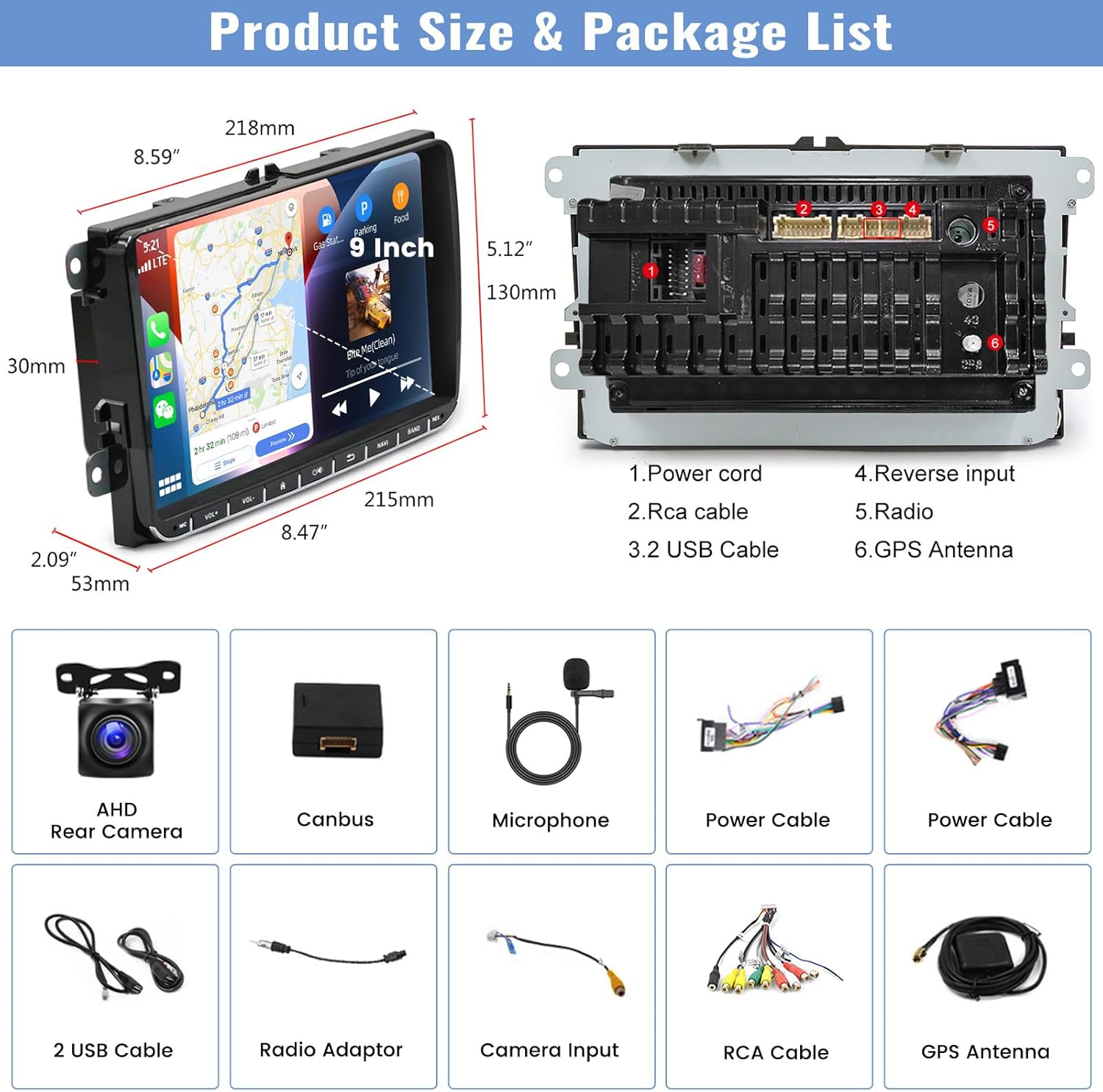
Image: An illustration detailing the dimensions of the 9-inch car radio unit and a comprehensive list of all accessories included in the package.
- Autoradio CAMECHO 9 pouces Android 13
- Caméra arrière AHD
- Décodeur CANbus
- Microphone externe
- Power Cable (x2, likely different types for compatibility)
- 2 câbles USB
- Adaptateur radio
- Câble d'entrée de caméra
- Ensemble de câbles RCA
- Antenne GPS
Garantie et assistance
Your CAMECHO Android 13 Car Radio comes with a Garantie de 1 ans à compter de la date d'achat. Cette garantie couvre les défauts de fabrication et les dysfonctionnements dans des conditions normales d'utilisation.
For warranty claims, technical support, or any questions regarding the product, please contact CAMECHO customer service through the retailer where you purchased the product or visit the official CAMECHO website for contact information. Please have your model number (CAMA3041A3MI2) and proof of purchase ready when contacting support.