
1. Introduction
This manual provides detailed instructions for the setup, operation, and maintenance of your GOYOJO 0310 Smart Wireless Weather Station. This advanced weather station features a 7-in-1 outdoor sensor and an indoor LCD display, offering comprehensive weather monitoring capabilities. Please read this manual thoroughly before using the device to ensure proper function and longevity.
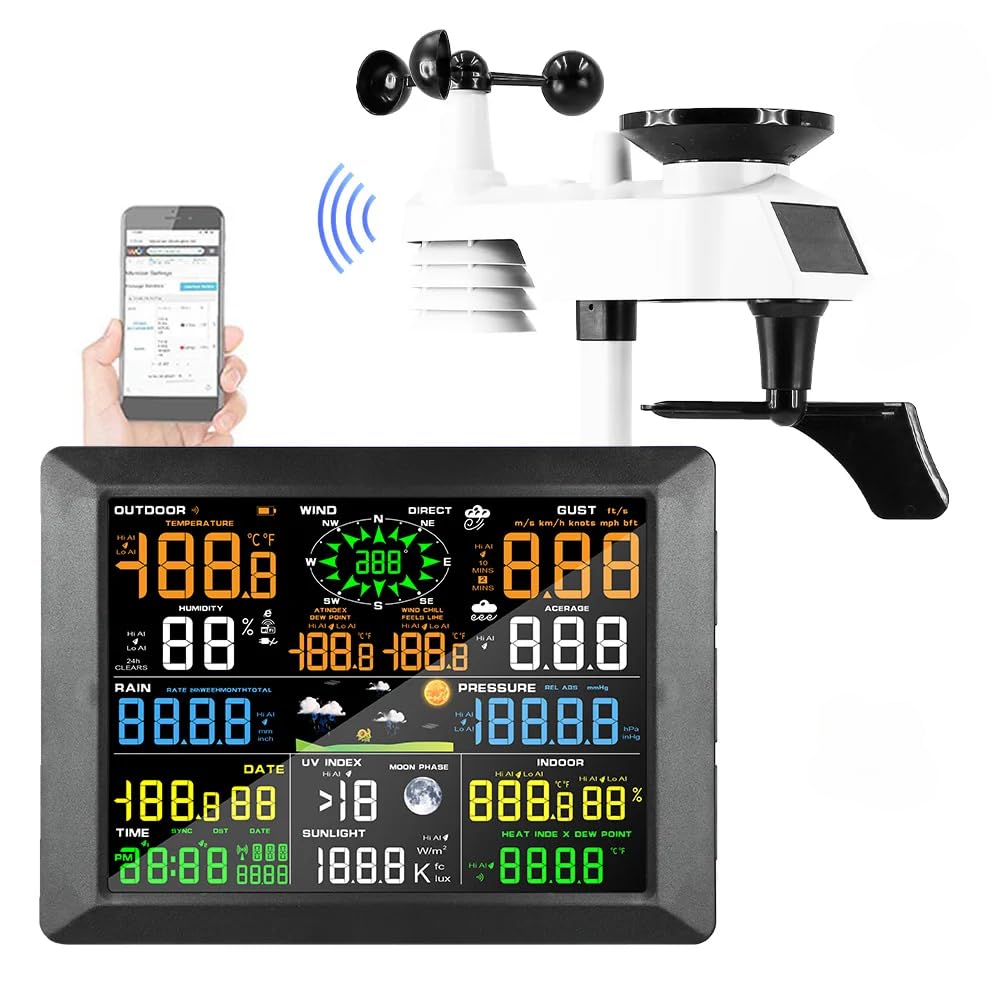
Image 1.1: GOYOJO 0310 Smart Wireless Weather Station components.
2. Contenu de la boîte
Déballez soigneusement tous les composants et vérifiez que vous avez bien reçu les éléments suivants :
- Seven-in-one Outdoor Sensor
- Indoor Receiver (Display Console)
- Indoor WIFI Module
- Adaptateur secteur
- Mounting Hardware (screws, base upper and lower cover, straight rod)
- Manuel d'instructions (ce document)

Image 2.1: All included components and accessories.
3. Guide de configuration
3.1 Installation du capteur extérieur
The 7-in-1 outdoor sensor measures temperature, humidity, wind speed, wind direction, rainfall, and UV index. It is solar-powered with battery backup.
- Installation de la batterie : Open the battery compartment on the outdoor sensor. Insert 3 AA batteries (not included), observing polarity. Lithium AA batteries are recommended for optimal performance in varying temperatures.
- Emplacement de montage : Choose an open location for the outdoor sensor, free from obstructions that could interfere with wind, rain, or sunlight. Ensure it is easily accessible for maintenance.
- Options de montage :
- Montage sur poteau: Attach the sensor to a pole using the provided mounting hardware (straight rod, base covers, screws).
- Montage en surface: Secure the sensor to a flat surface using the base covers and screws.
- Orientation: Ensure the wind vane and anemometer are free to rotate. The solar panel should face south for maximum sunlight exposure.

Image 3.1: Outdoor sensor mounting options and details.

Image 3.2: Power supply for the indoor display and outdoor sensor.
3.2 Indoor Receiver (Display Console) Setup
- Connexion électrique : Connect the provided power adapter to the indoor receiver and plug it into a standard electrical outlet. The receiver can also be powered by 3 AAA alkaline batteries (not included) for backup.
- Placement: Place the indoor receiver in a central location within your home, ensuring it is within range of the outdoor sensor for optimal wireless communication.
- Synchronisation initiale : The indoor receiver will automatically attempt to connect with the outdoor sensor. This may take a few minutes. Once connected, weather data will appear on the display.
3.3 Wi-Fi Connection and Data Transfer
The weather station supports Wi-Fi connectivity for seamless data transfer to online weather services like Weathercloud. This allows for remote monitoring and historical data analysis.
- Download App/Access Web Portail: Refer to the specific instructions provided with your device for downloading the companion mobile application or accessing the dedicated web portal (e.g., Weathercloud).
- Appareil d'enregistrement : Suivez les instructions affichées à l'écran dans l'application ou web portal to register your weather station using its unique device ID.
- Se connecter au Wi-Fi : Use the app or web portal to configure the weather station's Wi-Fi settings, connecting it to your home network.
- Synchronisation des données : Once connected, the weather station will automatically upload data to the chosen online service, allowing you to view real-time and historical weather information from anywhere.

Image 3.3: Syncing with online weather servers for remote access.
Video 3.1: Demonstration of the GOYOJO 0310 Weather Station setup and Weathercloud data interface. This video illustrates the physical installation of the outdoor sensor, the connection of the indoor display, and how to access and interpret weather data through the Weathercloud online platform, including changing units and viewing historical trends.
4. Mode d'emploi
4.1 Console d'affichage intérieure
The indoor display console provides real-time readings of various weather parameters. It features a large, true-color LCD screen for easy readability.

Image 4.1 : Détail view of the indoor display console.
- Affichage principal : Shows outdoor temperature, humidity, wind speed, wind direction, rainfall, atmospheric pressure, UV index, and indoor temperature/humidity.
- Heure et date : Synchronisation automatique via Wi-Fi.
- Réveil: Il est doté d'une fonction réveil intégrée.
- Prévisions météorologiques: Provides a 24/48-hour weather forecast based on barometric pressure changes.
4.2 Monitoring Weather Data Online
Through the connected online platform (e.g., Weathercloud), you can access a wealth of data and features:
- Données en temps réel : View current weather conditions from your station.
- Données historiques: Access daily, weekly, monthly, and yearly records of temperature, humidity, wind, rain, and more.
- Unités personnalisables : Change units for temperature (°C/°F), wind speed (m/s, km/h, mph, kn), atmospheric pressure (hPa, mbar, inHg), and rainfall (mm, in).
- Graphs and Reports: Visualize weather trends over time with interactive graphs and generate detailed reports.

Image 4.2: Remote monitoring of weather data via Wi-Fi.
5. Entretien
Regular maintenance ensures the accuracy and longevity of your weather station.
- Nettoyage des capteurs extérieurs : Periodically clean the rain collector funnel, wind cups, and solar panel to remove dirt, leaves, or debris that could affect readings. Use a soft, damp tissu.
- Vérification de la batterie : Check the batteries in the outdoor sensor and indoor receiver annually. Replace them if necessary, especially before winter for outdoor sensors to ensure continuous operation.
- Calibrage du capteur : While the sensors are factory-calibrated, if you suspect inaccuracies, refer to the online platform's settings for any available calibration options or contact support.
- Mises à jour du micrologiciel : Vérifiez le fabricant website or app for any available firmware updates for your device to ensure optimal performance and new features.
6. Dépannage
Si vous rencontrez des problèmes avec votre station météo, essayez les étapes de dépannage suivantes :
| Problème | Cause possible | Solution |
|---|---|---|
| No data on indoor display | Outdoor sensor not transmitting, low batteries, or interference. | Check outdoor sensor batteries. Ensure sensor and display are within range. Press the RESET button on the outdoor sensor (refer to Image 3.1 for location). |
| Relevés de température/humidité incorrects | Sensor obstruction or placement issues. | Ensure outdoor sensor is not in direct sunlight (unless designed for it) or near heat sources. Verify proper ventilation around the sensor. |
| Vitesse/direction du vent inexacte | Obstruction of wind cups/vane. | Clear any debris from wind cups and vane. Ensure sensor is mounted in an open area. |
| Les précipitations ne sont pas enregistrées. | Collecteur d'eau de pluie bloqué. | Clean the rain collector funnel and tipping bucket mechanism. |
| Problèmes de connectivité Wi-Fi | Incorrect Wi-Fi settings, weak signal, or network problems. | Verify Wi-Fi password. Ensure the indoor receiver is within range of your Wi-Fi router. Restart your router and the weather station. |
7. Spécifications
| Fonctionnalité | Détail |
|---|---|
| Marque | GOYOJO |
| Modèle | 0310 |
| Capteur extérieur | 7-in-1 (Temperature, Humidity, Wind Speed, Wind Direction, Rainfall, UV Index, Solar Radiation) |
| Source d'alimentation (capteur extérieur) | Solar Powered with 3x AA battery backup (not included) |
| Power Source (Indoor Receiver) | Power Adapter (included) or 3x AAA batteries (not included) |
| Technologie de connectivité | Wi-Fi (2.4 GHz) |
| Précision de la température | ±1 °C |
| Précision de l'humidité | ±5% |
| Précision de la vitesse du vent | Reliable data (specific value not provided) |
| Type d'affichage | LCD (True Color) |
| Dimensions du récepteur intérieur | 8.46" x 0.87" x 6.22" (215 mm x 22 mm x 158 mm) |
| LCD Display Dimensions | 6.69" x 4.92" (170 mm x 125 mm) |
| Code UPC | 658361252622 |
| ASIN | B0CSW35CYF |
8. Garantie et assistance
The GOYOJO 0310 Smart Wireless Weather Station is designed for reliable performance. While specific warranty details are not provided in this manual, GOYOJO offers professional technical support.
- Support technique : A professional technical support team is available to provide timely assistance within 24 hours for any issues encountered during use. Please refer to the product packaging or the manufacturer's official website pour les coordonnées.
- Enregistrement du produit: Registering your product may provide additional benefits or facilitate warranty claims. Check the manufacturer's website pour plus de détails.