
1. Produit terminéview
The HG Power 10 Inch Shutter Exhaust Fan (Model APB25D) is a high-performance ventilation solution designed for various applications. It effectively removes heat, odors, and excess moisture, improving air quality in spaces such as garages, chicken coops, sheds, basements, gables, kitchens, and attics. This model features a durable construction and an integrated ON/OFF switch for straightforward operation.
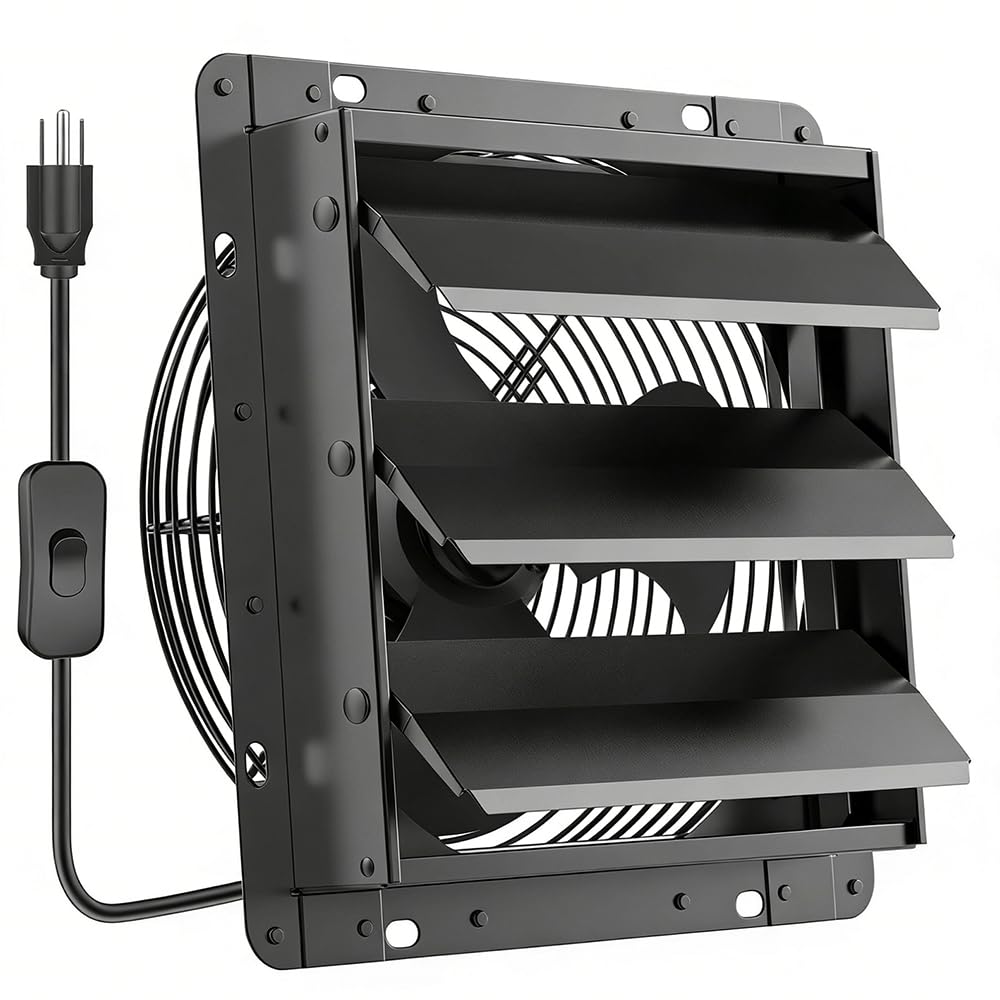
Figure 1: HG Power 10 Inch Shutter Exhaust Fan
2. Consignes de sécurité
Please read all safety instructions before installation and operation. Failure to follow these instructions may result in electric shock, fire, or serious injury.
- Always disconnect power before installing, servicing, or cleaning the fan.
- Ensure the fan is installed in accordance with all local and national electrical codes.
- Ne faites pas fonctionner le ventilateur avec un cordon ou une prise endommagés.
- Keep hands, clothing, and other objects away from moving parts during operation.
- Ce ventilateur est conçu uniquement à des fins de ventilation. Ne l'utilisez pas pour évacuer des matières dangereuses ou explosives.
- Assurez une mise à la terre appropriée pour réduire le risque de choc électrique.
3. Contenu du colis
Vérifiez que tous les éléments sont présents dans le colis :
- HG Power 10 Inch Shutter Exhaust Fan
- 8-foot long power cord with ON/OFF switch
- Écran à mailles
- Manuel d'utilisation
- Matériel de montage (vis, chevilles)

Figure 2: Fan with included power cord and switch
4. caractéristiques du produit
- Ventilation haute performance : Delivers 647 CFM (Cubic Feet Per Minute) airflow for effective air circulation.
- Construction durable : Features a powder-coated steel grille and a robust metal body for corrosion resistance and longevity.
- Persiennes automatiques : The 10.6"x10.6" automatic louver seals shut when the fan is off, providing protection against rain, dust, and insects.
- Easy Indoor-Mount Installation: Designed for installation entirely from inside the space, eliminating the need for external access or complex scaffolding.
- Fonctionnement silencieux : Operates at a low noise level of 52 decibels.
- Interrupteur marche/arrêt intégré : Convenient 8-foot long power cord with a push-button ON/OFF switch.
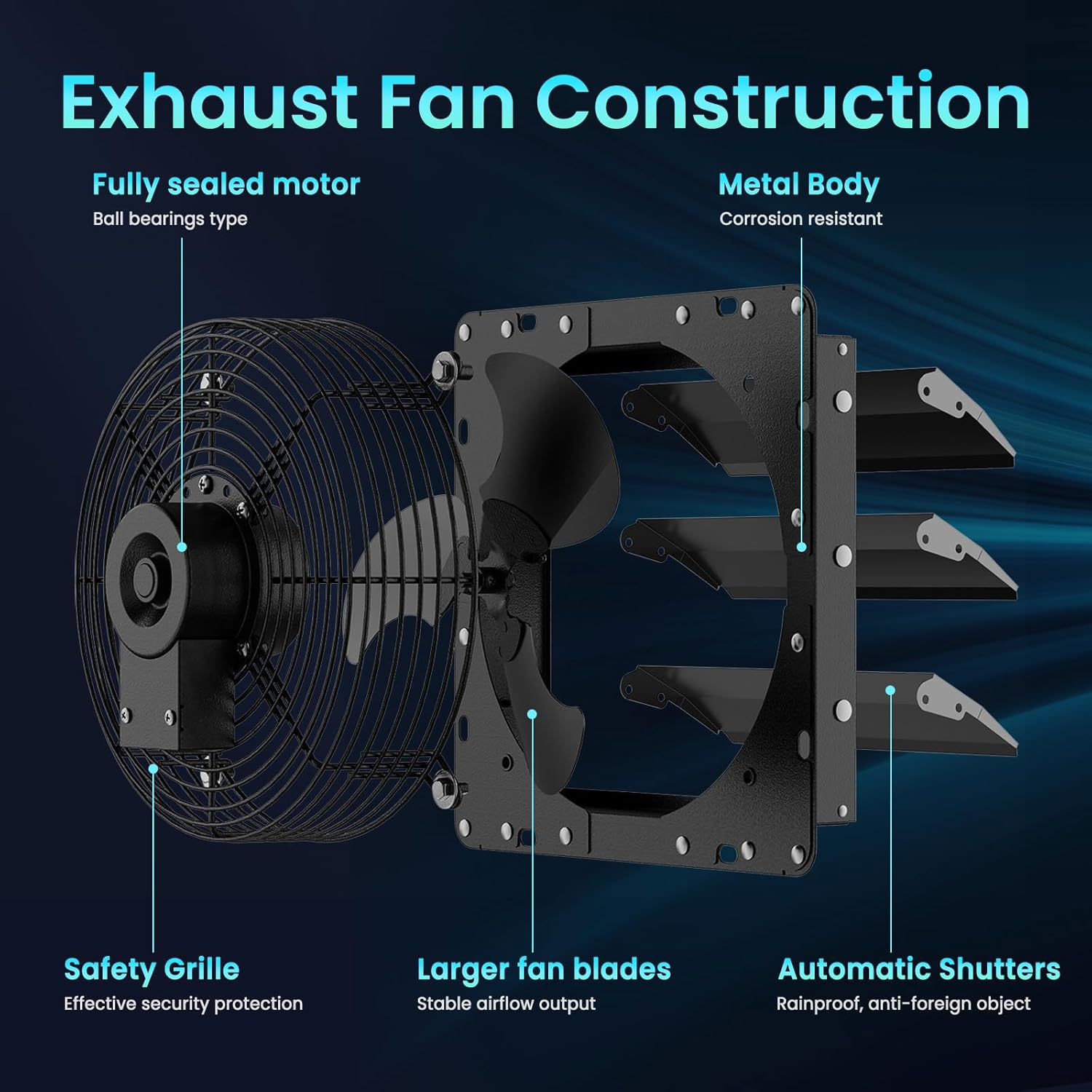
Figure 3 : Vue éclatée view of fan components

Figure 4: Automatic shutters in open and closed positions
5. Configuration et installation
The HG Power 10 Inch Shutter Exhaust Fan is designed for easy indoor-mount installation. Follow these steps for proper setup:
- Choisissez l'emplacement: Select a suitable location on a wall or window where ventilation is needed. Ensure the area is clear of obstructions and has access to a standard 110-120V AC power outlet.
- Préparer l'ouverture : Create an opening in the wall or window that accommodates the fan's dimensions (refer to specifications for exact measurements). The louvered side of the fan should face outdoors.
- Position du ventilateur : Insert the fan into the prepared opening from the interior side, ensuring the louvered side is facing outwards.
- Ventilateur sécurisé : Use the provided mounting hardware (screws and anchors) to firmly secure the fan to the wall or window frame from the interior. Ensure it is level and stable.
- Install Mesh Screen: Attach the mesh screen to the interior side of the fan using the designated attachment points to prevent debris from entering.
- Connecter l'alimentation : Plug the 8-foot power cord into a standard 110-120V AC outlet.
Video 1: Installation and usage of HG Power Exhaust Fan in a chicken coop. This video demonstrates the fan's setup and operation in a practical environment.
Vidéo 2 : Terminéview of HG Power Upgraded Shutter Exhaust Fans, showcasing features and applications. This video provides a general look at the fan's capabilities.
6. Mode d'emploi
This HG Power 10 Inch Shutter Exhaust Fan model (APB25D) is equipped with a simple ON/OFF push-button switch for operation.

Figure 5: Power cable with ON/OFF switch
- Allumer: Press the 'ON' side of the push-button switch located on the power cord. The fan will start operating, and the automatic louvers will open.
- Éteindre: Press the 'OFF' side of the push-button switch. The fan will stop, and the automatic louvers will close, sealing the opening.
Note: Some HG Power exhaust fan variants may include smart controllers or speed controllers. This specific model (APB25D) operates with a basic ON/OFF switch.
7. Entretien
Un entretien régulier garantit des performances optimales et une longue durée de vie à votre ventilateur d'extraction.
- Nettoyage: Periodically clean the fan blades, grille, and automatic louvers. Disconnect power before cleaning. Use a soft cloth and mild detergent. Avoid harsh chemicals or abrasive materials.
- Écran à mailles : Inspect and clean the mesh screen regularly to prevent dust and debris buildup, which can restrict airflow.
- Moteur: The fan features a fully sealed motor designed for long life and requires no lubrication.
- Inspection: Check the power cord for any signs of damage. Ensure all mounting screws are tight.
8. Dépannage
Si vous rencontrez des problèmes avec votre ventilateur, consultez les problèmes courants et leurs solutions ci-dessous :
- Le ventilateur ne s'allume pas :
- Assurez-vous que le cordon d’alimentation est correctement branché dans une prise qui fonctionne.
- Vérifiez si l'interrupteur MARCHE/ARRÊT est en position « MARCHE ».
- Vérifiez le bon fonctionnement de la prise de courant en y branchant un autre appareil.
- Faible débit d'air :
- Check if the mesh screen or fan blades are obstructed by dust or debris. Clean as necessary.
- Ensure the automatic louvers are fully open during operation.
- Bruit inhabituel :
- Inspect the fan blades for any foreign objects.
- Ensure the fan is securely mounted and not vibrating against the wall.
Si le problème persiste, contactez le service client.
9. Spécifications
| Fonctionnalité | Détail |
|---|---|
| Marque | HG Power |
| Nom du modèle | Shutter Exhaust Fan (APB25D) |
| Taille | 10" with Switch |
| Couleur | Noir |
| Capacité de débit d'air | 647 pieds cubes par minute (CFM) |
| Vitesse | 1400 tr/min |
| Niveau de bruit | 52 décibels |
| Quoitage | 42 watts |
| Voltage | 110 volts |
| Source d'énergie | AC |
| Type de commutateur | Push Button (ON/OFF) |
| Dimensions du produit | 6.69"P x 12.36"L x 12.36"H |
| Poids de l'article | 8.58 livres |
| Type d'installation | Montage intérieur |
| Dossier spécial | Résistant à l'eau |

Figure 6 : Diagramme des spécifications techniques
10. Applications
The HG Power 10 Inch Shutter Exhaust Fan is versatile and suitable for improving air quality and temperature control in various settings:
- Garages: Exhaust fumes and hot air.
- Chicken Coops: Maintain fresh air and reduce humidity.
- Sheds & Workshops: Remove dust, odors, and heat.
- Basements & Attics: Improve air circulation and prevent moisture buildup.
- Serres : Regulate temperature and humidity for plant growth.

Figure 7: Various application scenarios for the exhaust fan
11. Garantie et assistance
HG Power products are manufactured to high-quality standards. For warranty information, technical support, or replacement parts, please refer to the contact information provided on the product packaging or visit the official HG Power website.
Veuillez conserver votre preuve d'achat pour les réclamations au titre de la garantie.