
NBD NBD-EU-S110-QT
NBD 4K 48MP Digital Vlogging Camera User Manual
Model: NBD-EU-S110-QT
1. Introduction
Merci pour votre achatasing the NBD 4K 48MP Digital Vlogging Camera. This manual provides essential information for setting up, operating, and maintaining your camera. Please read it thoroughly before use to ensure optimal performance and longevity of your device.
2. Contenu du colis
Vérifiez que tous les éléments énumérés ci-dessous sont inclus dans votre colis :
- NBD 4K Camera x 1
- Micro x 1
- Trépied x 1
- Wide-Angle Lens x 1
- Macro Lens x 1
- Kit de nettoyage x 1
- Additional Light x 1
- Carte SD 32 Go x 1
- Lecteur de carte x 1
- Batterie x 2
- Chargeur x 1
- Sac photo x 1
- Longe x 1
- Télécommande x 1
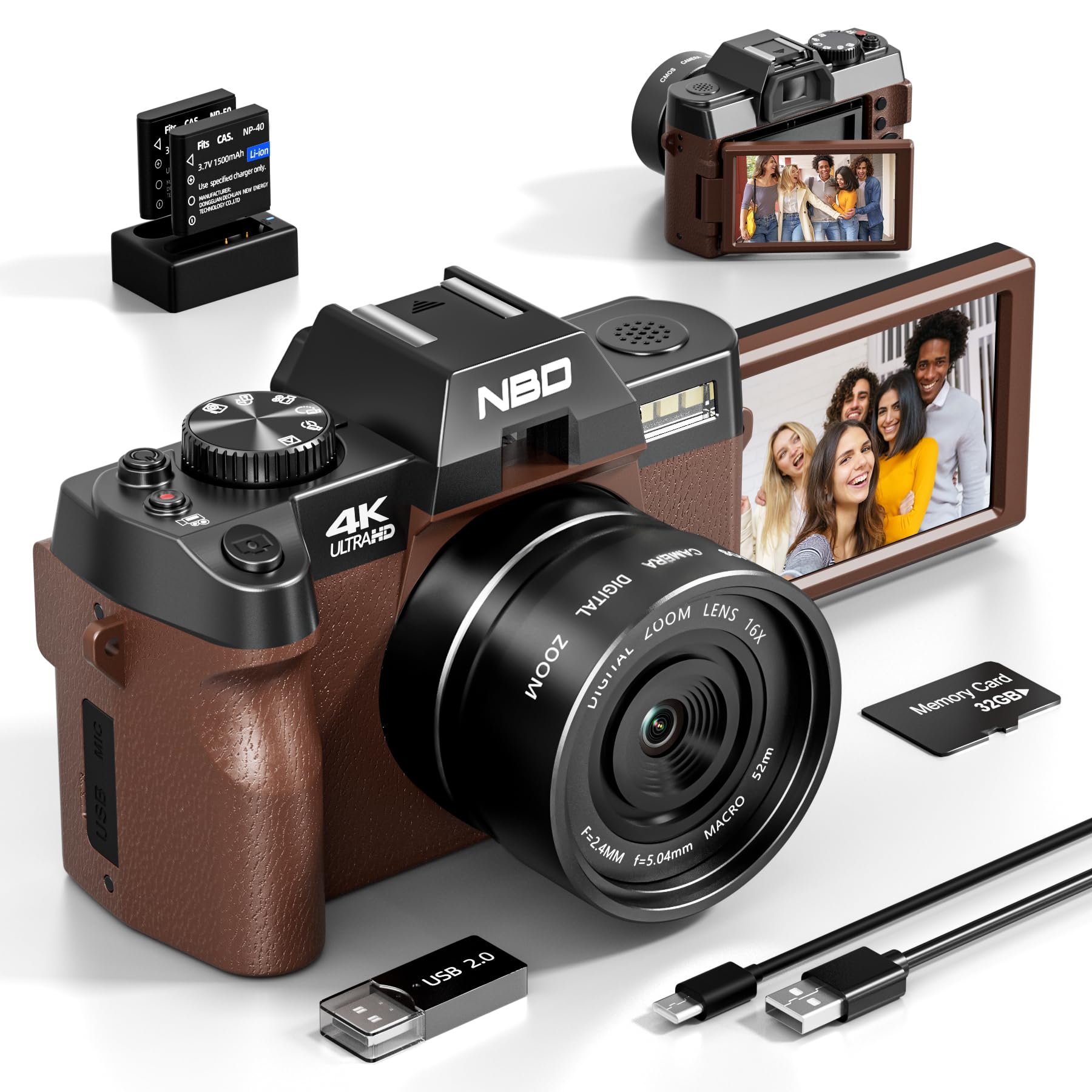
Image: NBD 4K Digital Camera with its complete set of accessories, including microphone, tripod, lenses, and other components.
3. Produit terminéview
3.1 Composants de la caméra
Familiarize yourself with the main parts of your NBD camera.
- Lentille: Composant optique principal pour la capture d'images.
- Écran LCD : 3-inch OLED display for viewnaviguer et se déplacer.
- Bouton d'alimentation : Allume/éteint la caméra.
- Bouton de l'obturateur : Prend des photos ou démarre/arrête l'enregistrement vidéo.
- Commandes de zoom : Adjusts digital zoom (up to 16x).
- Mode Dial/Buttons: Selects different shooting modes (photo, video, playback).
- Entrée microphone : Pour la connexion d'un microphone externe.
- Port USB : Pour le transfert de données et la facturation.
- Emplacement pour carte SD : Pour insérer la carte mémoire.
- Compartiment à piles : Contient la batterie rechargeable.
4. Installation
4.1 Chargement de la batterie
- Insert the provided battery into the charger.
- Connectez le chargeur à une source d’alimentation.
- The indicator light on the charger will show charging status. Charge fully before first use.
4.2 Insertion de la carte SD
- Localisez l'emplacement pour carte SD sur la caméra.
- Insérez la carte SD de 32 Go en orientant les contacts métalliques dans la bonne direction jusqu'à ce qu'elle s'enclenche.
- Pour retirer la carte, appuyez doucement dessus jusqu'à ce qu'elle ressorte.
4.3 Attaching Lenses and Accessories
- Lentille Grand angle: Screw the wide-angle lens onto the front of the camera's main lens. This expands the field of view de 45%.
- Objectif macro : The macro lens is typically integrated with the wide-angle lens or can be used separately for close-up shots. Refer to the lens markings for separation if applicable.
- Microphone: Connect the external microphone to the camera's microphone input port.
- Trépied: Screw the camera onto the tripod mount for stable shooting.
5. Mode d'emploi
5.1 Mise sous/hors tension
Maintenez le bouton Marche/Arrêt enfoncé pour allumer ou éteindre l'appareil photo.
5.2 Prendre des photos
- Allumez l'appareil photo.
- Select Photo mode using the mode dial or button.
- Cadrez votre photo à l'aide de l'écran LCD.
- Press the Shutter button halfway to activate autofocus.
- Appuyez à fond sur le déclencheur pour prendre la photo.
5.3 Enregistrement de vidéos
- Allumez l'appareil photo.
- Sélectionnez le mode vidéo.
- Press the Shutter button to start recording. A red indicator will usually appear on the screen.
- Appuyez à nouveau sur le déclencheur pour arrêter l'enregistrement.
5.4 Fonction Zoom
Use the zoom controls (usually a rocker switch) to digitally zoom in or out. The camera supports up to 16x digital zoom.
5.5 Autofocus and Night Vision
- Autofocus: The camera features autofocus for sharper images. Half-press the shutter button to engage.
- Vision nocturne : Activate night vision mode for improved performance in low-light conditions. Refer to the camera's menu for this setting.
5.6 Retardateur
The self-timer function allows for a delay before taking a photo. Access this setting through the camera's menu. Options include 2-second and 10-second delays.
5.7 Connectivité Wi-Fi
The camera supports Wi-Fi connectivity for transferring photos and videos to compatible devices. Consult the camera's on-screen menu for Wi-Fi setup and connection instructions.
5.8 Utilisation comme Webcame
Connectez l'appareil photo à votre ordinateur via USB pour l'utiliser comme un webcam for vlogging, video calls, or live streaming. Select the webcam mode on the camera when prompted.
6. Entretien
- Nettoyage: Use the provided cleaning kit to gently clean the lens and screen. Avoid abrasive materials.
- Stockage: Store the camera in its bag in a cool, dry place when not in use. Remove the battery if storing for extended periods.
- Entretien de la batterie: Do not expose batteries to extreme temperatures. Dispose of depleted batteries according to local regulations.
7. Dépannage
| Problème | Cause possible | Solution |
|---|---|---|
| La caméra ne s'allume pas. | La batterie est déchargée ou mal insérée. | Chargez complètement la batterie. Assurez-vous que la batterie est correctement insérée. |
| Impossible de prendre des photos/d'enregistrer des vidéos. | La carte SD est pleine, verrouillée ou non insérée. | Check SD card capacity. Unlock the SD card. Reinsert the SD card. |
| Les images sont floues. | Autofocus not engaged, lens dirty, or insufficient light. | Half-press shutter to focus. Clean the lens. Use additional light or night vision mode. |
| Problèmes de connexion Wi-Fi. | Mot de passe incorrect ou hors de portée. | Vérifiez le mot de passe Wi-Fi. Rapprochez-vous de la source Wi-Fi. |
| Le microphone n'enregistre pas le son. | Microphone not properly connected or settings incorrect. | Ensure microphone is securely plugged in. Check camera audio settings. |
| La caméra se bloque ou ne répond plus. | Problème logiciel temporaire. | Retirez puis réinsérez la batterie pour réinitialiser l'appareil photo. |
8. Spécifications
| Marque: | À noter |
| Nom du modèle : | NBD-EU-S110-QT |
| Effective Photo Resolution: | 48 MP |
| Résolution de capture vidéo : | 4K |
| Zoom numérique : | 16x |
| Taille de l'écran : | 3 pouces |
| Type d'affichage : | OLED |
| Image Sensor Technology: | CMOS |
| Max Aperture: | F/1.8 |
| Technologie de connectivité: | Wifi |
| Stabilisation d'image : | Oui |
| Autofocus: | Oui |
| Vision nocturne : | Oui |
| Retardateur : | Yes (2s, 10s) |
| Type de batterie : | Lithium-ion |
| Included Memory Card Size: | 32 Go (carte SD) |
9. Garantie et assistance
For warranty information and technical support, please refer to the documentation provided with your purchase or visit the official NBD webConsultez le site. Conservez votre preuve d'achat pour toute réclamation au titre de la garantie.
Remarque : Ce manuel est fourni à titre informatif uniquement. Les spécifications peuvent être modifiées sans préavis.
Ask a question about this manual
Ask about setup, troubleshooting, compatibility, parts, safety, or missing instructions. Manuals+ will review the question and use this page’s manual context to help answer it.