1. Introduction
This manual provides detailed instructions for the proper setup, operation, and maintenance of your Wantek 783F Headset. Please read this manual thoroughly before using the product to ensure optimal performance and longevity. Keep this manual for future reference.
2. Produit terminéview
The Wantek 783F Headset is a versatile single-ear headphone designed for clear communication and audio. It features a noise-cancelling microphone and multiple connectivity options for broad compatibility.
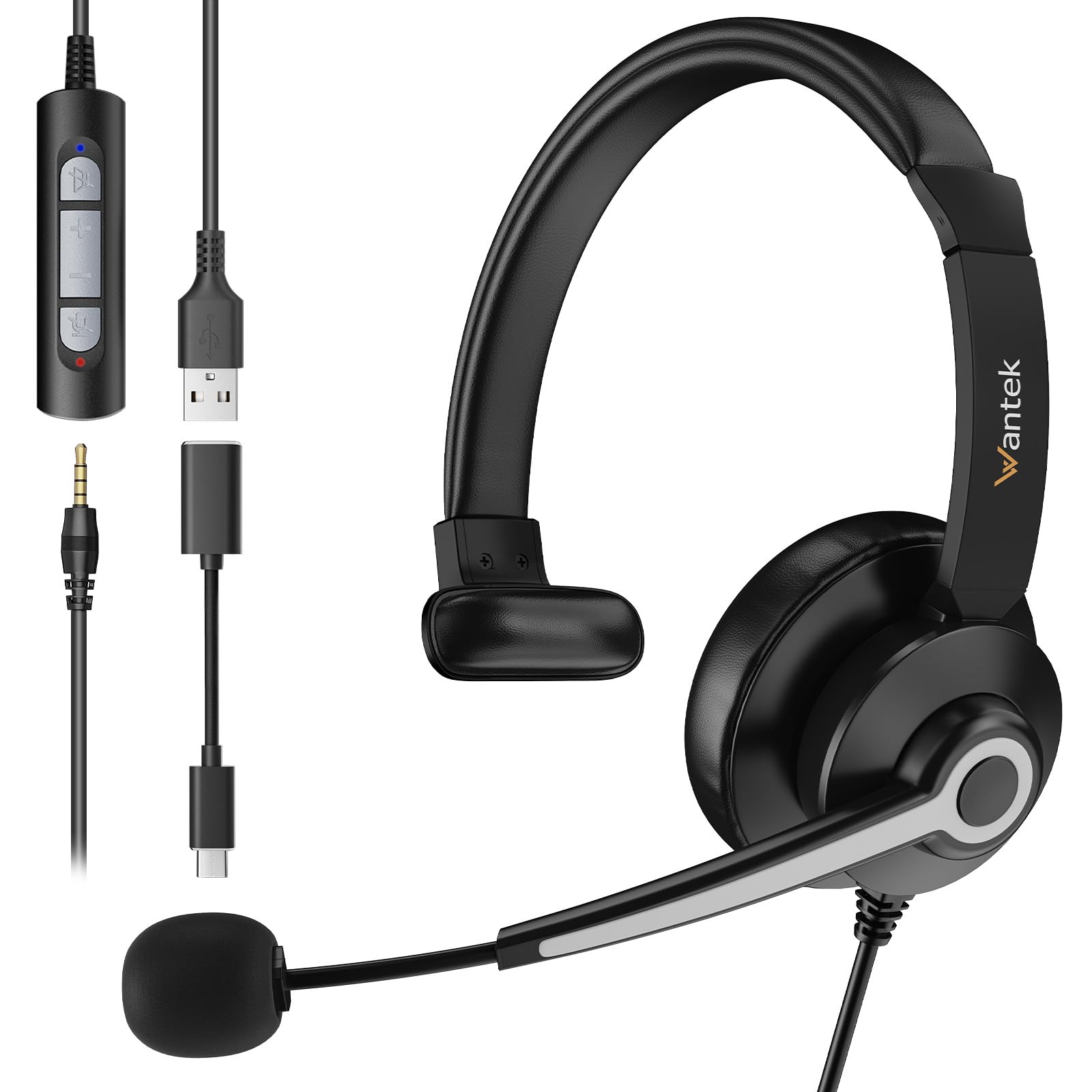
Image 2.1: Wantek 783F Headset with its inline controller and multiple connection options (3.5mm, USB, Type-C).
Les principales caractéristiques comprennent :
- Large compatibilité : Connects via USB, 3.5mm, and Type-C.
- Appels limpides : Noise-cancelling microphone reduces background noise by up to 97%.
- Conception confortable : Lightweight with a soft faux leather headband and 270° rotatable microphone boom.
- Easy Inline Control: Physical buttons for speaker mute, volume up/down, and microphone mute.
3. Instructions de configuration
The Wantek 783F Headset offers plug-and-play functionality, requiring no additional drivers for most operating systems.
3.1 Connexion du casque
Your headset can be connected to various devices using one of the three provided interfaces:
- Prise jack 3.5 mm : Connect the 3.5mm jack directly to devices such as smartphones, tablets, or laptops with a compatible audio port.
- Connecteur USB-A : Use the USB-A adapter to connect the headset to computers, laptops, or gaming consoles (e.g., PlayStation, Xbox) with a USB-A port.
- USB Type-C Adapter: Attach the Type-C adapter to the USB-A connector, then plug it into devices with a USB Type-C port, such as newer laptops, MacBooks, or Android phones.

Image 3.1: Connection diagram illustrating how to connect the headset using 3.5mm, USB, and Type-C interfaces to different devices.
3.2 Initial Device Recognition
After connecting, your device should automatically recognize the headset. You may need to select the headset as the default audio input and output device in your operating system's sound settings or within your communication application (e.g., Zoom, Skype, Microsoft Teams).
4. Mode d'emploi
The Wantek 783F Headset features an inline control unit for convenient audio management.
4.1 Fonctions de contrôle en ligne

Image 4.1 : Détail view of the inline controller, highlighting its buttons and their functions.
- Bouton de mise en sourdine du haut-parleur : Press to mute or unmute the headset's speaker audio. An indicator light may show the mute status.
- Augmenter le volume (VOL+) : Appuyez pour augmenter le volume d'écoute.
- Diminuer le volume (VOL-) : Appuyez pour diminuer le volume d'écoute.
- Bouton de désactivation du micro : Press to mute or unmute the microphone. An indicator light may show the mute status.
4.2 Réglage du microphone
The microphone boom can be rotated 270 degrees. Position the microphone approximately 1-2 inches from your mouth for optimal voice pickup. The flexible design allows for precise positioning.
4.3 Scénarios d'utilisation
The headset is suitable for various applications, including:
- Online meetings (Zoom, Skype, Webex, Google Meet)
- Call center operations
- Online learning and tutoring
- Voice chat and gaming
- General audio listening

Image 4.2 : Examples of the headset in use across different environments, demonstrating its versatility.
5. Entretien
Proper care and maintenance will extend the life of your headset.
5.1 Nettoyage
- Use a soft, dry cloth to wipe the headset and inline controller.
- Pour les saletés tenaces, appliquez légèrementampNettoyez le chiffon avec de l'eau. Évitez d'utiliser des produits chimiques agressifs ou des nettoyants abrasifs.
- Do not immerse the headset or any of its components in water.
5.2 Stockage
- Rangez le casque dans un endroit frais et sec, à l'abri de la lumière directe du soleil et des températures extrêmes.
- Avoid tangling the cable. Use the small clip on the wire to manage the cable and prevent damage.
6. Dépannage
Si vous rencontrez des problèmes avec votre casque, consultez les solutions courantes suivantes :
- Pas de son :
- Assurez-vous que le casque est correctement connecté à votre appareil.
- Vérifiez le réglage du volume intégré et augmentez le volume.
- Verify that the speaker mute button on the inline controller is not active.
- Confirm the headset is selected as the default playback device in your computer's sound settings.
- Le microphone ne fonctionne pas :
- Ensure the microphone mute button on the inline controller is not active.
- Check that the microphone boom is properly positioned.
- Confirm the headset is selected as the default recording device in your computer's sound settings or communication application.
- Testez le microphone avec une autre application ou un autre appareil.
- Audio déformé :
- Baissez le volume du casque et de votre appareil.
- Assurez-vous que la connexion est stable et exempte d'interférences.
- Essayez avec une autre source ou un autre appareil audio.
7. Spécifications
Below are the technical specifications for the Wantek 783F Headset:
| Fonctionnalité | Spécification |
|---|---|
| Nom de marque | Vouloir |
| Numéro de modèle de l'article | XUC783 |
| Dimensions du produit | 12 x 12 x 5 cm |
| Poids de l'article | 182 gramme |
| Couleur | Noir |
| Technologie de connectivité | Câblé |
| Prise pour casque | 3.5 mm Jack |
| Contrôle du bruit | Annulation passive du bruit |
| Type de contrôle | Voice Control (via inline controller) |
| Fonctionnalité du câble | Detachable (adapters) |
| Matériel | Polycarbonate (PC), Aluminum, Faux Leather |
| Appareils compatibles | Cellphones, Desktops, Laptops, Music Production Equipment, Tablets |
| Utilisations recommandées | Calling, Gaming, Motorcycling, Running |
8. Garantie et assistance
Wantek products are manufactured to high-quality standards. For information regarding warranty coverage, terms, and conditions, please refer to the warranty card included with your purchase or visit the official Wantek website.
For technical support, troubleshooting assistance beyond this manual, or to inquire about replacement parts, please contact Wantek customer service through their official support channels.