
Introduction
This manual provides essential information for the proper setup, operation, and maintenance of your ZdalaMit RMT-AH514U Replacement Remote Control. This remote is specifically designed as a direct replacement for the Sony HT-A3000 3.1ch Dolby Atmos Soundbar Surround Sound Home Theater System.
The RMT-AH514U remote control requires no programming; simply install the batteries, and it is ready for immediate use with your compatible Sony Soundbar system.
Configuration : Installation de la batterie
To begin using your remote control, you must first install the batteries. The remote requires two (2) 1.5V AAA Alkaline batteries (not included).
- Localisez le couvercle du compartiment à piles à l'arrière de la télécommande.
- Faites glisser le couvercle vers le bas ou appuyez sur le loquet (s'il y en a un) pour ouvrir le compartiment.
- Insérez deux piles AAA en veillant à ce que les bornes positive (+) et négative (-) soient correctement alignées avec les marquages à l'intérieur du compartiment.
- Remettez le couvercle du compartiment à piles en place jusqu'à ce qu'il s'enclenche correctement.

Image : Dos view of the RMT-AH514U remote control, illustrating the location of the battery compartment. The compartment is typically located on the lower half of the remote's rear side and slides open to reveal slots for two AAA batteries.
Mode d'emploi
The RMT-AH514U remote control is pre-programmed and ready for use with compatible Sony Soundbar systems immediately after battery installation. No additional setup or pairing is required.
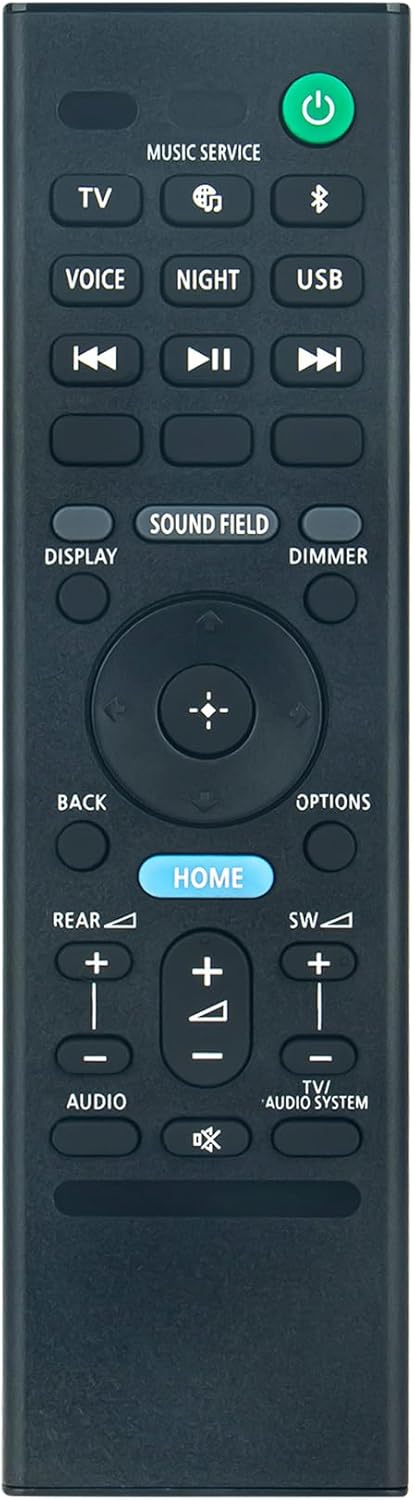
Image : Avant view of the RMT-AH514U remote control, displaying all functional buttons. Key buttons include Power (green), TV, Music Service, Voice, Night, USB, Display, Sound Field, Dimmer, navigation pad with central select button, Back, Options, Home (blue), Rear, SW, Audio, and TV/Audio System controls.
Fonctions principales :
- Bouton d'alimentation (vert) : Permet d'allumer ou d'éteindre la barre de son.
- TV: Bascule l'entrée sur le téléviseur.
- Music Service / USB: Selects respective audio sources.
- Voice / Night: Activates specific sound modes.
- Display / Dimmer: Controls display information and brightness.
- Champ sonore : Adjusts the sound field settings.
- Navigation Pad (Up, Down, Left, Right, Center): Utilisé pour la navigation et la sélection dans les menus.
- Back / Options: Navigates back in menus or accesses additional options.
- Home (Blue): Retour à l'écran d'accueil principal.
- Rear / SW (Subwoofer): Adjusts rear speaker and subwoofer levels.
- Audio / TV/Audio System: Controls audio settings and switches between TV and audio system output.
For detailed functionality of each button, please refer to the original user manual of your Sony HT-A3000 Soundbar system.
Compatibilité
This RMT-AH514U replacement remote control is compatible with the following Sony Soundbar models:
- Sony HT-A3000
- Sony RMT-AH514J (original remote model)
Ensure your soundbar model matches one of the listed compatible models for proper functionality.
Caractéristiques
| Fonctionnalité | Détail |
|---|---|
| Numéro de modèle | HT-A3000 (Remote Control RMT-AH514U) |
| Dimensions du produit | 5.9 x 1.57 x 0.55 pouces |
| Poids de l'article | 1.41 onces |
| Alimentation électrique | 2 x 1.5V AAA Alkaline Batteries (Not Included) |
| Couleur | Noir |
| Dossier spécial | Préprogrammé (aucune configuration requise) |
| Nombre maximum d'appareils pris en charge | 1 (Sony Soundbar System) |
| Appareils compatibles | Home Theater (Sony HT-A3000 Soundbar) |
Dépannage
- La télécommande ne répond pas :
- Assurez-vous que les piles sont insérées correctement en respectant la polarité (+/-).
- Replace old or depleted batteries with new 1.5V AAA Alkaline batteries.
- Verify that there are no obstructions between the remote control and the soundbar's infrared receiver.
- Confirm that your soundbar model is listed under the "Compatibility" section.
- Certains boutons ne fonctionnent pas :
- Check for any physical damage or debris around the button.
- Ensure the remote is pointed directly at the soundbar.
Entretien
Pour assurer la longévité et le bon fonctionnement de votre télécommande, suivez ces consignes d'entretien :
- Nettoyez régulièrement la télécommande avec un chiffon doux et sec. N’utilisez pas de nettoyants liquides ni de produits abrasifs.
- Évitez d'exposer la télécommande à des températures extrêmes, à la lumière directe du soleil ou à une forte humidité.
- Ne laissez pas tomber la télécommande et évitez de la soumettre à des chocs violents.
- Si la télécommande n'est pas utilisée pendant une période prolongée, retirez les piles pour éviter les fuites et les dommages potentiels.
Soutien
If you encounter any issues or have questions regarding your ZdalaMit RMT-AH514U Replacement Remote Control that are not addressed in this manual, please do not hesitate to contact our customer support for assistance.
Contact information is typically provided by your retailer or on the product packaging.