
Polyéthylène E220
Manuel d'utilisation du téléphone de bureau IP Poly Edge E220
Your guide to setting up and using your Poly Edge E220 IP Desk Phone.
1. Introduction
The Poly Edge E220 is a versatile IP desk phone designed for modern office environments, offering advanced communication features. It supports up to 16 lines with 4-line keys and includes integrated Bluetooth for seamless mobile phone and headset pairing. This manual provides detailed instructions for setup, operation, and maintenance of your device.
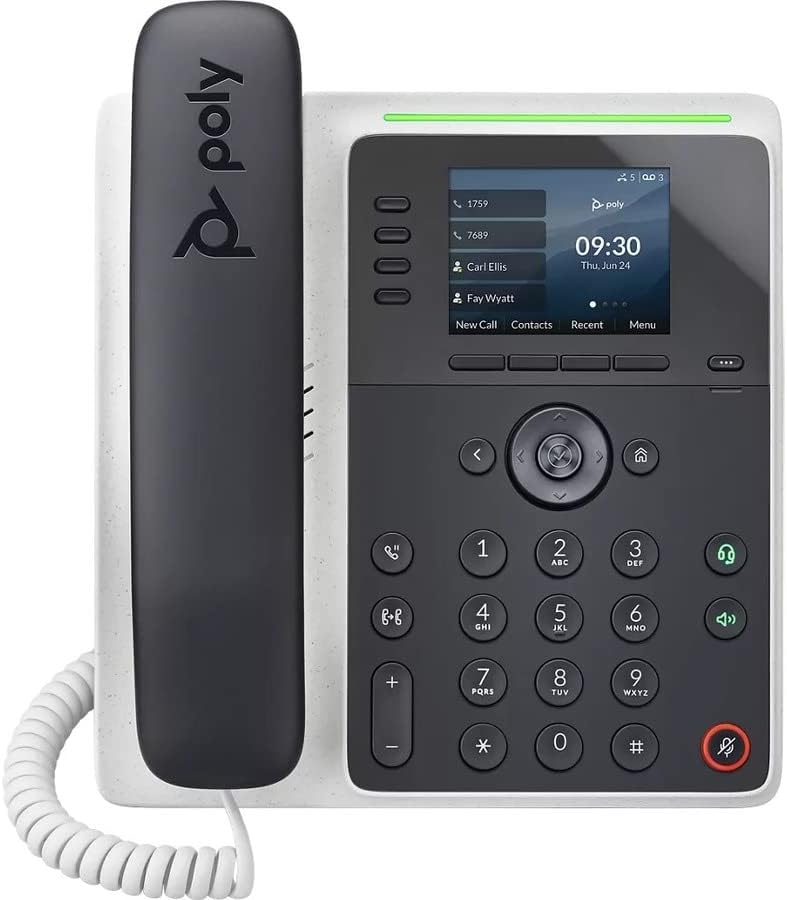
Image : Avant view of the Poly Edge E220 IP Desk Phone, showcasinson écran, son clavier et son combiné.
2. Contenu de la boîte
Veuillez vérifier que tous les composants suivants sont inclus dans votre colis :
- Poly Edge E220 IP Desk Phone Unit
- Combiné
- Cordon spiralé du combiné
- Cat5E Ethernet Cable
- Integrated Wall Mount (pre-attached or separate)
- Support de base
Note: A power supply is NOT included with this renewed product and must be acquired separately if Power over Ethernet (PoE) is not available.
3. caractéristiques du produit
- 4-Line Keys: Supports up to 16 lines for flexible call management.
- Bluetooth intégré: Allows for seamless pairing with mobile phones and Bluetooth headsets.
- Affichage haute résolution : Provides clear visibility for call information and menu navigation.
- Voix HD : Delivers superior audio quality for clearer conversations.
- Multi-Line Operation: Manage multiple active calls simultaneously.
- Capacité de conférence téléphonique : Supports 3-way conferencing.
4. Configuration et installation
4.1 Assemblage du téléphone
- Attach the Base Stand: Align the tabs on the base stand with the slots on the back of the phone unit. Slide the stand into place until it clicks securely.
- Connect the Handset: Plug one end of the coil cord into the handset and the other end into the handset port on the side of the phone unit.
4.2 Connexion des câbles
Locate the ports on the back and side of the phone unit.

Image : Côté view of the Poly Edge E220 IP Desk Phone, highlighting the various connection ports and the adjustable stand.
- Connexion réseau: Connect one end of the Cat5E Ethernet cable to the LAN port on the phone and the other end to your network switch or router. If your network provides Power over Ethernet (PoE), the phone will power on automatically.
- Power Connection (if no PoE): Si l'alimentation PoE n'est pas disponible, connectez un adaptateur secteur approprié (non fourni) au port d'alimentation du téléphone, puis à une prise de courant.
- Optional Headset Connection: If using a wired headset, connect it to the dedicated headset port.
4.3 Mise sous tension initiale
Once connected, the phone will power on and begin its boot sequence. This may take a few moments. The display will show the Poly logo, followed by network configuration and registration status. If prompted, enter your network credentials or contact your IT administrator for setup assistance.
5. Mode d'emploi
5.1 Passer et recevoir des appels
- Faire un appel: Pick up the handset, press the Speaker button, or press a line key. Dial the number and press the Dial soft key or wait for the call to connect.
- Pour répondre à un appel : Pick up the handset, press the Speaker button, or press the flashing line key.
- Pour terminer un appel : Replace the handset, or press the End Call soft key.

Image: A man engaged in a phone call using the Poly Edge E220 IP Desk Phone in a professional office environment.
5.2 Utilisation de Bluetooth
The Poly Edge E220 allows you to pair your mobile phone or Bluetooth headset for enhanced flexibility.
- Activer Bluetooth : Navigate to the phone's menu, select Settings, then Bluetooth, and ensure Bluetooth is enabled.
- Couplage d'un appareil : Put your Bluetooth device (mobile phone or headset) into pairing mode. On the phone, select 'Add New Device' or 'Scan for Devices'. Select your device from the list and follow the on-screen prompts to complete pairing.
- De liaison: Once paired, your device should automatically connect when in range. You can manually connect/disconnect from the Bluetooth menu.

Image: A woman working at a desk, utilizing the Poly Edge E220 IP Desk Phone alongside her laptop, demonstrating its integration into a modern workspace.
5.3 fonctionnalités avancées
- Prise: During a call, press the Hold soft key to place the call on hold. Press it again to resume.
- Transfert: During a call, press the Transfer soft key, dial the new number, and then press Transfer again to complete.
- Conférence: During an active call, press the Conference soft key, dial the number of the third party, and then press Conference again to join all parties.
- Messagerie vocale: Press the Voicemail button to access your voicemail messages.
6. Entretien
To ensure the longevity and optimal performance of your Poly Edge E220 IP Desk Phone, follow these maintenance guidelines:
- Nettoyage: Utilisez un chiffon doux, sec et non pelucheux pour nettoyer la surface et l'écran du téléphone. Pour les taches tenaces, frottez légèrement avec un chiffon doux.ampHumidifiez le chiffon avec de l'eau. Évitez d'utiliser des produits chimiques agressifs, des nettoyants abrasifs ou des aérosols.
- Environnement: Conservez le téléphone dans un endroit sec, à l'abri de la lumière directe du soleil, de la chaleur excessive et de l'humidité.
- Gestion des câbles: Veillez à ce que tous les câbles soient bien rangés et non tendus afin d'éviter d'endommager les ports ou les câbles.
- Mises à jour logicielles : Periodically check with your IT administrator for available software updates to ensure your phone has the latest features and security enhancements.
7. Dépannage
If you encounter issues with your Poly Edge E220, refer to the table below for common problems and solutions.
| Problème | Cause possible | Solution |
|---|---|---|
| Le téléphone ne s'allume pas | No power supply or PoE connection | Ensure Ethernet cable is connected to a PoE-enabled port, or connect a compatible power adapter. |
| Pas de tonalité | Network issue or phone not registered | Check network cable connection. Verify network status on the phone display. Contact IT support if registration fails. |
| Je n'entends pas mon interlocuteur. | Volume too low, faulty handset/headset, or network audio issue | Adjust volume. Test with speakerphone. Check handset/headset connection. Restart phone. |
| Appareil Bluetooth non appairé | Appareil pas en mode couplage ou hors de portée | Ensure Bluetooth device is in pairing mode and within range. Restart both devices. |
If the problem persists after attempting these solutions, please contact your IT department or the product support team for further assistance.
8. Spécifications
Key technical specifications for the Poly Edge E220 IP Desk Phone:
| Fonctionnalité | Détail |
|---|---|
| Dimensions du produit | 12.1 x 10.3 x 3.4 pouces |
| Poids de l'article | 2.55 livres |
| Type de téléphone | Téléphone IP filaire |
| Source d'énergie | Corded Electric (Power Supply NOT Included) / Power over Ethernet (PoE) |
| Type de composeur | Clavier unique |
| Type de répondeur | Digital (requires service provider support) |
| Capacité de conférence téléphonique | 3 voies |
| Opération multiligne | Yes, supports up to 16 lines with 4-line keys |
| Bluetooth | Integrated for mobile phone and headset pairing |
9. Garantie et assistance
As a renewed product, the Poly Edge E220 IP Desk Phone typically comes with a limited warranty provided by the refurbisher or seller. Please refer to your purchase documentation for specific warranty terms and conditions. For technical support, troubleshooting beyond this manual, or warranty claims, please contact the seller or your IT administrator.
Documents connexes - E220
 |
Avis de sécurité et de réglementation Poly Edge E Series - Informations de conformité et d'utilisation Informations complètes sur la sécurité, la réglementation et la conformité des appareils de téléphonie Poly Edge série E, y compris la sécurité électrique, les déclarations FCC/ISED, les avis environnementaux et les directives d'utilisation des produits. |
 |
Avis de sécurité et de réglementation de la série Poly Edge E Ce document fournit des informations de sécurité et de réglementation pour la série de produits Poly Edge E, notamment les Poly Edge E100, E220, E300, E320, E350, E400, E450, E500 et E550, ainsi que le module d'extension Poly Edge. |
 |
Guide de l'administrateur des téléphones Poly Edge série E Guide complet de l'administrateur pour les téléphones IP Poly Edge série E, couvrant la configuration, le provisionnement, les paramètres réseau, la sécurité et la maintenance pour PVOS 8.0.1. |
 |
Guide de l'administrateur Poly Trio C60 9.3.0 Ce guide d'administration HP fournit des instructions complètes pour la gestion du téléphone de conférence Poly Trio C60. Il aborde les aspects essentiels tels que la configuration initiale, les options de configuration détaillées, l'intégration réseau, les protocoles de sécurité et les fonctionnalités avancées destinées aux administrateurs informatiques. |
 |
Guide d'utilisation des téléphones Poly Edge série E Guide complet sur la navigation et l'utilisation des téléphones IP Poly Edge E Series, couvrant les fonctionnalités, le matériel, la configuration et les fonctionnalités avancées pour des modèles tels que les séries E100, E220, E300, E400 et E500. |
 |
Guide de démarrage rapide du support de bureau Poly Edge E100/E220 Un guide de démarrage rapide pour l'installation du support de bureau Poly Edge E100/E220, incluant le câblage requis et optionnel, ainsi que le cheminement des câbles. |
Ask a question about this manual
Ask about setup, troubleshooting, compatibility, parts, safety, or missing instructions. Manuals+ will review the question and use this page’s manual context to help answer it.