
1. Introduction
Thank you for choosing the FLEXISPOT EF1 Basic Plus Electric Height-Adjustable Desk. This manual provides essential information for the safe and efficient assembly, operation, and maintenance of your new desk. Please read these instructions thoroughly before use and retain them for future reference.
Avertissements de sécurité
- Always follow the assembly instructions carefully to prevent accidents and ensure proper function.
- Do not exceed the maximum load capacity of 70 kg (154 lbs) on the desktop. Overloading can compromise stability and cause damage.
- To prevent tipping, especially when the desk is at its maximum height (121 cm), ensure the desk is anchored correctly to a stable wall.
- Keep children and pets away from the desk during operation to avoid injury from moving parts.
- Veillez à ce qu'aucun obstacle ne se trouve sur le passage du bureau lors du réglage en hauteur.
- Ne vous asseyez pas et ne vous tenez pas debout sur le bureau.
- Coupez l'alimentation électrique avant de procéder au nettoyage ou à toute opération de maintenance.
2. Configuration et assemblage
The FLEXISPOT EF1 Basic Plus desk requires assembly. Please ensure all components are present before beginning. Refer to the included assembly guide for detailed step-by-step instructions.
Déballage et vérification des composants
Carefully unpack all parts and lay them out on a soft, clean surface to prevent scratches. Verify that all components listed in the packing list are present.
Assemblage terminéview
- Fixez les colonnes de levage aux pieds du bureau.
- Fixez la traverse aux colonnes de levage.
- Fixez le plateau de bureau au cadre assemblé.
- Install the control panel and cable management tray (if included).
- Connect all motor and control cables according to the wiring diagram.
- Branchez le cordon d'alimentation dans une prise mise à la terre.

Figure 1 : The FLEXISPOT EF1 Basic Plus Electric Height-Adjustable Desk with a black tabletop and white frame, set up in a home office environment.

Figure 2 : This image illustrates the smooth, single-piece desktop construction of the FlexiSpot desk, contrasting it with typical multi-piece desktops that may have uneven surfaces.

Figure 3 : An illustrative diagram detailing various desktop size and color options, along with key specifications for the desk frame, including adjustable height range, static and dynamic load capacities, and lifting noise levels.
3. Mode d'emploi
Panneau de configuration terminéview

Figure 4 : Un détail view of the desk's Smart Control Panel, highlighting the LED display, the up and down adjustment buttons, and four numbered buttons for memory presets.
The desk is equipped with an advanced all-in-one keypad for easy height adjustment and memory functions.
- Affichage LED: Affiche la hauteur actuelle du bureau en centimètres.
- Up/Down Buttons (⌃ / ⌄): Press and hold to manually adjust the desk height upwards or downwards. Release the button to stop at the desired height.
- Préréglages de mémoire (1, 2, 3, 4) : Four programmable buttons to save and recall your preferred sitting and standing heights.
Configuration des préréglages de mémoire
- Réglez le bureau à la hauteur souhaitée à l'aide des boutons Haut/Bas.
- Press the "M" or "SET" button (if available, otherwise proceed to step 3) to activate memory mode.
- Press one of the numbered preset buttons (1, 2, 3, or 4) within 3 seconds. The LED display will show "S-1", "S-2", etc., indicating the height has been saved to that preset.
Rappel des préréglages de mémoire
Il suffit d'appuyer sur le bouton numéroté correspondant (1, 2, 3 ou 4). Le bureau se réglera automatiquement à la hauteur enregistrée.
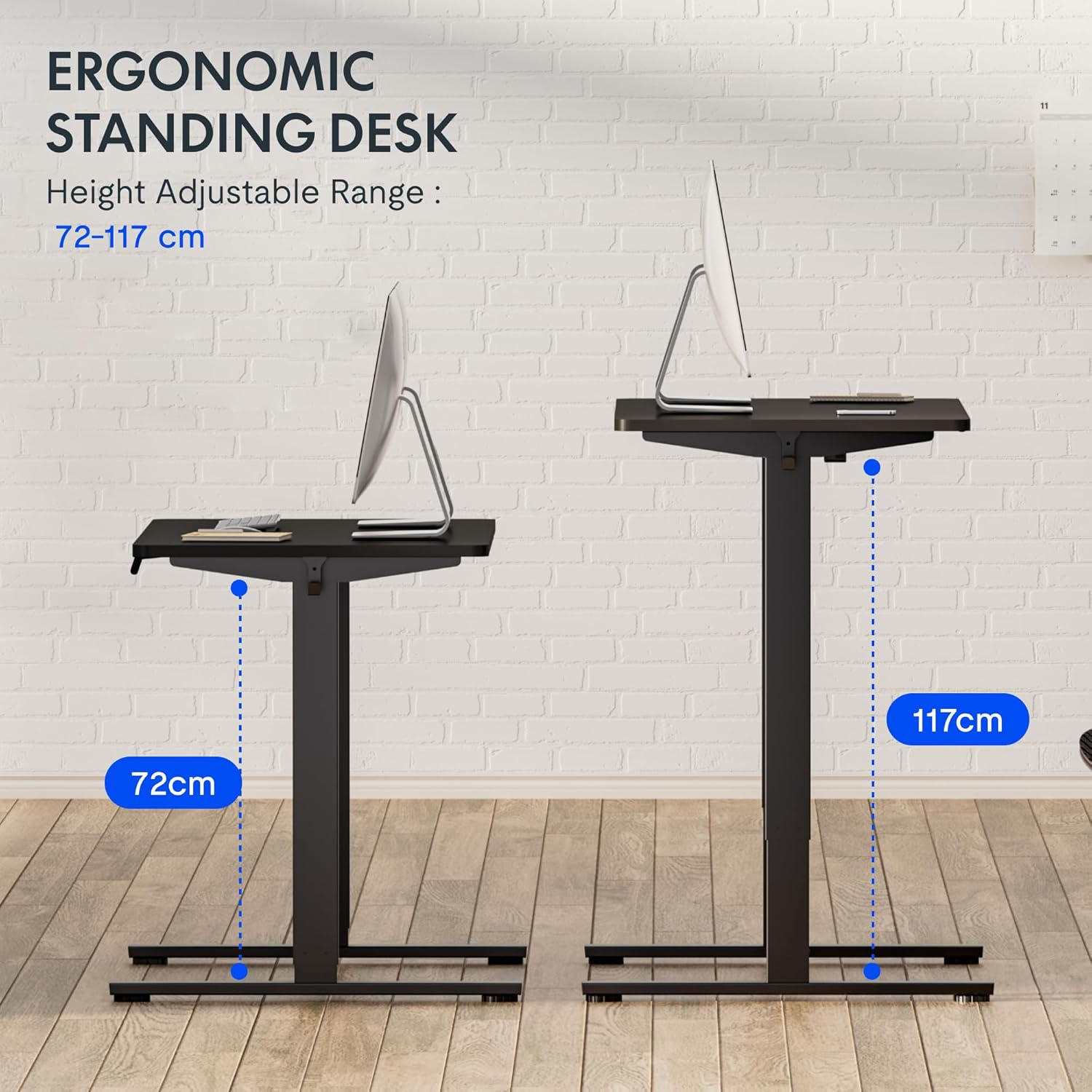
Figure 5 : This image demonstrates the height adjustment capabilities of the desk, showing a range from 72 cm (sitting height) to 117 cm (standing height). Note that the full adjustable range for this model is 71 cm to 121 cm.
4. Entretien
Un entretien régulier garantit la longévité et les performances optimales de votre bureau FLEXISPOT.
- Nettoyage: Essuyez le bureau et le cadre avec un chiffon doux et sec.amp Chiffon. Évitez les nettoyants abrasifs ou les produits chimiques agressifs qui pourraient endommager la finition.
- Gestion des câbles: Periodically check and organize cables to prevent tangles and ensure smooth operation.
- Inspection: Regularly inspect all screws and bolts to ensure they are tight. Retighten if necessary.
- Lubrification: The lifting columns are generally maintenance-free. Do not attempt to lubricate internal components unless specifically instructed by customer support.
5. Dépannage
Si vous rencontrez des problèmes avec votre bureau, reportez-vous aux problèmes courants et à leurs solutions ci-dessous.
| Problème | Cause possible | Solution |
|---|---|---|
| Le bureau ne bouge pas. |
|
|
| Le bureau bouge de façon irrégulière ou fait des bruits inhabituels. |
|
|
| Error code displayed on LED. |
|
|
Procédure de réinitialisation
If the desk is not functioning correctly, a reset may resolve the issue.
- Press and hold the "Down" button until the desk reaches its lowest position and slightly retracts, then releases.
- If this does not initiate a reset, unplug the desk from the power outlet for at least 10 seconds, then plug it back in.
- Repeat step 1. The desk should now be reset.
6. Spécifications
| Marque | FLEXIPOT |
| Numéro de modèle | HU-XI-201 |
| Desktop Dimensions (L x W x Thickness) | 120 x 80 x 2.5 cm |
| Adjustable Height Range (without tabletop) | 71 cm - 121 cm |
| Max Lifting Speed | 2.5 cm/s |
| Capacité de charge maximale | 70 kg (154 lb) |
| Niveau sonore de levage | <50 dB |
| Matériel de bureau | Engineered Wood (MDF) with High-Pressure Laminate |
| Matériau du cadre | Acier revêtu de poudre |
| Couleur | Black tabletop + White frame |
| Caractéristiques | Electric height adjustment, 4 memory presets |
7. Garantie et assistance
Informations sur la garantie
FLEXISPOT stands behind the quality of its products. Your EF1 Basic Plus desk comes with the following warranty:
- Garantie de 3 ans : Covers controllers and motors.
- Garantie de 5 ans : Covers the desk frame.
Please retain your proof of purchase for warranty claims. The warranty covers manufacturing defects under normal use. It does not cover damage caused by misuse, accidents, unauthorized modifications, or failure to follow the instructions in this manual.

Figure 6 : An image outlining the warranty coverage for FlexiSpot desks, specifically mentioning a 3-year warranty for controllers and motors, and a 5-year warranty for the desk frame.
Assistance clientèle
For technical assistance, warranty claims, or any questions regarding your FLEXISPOT EF1 Basic Plus desk, please contact FLEXISPOT customer support.
Website: www.flexispot.com (ou équivalent régional)
E-mail: Refer to your purchase documentation or the official FlexiSpot website pour l'adresse e-mail de contact.
Téléphone: Refer to your purchase documentation or the official FlexiSpot website pour le numéro de téléphone de contact.