
Introduction
Thank you for choosing the Baseus Adaman Digital Display Power Bank (Model: PPAD070001). This portable power bank is designed to provide reliable and efficient charging for your electronic devices. Please read this manual carefully before use to ensure proper operation and to maximize the lifespan of your device.
Consignes de sécurité
- N’exposez pas la batterie externe à des températures extrêmes, à la lumière directe du soleil ou au feu.
- Évitez de faire tomber, de démonter ou de modifier l'appareil.
- Tenir à l'écart de l'eau et d'autres liquides.
- Utilisez uniquement des câbles et adaptateurs de charge certifiés.
- Tenir hors de portée des enfants.
- Si la batterie externe gonfle, fuit ou dégage une odeur inhabituelle, cessez immédiatement de l'utiliser.
Contenu du colis
- Baseus Adaman Digital Display Power Bank (PPAD070001)
- Câble de chargement USB
- Manuel d'utilisation
Produit terminéview
The Baseus Adaman Power Bank (Model PPAD070001) is a portable charging solution featuring a digital display for battery status and multiple ports for wide compatibility. Its slim design makes it convenient for travel.

Image: Haut view of the Baseus Adaman Power Bank showing its various input and output ports. From left to right: Type-C (Input/Output), IP/IN (Input), Micro/IN (Input), USB2 (Output), USB1 (Output).

Image: Côté profile of the Baseus Adaman Power Bank, highlighting its slim and portable design.
- Port de type C: Supports both input and output (PD 3.0).
- USB1/USB2 Ports: Output ports for charging devices (QC 3.0).
- Port micro-USB : Input port for charging the power bank.
- IP/IN Port: Input port for charging the power bank (e.g., for Apple Lightning cables).
- Affichage numérique: Affiche le pourcentage de batterie en temps réeltage.
Installation
Before first use, fully charge the power bank. This ensures optimal battery performance.
Charger la batterie externe
- Connect the provided USB charging cable to one of the input ports on the power bank (Type-C, Micro-USB, or IP/IN).
- Connectez l'autre extrémité du câble à un chargeur mural USB (non inclus).
- L'affichage numérique indiquera l'état de charge et le pourcentage de batterie.tage.
- Once the display shows 100%, the power bank is fully charged. Disconnect it from the charger.
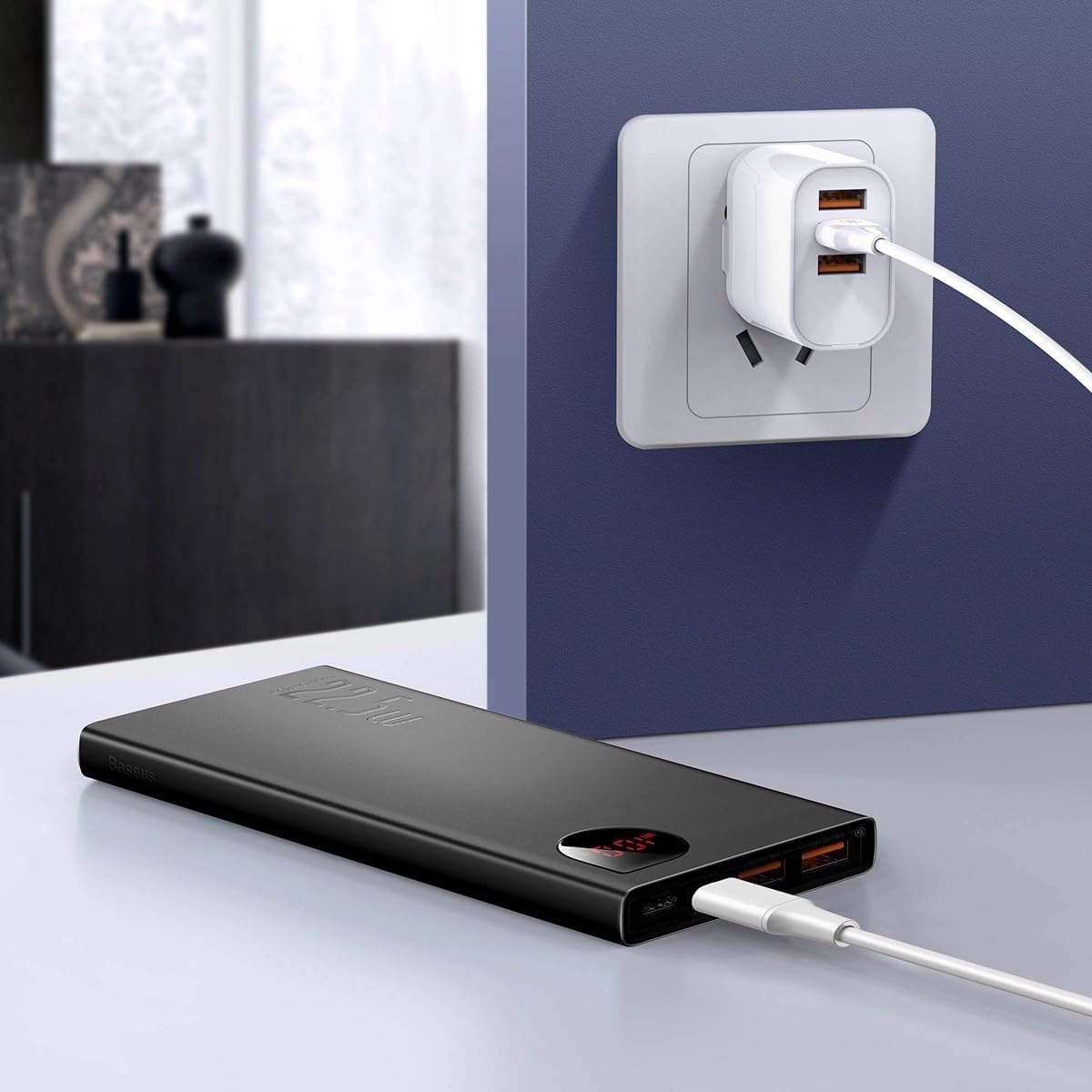
Image: The Baseus Adaman Power Bank connected to a wall charger via a USB cable, illustrating the process of recharging the power bank itself.
Mode d'emploi
Recharger vos appareils
- Connect your device's charging cable to one of the output ports on the power bank (Type-C, USB1, or USB2).
- Connectez l'autre extrémité du câble à votre appareil.
- La batterie externe commencera automatiquement à charger votre appareil. L'affichage numérique indiquera le pourcentage de batterie restant.tage.
- Pour arrêter la charge, il suffit de débrancher votre appareil de la batterie externe.

Image: A smartphone being charged by the Baseus Adaman Power Bank, demonstrating the device's charging capability for mobile phones.
Vérification du niveau de la batterie
The digital display on the power bank will show the current battery percentage when it is in use or when a device is connected. If the power bank is idle, you may need to briefly press the power button (if available, not explicitly mentioned but common) to activate the display.
Entretien
- Nettoyez la batterie externe avec un chiffon doux et sec. N'utilisez pas de produits chimiques agressifs ni de matériaux abrasifs.
- Rangez la banque d'alimentation dans un endroit frais et sec lorsqu'elle n'est pas utilisée.
- For optimal battery health, fully charge and discharge the power bank at least once every three months if it's not used regularly.
Dépannage
| Problème | Cause possible | Solution |
|---|---|---|
| La batterie externe ne charge pas les appareils. | Low battery, faulty cable, incompatible device. | Charge the power bank. Try a different cable. Ensure your device is compatible. |
| La batterie externe ne se recharge pas. | Faulty charging cable/adapter, damaged port. | Try a different charging cable and wall adapter. Check ports for damage. |
| L'affichage numérique ne fonctionne pas. | Power bank is off, low battery, malfunction. | Ensure power bank is on or connected to a device. Charge the power bank. If issue persists, contact support. |
Caractéristiques
| Fonctionnalité | Détail |
|---|---|
| Numéro de modèle | PPAD070001 |
| Marque | Baseus |
| Capacité de la batterie | 10000 mAh |
| Caractéristiques spéciales | Affichage numérique |
| Types de connecteurs | Input: USB Type-C, Micro-USB, IP/IN; Output: USB Type-C, USB-A (x2) |
| Voltage | 5 volts |
| Actuel | 5 Amps |
| Puissance de sortie | Up to 22.5W (PD 3.0, QC 3.0) |
| Composition des cellules de batterie | Lithium Polymère |
| Nombre de ports de sortie | 3 (1x Type-C, 2x USB-A) |
| Number of Input Ports | 3 (1x Type-C, 1x Micro-USB, 1x IP/IN) |
| Appareils compatibles | All Smartphones and other USB-powered devices |
| Portable | Oui |
Garantie et assistance
Ce produit est livré avec Aucune garantie as per the provided specifications. For any technical support or inquiries, please refer to the official Baseus webou contactez votre revendeur.
Pour plus d'informations, visitez : www.baseus.com