
Produit terminéview
The MEILAN M3 Mini GPS Bike Computer is a compact and lightweight device designed to track essential cycling data. It features a built-in high-sensitivity GPS chip supporting Beidou, GPS, and GLONASS for fast global positioning. The device offers multi-functions including speed, altitude, distance, and riding time measurement, making it suitable for serious cyclists and fitness enthusiasts. It is IPX6 waterproof and includes a day & night backlight for enhanced visibility.
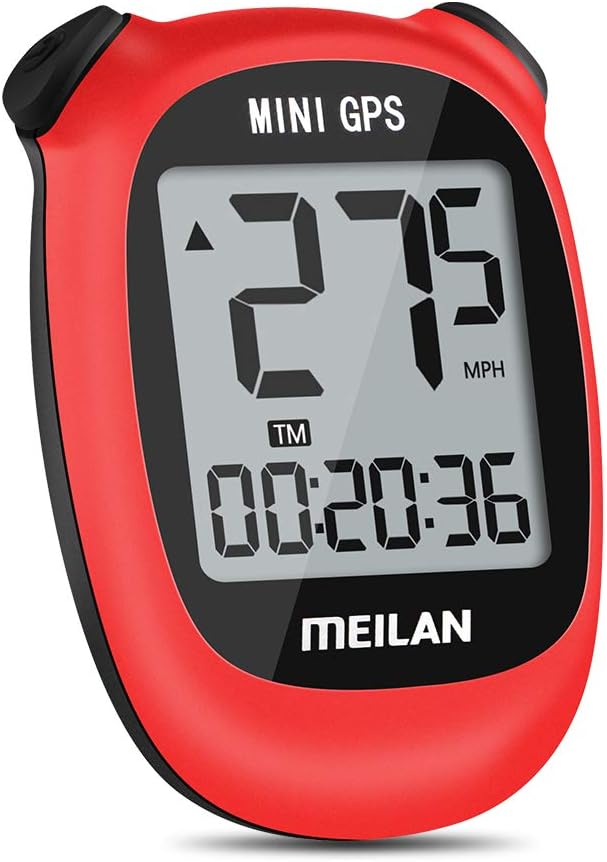
Image : Avant view of the MEILAN M3 Mini GPS Bike Computer, displaying speed and time on its LCD screen.
Configuration et installation
The MEILAN M3 Mini GPS Bike Computer is designed for easy setup and installation. Follow the steps below to get your device ready for use.
1. Chargement de l'appareil
The device is USB rechargeable. To charge, locate the blue cover on the back of the unit. Gently lift the cover to reveal the charging port. Insert the provided USB charging cable into the port and connect the other end to a USB DC 5V power source. A full charge provides up to 8 hours of run time.
Video: This video demonstrates the unboxing, charging process, and installation of the MEILAN M3 Mini GPS Bike Computer on a bicycle. It shows how to access the charging port and attach the mounting bracket.
2. Montage de l'appareil
The mounting unit features grooves on the back for easy attachment to any round surface, such as the bike's stem or handlebars. Use the provided rubber bands (two small and two large, depending on the size of your bike's bar) to secure the mounting unit. Ensure the mounting unit is oriented so that the device's connection grooves are at the top and bottom for proper installation.

Image: Visual guide for installing the MEILAN M3 Mini GPS Bike Computer, illustrating how to use the rubber rings and mount on either the stem or handlebar.
Once the mount is secure, align the grooves on the back of the MEILAN M3 with the mount. Insert the device sideways and then turn it to lock it into place. This ensures a secure fit during your rides.
Mode d'emploi
The MEILAN M3 Mini GPS Bike Computer is designed for intuitive operation, providing key cycling metrics at a glance.
1. GPS Acquisition and Time Setting
The device features a built-in high-sensitivity GPS chip supporting Beidou, GPS, and GLONASS for fast global positioning. Before initial use, set the TIME ZONE. The time will automatically calibrate according to your local time once a stable GPS signal is acquired.

Image: Illustration of the MEILAN GPS Bike Computer receiving signals from multiple satellites for accurate positioning and automatic time calibration.
2. Displaying Cycling Data
The 1.7-inch anti-glare LCD provides clear visibility of your cycling data from all angles. The device tracks various metrics including:
- Riding Distance: Total distance covered during your ride.
- Vitesse moyenne: Your average speed throughout the ride.
- Vitesse maximale : The highest speed achieved during your ride.
- Altitude actuelle: Your current elevation.
- Kilométrage total : Cumulative distance recorded by the device.
- Temps de conduite : Duration of your active cycling.
- Total Riding Time: Cumulative riding time.
- Fonction mémoire : Stores ride data.
- Unités de vitesse : Displays speed in Miles Per Hour (MPH) or Kilometers Per Hour (KM/H).

Image: A comprehensive diagram illustrating all the data points and functions tracked by the MEILAN M3 Mini GPS Bike Computer.

Image: Icons highlighting the main features: LCD Display, Built-in GPS Chip, IPX5 Waterproof, 400mAh Battery, and USB Rechargeable.
3. Day & Night Backlight
The advanced cycling computer is designed with day & night backlight. To change the backlight level for easy viewing under the sun or during night riding, press both the back and right buttons simultaneously.

Image: Comparison of the device's display in Night Mode (with backlight) and Normal Mode (without backlight).
4. Scénarios d'utilisation
The MEILAN M3 is versatile for various cycling needs, from short commutes to long-distance tours.

Image : Examples of short-distance commuting and long-distance cycling, illustrating the device's adaptability.
Entretien
The MEILAN M3 Mini GPS Bike Computer is designed to be durable with an IPX6 waterproof rating, protecting it from strong jets of water. For general maintenance, wipe the device clean with a soft, damp cloth. Avoid using harsh chemicals or abrasive cleaners. Ensure the charging port cover is securely closed when not charging to maintain its waterproof integrity.

Image: The device is shown to be waterproof, suitable for use in rainy conditions.
Dépannage
If you encounter any issues with your MEILAN M3 Mini GPS Bike Computer, please refer to the official Troubleshooting Guide for detailed solutions. Common issues may include GPS signal acquisition, display visibility, or battery life concerns.
Pour un guide complet, téléchargez le Guide de dépannage (PDF).
Caractéristiques
| Marque | MEILAN |
| Nom du modèle | M3_R |
| Couleur | Rouge |
| Dimensions du produit | 1.77"L x 0.79"l x 2.36"H |
| Poids de l'article | 0.08 livres |
| Taille de l'écran | 1.7 pouces |
| Type d'affichage | Écran LCD |
| Autonomie de la batterie | 8 heures |
| Type de capteur | GPS Sensor, Speed Sensor, Cadence Sensor, GLONASS Sensor |
| Composition des cellules de batterie | Dioxyde de lithium et de manganèse |
| Technologie de connectivité | Wireless / GPS |
| Composants inclus | M3 mini bike computer, mounting bracket, rubber band, instruction manual |
| Évaluation de la protection internationale | IPX6 |
| Type de montage | Handlebar Mount / Stem Mount |
| Entrée de l'interface humaine | Boutons |
| Matériel | Aluminium |
| Code UPC | 762977182607 |


Image: Available color variants of the MEILAN M3 Mini GPS Bike Computer.
Garantie et assistance
MEILAN provides customers with a three-month replacement and a one-year warranty from the date of purchase. For any questions during installation or use, please contact the seller directly via email.
Ressources de soutien supplémentaires :