
gear4music Visiondrum
manuel d'utilisation de la batterie électronique compacte à mailles gear4music VISIONDRUM
Model: Visiondrum
1. Introduction
This manual provides essential information for the setup, operation, and maintenance of your gear4music VISIONDRUM Compact Mesh Electronic Drum Set. Please read these instructions carefully before using the product to ensure proper function and longevity.
2. Produit terminéview
The VISIONDRUM Compact Mesh Electronic Drum Set is a 7-piece kit designed for both beginners and experienced players. It features mesh pads for a realistic playing feel and a compact, foldable design for easy storage and transport.

Image: The complete VISIONDRUM Compact Mesh Electronic Drum Set, including drum pads, cymbals, module, pedals, stool, and headphones.
2.1 Principales caractéristiques
- 7-Piece Mesh Design: Includes mesh pads for snare, toms, and cymbals, providing a realistic drumming experience.
- Compact et pliable : Engineered for easy setup, breakdown, and storage, making it suitable for small spaces.
- Hauteur réglable: The drum set and included stool are fully adjustable to accommodate players of various ages and sizes.
- Module sonore polyvalent : Features 12 pre-set drum kits and 10 play-along songs, offering a range of musical styles.
- Options de connectivité : Equipped with USB MIDI, 6.35mm output, Aux input, and headphone output for diverse integration.
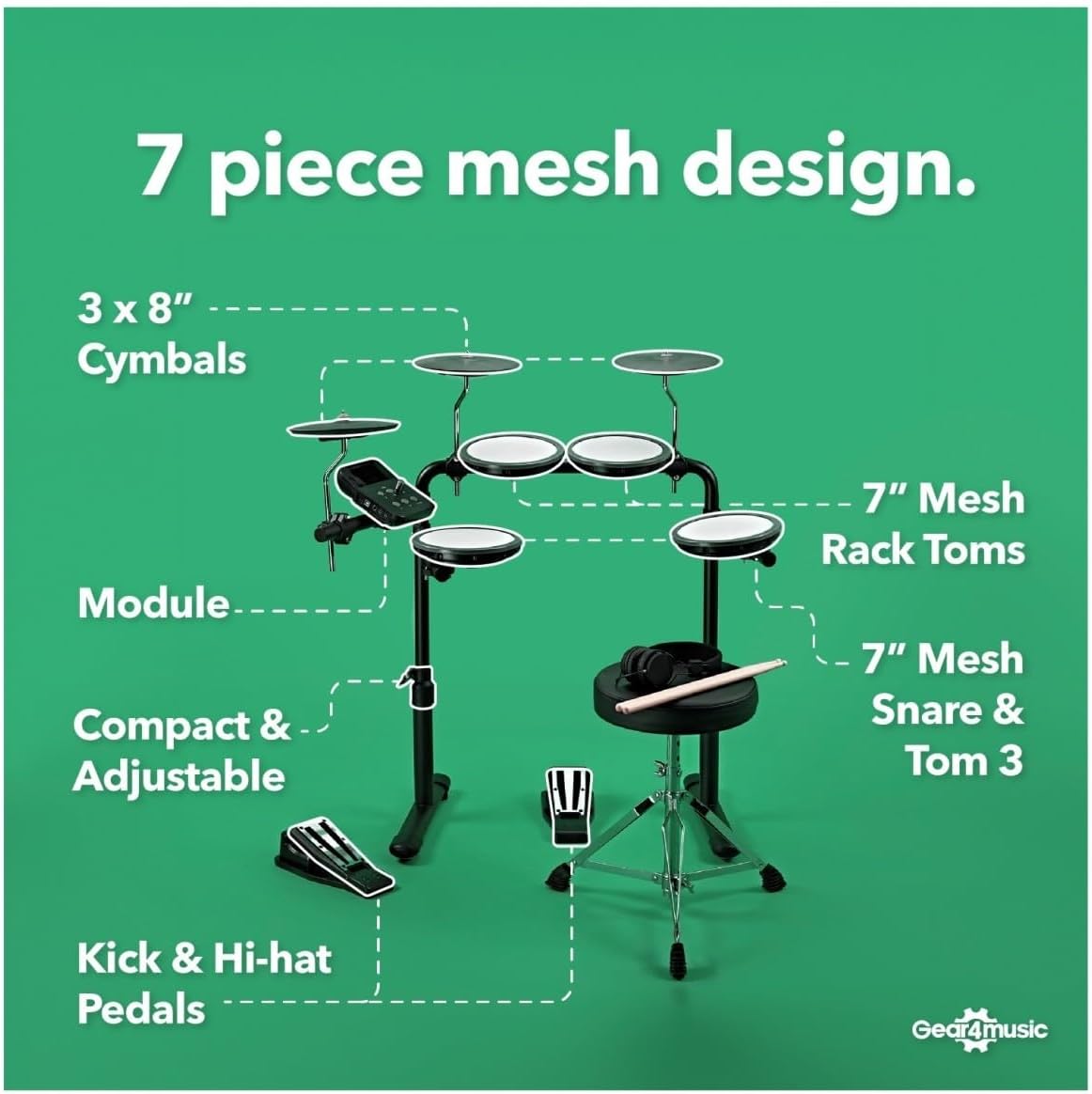
Image: A visual breakdown of the 7-piece mesh design, detailing the module, 3x 8" cymbals, 7" mesh rack toms, 7" mesh snare & tom 3, and kick & hi-hat pedals.
3. Instructions de configuration
The VISIONDRUM set is designed for straightforward assembly. Follow these steps to set up your drum kit:
- Déballer les composants : Carefully remove all components from the packaging. Verify that all listed parts are present, including the drum module, pads, cymbals, pedals, drum sticks, drum key, power adapter, headphones, and stool.
- Assemblage du cadre : Connect the frame sections as indicated in the included quick-start guide. Ensure all connections are secure.
- Fixez les pads et les cymbales : Mount the mesh drum pads and cymbals onto the frame. Use the drum key to tighten clamps and adjust their positions for comfortable playing.
- Position Pedals: Place the kick and hi-hat pedals on the floor in their desired positions.
- Connecter les câbles : Connectez chaque pad de batterie, cymbale et pédale à l'entrée correspondante du module de batterie à l'aide des câbles fournis. Assurez-vous que toutes les connexions sont bien serrées.
- Connecter l'alimentation : Plug the power adapter into the drum module and then into a suitable power outlet.
- Ajuster la hauteur : Adjust the height of the drum set and the stool to suit your playing posture. The frame allows for significant height adjustment to accommodate both children and adults.

Image: This diagram illustrates the adjustable height ranges for the drum set (490mm - 770mm) and the stool (390mm - 750mm), along with the overall width (610mm) and depth (400mm) of the assembled kit.
4. Mode d'emploi
Once assembled, your VISIONDRUM set is ready for use. The drum module is the central control unit for sounds and settings.
4.1 Mise sous/hors tension
Appuyez sur le Pouvoir button on the drum module to turn the unit on or off.
4.2 Sound Module Controls

Image : Une image détaillée view of the VISIONDRUM module, highlighting its various ports including USB MIDI, 6.35mm Output, Aux Input, and Headphones Output, alongside control buttons and a rotary knob.
- Bouton de volume : Use the large rotary knob to adjust the overall output volume.
- Sélection du kit : Use the dedicated buttons (often labeled with arrows or 'Kit') to cycle through the 12 pre-set drum kits. Each kit offers a unique sound profile.
- Lecture de la chanson: Access the 10 built-in songs to play along with. Refer to the quick-start guide for specific button functions for song selection and playback control.
- Métronome: The module includes a metronome function to assist with timing practice.
4.3 Connectivité
- Sortie casque : Connect headphones to the dedicated output jack for silent practice.
- Sortie 6.35 mm : Use this output to connect the drum set to an external amplifier, PA system, or audio interface for live performance or recording.
- Entrée auxiliaire: Connect an external audio device (e.g., smartphone, MP3 player) to the Aux input to play along with your favorite music.
- USB-MIDI : The USB port allows the drum set to function as a MIDI controller, enabling connection to computers and music software for recording or triggering virtual instruments.

Image: A user playing the VISIONDRUM electronic drum set, demonstrating its use with an external amplifier pour une expérience audio améliorée.
5. Entretien
Proper maintenance will ensure the longevity and optimal performance of your VISIONDRUM electronic drum set.
- Nettoyage: Use a soft, dry cloth to wipe down the drum pads, cymbals, module, and frame. Avoid using abrasive cleaners or solvents, as these can damage the surfaces.
- Stockage: When not in use, store the drum set in a cool, dry place away from direct sunlight and extreme temperatures. The compact, foldable design facilitates easy storage.
- Gestion des câbles: Ensure all cables are neatly routed and not subjected to excessive bending or pinching, which can lead to damage.
- Entretien des bonnets en filet : While durable, mesh heads can be sensitive to sharp objects. Avoid striking them with anything other than drum sticks.

Image: The VISIONDRUM electronic drum set shown in its compact, folded state, illustrating its space-saving design for storage.
6. Dépannage
If you encounter issues with your VISIONDRUM set, refer to the following common solutions:
- Pas de son :
- Vérifiez que l'adaptateur secteur est correctement branché et que le module est allumé.
- Vérifiez le bouton de volume du module et de tout élément connecté. ampAmplificateur/casque.
- Verify that all drum pads, cymbals, and pedals are correctly connected to the module.
- Si vous utilisez des écouteurs, assurez-vous qu'ils soient bien branchés dans la prise casque.
- Déclenchement incohérent :
- Check cable connections for any looseness.
- Ensure drum pads are securely mounted and not shifting during play.
- Adjust sensitivity settings on the module if available (refer to the quick-start guide for advanced module settings).
- Module ne répondant pas :
- Turn the module off, wait a few seconds, and then turn it back on.
- Assurez-vous que l'adaptateur secteur fonctionne correctement.
If the issue persists, please contact gear4music customer support for further assistance.
7. Spécifications
| Fonctionnalité | Détail |
|---|---|
| Nom du modèle | VISIONDRUM |
| Marque | gear4music |
| Définir la configuration | 7-piece mesh electronic drum set |
| Pads de batterie | Mesh pads (snare, toms) |
| Cymbales | 3 x 8" Cymbals |
| Module Sounds | 12 Drum Kits, 10 Songs, 68 Voices |
| Connectivité | USB MIDI, 6.35mm Output, Aux Input, Headphones Output |
| Type de matériau | Synthetic materials |
| Poids de l'article | 13.9 kilogrammes |
| Dimensions assemblées (approximatives) | Height: 490mm - 770mm, Depth: 400mm, Width: 610mm |
| Composants inclus | Electronic Drum Set, 2x Pedals, Drum Sticks, Drum Key, Power Adapter, Headphones, Stool |
8. Garantie et assistance
For warranty information and customer support, please refer to the documentation provided with your purchase or visit the official gear4music webConsultez le site. Conservez votre preuve d'achat pour toute réclamation au titre de la garantie.
gear4music Contact Information:
S'il vous plaît visitez www.gear4music.com/support pour obtenir les ressources d'assistance et les coordonnées les plus récentes.
Documents connexes - Visiondrum
 |
Manuel d'utilisation du kit de batterie numérique compact VISIONDRUM - Gear4music Manuel d'utilisation du kit de batterie numérique compact VISIONDRUM de Gear4music. Découvrez ses fonctions, sa connectivité, son fonctionnement et ses caractéristiques techniques. |
 |
Gear4music DD220X Kit de batterie électronique Manuel d'utilisation Manuel d'utilisation complet pour la batterie électronique Gear4music DD220X. Découvrez comment installer, utiliser et entretenir votre batterie électronique grâce à des instructions détaillées, ses caractéristiques, ses fonctions et ses spécifications. |
 |
Manuel d'utilisation des pads de batterie électroniques portables Gear4music DD70 Manuel d'utilisation complet pour les pads de batterie électroniques portables Gear4music DD70, détaillant leurs caractéristiques, fonctions, opérations, connexions, spécifications et consignes de sécurité. |
 |
Manuel d'utilisation des pads de batterie électroniques portables Gear4music DD70 Manuel d'utilisation complet pour les pads de batterie électroniques portables Gear4music DD70, détaillant leurs caractéristiques, fonctions, opérations et spécifications pour les musiciens. |
 |
Gear4music DD50 Portable Digital Drum Pad User Manual This user manual provides comprehensive information on the Gear4music DD50 Portable Digital Drum Pad, including setup, features, game and coach modes, pad assignment, tempo control, specifications, and contact details. |
 |
Guide d'installation du kit de batterie numérique Gear4music DD400X Un guide d'installation complet pour la batterie numérique Gear4music DD400X, détaillant tous les composants et les instructions de montage pour une installation rapide et précise. |
Ask a question about this manual
Ask about setup, troubleshooting, compatibility, parts, safety, or missing instructions. Manuals+ will review the question and use this page’s manual context to help answer it.