
1. Informations importantes sur la sécurité
Please read all instructions carefully before using the Gackoko HY9 Blackhead Remover Pore Vacuum. Improper use may result in skin irritation or injury.
- Do not stay on one area for more than 3 seconds. Continuous suction in one spot can cause redness, bruising, or skin damage.
- Move the device gently and continuously across the skin.
- Ne pas utiliser sur une peau abîmée, irritée ou enflammée.
- Avoid using the device on areas with acne cysts, open wounds, or severe skin conditions.
- Do not exfoliate your skin immediately before or after using the device.
- Tenir hors de portée des enfants.
- This device is not waterproof. Do not wash the main unit with water.
Consult a dermatologist if you have sensitive skin or pre-existing skin conditions before use.
2. Produit terminéview
The Gackoko HY9 Blackhead Remover is an electric facial pore cleaner designed to help remove blackheads, whiteheads, dead skin, and excess oil. It features adjustable suction power and multiple interchangeable probes for various skin needs.
Contenu du colis :
- Gackoko HY9 Blackhead Remover Device
- 5 Replaceable Suction Probes
- Câble de chargement USB
- Filter Sponges
- 4 Acne Extraction Tools
- Manuel d'utilisation
Caractéristiques de l'appareil:
- 5 niveaux de puissance d'aspiration
- LED Display for Suction Level and Battery Status
- USB Rechargeable (450mAh Battery)
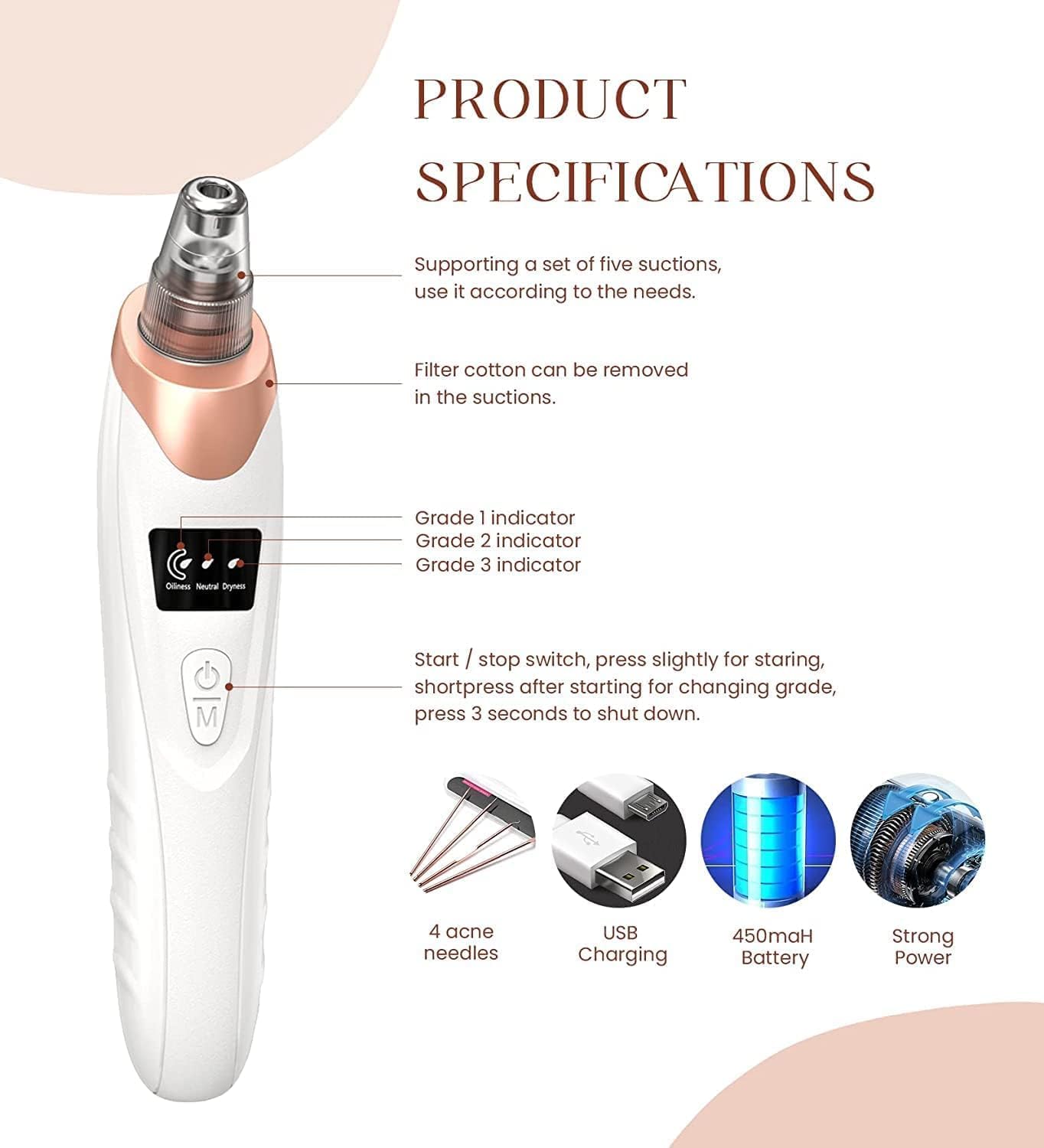
Figure 2.1: Gackoko HY9 Device Components and Features

Figure 2.2: Replaceable Suction Heads and Their Recommended Uses
- Petite tête ronde : For thin, tender, and easily allergic skin.
- Micro Crystal Head: Mainly used on oily skin for exfoliation.
- Tête à trou ovale : Mainly used to smooth fine lines and wrinkles.
- Middle Round Head: Strong suction, suitable for dry skin.
- Grosse tête ronde : Strongest suction, mainly used on forehead and cheeks.
3. Installation
Chargement de l'appareil :
- Connectez le câble de chargement USB au port de chargement de l'appareil.
- Branchez l'autre extrémité du câble USB à un adaptateur secteur USB compatible (non inclus) ou à un port USB d'ordinateur.
- L'écran LED indiquera l'état de charge. Une charge complète prend généralement quelques heures.
Attaching a Suction Head:
- Select the desired suction head based on your skin type and target area (refer to Figure 2.2).
- Gently twist and push the chosen head onto the device's nozzle until it is securely in place.
- Ensure a filter sponge is inserted into the suction head to prevent debris from entering the device.
4. Mode d'emploi
Follow these steps for effective and safe use of your Gackoko HY9 Blackhead Remover:
- Préparez votre peau : Before using the vacuum pore cleaner, open your pores with a hot towel or facial steamer for 5-10 minutes. This softens the skin and helps loosen blackheads.
- Sélectionnez le niveau d'aspiration : Press the power button to turn on the device. Short press the power button to cycle through the 5 suction power levels. Start with the lowest intensity (Level 1) and gradually increase if needed, based on your skin's tolerance.
- Appliquer sur la peau : Place the selected suction head flat against your skin. Gently slide the pore vacuum in a single, continuous horizontal direction.
- Avoid Prolonged Suction: Do not keep the device in one spot for more than 3 seconds. This is crucial to prevent redness or bruising. Keep the device moving.
- Recommended Usage Frequency: For dry skin, use once a week. For oily and mixed skin, use up to twice a week. Do not exceed 5 minutes of total use per session.
- Post-traitement : After use, apply an ice towel, cold water, or a facial mask to help shrink pores and soothe the skin.

Figure 4.1: Usage Steps and Precautions
Vidéo pédagogique :
Video 4.1: Demonstration of Gackoko HY9 Blackhead Remover usage, including device features, probe selection, and application technique on the face.
5. Entretien et nettoyage
- Cleaning Suction Heads: After each use, remove the suction head and filter sponge. Rinse the suction head with warm water and mild soap. Allow it to air dry completely before reattaching.
- Replacing Filter Sponges: Replace the filter sponge regularly (after every 1-2 uses or when visibly dirty) to maintain optimal suction and hygiene.
- Cleaning Device Body: Essuyez le corps principal de l'appareil avec un chiffon propre et sec.amp tissu. Ne pas laver la machine avec de l'eau or immerse it in any liquid.
- Stockage: Rangez l'appareil et ses accessoires dans un endroit frais et sec, à l'abri de la lumière directe du soleil.
6. Dépannage
If you encounter any issues with your Gackoko HY9 Blackhead Remover, please refer to the following common solutions:
| Problème | Cause possible | Solution |
|---|---|---|
| Pas d'aspiration ou aspiration faible | Suction head not properly attached; filter sponge clogged; low battery. | Ensure suction head is securely attached; replace filter sponge; charge the device fully. |
| L'appareil ne s'allume pas | Batterie faible ; dysfonctionnement de l’appareil. | Charge the device for at least 2 hours; if still not working, contact customer support. |
| Redness or bruising after use | Device held in one spot too long; suction level too high for skin type. | Ensure continuous movement of the device; reduce suction level; apply a cold compress to affected area. |
If the problem persists after trying these solutions, please contact Gackoko customer support.
7. Spécifications
| Fonctionnalité | Détail |
|---|---|
| Nom du modèle | HY9 |
| Fabricant | Gackoko |
| Source d'énergie | Rechargeable par USB |
| Capacité de la batterie | 450mAh |
| Niveaux d'aspiration | 5 |
| Nombre de sondes | 5 |
| Poids de l'article | 0.18 kilogrammes (6.35 onces) |
| Dimensions du colis | 7.99 x 4.69 x 1.93 pouces |
| Couleur | Blanc |
| Compatibilité avec le type de peau | Tous |
8. Garantie et assistance
Gackoko products are manufactured with quality and performance in mind. For warranty information, technical support, or any questions regarding your HY9 Blackhead Remover, please refer to the contact details provided with your purchase or visit the official Gackoko website.
Veuillez conserver votre preuve d'achat pour les réclamations au titre de la garantie.