
podofo 2+64G Car Stereo for Honda CRV 2007-2011
Podofo 2+64G Car Stereo for Honda CRV 2007-2011 Instruction Manual
Model: 2+64G Car Stereo for Honda CRV 2007-2011
1. Introduction
This manual provides detailed instructions for the installation, operation, and maintenance of your Podofo 2+64G Car Stereo. This Android 13 head unit is designed specifically for Honda CRV models from 2007 to 2011, offering a 9-inch touch screen with advanced features including GPS navigation, Wi-Fi, Bluetooth, Mirror Link, and support for an AHD backup camera. Please read this manual thoroughly before using the product to ensure proper functionality and safety.
2. Contenu du colis
Vérifiez que tous les éléments énumérés ci-dessous sont inclus dans votre colis :
- Podofo 2+64G Car Stereo Head Unit
- Caméra de recul
- Antenne GPS
- Câble d'alimentation
- Câble RCA
- Câbles USB (2)
- Manuel d'utilisation

Figure 2.1: Included accessories with the Podofo Car Stereo.
3. Installation
The Podofo car stereo is designed for a direct fit in Honda CRV 2007-2011 models. Professional installation is recommended. Ensure the vehicle's power is disconnected before beginning installation.
3.1 Removing the Factory Unit
Carefully remove the existing factory stereo system from your Honda CRV dashboard. This typically involves unscrewing two screws located above the unit and gently prying off the surrounding trim. Disconnect all existing wiring harnesses from the factory unit.
3.2 Connexions de câblage
Connect the provided wiring harnesses to the corresponding ports on the new Podofo head unit and the vehicle's wiring. Ensure all connections are secure. The unit comes with all necessary accessories for setup, including USB cables for wired connections.

Figure 3.1: Product size and wiring diagram for the Podofo Car Stereo.
3.3 Installation de la nouvelle unité
Once wiring is complete, carefully slide the new Podofo head unit into the dashboard opening. Secure it using the original screws or provided mounting hardware. Reattach the dashboard trim. The unit is designed to seamlessly integrate into your Honda CRV's interior.
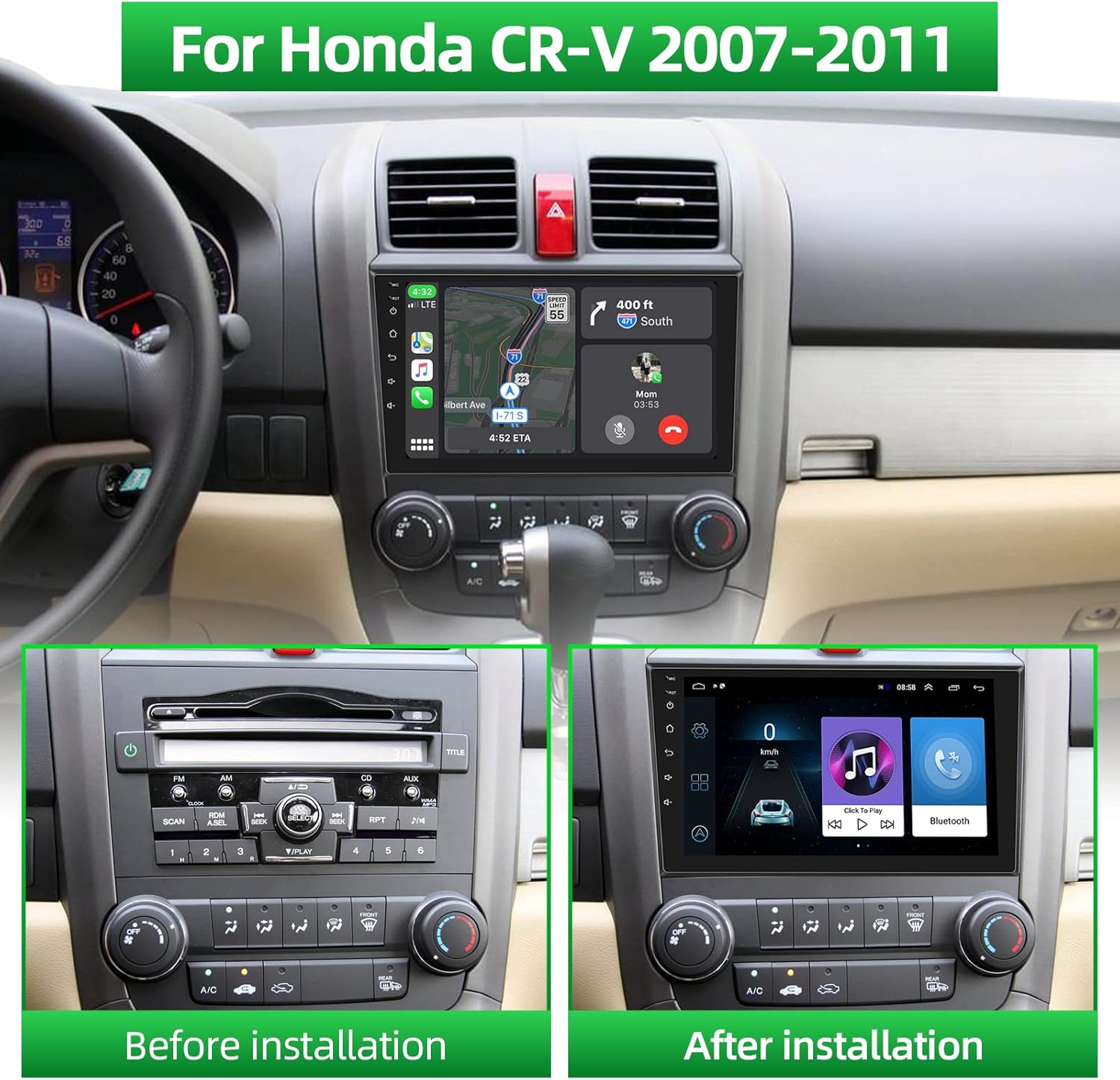
Figure 3.2: Before and after installation of the Podofo Car Stereo in a Honda CRV.
3.4 Guide vidéo d'installation
Video 3.1: Detailed installation process for the Podofo Car Stereo in a Honda CRV 2007-2011. This video demonstrates the steps for removing the old unit, connecting wires, and installing the new head unit.
4. Fonctionnement de base
4.1 Mise sous/hors tension
The unit powers on automatically with the vehicle's ignition. To manually power off or restart, press and hold the power button located on the left side of the unit.
4.2 Interface à écran tactile
The 9-inch HD touch screen provides intuitive control over all functions. Navigate through menus, select applications, and adjust settings by tapping or swiping. The interface is designed for responsiveness and ease of use.
4.3 Contrôle du volume
Adjust the volume using the dedicated volume buttons on the left side of the unit or through the on-screen controls.
5. Connectivité
5.1 Connexion Bluetooth
Pair your mobile phone via Bluetooth to enable hands-free calling and audio streaming. Access the Bluetooth settings on the head unit, search for your device, and connect. An external microphone is included for clear call quality.
5.2 Connexion Wi-Fi
Connect the head unit to a Wi-Fi network (e.g., mobile hotspot) to access online maps, download apps from the app store, and browse the internet.

Figure 5.1: GPS Navigation and Wi-Fi Connection interface.
Fonctionnalité Mirror Link 5.3
The Mirror Link feature allows you to display your smartphone's screen on the car stereo. Wired connection is supported for Android phones via USB cable, enabling touch control from the MP5 screen. iOS phones can mirror their screen but cannot be controlled via touch from the MP5 screen.
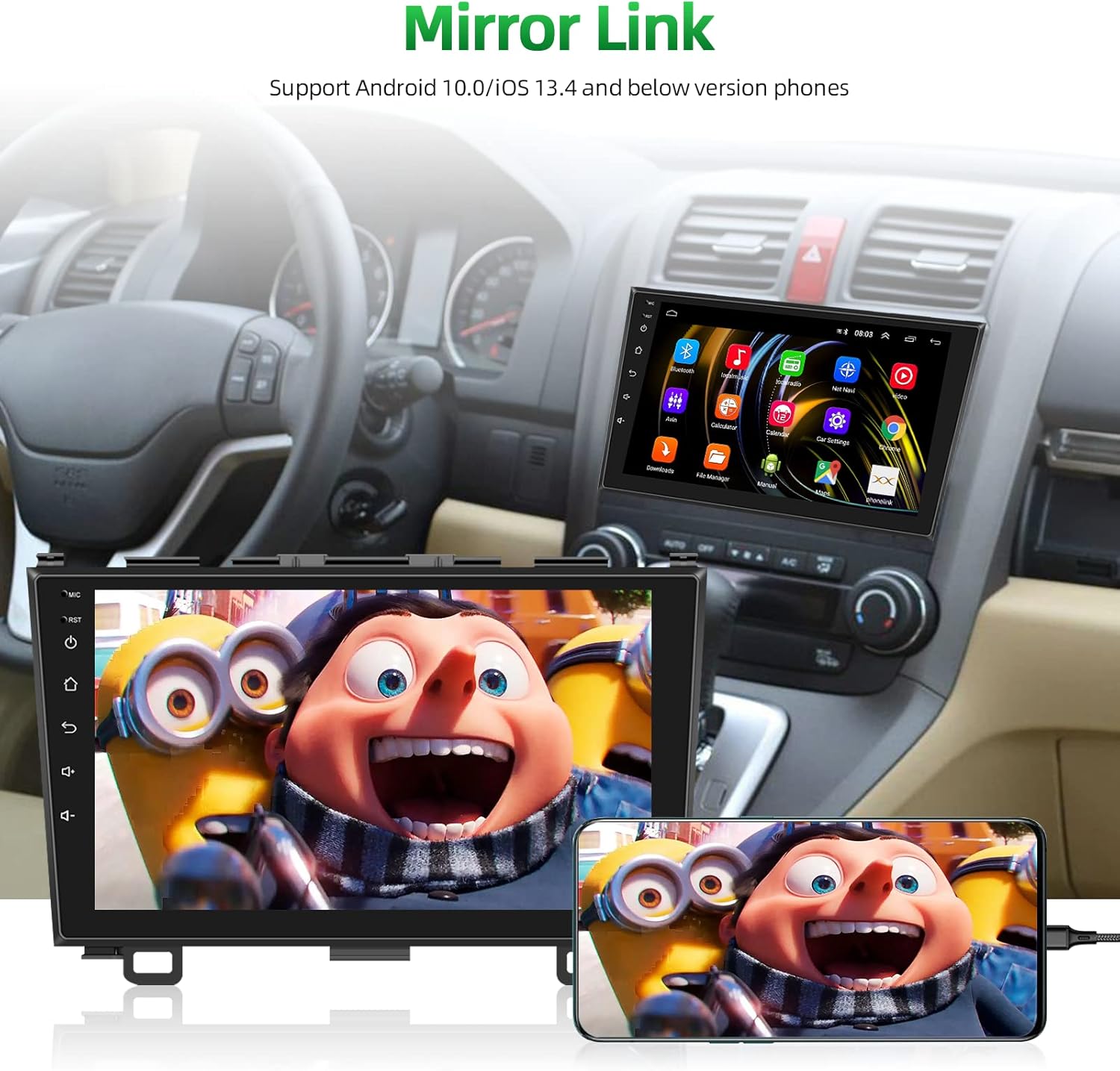
Figure 5.2: Mirror Link in action, displaying a smartphone's content on the car stereo.
5.4 Wireless CarPlay and Android Auto Connection Steps
Video 5.1: This video provides a step-by-step guide on how to connect your smartphone to the car stereo using Wireless CarPlay and Android Auto, including Bluetooth and Wi-Fi setup.
7. Fonctionnalités audio
Radio FM/RDS 7.1 GHz
Enjoy FM radio with 18 preset stations. RDS (Radio Data System) provides additional information such as station name, song title, and traffic updates where available.
7.2 HIFI Sound Quality
The system is equipped with HIFI restored vocal quality processing, ensuring clear and realistic sound for your music and calls.
8. Caméra de recul
An AHD waterproof and dustproof backup camera is included. When the vehicle is shifted into reverse, the screen automatically displays the rear view, en fournissant une assistance pour le stationnement et les manœuvres en toute sécurité.
Video 8.1: This video demonstrates the reversing connection for the backup camera, showing how to wire it to the head unit and the car's reversing light for automatic display.
9. Commande au volant (SWC)
The car radio supports the original vehicle's steering wheel controls. After installation, you can configure the steering wheel buttons to control various functions of the head unit, such as volume, track changes, and call management.

Figure 9.1 : Plusview of key features including Steering Wheel Control setup.
10. Spécifications
| Fonctionnalité | Détail |
|---|---|
| Poids de l'article | 2.99 livres |
| Dimensions du produit | 7.09 x 1.97 x 5.12 pouces |
| Taille de l'écran | 9 pouces |
| Commande vocale | Écran tactile |
| Résolution de l'écran | 1024*600 HD (1080p support) |
| Système opérateur | Android 13 |
| Mémoire | 2 Go de RAM + 32 Go de stockage |
| Technologie de connectivité | Bluetooth, Wi-Fi |
| Caractéristiques spéciales | FM/RDS/HIFI, Bluetooth, GPS, Wi-Fi, Steering Wheel Control, Mirror Link, AHD Backup Camera |
| Type de service de véhicule | Voiture (Honda CRV 2007-2011) |
| Type de montage | Support de tableau de bord |
11. Dépannage
- Pas d'alimentation : Vérifiez toutes les connexions électriques et assurez-vous que le contact du véhicule est mis. Vérifiez le fusible.
- Pas de son : Vérifiez les connexions des haut-parleurs, les niveaux de volume et les paramètres audio. Assurez-vous que la source audio correcte est sélectionnée.
- Problèmes de connexion Bluetooth : Ensure Bluetooth is enabled on both the head unit and your phone. Delete previous pairings and try reconnecting. Restarting the head unit or phone may resolve the issue.
- Perte du signal GPS : Assurez-vous que l'antenne GPS est correctement installée et qu'elle est dégagée. view du ciel. Vérifiez la présence d'obstacles.
- Caméra de recul non affichée : Verify the camera's power and video signal connections. Ensure the reverse trigger wire is correctly connected to the vehicle's reversing light circuit.
- L'écran tactile ne répond pas : Essayez de redémarrer l'appareil. Si le problème persiste, contactez le service client.
12. Garantie et assistance
Your Podofo Car Stereo is backed by comprehensive support and warranty options:
- Garantie: The product includes a 24-month replacement policy for eligible issues.
- Retours : Profitez d'une période de retour sans souci de 60 jours.
- Support technique : Un service de consultation et d'assistance technique à vie est disponible.
- Temps de réponse : Customer service aims for quick replies, typically within 18 hours.
Pour une protection supplémentaire, envisagez l'achatasing a 2-Year or 3-Year Protection Plan, or a Complete Protect monthly plan, available at the time of purchase.
For support, please contact the seller, Car-life Expert-US, or refer to the contact information provided with your purchase.