
1. Introduction
The Positive Grid Spark MINI is a portable 10W smart guitar amplifier and Bluetooth speaker designed for versatile sound experiences. It offers powerful, multi-dimensional sound and a rechargeable battery providing up to 8 hours of listening or playing time. This device integrates seamlessly with a free accompanying smart app, offering features like Auto Chords, video creation, and access to over 50,000 tones for endless musical inspiration.
Les principales caractéristiques comprennent :
- Guitare portable amp & Bluetooth speaker with powerful, multi-dimensional sound.
- Rechargeable battery delivers up to 8 hours of listening or play time.
- Free accompanying smart app (iOS or Android) with Auto Chords, video creation & access to 50,000+ tones.
- Smart Jam Live uses machine learning technology to build bass and drum backing tracks based on your playing style.
- Ready for electric guitar, acoustic, or bass – plug in anywhere for unbelievable sound.
- Créez vos propres sons de guitare avec 30 amps et 40 effets, puis enregistrez chez vous en utilisant Spark MINI comme interface audio USB.
2. Contenu de la boîte
Upon unboxing your Positive Grid Spark MINI, you should find the following items:
- Spark MINI 10W Smart Guitar Amp et haut-parleur Bluetooth
- Câble de chargement USB-C
- Removable Carrying Strap
- Guide de démarrage rapide

Figure 1 : Face avant view of the Spark MINI 10W Smart Guitar Amp.
3. Commandes et ports
The Spark MINI features intuitive controls and essential connectivity ports for ease of use.
Commandes du panneau supérieur :
- Bouton de préréglage : Rotate to select between custom, solo, lead, and rhythm presets. LEDs indicate the active preset.
- Guitar Volume Knob: Adjusts the volume level for your connected guitar.
- Bouton de volume de la musique : Controls the volume for Bluetooth audio playback.
- Prise d'entrée : Connect your electric, acoustic, or bass guitar here.
Ports du panneau arrière :
- Sortie ligne (3.5 mm) : Pour connecter des écouteurs ou des haut-parleurs externes.
- Aux In (3.5mm): Pour connecter des périphériques audio externes.
- USB-C Port (5V == 2A): Used for charging the device and for USB audio interface functionality.
- Bouton de couplage : Lance le mode de couplage Bluetooth.
- Bouton d'alimentation : Turns the device on/off. Hold for tuner function.
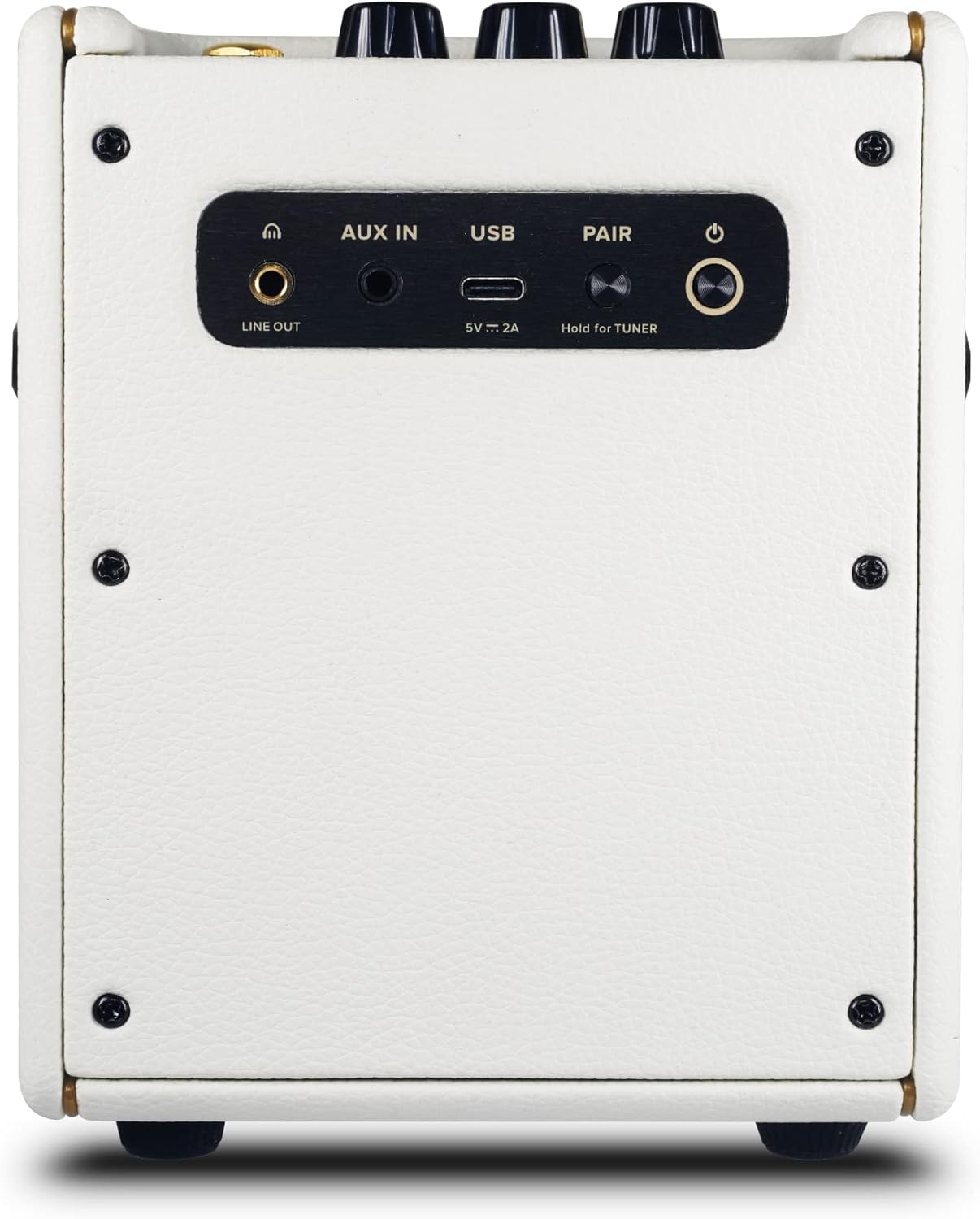
Figure 2 : Arrière view of the Spark MINI showing all ports and buttons.
4. Installation
4.1 Charge initiale
Before first use, fully charge your Spark MINI using the provided USB-C cable and a compatible 5V/2A power adapter (not included). The power LED will indicate charging status.
4.2 Mise sous/hors tension
Press and hold the Power button on the rear panel for a few seconds to turn the Spark MINI on or off.
4.3 Téléchargement et connexion de l'application
Download the free Spark app from the iOS App Store or Google Play Store. Open the app and follow the on-screen instructions to connect your Spark MINI via Bluetooth. This unlocks the full potential of the amplifier, including access to a vast tone library and smart features.

Figure 3: Spark MINI connected to the mobile app for enhanced control and features.
5. Modes de fonctionnement
5.1 Guitare Ampmode lifier
Connect your guitar to the Input jack. Use the Preset knob to select one of the four onboard tones (Custom, Solo, Lead, Rhythm). Adjust the Guitar Volume knob to your desired level. For advanced tone shaping, connect to the Spark app to access 30 amps, 40 effects, and thousands of user-created tones.
5.2 Mode haut-parleur Bluetooth
Pair your mobile device with the Spark MINI via Bluetooth. Once connected, you can stream music directly to the Spark MINI. Use the Music Volume knob to control the playback volume. This allows you to use the device as a high-quality portable Bluetooth speaker.
5.3 Smart Jam Live
Engage the Smart Jam Live feature through the Spark app. This innovative technology uses machine learning to analyze your playing style and automatically generate dynamic bass and drum backing tracks, providing a personalized jam session experience.
Interface audio USB 5.4
Connect the Spark MINI to your computer via the USB-C port. It can function as a USB audio interface, allowing you to record your guitar playing directly into your preferred digital audio workstation (DAW) software.
Video 1: Spark MINI - Metal Tone Demo. This video demonstrates the metal tone capabilities of the Spark MINI amplifier.
Video 2: Why This Spark Mini Guitar Amp - BT Speaker Is So Much FUN! This video provides an in-depth look at the features and enjoyment derived from the Spark MINI.
6. Spécifications
| Fonctionnalité | Détail |
|---|---|
| Poids de l'article | 3.75 livres |
| Dimensions du produit | 5.76 x 4.84 x 6.49 pouces |
| Numéro de modèle de l'article | 855316004729 |
| Piles | 1 pile lithium-ion requise. (incluse) |
| Puissance de sortietage | 10 watts |
| Type de batterie | Lithium-ion |
| Source d'énergie | Alimenté par batterie |
| Nom de la couleur | Blanc nacré |
| Appareils compatibles | Guitare |
| Type de connecteur | USB |
| Type de matériau | Black Textured Vinyl, Pearl Vinyl |

Figure 4: Dimensions of the Spark MINI 10W Smart Guitar Amp.
7. Entretien
7.1 Nettoyage
To clean your Spark MINI, use a soft, dry cloth. Avoid using abrasive cleaners or solvents, as these may damage the finish. Ensure no liquids enter the ports or speaker grille.
7.2 Stockage
Store the Spark MINI in a cool, dry place away from direct sunlight and extreme temperatures. If storing for an extended period, ensure the battery is partially charged (around 50%) to maintain battery health.
7.3 Entretien de la batterie
The Spark MINI uses a Lithium Ion battery. For optimal battery life, avoid fully discharging the battery frequently. Recharge the device when the battery indicator is low. Do not attempt to replace the battery yourself; contact customer support if battery issues arise.
8. Dépannage
8.1 No Sound from Guitar
- Ensure the guitar cable is securely connected to both the guitar and the Spark MINI Input jack.
- Check that the Spark MINI is powered on and the Guitar Volume knob is turned up.
- Verify that the correct preset is selected using the Preset knob.
- If using the app, ensure the guitar input is not muted within the app settings.
8.2 Problèmes de connectivité Bluetooth
- Ensure the Spark MINI is in pairing mode (indicated by a blinking Bluetooth LED).
- Check your mobile device's Bluetooth settings and ensure Spark MINI is visible and selected.
- Try restarting both the Spark MINI and your mobile device.
- If the app is crashing on high refresh rate phones (above 60fps), enable "power saving mode" on your phone to lock the refresh rate at 60fps.
8.3 Autonomie de la batterie réduite
- Assurez-vous que l'appareil est complètement chargé avant utilisation.
- High volume levels or continuous use of power-intensive app features can reduce battery life.
- Ensure the charging cable and adapter meet the 5V/2A requirement.
9. Garantie et assistance
Pour toute information concernant la garantie, l'assistance technique ou les demandes de service, veuillez consulter le site officiel de Positive Grid. webConsultez leur site web ou contactez directement leur service client. Conservez votre preuve d'achat pour toute réclamation au titre de la garantie.
Online resources and FAQs are available on the Positive Grid support page to assist with common questions and issues.


