
1. Consignes de sécurité
Read all instructions carefully before using the microwave oven to prevent fire, electric shock, personal injury, or exposure to excessive microwave energy.
- N’essayez pas d’utiliser ce four avec la porte ouverte ou si la porte est endommagée.
- Do not place any metal objects, aluminum foil, or metal-trimmed dishes in the microwave.
- Assurer une ventilation adéquate pendant le fonctionnement.
- Surveillez toujours les enfants lorsqu'ils utilisent le four à micro-ondes.
- Ne pas chauffer les récipients scellés, car ils pourraient exploser.
- Clean the microwave regularly to prevent grease buildup, which can be a fire hazard.
2. Produit terminéview
The GASLAND OTR1902S microwave oven combines microwave cooking with an integrated ventilation system, designed for over-the-range installation. It offers a spacious interior and multiple cooking functions.
Caractéristiques principales :
- Multi-Stage Precise Cooking: 1,000 watts with 11 variable power levels and 2-staget capacité de cuisson.
- Démarrage en une seule touche : 9 convenient presets (popcorn, potato, veggies, pizza, snack menu, melt/soften, auto reheat, auto cook, auto defrost) and an 'Add 30 Seconds' function.
- Efficient Airflow & LED Lights: 2-speed, 400 CFM ventilation fan to remove cooking odors, operating under 62dB. Features 2-watt LED lighting for illuminating the stovetop.
- Grande capacité : 1.9 cu. ft. interior space with a removable rack for double cooking and a turntable with an on/off function for flexible cooking.
- 2-in-1 Sleek Design: Combines microwave and hood functions, saving counter space and providing kitchen ventilation.

Figure 2.1: The GASLAND OTR1902S microwave oven in a kitchen setting, installed above a stove.
3. Installation
This microwave oven is designed for over-the-range installation. Ensure you have the necessary tools and assistance for safe and proper mounting.
Dimensions:

Figure 3.1: Built-in dimensions for the GASLAND OTR1902S microwave oven. The unit measures approximately 15.28 inches deep, 29.92 inches wide, and 16.42 inches high.
- Dimensions du produit : 15.28 x 29.92 x 16.42 pouces
- Required Cabinet Width: 30 pouces
- Profondeur minimale de l'armoire : 13 pouces
Composants inclus :

Figure 3.2: The microwave oven comes with a removable rack, a glass turntable, turntable support, and two grease filters.
- Rack amovible
- Plateau tournant en verre
- Prise en charge de la platine
- Grease Filters (x2)
4. Mode d'emploi
The control panel provides various options for cooking and convenience. Familiarize yourself with the buttons and their functions.
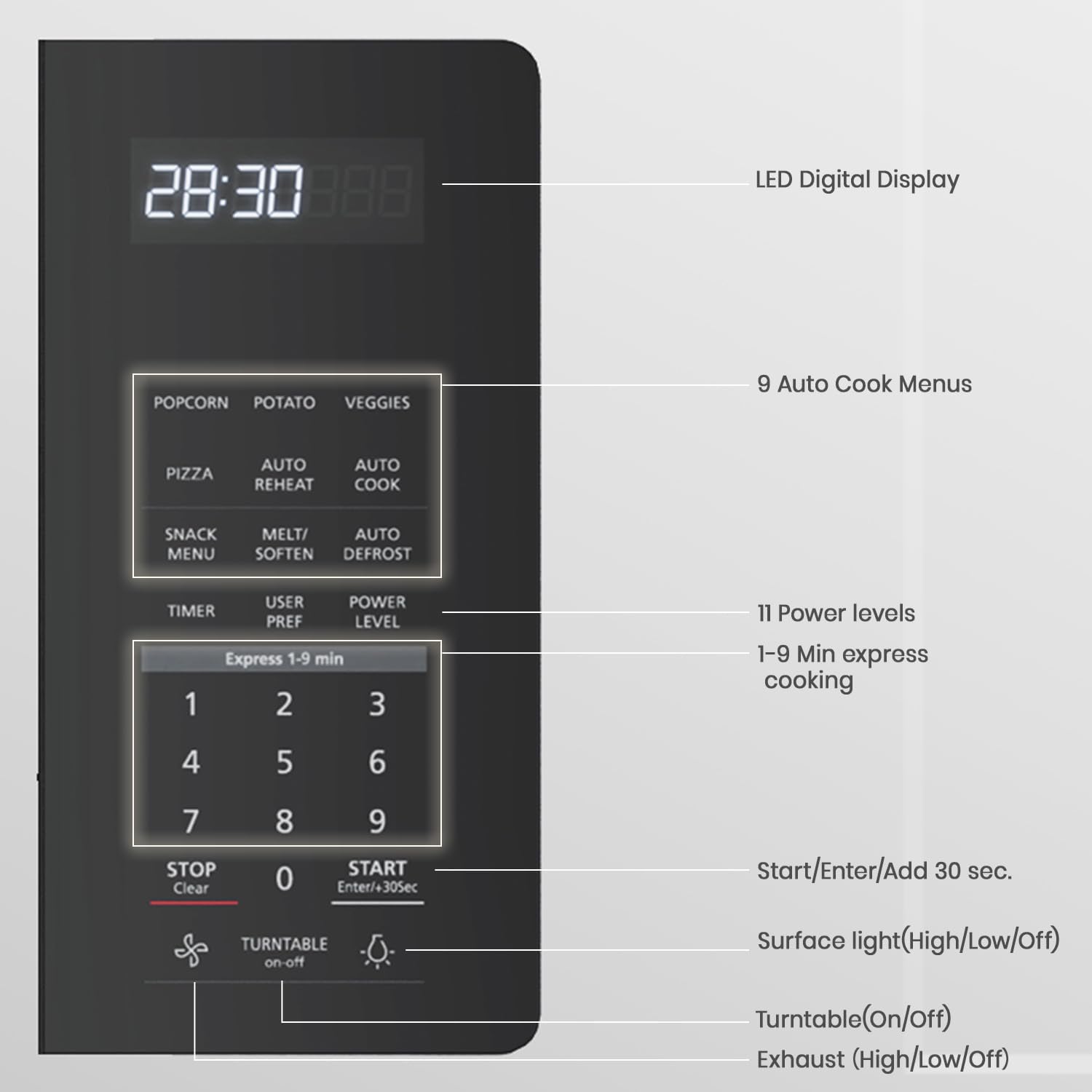
Figure 4.1 : Détaillé view of the control panel, highlighting the LED Digital Display, 9 Auto Cook Menus, 11 Power Levels, Express Cook, Start/Enter/+30 Sec, Surface Light, Turntable On/Off, and Exhaust Fan controls.
Fonctions du panneau de contrôle :
- Convenience Cooking: Popcorn, Potato, Veggies, Pizza, Snack Menu, Melt/Soften, Auto Reheat, Auto Cook, Auto Defrost. Press the desired button for pre-programmed cooking.
- Cuisson express (1 à 9 min) : Press any number from 1 to 9 for instant cooking for that many minutes at 100% power.
- Niveau d'énergie: Adjusts microwave power from 1 (lowest) to 11 (highest). Press 'Power Level' then the desired number.
- Minuterie Marche/Arrêt : À utiliser comme minuteur de cuisine.
- Ajoutez 30 secondes : Adds 30 seconds to the current cooking time or starts cooking for 30 seconds at 100% power.
- Platine vinyle marche/arrêt : Activates or deactivates the turntable rotation.
- Surface Light (High/Low/Off): Controls the light illuminating the stovetop below the microwave.
- Vent Fan (High/Low/Off): Controls the 2-speed exhaust fan.
- Réglage de l'horloge: Sets the time on the LED display.
- Annuler/Désactiver : Stops cooking or clears settings. Hold for 3 seconds to activate/deactivate Child Lock.
- Démarrer Pause: Démarre ou met en pause le cycle de cuisson.
Using Power Levels:

Figure 4.2: The microwave offers 11 power levels, from Level 1 (100% power) for high-heat cooking like boiling, to Levels 10-11 (0-10% power) for low-heat tasks like softening butter.
One-Touch Cooking Presets:
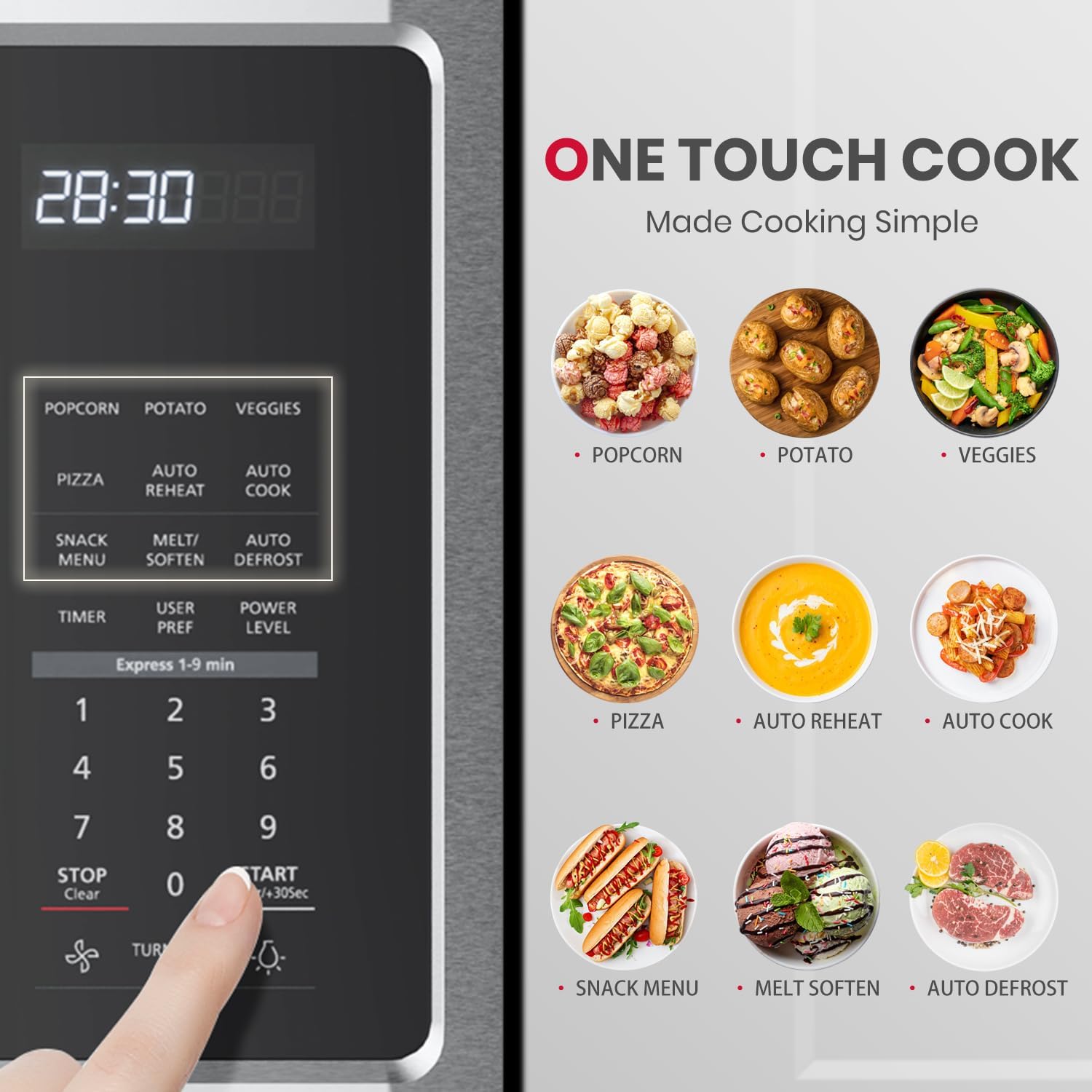
Figure 4.3: The control panel features dedicated buttons for Popcorn, Potato, Veggies, Pizza, Snack Menu, Melt/Soften, Auto Reheat, Auto Cook, and Auto Defrost for simplified cooking.
Système de ventilation :

Figure 4.4: The 400 CFM two-speed venting system effectively removes odors, vapors, and grease from your kitchen. Use the 'Vent Fan' button to select High, Low, or Off.
Stovetop Lighting:

Figure 4.5: The 2-watt LED surface light provides bright illumination for your cooktop. Use the 'Surface Light' button to toggle between High, Low, and Off settings.
How to Use the Microwave Oven OTR1603 OTR1902:
Video 4.1: This official seller video provides a detailed guide on how to use the GASLAND OTR1902S microwave oven, covering various functions and cooking modes.
5. Entretien
Un nettoyage et un entretien réguliers garantiront la longévité et les performances optimales de votre four à micro-ondes.
Nettoyage de l'intérieur :

Figure 5.1: The microwave interior is designed for easy cleaning. Simply wipe the cavity with a damp cloth. The grease filters are also washable with hot water.
- Wipe the interior cavity with a soft, damp chiffon et un détergent doux après chaque utilisation.
- For stubborn stains, place a bowl of water with lemon slices inside and microwave for 2-3 minutes. The steam will loosen the grime for easier wiping.
Nettoyage de la platine :
- The glass turntable and its support ring are removable and can be washed by hand or in the dishwasher.
Nettoyage des filtres à graisse :
- The grease filters located underneath the microwave should be removed and cleaned regularly (monthly or as needed) with hot water and detergent.
6. Dépannage
If you encounter any issues with your microwave oven, refer to the following common troubleshooting tips:
| Problème | Cause possible | Solution |
|---|---|---|
| Le micro-ondes ne démarre pas | Porte mal fermée ; cordon d'alimentation débranché ; fusible grillé/disjoncteur déclenché. | Ensure door is securely closed; Check power connection; Reset circuit breaker or replace fuse. |
| Les aliments ne chauffent pas | Incorrect power level/cooking time; Metal objects inside. | Adjust power level and cooking time; Remove any metal items. |
| Bruit excessif pendant le fonctionnement | Turntable not seated correctly; Fan operating at high speed. | Ensure turntable is properly placed; Adjust vent fan speed if desired. |
| La lumière ne fonctionne pas | Ampoule grillée. | Replace the light bulb (refer to service manual for instructions). |
7. Spécifications
| Fonctionnalité | Spécification |
|---|---|
| Nom de marque | GASLAND |
| Informations sur le modèle | OTR1902S |
| Poids de l'article | 61.7 livres (28.04 kilogramme) |
| Dimensions du produit | 15.28 x 29.92 x 16.42 pouces |
| Consommation d'énergie | 1000 watts |
| Capacité | 1.9 pieds cubes |
| Type d'installation | Au-dessus de la plage |
| Caractéristiques spéciales | Child Safety Lock, Defrost, Express Cook, One Touch Cooking, Turntable |
| Mode de cuisson au four | Électrique |
| Couleur | Argent |
| Voltage | 120 volts |
| Type de matériau | Acier inoxydable |
| Type de matériau intérieur | Acier inoxydable |
| Composants inclus | A removable rack, Turntable |
8. Garantie et assistance
For warranty information, technical support, or service inquiries, please refer to the documentation included with your product or contact GASLAND customer support directly. Keep your purchase receipt for warranty claims.