Introduction
This manual provides instructions for the FEINODI 6-in-1 Lightning to HDMI Adapter. This multi-port adapter is designed to expand the connectivity of your iPhone or iPad, offering HDMI video output, USB ports for peripherals, and SD/Micro SD card reading capabilities, along with a charging port.
Caractéristiques du produit
- Conception multiport 6 en 1 : Includes HDMI port, 2 USB 3.0 ports, SD card slot, Micro SD card slot, and a Lightning charging port.
- Full 1080P HDMI Output: Mirrors content from your device screen to HDMI-enabled equipment (TV, projector, monitor) with resolutions up to 1080P.
- USB Peripheral Support: Connect USB flash drives, mice, keyboards, card readers, cameras, printers, and other USB devices.
- Lecteur de carte SD/TF : Facilitates easy transfer of photos and videos from SD/Micro SD cards to your iPhone/iPad. Supports standard photo and video formats.
- Large compatibilité : Compatible with iPhone 7/7 Plus up to iPhone 14 Pro Max, and various iPad/iPod models running iOS 9.2 or above.
- Prêt à l'emploi : No additional app required for basic functions.

Image : Terminéview of the FEINODI 6-in-1 adapter showing its various ports: Lightning charging, HDMI, 2 USB ports, SD card slot, and Micro SD card slot.
Instructions d'installation
- Se connecter à l'iPhone/iPad : Plug the Lightning connector of the adapter into your iPhone or iPad's Lightning port.
- Connexion HDMI (facultatif) : For video output, connect an HDMI cable from the adapter's HDMI port to your TV, projector, or monitor. Select the correct HDMI input on your display device.
- Connexion des périphériques USB (facultatif) : Insert USB peripherals like a mouse, keyboard, or USB flash drive into the USB 3.0 ports.
- Insert SD/TF Card (Optional): Insérez votre carte SD ou Micro SD dans l'emplacement correspondant.
- Connect Power (Recommended): For stable operation, especially when using multiple ports or high-power USB devices, connect a Lightning charging cable to the adapter's charging port and then to a power source.

Image: The adapter connected to an iPhone, illustrating the insertion of SD and Micro SD cards, and the connection of a power adapter for stable operation.
Mode d'emploi
Sortie vidéo HDMI
Connect the adapter to your iPhone/iPad and an HDMI display. The device screen will be mirrored to the external display. This supports resolutions up to 1080P. Note that apps with HDCP video copyright protection (e.g., Netflix, Amazon Video, Hulu) are generally not supported for mirroring.
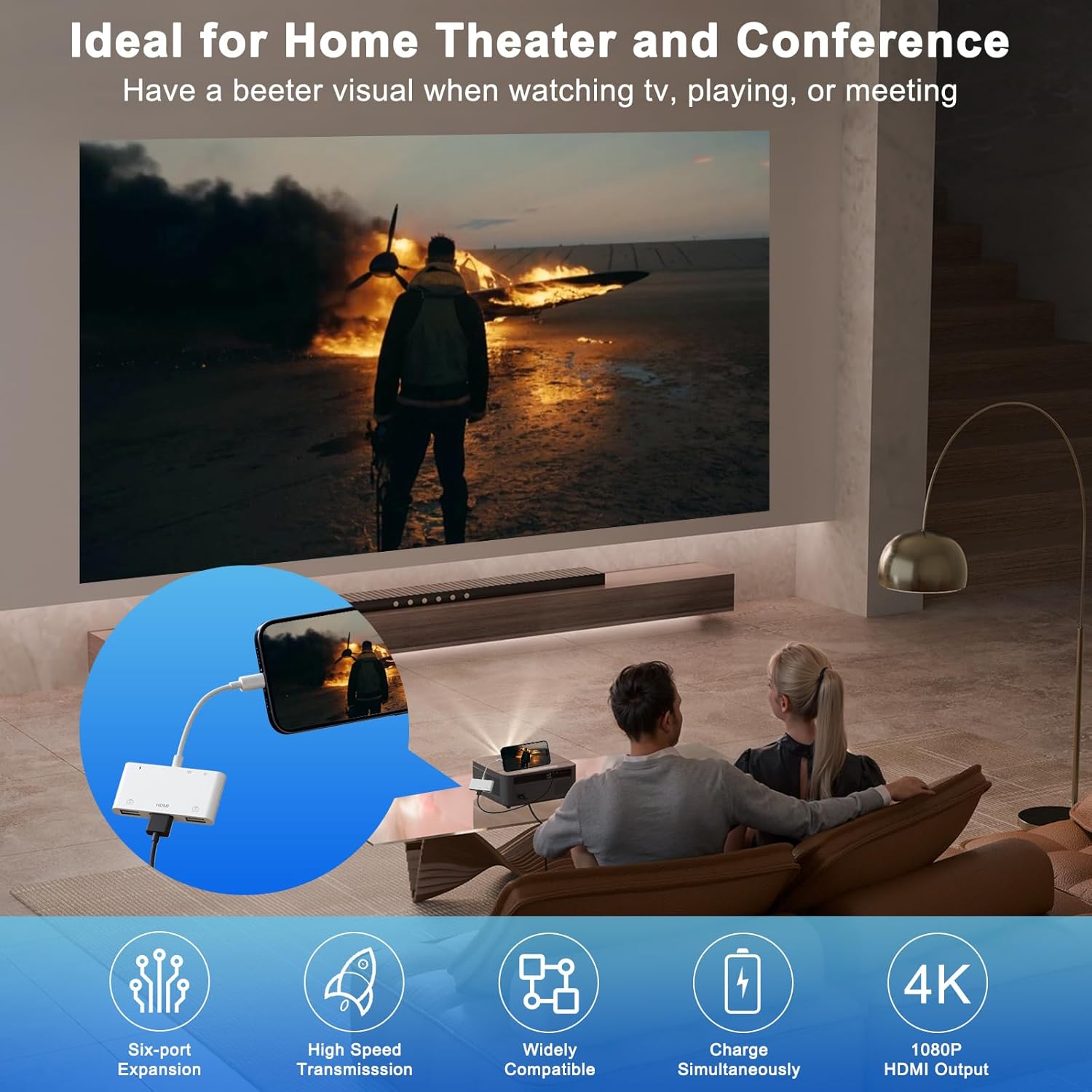
Image: An iPhone connected to the adapter, which is then connected to a projector, demonstrating screen mirroring for presentations or entertainment.

Image: A list of applications that work with HDMI mirroring (e.g., YouTube, Safari, Office) and those that do not support it due to copyright protection (e.g., Netflix, Amazon Video).
Connexion de périphérique USB
Plug your USB devices into the adapter's USB 3.0 ports. For iOS 13 and above, you can connect a mouse and keyboard for enhanced productivity. For mouse usage, enable Assistive Touch in your iPhone/iPad settings (Settings > Accessibility > Touch > Assistive Touch).

Image: Demonstrations of connecting a mouse and keyboard for typing, and transferring photos from a camera to an iPhone via the adapter.
Transfert de données sur carte SD/TF
Insert your SD or Micro SD card into the appropriate slot. For iOS 13 and later, you can import and export photos, videos, and various file types (EXCEL, WORD, PDF, MP3, MP4) using the "Files" app. For iOS 9.2-12.4, only one-way transmission (importing photos/videos) is supported.
Note: The SD card, TF card, and USB interfaces cannot be used simultaneously for card reading. Only one card reading operation can be in progress at a time.

Image: Visual instructions detailing the process of transferring photos and files between an iPhone/iPad and a USB device using the adapter and the "Fileapplication s"
Fonctionnalité de chargement
The adapter includes a Lightning charging port. Connect your Lightning charging cable to this port and a power adapter to charge your iPhone/iPad while using the adapter's other functions.
Entretien
- Keep the adapter clean and dry. Avoid exposure to liquids.
- Do not expose the adapter to extreme temperatures.
- Handle the adapter and its cables gently to prevent damage to connectors.
- Conserver dans un endroit frais et sec lorsqu'il n'est pas utilisé.
Dépannage
- No HDMI Output:
- Assurez-vous que le câble HDMI est correctement connecté à la fois à l'adaptateur et à l'écran.
- Vérifiez que l'écran est réglé sur la source d'entrée HDMI correcte.
- Connect a power source to the adapter's charging port for stable operation.
- Some apps with copyright protection (HDCP) do not support mirroring.
- Périphérique USB non reconnu :
- Ensure your iPhone/iPad is running iOS 13 or above for full USB peripheral support.
- Connect a power source to the adapter's charging port. Some USB devices require more power.
- For mouse functionality, ensure Assistive Touch is enabled in iOS settings.
- Carte SD/TF non lue :
- Ensure the card is inserted correctly into the appropriate slot.
- Only one card (SD or TF) can be read at a time. Do not use USB ports for card reading simultaneously.
- Vérifiez si la carte est endommagée ou corrompue.
- Unstable Connection / Intermittent Functionality:
- Always connect a power source to the adapter's Lightning charging port for optimal stability.
- Remove your phone case if it interferes with the adapter's connection to your iPhone/iPad.
- Assurez-vous que tous les câbles sont correctement connectés.
Video: Demonstration of the 6-in-1 USB Camera Adapter's features, including HDMI mirroring, file transfer, and peripheral connections.
Caractéristiques
| Numéro de modèle | 797444725056 |
| Dimensions du produit | 4.92 x 2.75 x 1.37 pouces |
| Poids de l'article | 1.44 onces |
| Type de connecteur | Foudre |
| Résolution HDMI | Jusqu'à 1080P |
| Ports USB | 2 x USB 3.0 |
| Lecteur de cartes | SD, Micro SD (TF) |
| Port de chargement | Foudre |
| Systèmes d'exploitation compatibles | iOS 9.2 et versions ultérieures |
Garantie et assistance
For warranty information or technical support, please refer to the product packaging or contact FEINODI customer service directly. Contact details are typically available on the manufacturer's official website ou via votre plateforme d'achat.